#!/usr/bin/env bash
#########################################
##
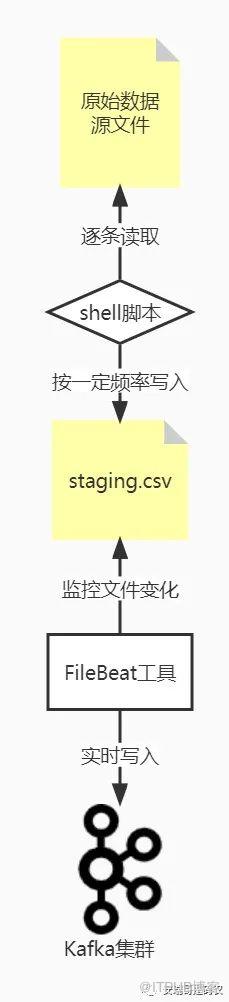
#Desc: 模拟真实的数据生产行为,将原始数据文件的内容逐行读到准备区文件中
#
#Author: Anryg
#
##########################################
set -o nounset #必须使用初始化之后的变量
set -o errexit #命令执行过程中如果有报错,直接退出整个脚本
###################################################
#
# _LOG
#
####################################################
# $1 - message
# $2 - log file
_LOG() {
        message="[$(date +'%Y-%m-%d %H:%M:%S') ${0##*/}] $1"
        echo ${message}
        if [[ $# == 2 ]]; then
                echo ${message} >>$2  ##指定日志文件
        fi
}
#################################################
current_dir=$(cd `dirname $0`; pwd)  ##获取程序所在的绝对路径

while read line
    do
        echo "${line}" >> staging.csv ##将读取的数据写入到准备区文件中
        sleep 1  ##每间隔1秒写一次
    done < $1  ##指定数据源文件

_LOG "数据文件写入完毕..." ${current_dir}/staging.log

exit 0
filebeat.inputs:

- type: log

  # Change to true to enable this input configuration.
  enabled: true

  # Paths that should be crawled and fetched. Glob based paths.
  paths:
    - /home/filebeat/staging.csv

output.kafka:
    hosts: ["broker01:6667","broker02:6667","broker03:6667"]
    topic: test
    version: 2.0.0

原文作者:安瑞哥是码农;如有侵权,请联系管理员删除。
上一篇:
大数据实战项目第2步——实时消费数据源
下一篇:
为什么要费力搞一个大数据实战项目?

请登录后发表评论
登录
全部评论
