1.什么事Spring Session?
HTTP协议本身是无状态的,为了保存会话信息,浏览器Cookie通过SessionID标识会话请求,服务器以SessionID为key来存储会话信息。在单实例应用中,可以考虑应用进程自身存储,随着应用体量的增长,需要横向扩容,多实例session共享问题随之而来。
Spring Session就是为了解决多进程session共享的问题
Spring Session支持存储在Hazelcast 、Redis、MongoDB、关系型数据库,本文主要讨论session存储在Redis。
2.redis换搭建
docker run -itd --name redis-6379 -p 6379:6379 redis --requirepass 1234563.代码工程
实验目的:通过redis实现session共享
pom.xml
<project xmlns="http://maven.apache.org/POM/4.0.0"xmlns:xsi="http://www.w3.org/2001/XMLSchema-instance"xsi:schemaLocation="http://maven.apache.org/POM/4.0.0 http://maven.apache.org/xsd/maven-4.0.0.xsd"><parent><artifactId>springboot-demo</artifactId><groupId>com.et</groupId><version>1.0-SNAPSHOT</version></parent><modelVersion>4.0.0</modelVersion><artifactId>session</artifactId><properties><maven.compiler.source>8</maven.compiler.source><maven.compiler.target>8</maven.compiler.target></properties><dependencies><dependency><groupId>org.springframework.boot</groupId><artifactId>spring-boot-starter-web</artifactId></dependency><dependency><groupId>org.springframework.boot</groupId><artifactId>spring-boot-autoconfigure</artifactId></dependency><dependency><groupId>org.springframework.boot</groupId><artifactId>spring-boot-starter-test</artifactId><scope>test</scope></dependency><dependency><groupId>org.springframework.boot</groupId><artifactId>spring-boot-starter-data-redis</artifactId></dependency><dependency><groupId>org.springframework.session</groupId><artifactId>spring-session-data-redis</artifactId></dependency></dependencies></project>
application.properties
# Session store-typespring.session.store-type=redis## Session timeout defaultserver.servlet.session.timeout=600# Session store to Redis key prefixspring.session.redis.namespace=test:spring:session## Redis configspring.redis.host=127.0.0.1spring.redis.password=123456spring.redis.port=6379server.port=8088
controller
package com.et.session.java.demo.et.demo.controller;import java.util.HashMap;import java.util.Map;import org.springframework.stereotype.Controller;import org.springframework.web.bind.annotation.PathVariable;import org.springframework.web.bind.annotation.RequestMapping;import org.springframework.web.bind.annotation.ResponseBody;import org.springframework.web.bind.annotation.RestController;import javax.servlet.http.HttpServletRequest;import javax.servlet.http.HttpSession;public class HelloWorldController {public Map<String, Object> showHelloWorld(){Map<String, Object> map = new HashMap<>();map.put("msg", "HelloWorld");return map;}public String getSesseion(HttpServletRequest request, String name){HttpSession session = request.getSession();String value = (String)session.getAttribute(name);return "sessionId:"+session.getId()+" value:"+value;}public String addSession(HttpServletRequest request, String name, String value){HttpSession session = request.getSession();session.setAttribute(name,value);return "sessionId:"+session.getId()+" name:"+name;}}
DemoApplication.java
package com.et.session.java.demo.et.demo;import org.springframework.boot.SpringApplication;import org.springframework.boot.autoconfigure.SpringBootApplication;public class DemoApplication {public static void main(String[] args) {SpringApplication.run(DemoApplication.class, args);}}
以上只是一些关键代码,所有代码请参见下面代码仓库
代码仓库
https://github.com/Harries/springboot-demo
4.测试
启动Spring Boot应用
创建Session
http://127.0.0.1:8088/add/aaa/111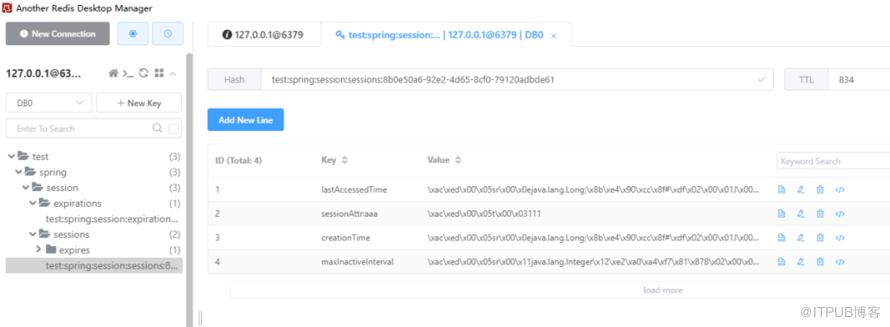
获取Session
http://127.0.0.1:8088/get/aaa
5.参考
https://www.baeldung.com/spring-session
https://www.springcloud.cc/spring-session.html#modules
http://www.liuhaihua.cn/archives/710469.html
原文作者:HBLOG;如有侵权,请联系管理员删除。

请登录后发表评论
登录
全部评论
