1.什么是Redis向量数据库?
Redis 是一个开源(BSD 许可)的内存数据结构存储,用作数据库、缓存、消息代理和流式处理引擎。Redis 提供数据结构,例如字符串、哈希、列表、集合、带范围查询的有序集合、位图、超对数日志、地理空间索引和流。
Redis 搜索和查询 扩展了 Redis OSS 的核心功能,并允许您将 Redis 用作向量数据库
在哈希或 JSON 文档中存储向量和关联的元数据
检索向量
执行向量搜索
2.向量检索(Vector Search)的核心原理
向量检索(Vector Search)的核心原理是通过将文本或数据表示为高维向量,并在查询时根据向量的相似度进行搜索。在你的代码中,向量检索过程涉及以下几步:
匹配的原理:
检索的核心是将文本或数据转换成向量,在高维向量空间中查找与查询最相似的向量。
在存储数据时将指定的字段通过嵌入模型生成了向量。
在检索时,查询文本被向量化,然后与 Redis 中存储的向量进行相似度比较,找到相似度最高的向量(即相关的文档)。
关键点:
嵌入模型 将文本转换成向量。
相似度计算 通过余弦相似度或欧几里得距离来度量相似性。
Top K 返回相似度最高的 K 个文档。
具体过程
1. 向量化数据:
当你将 JSON 中的字段存入 Redis 时,向量化工具(例如 vectorStore)会将指定的字段转换为高维向量。每个字段的内容会通过某种嵌入模型(如 Word2Vec、BERT、OpenAI Embeddings 等)转换成向量表示。每个向量表示的是该字段内容的语义特征。
2. 搜索时的向量生成:
当执行 SearchRequest.query(message) 时,系统会将输入的 message 转换为一个查询向量。这一步是通过同样的嵌入模型,将查询文本转换为与存储在 Redis 中相同维度的向量。
3. 相似度匹配:
vectorStore.similaritySearch(request) 函数使用了一个向量相似度计算方法来查找最相似的向量。这通常是通过 余弦相似度 或 欧几里得距离 来度量查询向量和存储向量之间的距离。然后返回与查询最相似的前 K 个文档,即 withTopK(topK) 所指定的 K 个最相关的结果。
4. 返回匹配的文档:
匹配的结果是根据相似度得分排序的 List<Document>。这些文档是你最初存储在 Redis 中的记录,包含了 JSON 中指定的字段。
3.环境搭建
version: '3'services::image: redis/redis-stackports:6379:6379:image: redislabs/redisinsight:latestports:5540:5540
Run following command:
docker-compose up -d访问 http://localhost:5540
4.代码工程
实验目标
实现文件数据向量化到redis,并进行相似性搜索
pom.xml
<?xml version="1.0" encoding="UTF-8"?><project xmlns="http://maven.apache.org/POM/4.0.0"xmlns:xsi="http://www.w3.org/2001/XMLSchema-instance"xsi:schemaLocation="http://maven.apache.org/POM/4.0.0 http://maven.apache.org/xsd/maven-4.0.0.xsd"><parent><groupId>org.springframework.boot</groupId><artifactId>spring-boot-starter-parent</artifactId><version>3.2.1</version><relativePath /> <!-- lookup parent from repository --></parent><modelVersion>4.0.0</modelVersion><artifactId>RedisVectorStore</artifactId><properties><maven.compiler.source>17</maven.compiler.source><maven.compiler.target>17</maven.compiler.target><spring-ai.version>0.8.1</spring-ai.version></properties><dependencies><dependency><groupId>org.springframework.boot</groupId><artifactId>spring-boot-starter-web</artifactId></dependency><dependency><groupId>org.springframework.boot</groupId><artifactId>spring-boot-autoconfigure</artifactId></dependency><dependency><groupId>org.springframework.boot</groupId><artifactId>spring-boot-starter-test</artifactId><scope>test</scope></dependency><dependency><groupId>org.springframework.ai</groupId><artifactId>spring-ai-transformers-spring-boot-starter</artifactId><version>${spring-ai.version}</version></dependency><dependency><groupId>org.springframework.ai</groupId><artifactId>spring-ai-redis-spring-boot-starter</artifactId><version>${spring-ai.version}</version></dependency><dependency><groupId>redis.clients</groupId><artifactId>jedis</artifactId><version>5.1.0</version></dependency></dependencies><repositories><repository><id>spring-milestones</id><name>Spring Milestones</name><url>https://repo.spring.io/milestone</url><snapshots><enabled>false</enabled></snapshots></repository><repository><id>spring-snapshots</id><name>Spring Snapshots</name><url>https://repo.spring.io/snapshot</url><releases><enabled>false</enabled></releases></repository></repositories><pluginRepositories><pluginRepository><id>spring-milestones</id><name>Spring Milestones</name><url>https://repo.spring.io/milestone</url><snapshots><enabled>false</enabled></snapshots></pluginRepository><pluginRepository><id>spring-snapshots</id><name>Spring Snapshots</name><url>https://repo.spring.io/snapshot</url><releases><enabled>false</enabled></releases></pluginRepository></pluginRepositories></project>
controller
package com.et.controller;import com.et.service.SearchService;import org.springframework.beans.factory.annotation.Autowired;import org.springframework.web.bind.annotation.RequestMapping;import org.springframework.web.bind.annotation.RestController;import com.et.service.SearchService;import java.util.HashMap;import java.util.Map;@RestControllerpublic class HelloWorldController {@AutowiredSearchService searchService;@RequestMapping("/hello")public Map<String, Object> showHelloWorld(){Map<String, Object> map = new HashMap<>();map.put("msg", searchService.retrieve("beer"));return map;}}
configuration
加载文件数据到并将数据向量化到redis
JsonReader loader = new JsonReader(file, KEYS);JsonReader 和 VectorStore 实现是将 KEYS 中指定的多个字段拼接在一起,生成一个统一的文本表示,然后通过嵌入模型将这些字段的组合文本转换为一个单一的向量,那么这里就是将多个字段组合成 一个综合向量。并将其处理后存入 Redis。
package com.et.config;import org.slf4j.Logger;import org.slf4j.LoggerFactory;import org.springframework.ai.autoconfigure.vectorstore.redis.RedisVectorStoreProperties;import org.springframework.ai.reader.JsonReader;import org.springframework.ai.vectorstore.RedisVectorStore;import org.springframework.beans.factory.annotation.Value;import org.springframework.boot.ApplicationArguments;import org.springframework.boot.ApplicationRunner;import org.springframework.core.io.InputStreamResource;import org.springframework.core.io.Resource;import org.springframework.stereotype.Component;import java.util.Map;import java.util.zip.GZIPInputStream;public class DataLoader implements ApplicationRunner {private static final Logger logger = LoggerFactory.getLogger(DataLoader.class);private static final String[] KEYS = { "name", "abv", "ibu", "description" };private Resource data;private final RedisVectorStore vectorStore;private final RedisVectorStoreProperties properties;public DataLoader(RedisVectorStore vectorStore, RedisVectorStoreProperties properties) {this.vectorStore = vectorStore;this.properties = properties;}public void run(ApplicationArguments args) throws Exception {Map<String, Object> indexInfo = vectorStore.getJedis().ftInfo(properties.getIndex());Long sss= (Long) indexInfo.getOrDefault("num_docs", "0");int numDocs=sss.intValue();if (numDocs > 20000) {logger.info("Embeddings already loaded. Skipping");return;}Resource file = data;if (data.getFilename().endsWith(".gz")) {GZIPInputStream inputStream = new GZIPInputStream(data.getInputStream());file = new InputStreamResource(inputStream, "beers.json.gz");}logger.info("Creating Embeddings...");// tag::loader[]// Create a JSON reader with fields relevant to our use caseJsonReader loader = new JsonReader(file, KEYS);// Use the autowired VectorStore to insert the documents into RedisvectorStore.add(loader.get());// end::loader[]logger.info("Embeddings created.");}}
配置redis vectorStore
package com.et.config;import org.springframework.ai.autoconfigure.vectorstore.redis.RedisVectorStoreProperties;import org.springframework.ai.chat.ChatClient;import org.springframework.ai.document.MetadataMode;import org.springframework.ai.transformers.TransformersEmbeddingClient;import org.springframework.ai.vectorstore.RedisVectorStore;import org.springframework.ai.vectorstore.RedisVectorStore.RedisVectorStoreConfig;import org.springframework.ai.vectorstore.VectorStore;import org.springframework.context.annotation.Bean;import org.springframework.context.annotation.Configuration;@Configurationpublic class RedisConfiguration {@BeanTransformersEmbeddingClient transformersEmbeddingClient() {return new TransformersEmbeddingClient(MetadataMode.EMBED);}@BeanVectorStore vectorStore(TransformersEmbeddingClient embeddingClient, RedisVectorStoreProperties properties) {var config = RedisVectorStoreConfig.builder().withURI(properties.getUri()).withIndexName(properties.getIndex()).withPrefix(properties.getPrefix()).build();RedisVectorStore vectorStore = new RedisVectorStore(config, embeddingClient);vectorStore.afterPropertiesSet();return vectorStore;}}
service
查询时,查询文本也会生成一个整体向量,与存储的综合向量进行匹配。
package com.et.service;import org.springframework.ai.document.Document;import org.springframework.ai.vectorstore.SearchRequest;import org.springframework.ai.vectorstore.VectorStore;import org.springframework.beans.factory.annotation.Autowired;import org.springframework.beans.factory.annotation.Value;import org.springframework.stereotype.Service;import java.util.List;public class SearchService {private int topK;private VectorStore vectorStore;public List<Document> retrieve(String message) {SearchRequest request = SearchRequest.query(message).withTopK(topK);// Query Redis for the top K documents most relevant to the input messageList<Document> docs = vectorStore.similaritySearch(request);return docs;}}
只是一些关键代码,所有代码请参见下面代码仓库
代码仓库
https://github.com/Harries/springboot-demo(RedisVectorStore)
5.测试
启动Spring Boot应用程序,查看日志
. ____ _ __ _ _/\\ / ___'_ __ _ _(_)_ __ __ _ \ \ \ \( ( )\___ | '_ | '_| | '_ \/ _` | \ \ \ \\\/ ___)| |_)| | | | | || (_| | ) ) ) )' |____| .__|_| |_|_| |_\__, | / / / /=========|_|==============|___/=/_/_/_/:: Spring Boot :: (v3.2.1)2024-09-24T14:03:48.217+08:00 INFO 23996 --- [ main] com.et.DemoApplication : Starting DemoApplication using Java 17.0.9 with PID 23996 (D:\IdeaProjects\ETFramework\RedisVectorStore\target\classes started by Dell in D:\IdeaProjects\ETFramework)2024-09-24T14:03:48.221+08:00 INFO 23996 --- [ main] com.et.DemoApplication : No active profile set, falling back to 1 default profile: "default"2024-09-24T14:03:49.186+08:00 INFO 23996 --- [ main] o.s.b.w.embedded.tomcat.TomcatWebServer : Tomcat initialized with port 8088 (http)2024-09-24T14:03:49.199+08:00 INFO 23996 --- [ main] o.apache.catalina.core.StandardService : Starting service [Tomcat]2024-09-24T14:03:49.199+08:00 INFO 23996 --- [ main] o.apache.catalina.core.StandardEngine : Starting Servlet engine: [Apache Tomcat/10.1.17]2024-09-24T14:03:49.289+08:00 INFO 23996 --- [ main] o.a.c.c.C.[Tomcat].[localhost].[/] : Initializing Spring embedded WebApplicationContext2024-09-24T14:03:49.290+08:00 INFO 23996 --- [ main] w.s.c.ServletWebServerApplicationContext : Root WebApplicationContext: initialization completed in 1033 ms2024-09-24T14:03:49.406+08:00 WARN 23996 --- [ main] ai.djl.util.cuda.CudaUtils : Failed to detect GPU count: CUDA driver version is insufficient for CUDA runtime version (35)2024-09-24T14:03:49.407+08:00 WARN 23996 --- [ main] ai.djl.util.cuda.CudaUtils : Failed to detect GPU count: CUDA driver version is insufficient for CUDA runtime version (35)2024-09-24T14:03:49.408+08:00 INFO 23996 --- [ main] ai.djl.util.Platform : Found matching platform from: jar:file:/D:/jar_repository/ai/djl/huggingface/tokenizers/0.26.0/tokenizers-0.26.0.jar!/native/lib/tokenizers.properties2024-09-24T14:03:49.867+08:00 INFO 23996 --- [ main] o.s.a.t.TransformersEmbeddingClient : Model input names: input_ids, attention_mask, token_type_ids2024-09-24T14:03:49.867+08:00 INFO 23996 --- [ main] o.s.a.t.TransformersEmbeddingClient : Model output names: last_hidden_state2024-09-24T14:03:50.346+08:00 INFO 23996 --- [ main] o.s.b.w.embedded.tomcat.TomcatWebServer : Tomcat started on port 8088 (http) with context path ''2024-09-24T14:03:50.354+08:00 INFO 23996 --- [ main] com.et.DemoApplication : Started DemoApplication in 2.522 seconds (process running for 2.933)2024-09-24T14:03:50.364+08:00 INFO 23996 --- [ main] com.et.config.DataLoader : Creating Embeddings...2024-09-24T14:03:51.493+08:00 WARN 23996 --- [ main] ai.djl.util.cuda.CudaUtils : Failed to detect GPU count: CUDA driver version is insufficient for CUDA runtime version (35)2024-09-24T14:03:51.800+08:00 INFO 23996 --- [ main] ai.djl.pytorch.engine.PtEngine : PyTorch graph executor optimizer is enabled, this may impact your inference latency and throughput. See: https://docs.djl.ai/docs/development/inference_performance_optimization.html#graph-executor-optimization2024-09-24T14:03:51.802+08:00 INFO 23996 --- [ main] ai.djl.pytorch.engine.PtEngine : Number of inter-op threads is 62024-09-24T14:03:51.802+08:00 INFO 23996 --- [ main] ai.djl.pytorch.engine.PtEngine : Number of intra-op threads is 62024-09-24T14:04:26.212+08:00 INFO 23996 --- [nio-8088-exec-1] o.a.c.c.C.[Tomcat].[localhost].[/] : Initializing Spring DispatcherServlet 'dispatcherServlet'2024-09-24T14:04:26.213+08:00 INFO 23996 --- [nio-8088-exec-1] o.s.web.servlet.DispatcherServlet : Initializing Servlet 'dispatcherServlet'2024-09-24T14:04:26.215+08:00 INFO 23996 --- [nio-8088-exec-1] o.s.web.servlet.DispatcherServlet : Completed initialization in 2 ms2024-09-24T14:09:48.846+08:00 INFO 23996 --- [ main] com.et.config.DataLoader : Embeddings created.
查看redis是否存在向量化的数据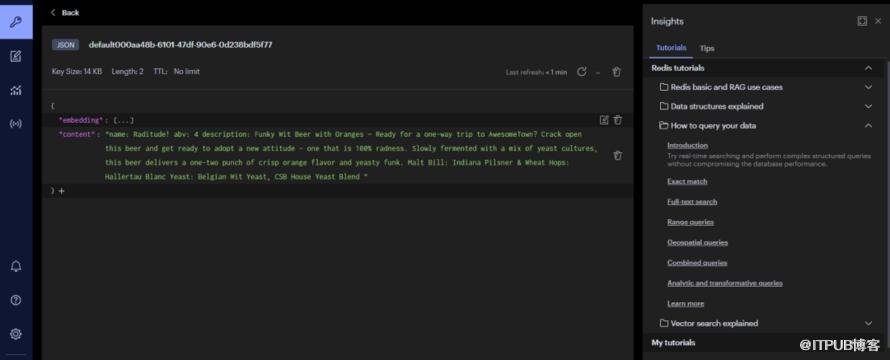 访问http://127.0.0.1:8088/hello 进行0 相似度搜索(top 10),返回得分前10的数据
6.引用
https://docs.springframework.org.cn/spring-ai/reference/api/vectordbs/redis.html
https://redis.io/docs/latest/develop/interact/search-and-query/advanced-concepts/vectors/
http://www.liuhaihua.cn/archives/711448.html
原文作者:HBLOG;如有侵权,请联系管理员删除。

