1.什么是Keycloak?
Keycloak是一种面向现代应用和服务的开源IAM(身份识别与访问管理)解决方案
Keycloak提供了单点登录(SSO)功能,支持OpenID Connect、OAuth 2.0、SAML 2.0标准协议,拥有简单易用的管理控制台,并提供对LDAP、Active Directory以及Github、Google等社交账号登录的支持,做到了非常简单的开箱即用。
Keycloak常用核心概念介绍
首先通过官方的一张图来了解下整体的核心概念

这里先只介绍4个最常用的核心概念:
Users: 用户,使用并需要登录系统的对象Roles: 角色,用来对用户的权限进行管理Clients: 客户端,需要接入Keycloak并被Keycloak保护的应用和服务Realms: 领域,领域管理着一批用户、证书、角色、组等,一个用户只能属于并且能登陆到一个域,域之间是互相独立隔离的, 一个域只能管理它下面所属的用户
2.环境搭建
docker安装
docker run -d -p 8080:8080 -e KEYCLOAK_ADMIN=admin -e KEYCLOAK_ADMIN_PASSWORD=admin quay.io/keycloak/keycloak:18.0.2 start-dev登陆控制台
http://localhost:8080/admin (admin/admin)
创建 realm
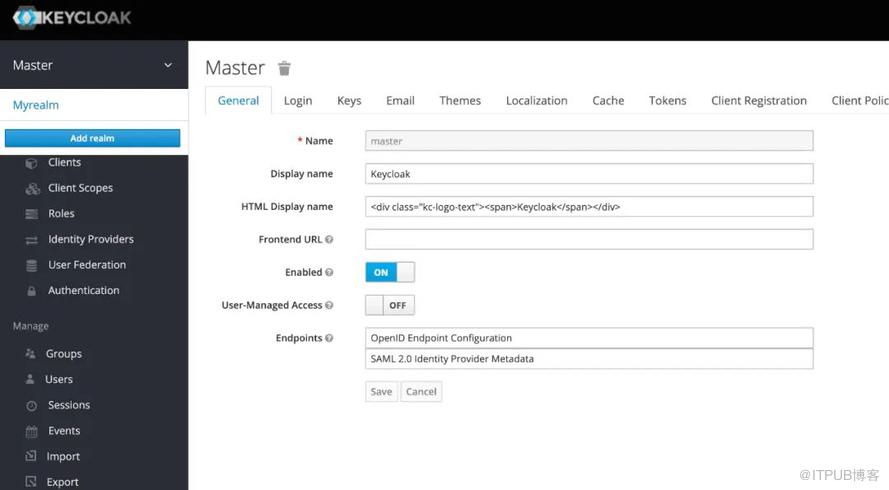
创建client
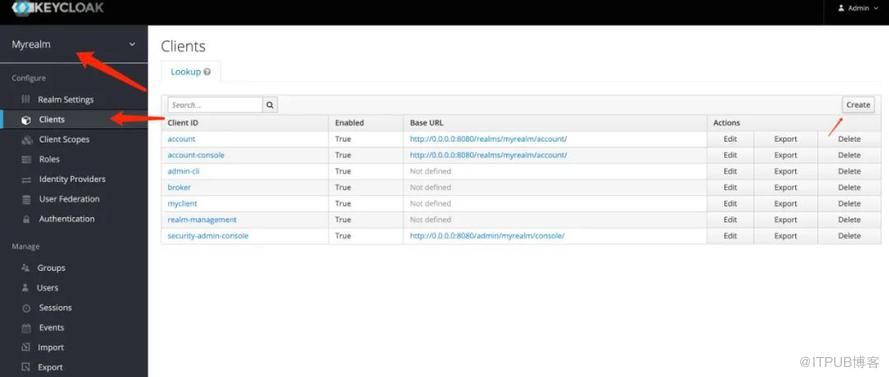
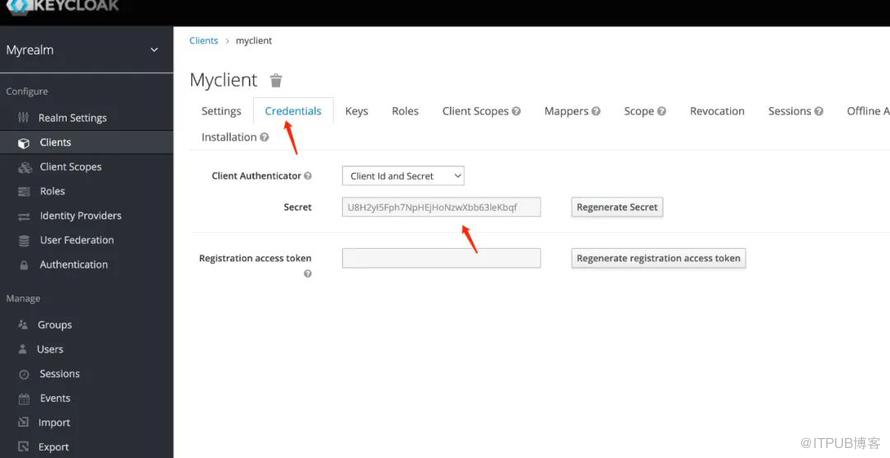
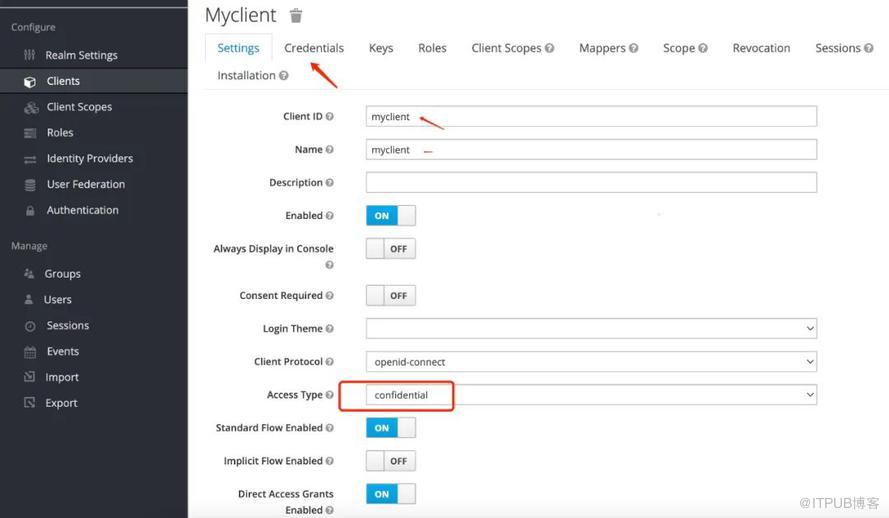

创建用户
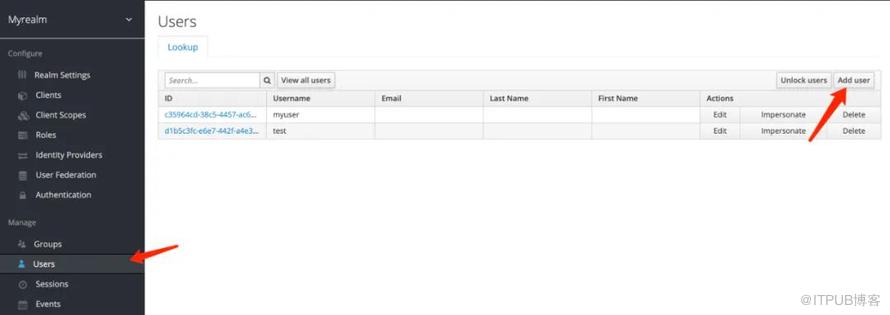
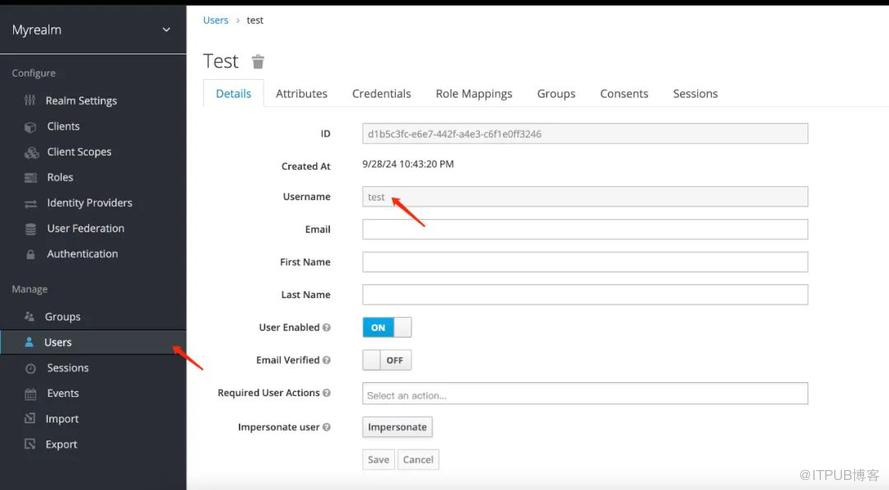
测试环境
访问https://www.keycloak.org/app/,输入相关信息
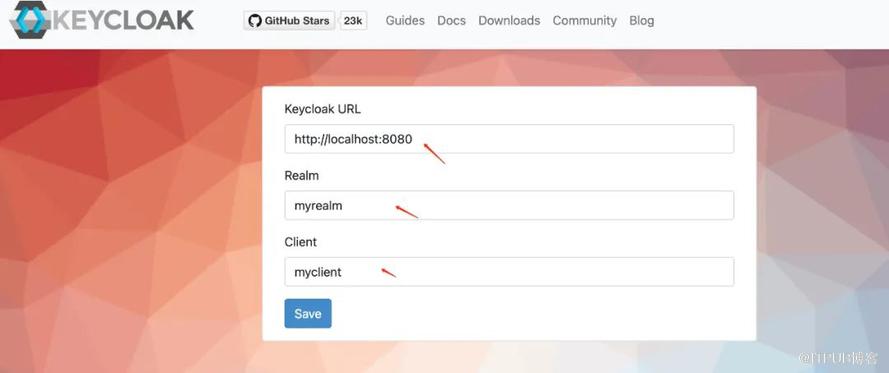
点击保存后,会跳转到登陆页,然后输入之前创建的用户和密码,没有问题的话会跳转到成功页面
3.代码工程
实验目标
基于keycloak实现对登陆的校验
pom.xml
<?xml version="1.0" encoding="UTF-8"?><project xmlns="http://maven.apache.org/POM/4.0.0"xmlns:xsi="http://www.w3.org/2001/XMLSchema-instance"xsi:schemaLocation="http://maven.apache.org/POM/4.0.0 http://maven.apache.org/xsd/maven-4.0.0.xsd"><parent><groupId>org.springframework.boot</groupId><artifactId>spring-boot-starter-parent</artifactId><version>3.2.1</version><relativePath/> <!-- lookup parent from repository --></parent><modelVersion>4.0.0</modelVersion><artifactId>keycloak</artifactId><properties><maven.compiler.source>17</maven.compiler.source><maven.compiler.target>17</maven.compiler.target></properties><dependencies><dependency><groupId>org.springframework.boot</groupId><artifactId>spring-boot-starter-web</artifactId></dependency><dependency><groupId>org.springframework.boot</groupId><artifactId>spring-boot-autoconfigure</artifactId></dependency><dependency><groupId>org.springframework.boot</groupId><artifactId>spring-boot-starter-test</artifactId><scope>test</scope></dependency><dependency><groupId>org.springframework.boot</groupId><artifactId>spring-boot-starter-oauth2-client</artifactId></dependency><dependency><groupId>org.springframework.boot</groupId><artifactId>spring-boot-starter-security</artifactId></dependency></dependencies></project>
controller
package com.et.controller;import org.springframework.ui.Model;import org.springframework.web.bind.annotation.GetMapping;import org.springframework.web.bind.annotation.RequestMapping;import org.springframework.web.bind.annotation.RestController;import java.security.Principal;import java.util.HashMap;import java.util.Map;@RestController@RequestMapping("/demo")public class HelloWorldController {@RequestMapping("/hello")public Map<String, Object> showHelloWorld(){Map<String, Object> map = new HashMap<>();map.put("msg", "HelloWorld");return map;}@GetMapping("getValue")public String getValue(){return "Hello Keycloak!";}}
config
package com.et.config;import com.et.service.CustomOAuth2UserService;import org.springframework.context.annotation.Bean;import org.springframework.context.annotation.Configuration;import org.springframework.security.config.annotation.web.builders.HttpSecurity;import org.springframework.security.config.annotation.web.configuration.EnableWebSecurity;import org.springframework.security.config.http.SessionCreationPolicy;import org.springframework.security.oauth2.client.endpoint.DefaultAuthorizationCodeTokenResponseClient;import org.springframework.security.oauth2.client.endpoint.OAuth2AccessTokenResponseClient;import org.springframework.security.oauth2.client.endpoint.OAuth2AuthorizationCodeGrantRequest;import org.springframework.security.oauth2.client.userinfo.OAuth2UserRequest;import org.springframework.security.oauth2.client.userinfo.OAuth2UserService;import org.springframework.security.oauth2.core.user.OAuth2User;import org.springframework.security.web.SecurityFilterChain;@Configuration@EnableWebSecuritypublic class SecurityConfiguration {@Beanpublic SecurityFilterChain securityFilterChain(HttpSecurity http) throws Exception {http.oauth2Login(oauth2Login ->oauth2Login.tokenEndpoint(tokenEndpoint ->tokenEndpoint.accessTokenResponseClient(accessTokenResponseClient())).userInfoEndpoint(userInfoEndpoint ->userInfoEndpoint.userService(customOAuth2UserService()))).oauth2Client(oauth2Client ->oauth2Client.authorizationCodeGrant(codeGrant ->codeGrant.accessTokenResponseClient(accessTokenResponseClient()))).sessionManagement(sessionManagement ->sessionManagement.sessionCreationPolicy(SessionCreationPolicy.ALWAYS)).authorizeHttpRequests(authorizeRequests ->authorizeRequests.requestMatchers("/unauthenticated", "/oauth2/**", "/login/**").permitAll().anyRequest().fullyAuthenticated()).logout(logout ->logout.logoutSuccessUrl("http://localhost:8080/realms/tom/protocol/openid-connect/logout?redirect_uri=http://localhost:8081/"));return http.build();}@Beanpublic OAuth2UserService<OAuth2UserRequest, OAuth2User> customOAuth2UserService() {return new CustomOAuth2UserService();}@Beanpublic OAuth2AccessTokenResponseClient<OAuth2AuthorizationCodeGrantRequest> accessTokenResponseClient() {return new DefaultAuthorizationCodeTokenResponseClient();}}
service
package com.et.service;import org.springframework.security.oauth2.client.oidc.userinfo.OidcUserRequest;import org.springframework.security.oauth2.client.oidc.userinfo.OidcUserService;import org.springframework.security.oauth2.client.registration.ClientRegistration;import org.springframework.security.oauth2.client.userinfo.DefaultOAuth2UserService;import org.springframework.security.oauth2.client.userinfo.OAuth2UserRequest;import org.springframework.security.oauth2.client.userinfo.OAuth2UserService;import org.springframework.security.oauth2.core.OAuth2AuthenticationException;import org.springframework.security.oauth2.core.oidc.OidcIdToken;import org.springframework.security.oauth2.core.user.OAuth2User;import org.springframework.security.oauth2.core.OAuth2Error;import java.util.Map;public class CustomOAuth2UserService implements OAuth2UserService<OAuth2UserRequest, OAuth2User> {private final OidcUserService oidcUserService = new OidcUserService();private final DefaultOAuth2UserService defaultOAuth2UserService = new DefaultOAuth2UserService();@Overridepublic OAuth2User loadUser(OAuth2UserRequest userRequest) throws OAuth2AuthenticationException {if (isOidcProvider(userRequest.getClientRegistration())) {OidcIdToken idToken = extractOidcIdToken(userRequest);OidcUserRequest oidcUserRequest = new OidcUserRequest(userRequest.getClientRegistration(),userRequest.getAccessToken(),idToken);return oidcUserService.loadUser(oidcUserRequest);} else {return defaultOAuth2UserService.loadUser(userRequest);}}private boolean isOidcProvider(ClientRegistration clientRegistration) {return clientRegistration.getProviderDetails().getConfigurationMetadata().containsKey("userinfo_endpoint");}private OidcIdToken extractOidcIdToken(OAuth2UserRequest userRequest) {Map<String, Object> additionalParameters = userRequest.getAdditionalParameters();Object idTokenObj = additionalParameters.get("id_token");if (idTokenObj instanceof Map) {@SuppressWarnings("unchecked")Map<String, Object> idTokenClaims = (Map<String, Object>) idTokenObj;return new OidcIdToken(userRequest.getAccessToken().getTokenValue(),userRequest.getAccessToken().getIssuedAt(),userRequest.getAccessToken().getExpiresAt(),idTokenClaims);}throw new OAuth2AuthenticationException(new OAuth2Error("invalid_id_token"), "Invalid or missing ID token");}}
application.yaml
spring.application.name=demo1### server portserver.port=8081## logginglogging.level.org.springframework.security=INFOlogging.pattern.console=%d{dd-MM-yyyy HH:mm:ss} %magenta([%thread]) %highlight(%-5level) %logger.%M - %msg%nspring.security.oauth2.client.provider.external.issuer-uri=http://localhost:8080/realms/myrealm# externalspring.security.oauth2.client.registration.external.provider=externalspring.security.oauth2.client.registration.external.client-name=myclientspring.security.oauth2.client.registration.external.client-id=myclientspring.security.oauth2.client.registration.external.client-secret=U8H2yI5Fph7NpHEjHoNzwXbb63leKbqfspring.security.oauth2.client.registration.external.scope=openid,offline_access,profilespring.security.oauth2.client.registration.external.authorization-grant-type=authorization_code
代码仓库
https://github.com/Harries/springboot-demo(keycloak)
4.测试
启动Spring Boot应用
访问http://localhost:8081/demo/hello
输入用户名和密码
成功后,会调用接口返回
{"msg":"HelloWorld"}
5.引用
https://www.keycloak.org/getting-started/getting-started-docker
http://www.liuhaihua.cn/archives/711478.html
原文作者:HBLOG;如有侵权,请联系管理员删除。

