1.什么是Spring Shell?
Spring Shell是Spring生态中的一员,用于开发命令行应用程序,官网:https://projects.spring.io/spring-shell/ 。 Spring Shell构建在JLine之上,集成Bean Validation API实现命令参数校验。 从2.0版本开始,Spring Shell还可以非常方便地与Spring Boot进行集成,直接使用Spring Boot提供的一些非常实用的功能(如:打包可执行jar文件)。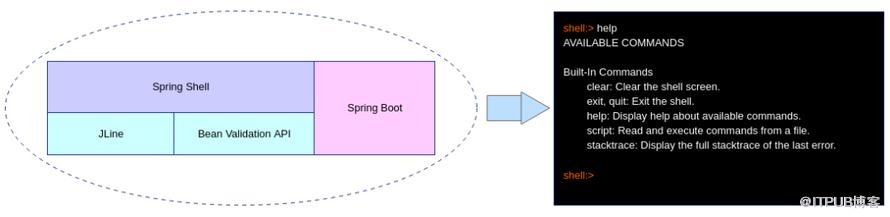
2.代码工程
实验目的:测试各种Spring shell功能
pom.xml
<project xmlns="http://maven.apache.org/POM/4.0.0"xmlns:xsi="http://www.w3.org/2001/XMLSchema-instance"xsi:schemaLocation="http://maven.apache.org/POM/4.0.0 http://maven.apache.org/xsd/maven-4.0.0.xsd"><parent><artifactId>springboot-demo</artifactId><groupId>com.et</groupId><version>1.0-SNAPSHOT</version></parent><modelVersion>4.0.0</modelVersion><artifactId>Spring-Shell</artifactId><properties><maven.compiler.source>8</maven.compiler.source><maven.compiler.target>8</maven.compiler.target></properties><dependencies><dependency><groupId>org.springframework.boot</groupId><artifactId>spring-boot-starter-web</artifactId></dependency><dependency><groupId>org.springframework.boot</groupId><artifactId>spring-boot-autoconfigure</artifactId></dependency><dependency><groupId>org.springframework.boot</groupId><artifactId>spring-boot-starter-test</artifactId><scope>test</scope></dependency><dependency><groupId>org.springframework.shell</groupId><artifactId>spring-shell-starter</artifactId><version>2.0.0.RELEASE</version></dependency></dependencies><build><plugins><plugin><groupId>org.springframework.boot</groupId><artifactId>spring-boot-maven-plugin</artifactId></plugin></plugins></build></project>
command
第一个hello word例子
package com.et.spring.shell.command;import org.springframework.shell.standard.ShellCommandGroup;import org.springframework.shell.standard.ShellComponent;import org.springframework.shell.standard.ShellMethod;import org.springframework.shell.standard.ShellOption;import javax.validation.constraints.Size;import java.util.List;public class HelloWorld {public void hello(String name) {System.out.println("hello, " + name + "!");}}
各种常见参数设置
package com.et.spring.shell.command;import org.springframework.shell.standard.ShellCommandGroup;import org.springframework.shell.standard.ShellComponent;import org.springframework.shell.standard.ShellMethod;import org.springframework.shell.standard.ShellOption;import javax.validation.constraints.Size;import java.util.List;public class Calculator {// give multi name//@ShellMethod for group//@ShellMethod(value = "Add numbers.", key = {"sum", "addition"})public void add(int a, int b) {int sum = a + b;System.out.println(String.format("%d + %d = %d", a, b, sum));}public void myhelp( String cmd) {System.out.println(cmd);}// params is collectionpublic void addByList( List<Integer> numbers) {int s = 0;for(int number : numbers) {s += number;}System.out.println(String.format("s=%d", s));}public void echo(String what) {System.out.println(what);}// use @Size validate param lengthpublic void changePwd( String pwd) {System.out.println(pwd);}}
控制命令的执行顺序
package com.et.spring.shell.command;import org.springframework.shell.Availability;import org.springframework.shell.standard.ShellCommandGroup;import org.springframework.shell.standard.ShellComponent;import org.springframework.shell.standard.ShellMethod;("Downloader")public class Downloader {private boolean connected = false;("Connect server")public void connect() {connected = true;}("Download file")public void download() {System.out.println("Downloaded.");}// download availabilitypublic Availability downloadAvailability() {return connected ? Availability.available():Availability.unavailable("you are not connected");}}
DemoApplication.java
package com.et.spring.shell;import org.springframework.boot.SpringApplication;import org.springframework.boot.autoconfigure.SpringBootApplication;public class DemoApplication {public static void main(String[] args) {SpringApplication.run(DemoApplication.class, args);}}
以上只是一些关键代码,所有代码请参见下面代码仓库
代码仓库
https://github.com/Harries/springboot-demo
3.测试
打包Spring Boot应用
mvn clean package -Dmaven.test.skip=true启动程序
java -jar Spring-Shell-1.0-SNAPSHOT.jar执行命令, 输入help,查看所有命令
 执行命令
执行命令
shell:>sum 1 21 + 2 = 3
4.引用
https://docs.spring.io/spring-shell/reference/getting-started.html
https://www.cnblogs.com/nuccch/p/11067342.html
http://www.liuhaihua.cn/archives/710583.html
原文作者:HBLOG;如有侵权,请联系管理员删除。

请登录后发表评论
登录
全部评论
