1.什么是Stripe?
一体化全球支付平台,开启收入增长引擎,针对不同规模业务打造的支付解决方案,满足从初创公司到跨国企业的多维度需求,助力全球范围内线上线下付款。
转化更多客户: 通过内置的优化功能、100 多种支付方式及一键结账来提高转化率。实现线上和线下付款一体化,提供无缝的客户体验。
全球覆盖,本地体验: 引入多样化支付方式,采用当地货币呈现价格,以此快速拓展新市场,实现向 195+ 个国家/地区的跨境销售,有效降低管理多币种的成本。
减少欺诈,增加收入: Stripe 的机器学习优化功能基于数十亿数据点进行深度训练,为您自动降低欺诈风险,同时提升交易授权率。
降本增效,快速拓展: 通过提高开发人员的工作效率,节省时间和工程资源。凭借领先的可靠性避免宕机,并通过替代支付方式和路径降低成本。
2.代码工程
实验目标
1.实现一次支付功能 2.实现订阅支付功能
pom.xml
<?xml version="1.0" encoding="UTF-8"?><project xmlns="http://maven.apache.org/POM/4.0.0"xmlns:xsi="http://www.w3.org/2001/XMLSchema-instance"xsi:schemaLocation="http://maven.apache.org/POM/4.0.0 http://maven.apache.org/xsd/maven-4.0.0.xsd"><parent><artifactId>springboot-demo</artifactId><groupId>com.et</groupId><version>1.0-SNAPSHOT</version></parent><modelVersion>4.0.0</modelVersion><artifactId>stripe</artifactId><properties><maven.compiler.source>8</maven.compiler.source><maven.compiler.target>8</maven.compiler.target></properties><dependencies><dependency><groupId>org.springframework.boot</groupId><artifactId>spring-boot-starter-web</artifactId></dependency><dependency><groupId>org.springframework.boot</groupId><artifactId>spring-boot-autoconfigure</artifactId></dependency><dependency><groupId>org.springframework.boot</groupId><artifactId>spring-boot-starter-test</artifactId><scope>test</scope></dependency><dependency><groupId>com.sparkjava</groupId><artifactId>spark-core</artifactId><version>2.9.4</version></dependency><dependency><groupId>com.google.code.gson</groupId><artifactId>gson</artifactId><version>2.9.1</version></dependency><dependency><groupId>org.projectlombok</groupId><artifactId>lombok</artifactId><version>1.18.20</version><scope>provided</scope></dependency><dependency><groupId>com.stripe</groupId><artifactId>stripe-java</artifactId><version>25.7.0</version></dependency><dependency><groupId>org.springframework.boot</groupId><artifactId>spring-boot-starter-thymeleaf</artifactId></dependency></dependencies></project>
controller
package com.et.stripe.controller;import com.et.stripe.common.Response;import com.et.stripe.service.StripeService;import com.stripe.model.Coupon;import org.springframework.beans.factory.annotation.Value;import org.springframework.stereotype.Controller;import org.springframework.ui.Model;import org.springframework.web.bind.annotation.GetMapping;import org.springframework.web.bind.annotation.PostMapping;import org.springframework.web.bind.annotation.ResponseBody;public class PaymentController {private String API_PUBLIC_KEY;private StripeService stripeService;public PaymentController(StripeService stripeService) {this.stripeService = stripeService;}public String homepage() {return "homepage";}public String subscriptionPage(Model model) {model.addAttribute("stripePublicKey", API_PUBLIC_KEY);return "subscription";}public String chargePage(Model model) {model.addAttribute("stripePublicKey", API_PUBLIC_KEY);return "charge";}/*========== REST APIs for Handling Payments ===================*/publicResponse createSubscription(String email, String token, String plan, String coupon) {//validate dataif (token == null || plan.isEmpty()) {return new Response(false, "Stripe payment token is missing. Please, try again later.");}//create customer firstString customerId = stripeService.createCustomer(email, token);if (customerId == null) {return new Response(false, "An error occurred while trying to create a customer.");}//create subscriptionString subscriptionId = stripeService.createSubscription(customerId, plan, coupon);if (subscriptionId == null) {return new Response(false, "An error occurred while trying to create a subscription.");}// Ideally you should store customerId and subscriptionId along with customer object here.// These values are required to update or cancel the subscription at later stage.return new Response(true, "Success! Your subscription id is " + subscriptionId);}publicResponse cancelSubscription(String subscriptionId) {boolean status = stripeService.cancelSubscription(subscriptionId);if (!status) {return new Response(false, "Failed to cancel the subscription. Please, try later.");}return new Response(true, "Subscription cancelled successfully.");}publicResponse couponValidator(String code) {Coupon coupon = stripeService.retrieveCoupon(code);if (coupon != null && coupon.getValid()) {String details = (coupon.getPercentOff() == null ? "$" + (coupon.getAmountOff() / 100) : coupon.getPercentOff() + "%") +" OFF " + coupon.getDuration();return new Response(true, details);} else {return new Response(false, "This coupon code is not available. This may be because it has expired or has " +"already been applied to your account.");}}publicResponse createCharge(String email, String token) {//validate dataif (token == null) {return new Response(false, "Stripe payment token is missing. Please, try again later.");}//create chargeString chargeId = stripeService.createCharge(email, token, 999); //$9.99 USDif (chargeId == null) {return new Response(false, "An error occurred while trying to create a charge.");}// You may want to store charge id along with order informationreturn new Response(true, "Success! Your charge id is " + chargeId);}}
service
package com.et.stripe.service;import com.stripe.Stripe;import com.stripe.model.Charge;import com.stripe.model.Coupon;import com.stripe.model.Customer;import com.stripe.model.Subscription;import com.stripe.param.SubscriptionCancelParams;import org.springframework.beans.factory.annotation.Value;import org.springframework.stereotype.Service;import java.util.HashMap;import java.util.Map;@Servicepublic class StripeService {@Value("${stripe.keys.secret}")private String API_SECRET_KEY;public StripeService() {}public String createCustomer(String email, String token) {String id = null;try {Stripe.apiKey = API_SECRET_KEY;Map<String, Object> customerParams = new HashMap<>();// add customer unique id here to track them in your web applicationcustomerParams.put("description", "Customer for " + email);customerParams.put("email", email);customerParams.put("source", token); // ^ obtained with Stripe.js//create a new customerCustomer customer = Customer.create(customerParams);id = customer.getId();} catch (Exception ex) {ex.printStackTrace();}return id;}public String createSubscription(String customerId, String plan, String coupon) {String id = null;try {Stripe.apiKey = API_SECRET_KEY;Map<String, Object> item = new HashMap<>();item.put("price", plan);Map<String, Object> items = new HashMap<>();items.put("0", item);Map<String, Object> params = new HashMap<>();params.put("customer", customerId);params.put("items", items);//add coupon if availableif (!coupon.isEmpty()) {params.put("coupon", coupon);}Subscription sub = Subscription.create(params);id = sub.getId();} catch (Exception ex) {ex.printStackTrace();}return id;}public boolean cancelSubscription(String subscriptionId) {boolean status;try {Stripe.apiKey = API_SECRET_KEY;Subscription sub = Subscription.retrieve(subscriptionId);sub.cancel((SubscriptionCancelParams) null);status = true;} catch (Exception ex) {ex.printStackTrace();status = false;}return status;}public Coupon retrieveCoupon(String code) {try {Stripe.apiKey = API_SECRET_KEY;return Coupon.retrieve(code);} catch (Exception ex) {ex.printStackTrace();}return null;}public String createCharge(String email, String token, int amount) {String id = null;try {Stripe.apiKey = API_SECRET_KEY;Map<String, Object> chargeParams = new HashMap<>();chargeParams.put("amount", amount);chargeParams.put("currency", "usd");chargeParams.put("description", "Charge for " + email);chargeParams.put("source", token); // ^ obtained with Stripe.js//create a chargeCharge charge = Charge.create(chargeParams);id = charge.getId();} catch (Exception ex) {ex.printStackTrace();}return id;}}
templates
homepage
<html xmlns:th="http://www.thymeleaf.org"><head><title>Homepage</title><!--Bootstrap 4 CSS--><link href="https://stackpath.bootstrapcdn.com/bootstrap/4.3.1/css/bootstrap.min.css" rel="stylesheet"><!--Bootstrap 4 JavaScript--><script src="https://code.jquery.com/jquery-3.3.1.min.js"></script><script src="https://stackpath.bootstrapcdn.com/bootstrap/4.3.1/js/bootstrap.min.js"></script></head><body class="bg-light pt-5"><!--hero section--><section class="py-5"><div class="container"><div class="row"><div class="col-lg-7 col-md-10 col-12 my-auto mx-auto text-center"><h1>Stripe Payment Examples</h1><p class="lead mb-4">What would you like to do?</p><a class="btn btn-primary" th:href="@{/subscription}">Create Recurring Subscription</a><a class="btn btn-success" th:href="@{/charge}">Create One-Time Charge</a><p class="mt-5 text-muted"><small>An example project by <a target="_blank"th:href="@{https://attacomsian.com}">Atta</a>.</small></p></div></div></div></section></body></html>
charge
<html xmlns:th="http://www.thymeleaf.org"><head><title>Charge</title><!--Bootstrap 4 CSS--><link href="https://stackpath.bootstrapcdn.com/bootstrap/4.3.1/css/bootstrap.min.css" rel="stylesheet"><!--Bootstrap 4 JavaScript--><script src="https://code.jquery.com/jquery-3.3.1.min.js"></script><script src="https://stackpath.bootstrapcdn.com/bootstrap/4.3.1/js/bootstrap.min.js"></script><!--Stripe JavaScript Library--><script src="https://js.stripe.com/v3/"></script></head><body class="bg-light pt-5"><!--hero section--><section class="py-5"><div class="container"><div class="row"><div class="col-lg-6 col-md-8 col-12 my-auto mx-auto"><h1>Stripe One-Time Charge</h1><p class="lead mb-4">Please fill the form below to complete the order payment</p><div class="card mb-4"><div class="card-body"><h5>Leather Bag</h5><p class="lead">USD 9.99</p></div></div><form action="#" id="payment-form" method="post"><input id="api-key" th:value="${stripePublicKey}" type="hidden"><div class="form-group"><label class="font-weight-medium" for="card-element">Enter credit or debit card below</label><div class="w-100" id="card-element"><!-- A Stripe Element will be inserted here. --></div></div><div class="form-group"><input class="form-control" id="email" name="email"placeholder="Email Address" required type="email"></div><!-- Used to display Element errors. --><div class="text-danger w-100" id="card-errors" role="alert"></div><div class="form-group pt-2"><button class="btn btn-primary btn-block" id="submitButton" type="submit">Pay With Your Card</button><div class="small text-muted mt-2">Pay securely with Stripe. By clicking the button above, you agreeto our <a href="#" target="_blank">Terms of Service</a>,<a href="#" target="_blank">Privacy</a> and<a href="#" target="_blank">Refund</a> policies.</div></div></form><p class="mt-5 text-muted"><small>An example project by <a target="_blank" th:href="@{https://attacomsian.com}">Atta</a>.</small></p></div></div></div></section><!--custom javascript for handling subscription--><script>$(function () {var API_KEY = $('#api-key').val();// Create a Stripe client.var stripe = Stripe(API_KEY);// Create an instance of Elements.var elements = stripe.elements();// Create an instance of the card Element.var card = elements.create('card');// Add an instance of the card Element into the `card-element` <div>.card.mount('#card-element');// Handle real-time validation errors from the card Element.card.addEventListener('change', function (event) {var displayError = document.getElementById('card-errors');if (event.error) {displayError.textContent = event.error.message;} else {displayError.textContent = '';}});// Handle form submission.var form = document.getElementById('payment-form');form.addEventListener('submit', function (event) {event.preventDefault();// handle paymenthandlePayments();});//handle card submissionfunction handlePayments() {stripe.createToken(card).then(function (result) {if (result.error) {// Inform the user if there was an error.var errorElement = document.getElementById('card-errors');errorElement.textContent = result.error.message;} else {// Send the token to your server.var token = result.token.id;var email = $('#email').val();$.post("/create-charge",{email: email, token: token},function (data) {alert(data.details);}, 'json');}});}});</script></body></html>
subscription
<html xmlns:th="http://www.thymeleaf.org"><head><title>Subscription</title><!--Bootstrap 4 CSS--><link href="https://stackpath.bootstrapcdn.com/bootstrap/4.3.1/css/bootstrap.min.css" rel="stylesheet"><!--Bootstrap 4 JavaScript--><script src="https://code.jquery.com/jquery-3.3.1.min.js"></script><script src="https://stackpath.bootstrapcdn.com/bootstrap/4.3.1/js/bootstrap.min.js"></script><!--Stripe JavaScript Library--><script src="https://js.stripe.com/v3/"></script></head><body class="bg-light pt-5"><!--hero section--><section class="py-5"><div class="container"><div class="row"><div class="col-lg-6 col-md-8 col-12 my-auto mx-auto"><h1>Stripe Recurring Subscription</h1><p class="lead mb-4">Please fill the form below to complete the payment</p><h5 class="mb-2">Choose your payment plan</h5><p class="text-muted">60% OFF when you upgrade to annual plan.</p><div class="py-2"><div class="custom-control custom-radio"><input class="custom-control-input" id="monthly-plan" name="premium-plan" type="radio"value="price_1PtRC5KYHXnPEBSj85nrvuKC"/><label class="custom-control-label" for="monthly-plan"><strong>Monthly $9.99</strong><br/><small class="text-muted">Pay $9.99 every month and get access to all premium features.</small></label></div><div class="custom-control custom-radio mt-3"><input checked="" class="custom-control-input" id="annually-plan" name="premium-plan"type="radio" value="annual-subscription"/><label class="custom-control-label" for="annually-plan"><strong>Yearly $49.99</strong><span class="badge badge-primary ml-1">60% OFF</span><br/><small class="text-muted">Pay $49.99 every year and get access to all premium features.</small></label></div></div><form action="#" id="payment-form" method="post"><input id="api-key" th:value="${stripePublicKey}" type="hidden"><div class="form-group"><label class="font-weight-medium" for="card-element">Enter credit or debit card below</label><div class="w-100" id="card-element"><!-- A Stripe Element will be inserted here. --></div></div><div class="form-group"><input class="form-control" id="email" name="email"placeholder="Email Address" required type="email"></div><div class="form-group"><input class="form-control" id="coupon" name="coupon"placeholder="Coupon code (optional)" type="text"></div><!-- Used to display Element errors. --><div class="text-danger w-100" id="card-errors" role="alert"></div><div class="form-group pt-2"><button class="btn btn-primary btn-block" id="submitButton" type="submit">Pay With Your Card</button><div class="small text-muted mt-2">Pay securely with Stripe. By clicking the button above, you agreeto our <a href="#" target="_blank">Terms of Service</a>,<a href="#" target="_blank">Privacy</a> and<a href="#" target="_blank">Refund</a> policies.</div></div></form><p class="mt-5 text-muted"><small>An example project by <a target="_blank" th:href="@{https://attacomsian.com}">Atta</a>.</small></p></div></div></div></section><!--custom javascript for handling subscription--><script>$(function () {var API_KEY = $('#api-key').val();// Create a Stripe client.var stripe = Stripe(API_KEY);// Create an instance of Elements.var elements = stripe.elements();// Create an instance of the card Element.var card = elements.create('card');// Add an instance of the card Element into the `card-element` <div>.card.mount('#card-element');// Handle real-time validation errors from the card Element.card.addEventListener('change', function (event) {var displayError = document.getElementById('card-errors');if (event.error) {displayError.textContent = event.error.message;} else {displayError.textContent = '';}});// Handle form submission.var form = document.getElementById('payment-form');form.addEventListener('submit', function (event) {event.preventDefault();//validate coupon if anyvar code = $('#coupon').val().trim();if (code.length > 0) {$.post("/coupon-validator",{code: code},function (data) {if (data.status) {handlePayments();} else {alert(data.details);}}, 'json');} else {handlePayments();}});//handle card submissionfunction handlePayments() {stripe.createToken(card).then(function (result) {if (result.error) {// Inform the user if there was an error.var errorElement = document.getElementById('card-errors');errorElement.textContent = result.error.message;} else {// Send the token to your server.var token = result.token.id;var plan = $('input[name="premium-plan"]:checked').val();var email = $('#email').val();var coupon = $('#coupon').val();$.post("/create-subscription",{email: email, token: token, plan: plan, coupon: coupon},function (data) {alert(data.details);}, 'json');}});}});</script></body></html>
application.yaml
stripe.keys.public=pk_test_xxxxxstripe.keys.secret=sk_test_xxxxxspring.thymeleaf.cache=false
以上只是一些关键代码,所有代码请参见下面代码仓库
代码仓库
https://github.com/Harries/springboot-demo(stripe)
3.测试
启动Spring Boot应用
一次支付测试
http://127.0.0.1:8080/charge 可以在这个地址 https://docs.stripe.com/testing,找到测试卡号, 输入测试卡号,显示支付成功
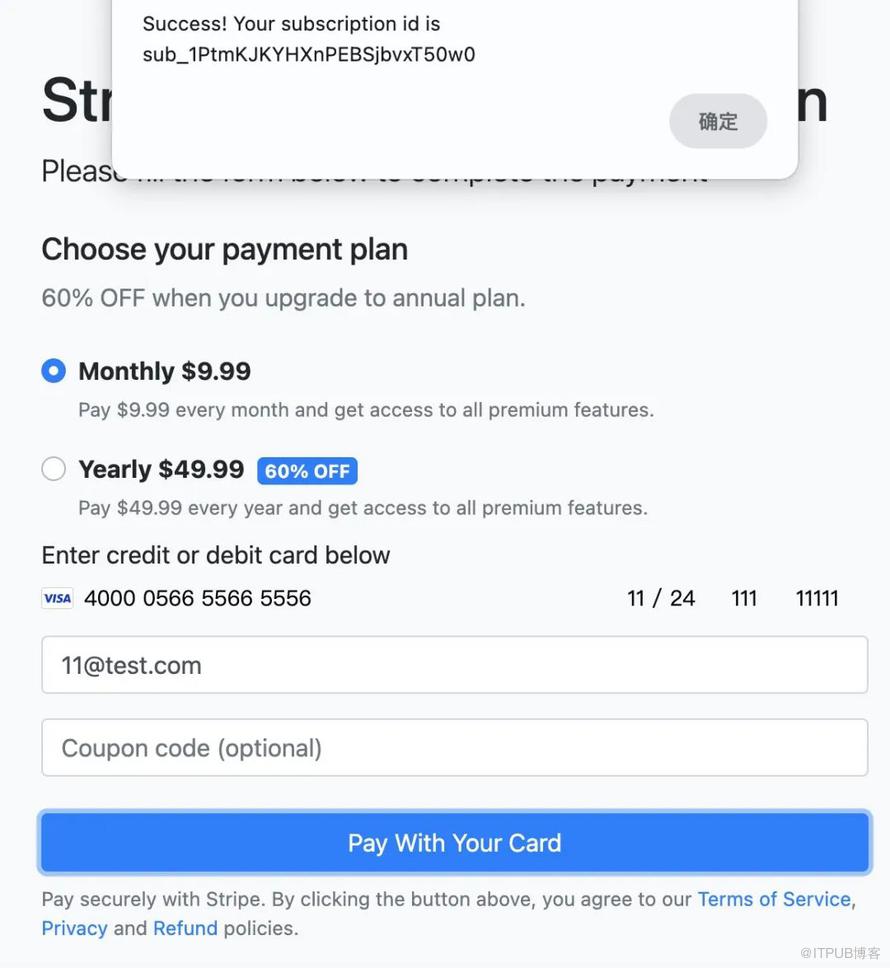
订阅支付测试
http://127.0.0.1:8080/subscription
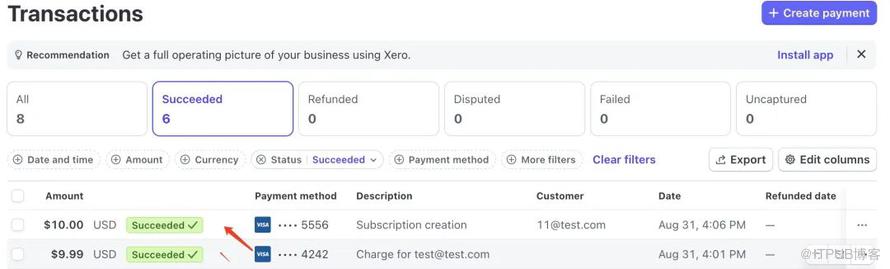
stripe控制台交易信息
4.引用
https://docs.stripe.com/testing
https://stripe.com/
http://www.liuhaihua.cn/archives/711254.html

如果觉得文章对您有帮助的话,请帮忙关注/留言/转发!另外最近写的一个《Spring Boot快速入门》专栏,大家可以去看看,对新手友好,极简入门。没有冗余的理论知识,直接上干货代码。方便在实际项目中快速应用!
原文作者:HBLOG;如有侵权,请联系管理员删除。

