1.什么时候mfa?
多重身份验证(MFA)是多步骤的账户登录过程,它要求用户输入更多信息,而不仅仅是输入密码。例如,除了密码之外,用户可能需要输入发送到其电子邮件的代码,回答一个秘密问题,或者扫描指纹。如果系统密码遭到泄露,第二种形式的身份验证有助于防止未经授权的账户访问。
为什么有必要进行多重身份验证?
数字安全在当今世界至关重要,因为企业和用户都在网上存储敏感信息。每个人都使用在线账户与存储在互联网上的应用程序、服务和数据进行交互。这些在线信息的泄露或滥用可能会在现实世界中造成严重后果,例如财务盗窃、业务中断和隐私泄露。 虽然密码可以保护数字资产,但仅仅有密码是不够的。专家级网络犯罪分子试图主动寻找密码。通过发现一个密码,就有可能获得对您可能重复使用该密码的多个账户的访问权限。多重身份验证作为额外的安全层,即使密码被盗,也可以防止未经授权的用户访问这些账户。企业使用多重身份验证来验证用户身份,并为授权用户提供快速便捷的访问。
2.什么是google authenticator?
Google Authenticator是谷歌推出的一款动态口令工具谷歌身份验证器,解决大家的Google账户遭到恶意攻击的问题,在手机端生成动态口令后,在Google相关的服务登陆中除了用正常用户名和密码外,需要输入一次动态口令才能验证成功,即时验证更安全。 Google Authenticator的实现原理是基于服务器端随机生成的密钥,客户端(Authentictor)使用服务器端的密钥和时间戳通过算法生成动态验证码。该验证码的生成只跟密钥和时间戳有关,客户端在飞行模式下都是可以运行的,跟网络等无关。
安装身份验证器
IOS 版本:Google Authenticator 可以在App Store搜索
google authenticator安卓:Google Authenticator
3.代码工程
实验目标
实验用利用google Authenticator进行2次校验
pom.xml
<?xml version="1.0" encoding="UTF-8"?><project xmlns="http://maven.apache.org/POM/4.0.0"xmlns:xsi="http://www.w3.org/2001/XMLSchema-instance"xsi:schemaLocation="http://maven.apache.org/POM/4.0.0 http://maven.apache.org/xsd/maven-4.0.0.xsd"><parent><artifactId>springboot-demo</artifactId><groupId>com.et</groupId><version>1.0-SNAPSHOT</version></parent><modelVersion>4.0.0</modelVersion><artifactId>MFA</artifactId><properties><maven.compiler.source>8</maven.compiler.source><maven.compiler.target>8</maven.compiler.target></properties><dependencies><dependency><groupId>org.springframework.boot</groupId><artifactId>spring-boot-starter-web</artifactId></dependency><dependency><groupId>org.springframework.boot</groupId><artifactId>spring-boot-autoconfigure</artifactId></dependency><dependency><groupId>org.springframework.boot</groupId><artifactId>spring-boot-starter-test</artifactId><scope>test</scope></dependency><dependency><groupId>org.springframework.boot</groupId><artifactId>spring-boot-starter</artifactId></dependency><dependency><groupId>org.springframework.boot</groupId><artifactId>spring-boot-starter-jersey</artifactId></dependency><dependency><groupId>org.springframework.boot</groupId><artifactId>spring-boot-starter-security</artifactId></dependency><dependency><groupId>commons-codec</groupId><artifactId>commons-codec</artifactId><version>1.12</version></dependency><dependency><groupId>org.apache.commons</groupId><artifactId>commons-lang3</artifactId><version>3.8.1</version></dependency><!-- https://mvnrepository.com/artifact/com.h2database/h2 --><dependency><groupId>com.h2database</groupId><artifactId>h2</artifactId><version>2.2.220</version><scope>test</scope></dependency></dependencies></project>
注册并返回二次校验密钥
package com.et.mfa.controller;import com.et.mfa.domain.User;import com.et.mfa.service.UserService;import org.apache.commons.codec.binary.Base32;import org.springframework.beans.factory.annotation.Autowired;import org.springframework.beans.factory.annotation.Value;import org.springframework.web.bind.annotation.*;@RestController@RequestMapping(value = "/user/", method = RequestMethod.POST)public class UserRestController {@Value("${2fa.enabled}")private boolean isTwoFaEnabled;@Autowiredprivate UserService userService;@PostMapping("/register/{login}/{password}")public String register(@PathVariable String login, @PathVariable String password) {User user = userService.register(login, password);String encodedSecret = new Base32().encodeToString(user.getSecret().getBytes());// This Base32 encode may usually return a string with padding characters - '='.// QR generator which is user (zxing) does not recognize strings containing symbols other than alphanumeric// So just remove these redundant '=' padding symbols from resulting stringreturn encodedSecret.replace("=", "");}}
登陆和二次校验
package com.et.mfa.controller;import com.et.mfa.domain.AuthenticationStatus;import com.et.mfa.domain.User;import com.et.mfa.service.TotpService;import com.et.mfa.service.UserService;import org.springframework.beans.factory.annotation.Autowired;import org.springframework.beans.factory.annotation.Value;import org.springframework.security.authentication.UsernamePasswordAuthenticationToken;import org.springframework.security.core.context.SecurityContextHolder;import org.springframework.web.bind.annotation.*;import java.util.ArrayList;import java.util.Optional;@RestController@RequestMapping(value = "/authenticate/", method = RequestMethod.POST)public class AuthenticationRestController {@Value("${2fa.enabled}")private boolean isTwoFaEnabled;@Autowiredprivate UserService userService;@Autowiredprivate TotpService totpService;@PostMapping("{login}/{password}")public AuthenticationStatus authenticate(@PathVariable String login, @PathVariable String password) {Optional<User> user = userService.findUser(login, password);if (!user.isPresent()) {return AuthenticationStatus.FAILED;}if (!isTwoFaEnabled) {UsernamePasswordAuthenticationToken authentication = new UsernamePasswordAuthenticationToken(login, password);SecurityContextHolder.getContext().setAuthentication(authentication);return AuthenticationStatus.AUTHENTICATED;} else {SecurityContextHolder.getContext().setAuthentication(null);return AuthenticationStatus.REQUIRE_TOKEN_CHECK;}}@GetMapping("token/{login}/{password}/{token}")public AuthenticationStatus tokenCheck(@PathVariable String login, @PathVariable String password, @PathVariable String token) {Optional<User> user = userService.findUser(login, password);if (!user.isPresent()) {return AuthenticationStatus.FAILED;}if (!totpService.verifyCode(token, user.get().getSecret())) {return AuthenticationStatus.FAILED;}UsernamePasswordAuthenticationToken authentication = new UsernamePasswordAuthenticationToken(user.get().getLogin(), user.get().getPassword(), new ArrayList<>());SecurityContextHolder.getContext().setAuthentication(authentication);return AuthenticationStatus.AUTHENTICATED;}@PostMapping("/logout")public void logout() {SecurityContextHolder.clearContext();}}
service
package com.et.mfa.service;import com.et.mfa.domain.User;import org.apache.commons.lang3.RandomStringUtils;import org.springframework.beans.factory.annotation.Value;import org.springframework.stereotype.Service;import java.util.ArrayList;import java.util.List;import java.util.Optional;@Servicepublic class UserService {private static final List<User> users = new ArrayList<>();private static final int SECRET_SIZE = 10;@Value("${2fa.enabled}")private boolean isTwoFaEnabled;public User register(String login, String password) {User user = new User(login, password, generateSecret());users.add(user);return user;}public Optional<User> findUser(String login, String password) {return users.stream().filter(user -> user.getLogin().equals(login) && user.getPassword().equals(password)).findFirst();}private String generateSecret() {return RandomStringUtils.random(SECRET_SIZE, true, true).toUpperCase();}}
package com.et.mfa.service;import com.et.mfa.domain.TOTP;import org.apache.commons.codec.EncoderException;import org.apache.commons.codec.binary.Hex;import org.springframework.stereotype.Service;public class TotpService {public boolean verifyCode(String totpCode, String secret) {String totpCodeBySecret = generateTotpBySecret(secret);return totpCodeBySecret.equals(totpCode);}private String generateTotpBySecret(String secret) {// Getting current timestamp representing 30 seconds time framelong timeFrame = System.currentTimeMillis() / 1000L / 30;// Encoding time frame value to HEX string - requred by TOTP generator which is used here.String timeEncoded = Long.toHexString(timeFrame);String totpCodeBySecret;try {// Encoding given secret string to HEX string - requred by TOTP generator which is used here.char[] secretEncoded = (char[]) new Hex().encode(secret);// Generating TOTP by given time and secret - using TOTP algorithm implementation provided by IETF.totpCodeBySecret = TOTP.generateTOTP(String.copyValueOf(secretEncoded), timeEncoded, "6");} catch (EncoderException e) {throw new RuntimeException(e);}return totpCodeBySecret;}}
前台页面
register.html
<html lang="en"><head><meta charset="UTF-8"><meta content="width=device-width, initial-scale=1, shrink-to-fit=no" name="viewport"><!-- Bootstrap CSS --><link crossorigin="anonymous" href="https://maxcdn.bootstrapcdn.com/bootstrap/4.0.0-beta.3/css/bootstrap.min.css"integrity="sha384-Zug+QiDoJOrZ5t4lssLdxGhVrurbmBWopoEl+M6BdEfwnCJZtKxi1KgxUyJq13dy" rel="stylesheet"><link href="styles.css" rel="stylesheet"/><title>Register</title></head><body><div class="custom-container container"><h2 align="center">Register user</h2><div class="form-group"><label for="login">Login</label><input class="form-control" id="login" placeholder="Enter login" type="text"/></div><div class="form-group"><label for="password">Password: </label><input class="form-control" id="password" placeholder="Enter password" type="password"/></div><button class="btn btn-primary" id="btnRegister" type="button">Register</button><button class="btn btn-outline-primary" id="btnCancelRegister" type="button">Cancel</button></div><div class="modal fade" id="modalRegister" role="dialog" tabindex="-1"><div class="modal-dialog" role="document"><div class="modal-content"><div class="modal-header"><h5 class="modal-title">Configure your token</h5><button aria-label="Close" class="close" data-dismiss="modal" type="button"><span aria-hidden="true">×</span></button></div><div class="modal-body"><p>To complete registration you should configure your token in Google Authenticator application. Youwill need this token further to be able to log in.</p><p>Scan the QR-code diplayed below or enter token manually.</p><div class="text-center"><img class="img-thumbnail" id="tokenQr" src=""/><h3><span id="tokenValue"></span></h3></div></div><div class="modal-footer"><button class="btn btn-primary" data-dismiss="modal" id="btnRegisterDone" type="button">Done</button></div></div></div></div><!-- Optional JavaScript --><!-- jQuery first, then Popper.js, then Bootstrap JS --><script src="https://ajax.googleapis.com/ajax/libs/jquery/3.2.1/jquery.min.js"></script><script crossorigin="anonymous"integrity="sha384-ApNbgh9B+Y1QKtv3Rn7W3mgPxhU9K/ScQsAP7hUibX39j7fakFPskvXusvfa0b4Q"src="https://cdnjs.cloudflare.com/ajax/libs/popper.js/1.12.9/umd/popper.min.js"></script><script crossorigin="anonymous"integrity="sha384-a5N7Y/aK3qNeh15eJKGWxsqtnX/wWdSZSKp+81YjTmS15nvnvxKHuzaWwXHDli+4"src="https://maxcdn.bootstrapcdn.com/bootstrap/4.0.0-beta.3/js/bootstrap.min.js"></script><script src="scripts.js" type="application/javascript"></script></body></html>
login.html
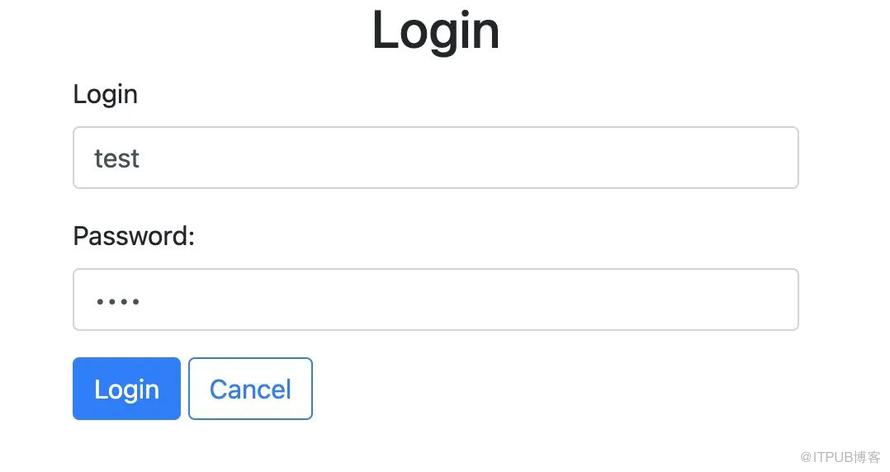
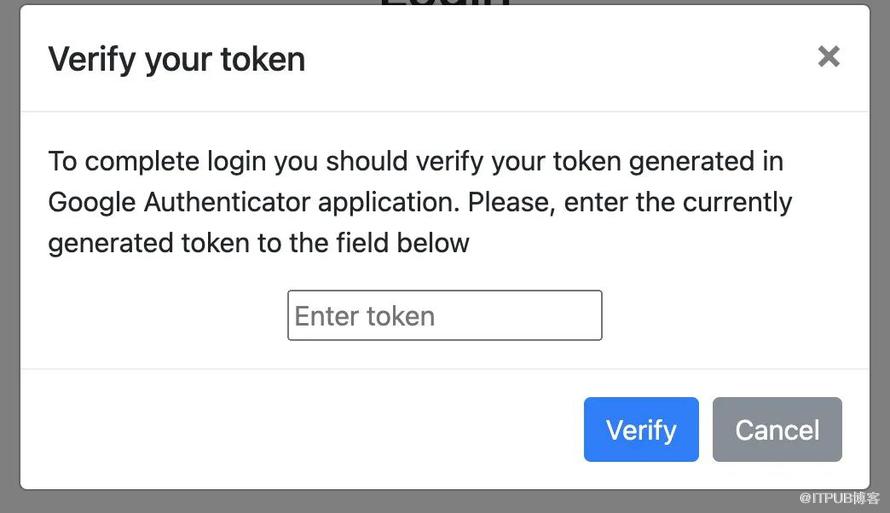
<html lang="en"><head><meta charset="UTF-8"><meta content="width=device-width, initial-scale=1, shrink-to-fit=no" name="viewport"><!-- Bootstrap CSS --><link crossorigin="anonymous" href="https://maxcdn.bootstrapcdn.com/bootstrap/4.0.0-beta.3/css/bootstrap.min.css"integrity="sha384-Zug+QiDoJOrZ5t4lssLdxGhVrurbmBWopoEl+M6BdEfwnCJZtKxi1KgxUyJq13dy" rel="stylesheet"><link href="styles.css" rel="stylesheet"/><title>Login</title></head><body><div class="custom-container container"><h2 align="center">Login</h2><div class="alert alert-danger collapse" id="msgLoginFailed" role="alert">Provided login or password could not be recognized</div><div class="form-group"><label for="login">Login</label><input class="form-control" id="login" placeholder="Enter login" type="text"/></div><div class="form-group"><label for="password">Password: </label><input class="form-control" id="password" placeholder="Enter password" type="password"/></div><button class="btn btn-primary" id="btnLogin" type="button">Login</button><button class="btn btn-outline-primary" id="btnCancelLogin" type="button">Cancel</button></div><div class="modal fade" id="modalLoginCheckToken" role="dialog" tabindex="-1"><div class="modal-dialog" role="document"><div class="modal-content"><div class="modal-header"><h5 class="modal-title">Verify your token</h5><button aria-label="Close" class="close" data-dismiss="modal" type="button"><span aria-hidden="true">×</span></button></div><div class="modal-body"><div class="alert alert-danger collapse" id="msgTokenCheckFailed" role="alert">Provided token could not be recognized</div><p>To complete login you should verify your token generated in Google Authenticator application.Please, enter the currently generated token to the field below</p><div class="text-center"><input id="loginToken" placeholder="Enter token" type="text"/></div></div><div class="modal-footer"><button class="btn btn-primary" id="btnTokenVerify" type="button">Verify</button><button class="btn btn-secondary" data-dismiss="modal" type="button">Cancel</button></div></div></div></div><!-- Optional JavaScript --><!-- jQuery first, then Popper.js, then Bootstrap JS --><script src="http://code.jquery.com/jquery.js"></script><script crossorigin="anonymous"integrity="sha384-ApNbgh9B+Y1QKtv3Rn7W3mgPxhU9K/ScQsAP7hUibX39j7fakFPskvXusvfa0b4Q"src="https://cdnjs.cloudflare.com/ajax/libs/popper.js/1.12.9/umd/popper.min.js"></script><script crossorigin="anonymous"integrity="sha384-a5N7Y/aK3qNeh15eJKGWxsqtnX/wWdSZSKp+81YjTmS15nvnvxKHuzaWwXHDli+4"src="https://maxcdn.bootstrapcdn.com/bootstrap/4.0.0-beta.3/js/bootstrap.min.js"></script><script src="scripts.js" type="application/javascript"></script></body></html>
以上只是一些关键代码,所有代码请参见下面代码仓库
代码仓库
https://github.com/Harries/springboot-demo(mfa)
4测试
启动Spring Boot应用
注册

绑定密钥

登陆
二次交验
5.引用
https://safety.google/authentication/
http://www.liuhaihua.cn/archives/711268.html
https://play.google.com/store/apps/details?id=com.google.android.apps.authenticator2&hl=zh

如果觉得文章对您有帮助的话,请帮忙关注/留言/转发!另外最近写的一个《Spring Boot快速入门》专栏,大家可以去看看,对新手友好,极简入门。没有冗余的理论知识,直接上干货代码。方便在实际项目中快速应用!
原文作者:HBLOG;如有侵权,请联系管理员删除。

