一、ElasticSearch介绍
elasticsearch是构建在Apache Lucene上的使用Java语言开发的开源分布式搜素引擎。Lucene是一个开源的全文搜索引擎工具包,它仅是一个工具包而不是一个完整的工作引擎,并且只能被Java应用程序调用,elasticsearch基于REST API,因此任何开发语言开发的任何应用程序都可以通过JSON格式的HTTP请求来管理elasticsearch集群。elasticsearch封装并扩展了Luncene,使存储、索引、搜索都变得更快、更容易。除此之外,elasticsearch还可以完好地存储数据,甚至可以将其直接作为带搜索功能的NoSQL数据库来使用,它的数据是通过文档形式表示的。以下将elasticsearch都简称为es。
二、ElasticSearch环境搭建
采用docker-compose搭建,具体配置如下:
version: '3'# 网桥es -> 方便相互通讯networks:es:services:elasticsearch:image: registry.cn-hangzhou.aliyuncs.com/zhengqing/elasticsearch:7.14.1 # 原镜像`elasticsearch:7.14.1`container_name: elasticsearch # 容器名为'elasticsearch'restart: unless-stopped # 指定容器退出后的重启策略为始终重启,但是不考虑在Docker守护进程启动时就已经停止了的容器volumes: # 数据卷挂载路径设置,将本机目录映射到容器目录"./elasticsearch/data:/usr/share/elasticsearch/data""./elasticsearch/logs:/usr/share/elasticsearch/logs""./elasticsearch/config/elasticsearch.yml:/usr/share/elasticsearch/config/elasticsearch.yml"# - "./elasticsearch/config/jvm.options:/usr/share/elasticsearch/config/jvm.options""./elasticsearch/plugins/ik:/usr/share/elasticsearch/plugins/ik" # IK中文分词插件environment: # 设置环境变量,相当于docker run命令中的-eTZ: Asia/ShanghaiLANG: en_US.UTF-8TAKE_FILE_OWNERSHIP: "true" # 权限: single-nodeES_JAVA_OPTS: "-Xmx512m -Xms512m"#ELASTIC_PASSWORD: "123456" # elastic账号密码ports:"9200:9200""9300:9300"networks:eskibana:image: registry.cn-hangzhou.aliyuncs.com/zhengqing/kibana:7.14.1 # 原镜像`kibana:7.14.1`container_name: kibanarestart: unless-stoppedvolumes:./elasticsearch/kibana/config/kibana.yml:/usr/share/kibana/config/kibana.ymlports:"5601:5601"depends_on:elasticsearchlinks:elasticsearchnetworks:es
部署
# 运行docker-compose -f docker-compose-elasticsearch.yml -p elasticsearch up -d# 运行后,给当前目录下所有文件赋予权限(读、写、执行)#chmod -R 777 ./elasticsearch
ES访问地址:
ip地址:9200默认账号密码:elastic/123456kibana访问地址:
ip地址:5601/app/dev_tools#/console默认账号密码:elastic/123456
设置ES密码
# 进入容器docker exec -it elasticsearch /bin/bash# 设置密码-随机生成密码# elasticsearch-setup-passwords auto# 设置密码-手动设置密码elasticsearch-setup-passwords interactive# 访问curl 127.0.0.1:9200 -u elastic:123456
三、代码工程
pom.xml
<project xmlns="http://maven.apache.org/POM/4.0.0"xmlns:xsi="http://www.w3.org/2001/XMLSchema-instance"xsi:schemaLocation="http://maven.apache.org/POM/4.0.0 http://maven.apache.org/xsd/maven-4.0.0.xsd"><parent><artifactId>springboot-demo</artifactId><groupId>com.et</groupId><version>1.0-SNAPSHOT</version></parent><modelVersion>4.0.0</modelVersion><artifactId>elasticsearch</artifactId><dependencies><dependency><groupId>org.springframework.boot</groupId><artifactId>spring-boot-starter-data-elasticsearch</artifactId></dependency><dependency><groupId>org.springframework.boot</groupId><artifactId>spring-boot-starter-web</artifactId></dependency><dependency><groupId>org.springframework.boot</groupId><artifactId>spring-boot-starter-webflux</artifactId></dependency><dependency><groupId>com.alibaba</groupId><artifactId>fastjson</artifactId><version>${fastjson.version}</version></dependency><dependency><groupId>org.springframework.boot</groupId><artifactId>spring-boot-starter-test</artifactId><scope>test</scope></dependency><dependency><groupId>io.projectreactor</groupId><artifactId>reactor-test</artifactId><scope>test</scope></dependency></dependencies></project>
启动类
package com.et59.elaticsearch;import org.springframework.boot.SpringApplication;import org.springframework.boot.autoconfigure.SpringBootApplication;public class EssearchApplication {public static void main(String[] args) {SpringApplication.run(EssearchApplication.class, args);}}
service
package com.et59.elaticsearch.service;import com.et59.elaticsearch.document.ProductDocument;import java.util.List;/*** @author zhoudong* @version 0.1* @date 2018/12/13 15:32*/public interface EsSearchService extends BaseSearchService<ProductDocument> {/*** 保存* @auther: zhoudong* @date: 2018/12/13 16:02*/void save(ProductDocument... productDocuments);/*** 删除* @param id*/void delete(String id);/*** 清空索引*/void deleteAll();/*** 根据ID查询* @param id* @return*/ProductDocument getById(String id);/*** 查询全部* @return*/List<ProductDocument> getAll();}
package com.et59.elaticsearch.service.impl;import com.alibaba.fastjson.JSON;import com.et59.elaticsearch.document.ProductDocument;import com.et59.elaticsearch.repository.ProductDocumentRepository;import com.et59.elaticsearch.service.EsSearchService;import org.slf4j.Logger;import org.slf4j.LoggerFactory;import org.springframework.data.elasticsearch.core.ElasticsearchTemplate;import org.springframework.stereotype.Service;import javax.annotation.Resource;import java.util.*;/*** elasticsearch 搜索引擎 service实现* @author zhoudong* @version 0.1* @date 2018/12/13 15:33*/public class EsSearchServiceImpl extends BaseSearchServiceImpl<ProductDocument> implements EsSearchService {private Logger log = LoggerFactory.getLogger(getClass());private ElasticsearchTemplate elasticsearchTemplate;private ProductDocumentRepository productDocumentRepository;public void save(ProductDocument ... productDocuments) {elasticsearchTemplate.putMapping(ProductDocument.class);if(productDocuments.length > 0){/*Arrays.asList(productDocuments).parallelStream().map(productDocumentRepository::save).forEach(productDocument -> log.info("【保存数据】:{}", JSON.toJSONString(productDocument)));*/log.info("【保存索引】:{}",JSON.toJSONString(productDocumentRepository.saveAll(Arrays.asList(productDocuments))));}}public void delete(String id) {productDocumentRepository.deleteById(id);}public void deleteAll() {productDocumentRepository.deleteAll();}public ProductDocument getById(String id) {return productDocumentRepository.findById(id).get();}public List<ProductDocument> getAll() {List<ProductDocument> list = new ArrayList<>();productDocumentRepository.findAll().forEach(list::add);return list;}}
document
package com.et59.elaticsearch.document;import org.springframework.data.annotation.Id;import org.springframework.data.elasticsearch.annotations.Document;import org.springframework.data.elasticsearch.annotations.Field;import org.springframework.data.elasticsearch.annotations.Mapping;import java.io.Serializable;import java.util.Date;/*** 产品实体* @author zhoudong* @version 0.1* @date 2018/12/13 15:22*/(indexName = "orders", type = "product")(mappingPath = "productIndex.json") // 解决IK分词不能使用问题public class ProductDocument implements Serializable {private String id;//@Field(analyzer = "ik_max_word",searchAnalyzer = "ik_max_word")private String productName;//@Field(analyzer = "ik_max_word",searchAnalyzer = "ik_max_word")private String productDesc;private Date createTime;private Date updateTime;public String getId() {return id;}public void setId(String id) {this.id = id;}public String getProductName() {return productName;}public void setProductName(String productName) {this.productName = productName;}public String getProductDesc() {return productDesc;}public void setProductDesc(String productDesc) {this.productDesc = productDesc;}public Date getCreateTime() {return createTime;}public void setCreateTime(Date createTime) {this.createTime = createTime;}public Date getUpdateTime() {return updateTime;}public void setUpdateTime(Date updateTime) {this.updateTime = updateTime;}}
repository
package com.et59.elaticsearch.repository;import com.et59.elaticsearch.document.ProductDocument;import org.springframework.data.elasticsearch.repository.ElasticsearchRepository;import org.springframework.stereotype.Component;/*** @author zhoudong* @version 0.1* @date 2018/12/13 17:35*/@Componentpublic interface ProductDocumentRepository extends ElasticsearchRepository<ProductDocument,String> {}
application.properties
elasticsearch.yml 文件中的 cluster.namespring.data.elasticsearch.cluster-name=docker-clusterelasticsearch 调用地址,多个使用“,”隔开spring.data.elasticsearch.cluster-nodes=127.0.0.1:9300spring.data.elasticsearch.repositories.enabled=truespring.data.elasticsearch.username=elasticspring.data.elasticsearch.password=123456spring.data.elasticsearch.network.host=0.0.0.0
productIndex.json
{"properties": {"createTime": {"type": "long"},"productDesc": {"type": "text","analyzer": "ik_max_word","search_analyzer": "ik_max_word"},"productName": {"type": "text","analyzer": "ik_max_word","search_analyzer": "ik_max_word"},"updateTime": {"type": "long"}}}
代码仓库地址
https://github.com/Harries/springboot-demo
四、验证
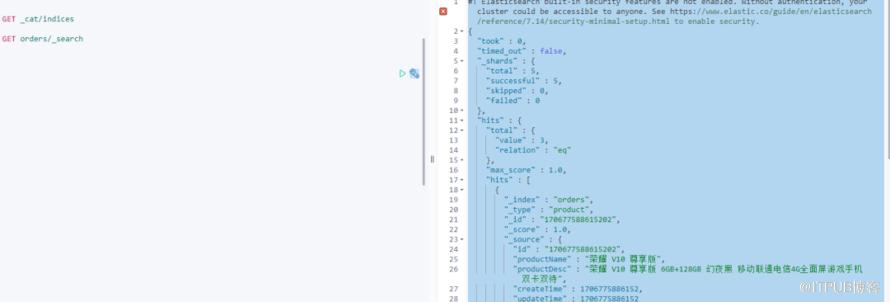
package com.et59.elaticsearch;import com.alibaba.fastjson.JSON;import com.et59.elaticsearch.document.ProductDocument;import com.et59.elaticsearch.document.ProductDocumentBuilder;import com.et59.elaticsearch.service.EsSearchService;import com.et59.elaticsearch.page.Page;import org.junit.Test;import org.junit.runner.RunWith;import org.slf4j.Logger;import org.slf4j.LoggerFactory;import org.springframework.beans.factory.annotation.Autowired;import org.springframework.boot.test.context.SpringBootTest;import org.springframework.test.context.junit4.SpringRunner;import java.util.Date;import java.util.List;import java.util.Map;@RunWith(SpringRunner.class)@SpringBootTestpublic class EssearchApplicationTests {private Logger log = LoggerFactory.getLogger(getClass());@Autowiredprivate EsSearchService esSearchService;@Testpublic void save() {log.info("【创建索引前的数据条数】:{}",esSearchService.getAll().size());ProductDocument productDocument = ProductDocumentBuilder.create().addId(System.currentTimeMillis() + "01").addProductName("无印良品 MUJI 基础润肤化妆水").addProductDesc("无印良品 MUJI 基础润肤化妆水 高保湿型 200ml").addCreateTime(new Date()).addUpdateTime(new Date()).builder();ProductDocument productDocument1 = ProductDocumentBuilder.create().addId(System.currentTimeMillis() + "02").addProductName("荣耀 V10 尊享版").addProductDesc("荣耀 V10 尊享版 6GB+128GB 幻夜黑 移动联通电信4G全面屏游戏手机 双卡双待").addCreateTime(new Date()).addUpdateTime(new Date()).builder();ProductDocument productDocument2 = ProductDocumentBuilder.create().addId(System.currentTimeMillis() + "03").addProductName("资生堂(SHISEIDO) 尿素红罐护手霜").addProductDesc("日本进口 资生堂(SHISEIDO) 尿素红罐护手霜 100g/罐 男女通用 深层滋养 改善粗糙").addCreateTime(new Date()).addUpdateTime(new Date()).builder();esSearchService.save(productDocument,productDocument1,productDocument2);log.info("【创建索引ID】:{},{},{}",productDocument.getId(),productDocument1.getId(),productDocument2.getId());log.info("【创建索引后的数据条数】:{}",esSearchService.getAll().size());}@Testpublic void getAll(){esSearchService.getAll().parallelStream().map(JSON::toJSONString).forEach(System.out::println);}@Testpublic void deleteAll() {esSearchService.deleteAll();}@Testpublic void getById() {log.info("【根据ID查询内容】:{}", JSON.toJSONString(esSearchService.getById("154470178213401")));}@Testpublic void query() {log.info("【根据关键字搜索内容】:{}", JSON.toJSONString(esSearchService.query("无印良品荣耀",ProductDocument.class)));}@Testpublic void queryHit() {String keyword = "联通尿素";String indexName = "orders";List<Map<String,ObjectsearchHits = esSearchService.queryHit(keyword,indexName,"productName","productDesc");log.info("【根据关键字搜索内容,命中部分高亮,返回内容】:{}", JSON.toJSONString(searchHits));//[{"highlight":{"productDesc":"<span style='color:red'>无印良品</span> MUJI 基础润肤化妆水 高保湿型 200ml","productName":"<span style='color:red'>无印良品</span> MUJI 基础润肤化妆水"},"source":{"productDesc":"无印良品 MUJI 基础润肤化妆水 高保湿型 200ml","createTime":1544755966204,"updateTime":1544755966204,"id":"154475596620401","productName":"无印良品 MUJI 基础润肤化妆水"}},{"highlight":{"productDesc":"<span style='color:red'>荣耀</span> V10 尊享版 6GB+128GB 幻夜黑 移动联通电信4G全面屏游戏手机 双卡双待","productName":"<span style='color:red'>荣耀</span> V10 尊享版"},"source":{"productDesc":"荣耀 V10 尊享版 6GB+128GB 幻夜黑 移动联通电信4G全面屏游戏手机 双卡双待","createTime":1544755966204,"updateTime":1544755966204,"id":"154475596620402","productName":"荣耀 V10 尊享版"}}]}@Testpublic void queryHitByPage() {String keyword = "联通尿素";String indexName = "orders";Page<Map<String,ObjectsearchHits = esSearchService.queryHitByPage(1,1,keyword,indexName,"productName","productDesc");log.info("【分页查询,根据关键字搜索内容,命中部分高亮,返回内容】:{}", JSON.toJSONString(searchHits));//[{"highlight":{"productDesc":"<span style='color:red'>无印良品</span> MUJI 基础润肤化妆水 高保湿型 200ml","productName":"<span style='color:red'>无印良品</span> MUJI 基础润肤化妆水"},"source":{"productDesc":"无印良品 MUJI 基础润肤化妆水 高保湿型 200ml","createTime":1544755966204,"updateTime":1544755966204,"id":"154475596620401","productName":"无印良品 MUJI 基础润肤化妆水"}},{"highlight":{"productDesc":"<span style='color:red'>荣耀</span> V10 尊享版 6GB+128GB 幻夜黑 移动联通电信4G全面屏游戏手机 双卡双待","productName":"<span style='color:red'>荣耀</span> V10 尊享版"},"source":{"productDesc":"荣耀 V10 尊享版 6GB+128GB 幻夜黑 移动联通电信4G全面屏游戏手机 双卡双待","createTime":1544755966204,"updateTime":1544755966204,"id":"154475596620402","productName":"荣耀 V10 尊享版"}}]}@Testpublic void deleteIndex() {log.info("【删除索引库】");esSearchService.deleteIndex("orders");}}
五、参考
https://www.elastic.co/guide/cn/elasticsearch/guide/current/index.html
http://www.liuhaihua.cn/archives/710195.html
原文作者:HBLOG;如有侵权,请联系管理员删除。

