一、websocket介绍
WebSocket 是一种基于 TCP 协议的全双工通信协议,它允许客户端和服务器之间建立持久的、双向的通信连接。相比传统的 HTTP 请求 - 响应模式,WebSocket 提供了实时、低延迟的数据传输能力。通过 WebSocket,客户端和服务器可以在任意时间点互相发送消息,实现实时更新和即时通信的功能。WebSocket 协议经过了多个浏览器和服务器的支持,成为了现代 Web 应用中常用的通信协议之一。它广泛应用于聊天应用、实时数据更新、多人游戏等场景,为 Web 应用提供了更好的用户体验和更高效的数据传输方式。
二、代码工程
本实验将会指导你如何在 Spring Boot 中整合、使用 WebSocket
maven依赖
<project xmlns="http://maven.apache.org/POM/4.0.0"xmlns:xsi="http://www.w3.org/2001/XMLSchema-instance"xsi:schemaLocation="http://maven.apache.org/POM/4.0.0 http://maven.apache.org/xsd/maven-4.0.0.xsd"><parent><artifactId>springboot-demo</artifactId><groupId>com.et</groupId><version>1.0-SNAPSHOT</version></parent><modelVersion>4.0.0</modelVersion><artifactId>websocket</artifactId><properties><maven.compiler.source>8</maven.compiler.source><maven.compiler.target>8</maven.compiler.target></properties><dependencies><dependency><groupId>org.springframework.boot</groupId><artifactId>spring-boot-starter-web</artifactId></dependency><dependency><groupId>org.springframework.boot</groupId><artifactId>spring-boot-autoconfigure</artifactId></dependency><dependency><groupId>org.springframework.boot</groupId><artifactId>spring-boot-starter-websocket</artifactId></dependency><dependency><groupId>com.alibaba</groupId><artifactId>fastjson</artifactId><version>2.0.40</version><scope>compile</scope></dependency></dependencies></project>
配置文件
server:port: 8088
websocket配置类
package com.et.websocket.config;import org.springframework.context.annotation.Bean;import org.springframework.context.annotation.Configuration;import org.springframework.web.socket.config.annotation.EnableWebSocket;import org.springframework.web.socket.server.standard.ServerEndpointExporter;@Configuration@EnableWebSocketpublic class WebSocketConfiguration {@Beanpublic ServerEndpointExporter serverEndpointExporter() {return new ServerEndpointExporter();}}
websocket服务类
WebSocket 一共有四个事件,分别对应 JSR-356 定义的 @OnOpen、@OnMessage、@OnClose、@OnError 注解。
@OnOpen:标注客户端打开 WebSocket 服务端点调用方法
@OnClose:标注客户端关闭 WebSocket 服务端点调用方法
@OnMessage:标注客户端发送消息,WebSocket 服务端点调用方法
@OnError:标注客户端请求 WebSocket 服务端点发生异常调用方法
package com.et.websocket.channel;import com.alibaba.fastjson2.JSON;import com.alibaba.fastjson2.JSONObject;import org.slf4j.Logger;import org.slf4j.LoggerFactory;import org.springframework.stereotype.Component;import org.springframework.util.StringUtils;import javax.websocket.*;import javax.websocket.server.PathParam;import javax.websocket.server.ServerEndpoint;import java.io.IOException;import java.util.concurrent.ConcurrentHashMap;import java.util.concurrent.atomic.AtomicInteger;@ServerEndpoint("/websocket/{userId}")@Componentpublic class WebSocketServer {private static final Logger log = LoggerFactory.getLogger(WebSocketServer.class);/*** 当前在线连接数*/private static AtomicInteger onlineCount = new AtomicInteger(0);/*** 用来存放每个客户端对应的 WebSocketServer 对象*/private static ConcurrentHashMap<String, WebSocketServer> webSocketMap = new ConcurrentHashMap<>();/*** 与某个客户端的连接会话,需要通过它来给客户端发送数据*/private Session session;/*** 接收 userId*/private String userId = "";/*** 连接建立成功调用的方法*/@OnOpenpublic void onOpen(Session session, @PathParam("userId") String userId) {this.session = session;this.userId = userId;if (webSocketMap.containsKey(userId)) {webSocketMap.remove(userId);webSocketMap.put(userId, this);} else {webSocketMap.put(userId, this);addOnlineCount();}log.info("用户连接:" + userId + ",当前在线人数为:" + getOnlineCount());try {sendMessage("连接成功!");} catch (IOException e) {log.error("用户:" + userId + ",网络异常!!!!!!");}}/*** 连接关闭调用的方法*/@OnClosepublic void onClose() {if (webSocketMap.containsKey(userId)) {webSocketMap.remove(userId);subOnlineCount();}log.info("用户退出:" + userId + ",当前在线人数为:" + getOnlineCount());}/*** 收到客户端消息后调用的方法** @param message 客户端发送过来的消息*/@OnMessagepublic void onMessage(String message, Session session) {log.info("用户消息:" + userId + ",报文:" + message);if (!StringUtils.isEmpty(message)) {try {JSONObject jsonObject = JSON.parseObject(message);jsonObject.put("fromUserId", this.userId);String toUserId = jsonObject.getString("toUserId");if (!StringUtils.isEmpty(toUserId) && webSocketMap.containsKey(toUserId)) {webSocketMap.get(toUserId).sendMessage(jsonObject.toJSONString());} else {log.error("请求的 userId:" + toUserId + "不在该服务器上");}} catch (Exception e) {e.printStackTrace();}}}/*** 发生错误时调用** @param session* @param error*/@OnErrorpublic void onError(Session session, Throwable error) {log.error("用户错误:" + this.userId + ",原因:" + error.getMessage());error.printStackTrace();}/*** 实现服务器主动推送*/public void sendMessage(String message) throws IOException {this.session.getBasicRemote().sendText(message);}public static synchronized AtomicInteger getOnlineCount() {return onlineCount;}public static synchronized void addOnlineCount() {WebSocketServer.onlineCount.getAndIncrement();}public static synchronized void subOnlineCount() {WebSocketServer.onlineCount.getAndDecrement();}}
启动类
package com.et.websocket;import org.springframework.boot.SpringApplication;import org.springframework.boot.autoconfigure.SpringBootApplication;public class DemoApplication {public static void main(String[] args) {SpringApplication.run(DemoApplication.class, args);}}
代码仓库
https://github.com/Harries/springboot-demo
三、测试
打开postman,新建2个websocket测试连接,ws://127.0.0.1:8088/websocket/wupx,点击开启连接按钮,消息记录中会多一条由服务器端发送的连接成功!记录。 输入
输入ws://127.0.0.1:8088/websocket/huxy,点击开启连接按钮,然后回到第一次打开的网页在消息框中输入{"toUserId":"huxy","message":"i love you"},点击发送到服务端,第二个网页中会收到服务端推送的消息{"fromUserId":"wupx","message":"i love you","toUserId":"huxy"}。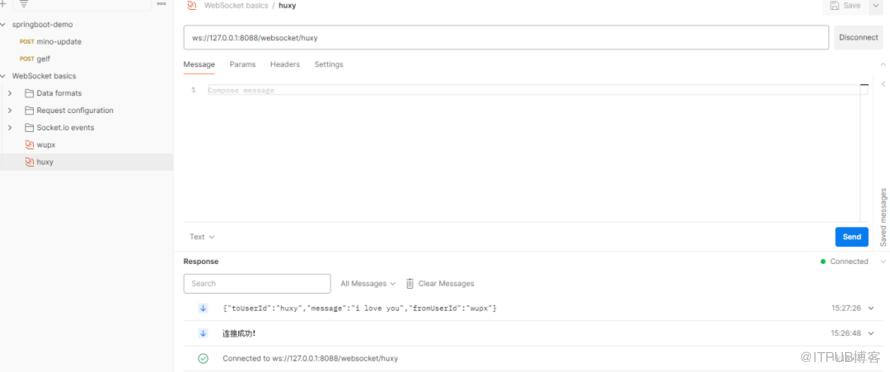 控制台输出
控制台输出
2024-02-26 15:26:48.699 INFO 27848 --- [nio-8088-exec-2] c.et.websocket.channel.WebSocketServer : 用户连接:huxy,当前在线人数为:12024-02-26 15:26:56.581 INFO 27848 --- [nio-8088-exec-4] c.et.websocket.channel.WebSocketServer : 用户连接:wupx,当前在线人数为:22024-02-26 15:27:26.401 INFO 27848 --- [nio-8088-exec-5] c.et.websocket.channel.WebSocketServer : 用户消息:wupx,报文:{"toUserId":"huxy","message":"i love you"}
四、引用
https://www.cnblogs.com/wupeixuan/p/13389757.html
http://www.liuhaihua.cn/archives/710240.html
目前100000+人已关注加入我们


原文作者:HBLOG;如有侵权,请联系管理员删除。

