1.itext介绍
iText是著名的开放源码的站点sourceforge一个项目,是用于生成PDF文档的一个java类库。通过iText不仅可以生成PDF或rtf的文档,而且可以将XML、Html文件转化为PDF文件
iText 的特点
以下是 iText 库的显着特点 −
Interactive − iText 为你提供类(API)来生成交互式 PDF 文档。使用这些,你可以创建地图和书籍。
Adding bookmarks, page numbers, etc − 使用 iText,你可以添加书签、页码和水印。
Split & Merge − 使用 iText,你可以将现有的 PDF 拆分为多个 PDF,还可以向其中添加/连接其他页面。
Fill Forms − 使用 iText,你可以在 PDF 文档中填写交互式表单。
Save as Image − 使用 iText,你可以将 PDF 保存为图像文件,例如 PNG 或 JPEG。
Canvas − iText 库为您提供了一个 Canvas 类,你可以使用它在 PDF 文档上绘制各种几何形状,如圆形、线条等。
Create PDFs − 使用 iText,你可以从 Java 程序创建新的 PDF 文件。你也可以包含图像和字体。
2.代码工程
实验目标:将thymeleaf 的views生成成PDF
pom.xml
<project xmlns="http://maven.apache.org/POM/4.0.0"xmlns:xsi="http://www.w3.org/2001/XMLSchema-instance"xsi:schemaLocation="http://maven.apache.org/POM/4.0.0 http://maven.apache.org/xsd/maven-4.0.0.xsd"><parent><artifactId>springboot-demo</artifactId><groupId>com.et</groupId><version>1.0-SNAPSHOT</version></parent><modelVersion>4.0.0</modelVersion><artifactId>itextpdf</artifactId><properties><maven.compiler.source>8</maven.compiler.source><maven.compiler.target>8</maven.compiler.target></properties><dependencies><dependency><groupId>org.springframework.boot</groupId><artifactId>spring-boot-starter-web</artifactId></dependency><dependency><groupId>org.springframework.boot</groupId><artifactId>spring-boot-autoconfigure</artifactId></dependency><dependency><groupId>org.springframework.boot</groupId><artifactId>spring-boot-starter-test</artifactId><scope>test</scope></dependency><dependency><groupId>org.springframework.boot</groupId><artifactId>spring-boot-starter-thymeleaf</artifactId></dependency><dependency><groupId>com.itextpdf</groupId><artifactId>html2pdf</artifactId><version>3.0.1</version></dependency><dependency><groupId>com.itextpdf</groupId><artifactId>kernel</artifactId><version>7.1.12</version></dependency><dependency><groupId>org.projectlombok</groupId><artifactId>lombok</artifactId></dependency></dependencies></project>
application.yaml
server:port: 8088spring:thymeleaf:cache: false
DemoApplication
package com.et.itextpdf;import org.springframework.boot.SpringApplication;import org.springframework.boot.autoconfigure.SpringBootApplication;import org.springframework.boot.web.servlet.ServletComponentScan;public class DemoApplication {public static void main(String[] args) {SpringApplication.run(DemoApplication.class, args);}}
controller
converterProperties.setBaseUri 很重要。否则,像 /main.css 这样的静态资源将无法找到
package com.et.itextpdf.controller;import com.et.itextpdf.pojo.Order;import com.et.itextpdf.util.OrderHelper;import com.itextpdf.html2pdf.ConverterProperties;import com.itextpdf.html2pdf.HtmlConverter;import org.springframework.beans.factory.annotation.Autowired;import org.springframework.http.HttpHeaders;import org.springframework.http.MediaType;import org.springframework.http.ResponseEntity;import org.springframework.stereotype.Controller;import org.springframework.ui.Model;import org.springframework.web.bind.annotation.RequestMapping;import org.thymeleaf.TemplateEngine;import org.thymeleaf.context.WebContext;import javax.servlet.ServletContext;import javax.servlet.http.HttpServletRequest;import javax.servlet.http.HttpServletResponse;import java.io.ByteArrayOutputStream;import java.io.IOException;@Controller@RequestMapping("/orders")public class PDFController {@AutowiredServletContext servletContext;private final TemplateEngine templateEngine;public PDFController(TemplateEngine templateEngine) {this.templateEngine = templateEngine;}@RequestMapping(path = "/")public String getOrderPage(Model model) {Order order = OrderHelper.getOrder();model.addAttribute("orderEntry", order);return "order";}@RequestMapping(path = "/pdf")public ResponseEntity<?> getPDF(HttpServletRequest request, HttpServletResponse response) throws IOException {/* Do Business Logic*/Order order = OrderHelper.getOrder();/* Create HTML using Thymeleaf template Engine */WebContext context = new WebContext(request, response, servletContext);context.setVariable("orderEntry", order);String orderHtml = templateEngine.process("order", context);/* Setup Source and target I/O streams */ByteArrayOutputStream target = new ByteArrayOutputStream();ConverterProperties converterProperties = new ConverterProperties();converterProperties.setBaseUri("http://localhost:8088");/* Call convert method */HtmlConverter.convertToPdf(orderHtml, target, converterProperties);/* extract output as bytes */byte[] bytes = target.toByteArray();/* Send the response as downloadable PDF */return ResponseEntity.ok().header(HttpHeaders.CONTENT_DISPOSITION, "attachment; filename=order.pdf").contentType(MediaType.APPLICATION_PDF).body(bytes);}}
view
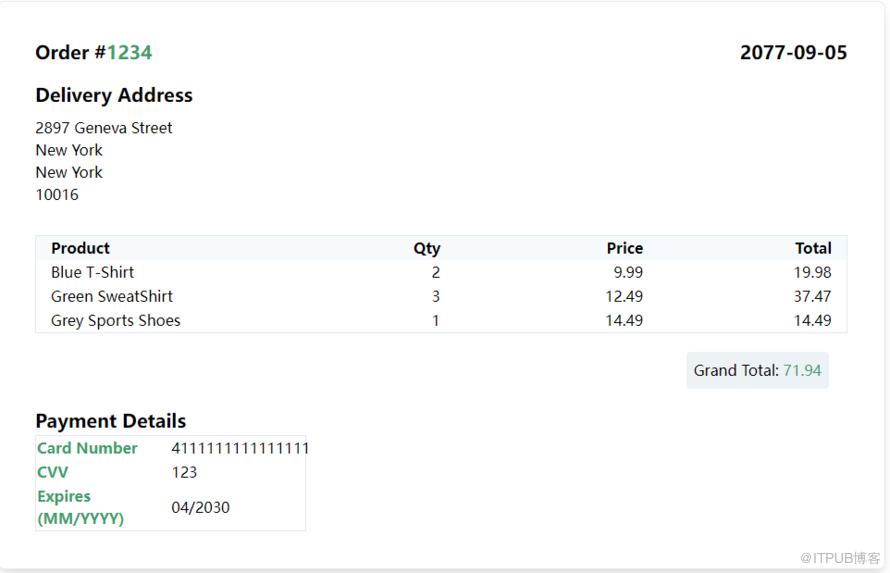
Spring MVC 带有模板引擎,可以提供动态的 HTML 内容。我们可以通过以下方法轻松将这些回复转换为 PDF 格式。在本例中,我导入了 spring-boot-starter-web 和 spring-boot-starter-thymeleaf 来为我的 spring boot 项目提供 MVC 和 thymeleaf 支持。您可以使用自己选择的模板引擎。看看下面这个thymeleaf模板内容。主要展示订单详细信息。另外,通过 OrderHelper 的辅助方法来生成一些虚拟订单内容。
<html lang="en" xmlns:th="http://www.thymeleaf.org"><head><meta charset="UTF-8"><meta content="width=device-width, user-scalable=no, initial-scale=1.0, maximum-scale=1.0, minimum-scale=1.0"name="viewport"><meta content="ie=edge" http-equiv="X-UA-Compatible"><title>Spring Boot - Thymeleaf</title><link th:href="@{/main.css}" rel="stylesheet"/></head><body class="flex items-center justify-center h-screen"><div class="rounded-lg border shadow-lg p-10 w-3/5"><div class="flex flex-row justify-between pb-4"><div><h2 class="text-xl font-bold">Order #<span class="text-green-600" th:text="${orderEntry.orderId}"></span></h2></div><div><div class="text-xl font-bold" th:text="${orderEntry.date}"></div></div></div><div class="flex flex-col pb-8"><div class="pb-2"><h2 class="text-xl font-bold">Delivery Address</h2></div><div th:text="${orderEntry.account.address.street}"></div><div th:text="${orderEntry.account.address.city}"></div><div th:text="${orderEntry.account.address.state}"></div><div th:text="${orderEntry.account.address.zipCode}"></div></div><table class="table-fixed w-full text-right border rounded"><thead class="bg-gray-100"><tr><th class="text-left pl-4">Product</th><th>Qty</th><th>Price</th><th class="pr-4">Total</th></tr></thead><tbody><tr th:each="item : ${orderEntry.items}"><td class="pl-4 text-left" th:text="${item.name}"></td><td th:text="${item.quantity}"></td><td th:text="${item.price}"></td><td class="pr-4" th:text="${item.price * item.quantity}"></td></tr></tbody></table><div class="flex flex-row-reverse p-5"><h2 class="font-medium bg-gray-200 p-2 rounded">Grand Total: <span class="text-green-600" th:text="${orderEntry.payment.amount}"></span></h2></div><h2 class="text-xl font-bold">Payment Details</h2><table class="table-fixed text-left w-2/6 border"><tr><th class="text-green-600">Card Number</th><td th:text="${orderEntry.payment.cardNumber}"></td></tr><tr><th class="text-green-600">CVV</th><td th:text="${orderEntry.payment.cvv}"></td></tr><tr><th class="text-green-600">Expires (MM/YYYY)</th><td th:text="${orderEntry.payment.month +'/'+ orderEntry.payment.year}"></td></tr></table></div></body></html>
POJO
package com.et.itextpdf.pojo;import lombok.Data;public class Account {private String name;private String phoneNumber;private String email;private Address address;}
package com.et.itextpdf.pojo;import lombok.Data;public class Address {private String street;private String city;private String state;private String zipCode;}
package com.et.itextpdf.pojo;import lombok.Data;import java.math.BigDecimal;public class Item {private String sku;private String name;private Integer quantity;private BigDecimal price;}
package com.et.itextpdf.pojo;import lombok.Data;import java.util.List;public class Order {private Integer orderId;private String date;private Account account;private Payment payment;private List<Item> items;}
package com.et.itextpdf.pojo;import lombok.Data;import java.math.BigDecimal;public class Payment {private BigDecimal amount;private String cardNumber;private String cvv;private String month;private String year;}
以上只是一些关键代码,所有代码请参见下面代码仓库
代码仓库
https://github.com/Harries/springboot-demo
3.测试
启动spring boot应用
访问http://127.0.0.1:8088/orders/,返回结果如下:
-
访问http://127.0.0.1:8088/orders/pdf,生成pdf并下载
4.引用
https://springhow.com/spring-boot-pdf-generation/
https://kb.itextpdf.com/itext/ebooks
http://www.liuhaihua.cn/archives/710362.html
原文作者:HBLOG;如有侵权,请联系管理员删除。

