1.oauth2介绍
1,什么是 OAuth 2?
OAuth 是一个开放标准,该标准允许用户让第三方应用访问该用户在某一网站上存储的私密资源(如头像、照片、视频等),而在这个过程中无须将用户名和密码提供给第三方应用。实现这一功能是通过提供一个令牌(token),而不是用户名和密码来访问他们存放在特定服务提供者的数据。
每一个令牌授权一个特定的网站在特定的时段内访问特定的资源。这样,OAuth 让用户可以授权第三方网站灵活地访问存储在另外一些资源服务器的特定信息,而非所有内容。目前主流的 qq,微信等第三方授权登录方式都是基于 OAuth2 实现的。
OAuth 2 是 OAuth 协议的下一版本,但不向下兼容 OAuth 1.0。OAuth 2 关注客户端开发者的简易性,同时为 Web 应用、桌面应用、移动设备、起居室设备提供专门的认证流程。
传统的 Web 开发登录认证一般都是基于 Session 的,但是在前后端分离的架构中继续使用 Session 会有许多不便,因为移动端(Android、iOS、微信小程序等)要么不支持Cookie(微信小程序),要么使用非常不便,对于这些问题,使用 OAuth 2 认证都能解决。
2,OAuth 2 角色
OAuth 2 标准中定义了以下几种角色:
资源所有者(Resource Owner):即代表授权客户端访问本身资源信息的用户,客户端访问用户帐户的权限仅限于用户授权的“范围”。
客户端(Client):即代表意图访问受限资源的第三方应用。在访问实现之前,它必须先经过用户者授权,并且获得的授权凭证将进一步由授权服务器进行验证。
授权服务器(Authorization Server):授权服务器用来验证用户提供的信息是否正确,并返回一个令牌给第三方应用。
资源服务器(Resource Server):资源服务器是提供给用户资源的服务器,例如头像、照片、视频等。
注意:一般来说,授权服务器和资源服务器可以是同一台服务器。
2.环境准备
docker run -itd --name redis-6379 -p 6379:6379 redis --requirepass 123456
3.代码工程
实验目的:通过 oauth2办法access_token实现对接口权限的控制
pom.xml
<project xmlns="http://maven.apache.org/POM/4.0.0"xmlns:xsi="http://www.w3.org/2001/XMLSchema-instance"xsi:schemaLocation="http://maven.apache.org/POM/4.0.0 http://maven.apache.org/xsd/maven-4.0.0.xsd"><parent><artifactId>springboot-demo</artifactId><groupId>com.et</groupId><version>1.0-SNAPSHOT</version></parent><modelVersion>4.0.0</modelVersion><artifactId>oatuth2</artifactId><properties><maven.compiler.source>8</maven.compiler.source><maven.compiler.target>8</maven.compiler.target></properties><dependencies><dependency><groupId>org.springframework.boot</groupId><artifactId>spring-boot-starter-web</artifactId></dependency><dependency><groupId>org.springframework.boot</groupId><artifactId>spring-boot-autoconfigure</artifactId></dependency><dependency><groupId>org.springframework.boot</groupId><artifactId>spring-boot-starter-test</artifactId><scope>test</scope></dependency><dependency><groupId>org.springframework.boot</groupId><artifactId>spring-boot-starter-security</artifactId></dependency><dependency><groupId>org.springframework.security.oauth</groupId><artifactId>spring-security-oauth2</artifactId><version>2.3.3.RELEASE</version></dependency><!-- redis --><dependency><groupId>org.springframework.boot</groupId><artifactId>spring-boot-starter-data-redis</artifactId><exclusions><exclusion><groupId>io.lettuce</groupId><artifactId>lettuce-core</artifactId></exclusion></exclusions></dependency><dependency><groupId>redis.clients</groupId><artifactId>jedis</artifactId></dependency></dependencies></project>
application.properties
server.port=8088# basic configurationspring.redis.database=0spring.redis.host=127.0.0.1spring.redis.port=6379spring.redis.password=123456# pools configurationspring.redis.jedis.pool.max-active=8spring.redis.jedis.pool.max-idle=8spring.redis.jedis.pool.max-wait=-1msspring.redis.jedis.pool.min-idle=0
授权服务器配置
package com.et.oauth2.config;import org.springframework.beans.factory.annotation.Autowired;import org.springframework.context.annotation.Bean;import org.springframework.context.annotation.Configuration;import org.springframework.data.redis.connection.RedisConnectionFactory;import org.springframework.security.authentication.AuthenticationManager;import org.springframework.security.core.userdetails.UserDetailsService;import org.springframework.security.crypto.bcrypt.BCryptPasswordEncoder;import org.springframework.security.crypto.password.PasswordEncoder;import org.springframework.security.oauth2.config.annotation.configurers.ClientDetailsServiceConfigurer;import org.springframework.security.oauth2.config.annotation.web.configuration.AuthorizationServerConfigurerAdapter;import org.springframework.security.oauth2.config.annotation.web.configuration.EnableAuthorizationServer;import org.springframework.security.oauth2.config.annotation.web.configurers.AuthorizationServerEndpointsConfigurer;import org.springframework.security.oauth2.config.annotation.web.configurers.AuthorizationServerSecurityConfigurer;import org.springframework.security.oauth2.provider.token.TokenStore;import org.springframework.security.oauth2.provider.token.store.redis.RedisTokenStore;public class AuthorizationServerConfig extends AuthorizationServerConfigurerAdapter {// 该对象用来支持 password 模式AuthenticationManager authenticationManager;// 该对象用来将令牌信息存储到内存中/* @Autowired(required = false)TokenStore inMemoryTokenStore;*/RedisConnectionFactory redisConnectionFactory;// 该对象将为刷新token提供支持UserDetailsService userDetailsService;// 指定密码的加密方式PasswordEncoder passwordEncoder() {// 使用BCrypt强哈希函数加密方案(密钥迭代次数默认为10)return new BCryptPasswordEncoder();}// 配置 password 授权模式public void configure(ClientDetailsServiceConfigurer clients)throws Exception {clients.inMemory().withClient("password").authorizedGrantTypes("password", "refresh_token") //授权模式为password和refresh_token两种.accessTokenValiditySeconds(1800) // 配置access_token的过期时间.resourceIds("rid") //配置资源id.scopes("all").secret("$2a$10$RMuFXGQ5AtH4wOvkUqyvuecpqUSeoxZYqilXzbz50dceRsga.WYiq"); //123加密后的密码}public void configure(AuthorizationServerEndpointsConfigurer endpoints) {//endpoints.tokenStore(inMemoryTokenStore) //配置令牌的存储(这里存放在内存中)endpoints.tokenStore(new RedisTokenStore(redisConnectionFactory)).authenticationManager(authenticationManager).userDetailsService(userDetailsService);}public void configure(AuthorizationServerSecurityConfigurer security) {// 表示支持 client_id 和 client_secret 做登录认证security.allowFormAuthenticationForClients();}}
资源配置
package com.et.oauth2.config;import org.springframework.context.annotation.Configuration;import org.springframework.security.config.annotation.web.builders.HttpSecurity;import org.springframework.security.oauth2.config.annotation.web.configuration.EnableResourceServer;import org.springframework.security.oauth2.config.annotation.web.configuration.ResourceServerConfigurerAdapter;import org.springframework.security.oauth2.config.annotation.web.configurers.ResourceServerSecurityConfigurer;public class ResourceServerConfig extends ResourceServerConfigurerAdapter {public void configure(ResourceServerSecurityConfigurer resources) {resources.resourceId("rid") // 配置资源id,这里的资源id和授权服务器中的资源id一致.stateless(true); // 设置这些资源仅基于令牌认证}// 配置 URL 访问权限public void configure(HttpSecurity http) throws Exception {http.authorizeRequests().antMatchers("/admin/**").hasRole("admin").antMatchers("/user/**").hasRole("user").anyRequest().authenticated();}}
Security配置
package com.et.oauth2.config;import org.springframework.context.annotation.Bean;import org.springframework.context.annotation.Configuration;import org.springframework.security.authentication.AuthenticationManager;import org.springframework.security.config.annotation.authentication.builders.AuthenticationManagerBuilder;import org.springframework.security.config.annotation.web.builders.HttpSecurity;import org.springframework.security.config.annotation.web.configuration.WebSecurityConfigurerAdapter;import org.springframework.security.core.userdetails.UserDetailsService;public class WebSecurityConfig extends WebSecurityConfigurerAdapter {public AuthenticationManager authenticationManagerBean() throws Exception {return super.authenticationManagerBean();}protected UserDetailsService userDetailsService() {return super.userDetailsService();}protected void configure(AuthenticationManagerBuilder auth) throws Exception {auth.inMemoryAuthentication().withUser("admin").password("$2a$10$RMuFXGQ5AtH4wOvkUqyvuecpqUSeoxZYqilXzbz50dceRsga.WYiq") //123.roles("admin").and().withUser("sang").password("$2a$10$RMuFXGQ5AtH4wOvkUqyvuecpqUSeoxZYqilXzbz50dceRsga.WYiq") //123.roles("user");}protected void configure(HttpSecurity http) throws Exception {http.antMatcher("/oauth/**").authorizeRequests().antMatchers("/oauth/**").permitAll().and().csrf().disable();}}
controller
package com.et.oauth2.controller;import org.springframework.web.bind.annotation.GetMapping;import org.springframework.web.bind.annotation.RequestMapping;import org.springframework.web.bind.annotation.RestController;import java.util.HashMap;import java.util.Map;@RestControllerpublic class HelloWorldController {@GetMapping("/admin/hello")public String admin() {return "hello admin";}@GetMapping("/user/hello")public String user() {return "hello user";}@GetMapping("/hello")public String hello() {return "hello";}}
以上只是一些关键代码,所有代码请参见下面代码仓库
代码仓库
https://github.com/Harries/springboot-demo
4.测试
启动Spring boot应用
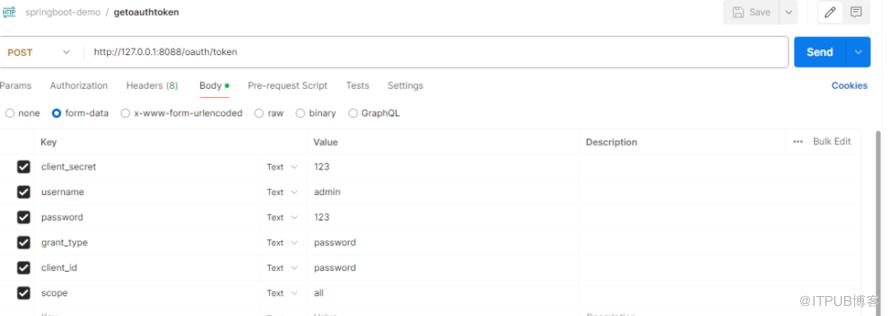
获取access_token
postman输入http://127.0.0.1:8088/oauth/token获取
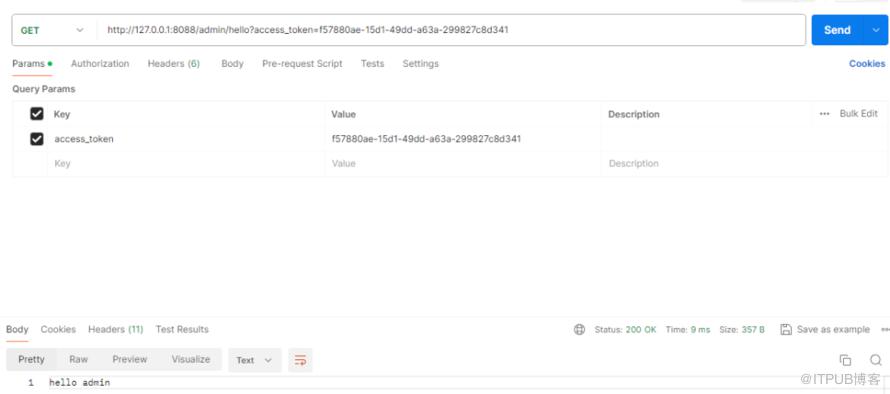
访问资源(有admin角色)
postman输入
http://127.0.0.1:8088/admin/hello?access_token=f57880ae-15d1-49dd-a63a-299827c8d341
无权限访问(没有user角色)
postman输入
http://127.0.0.1:8088/user/hello?access_token=f57880ae-15d1-49dd-a63a-299827c8d341

5.参考引用
https://www.hangge.com/blog/cache/detail_2683.html#
http://www.liuhaihua.cn/archives/710484.html
原文作者:HBLOG;如有侵权,请联系管理员删除。

