1.什么是sse?
SSE(Server-Sent Events)是一种允许服务器向客户端推送实时数据的技术,它建立在 HTTP 和简单文本格式之上,提供了一种轻量级的服务器推送方式,通常也被称为“事件流”(Event Stream)。他通过在客户端和服务端之间建立一个长连接,并通过这条连接实现服务端和客户端的消息实时推送。
SSE的基本特性:
HTML5中的协议,是基于纯文本的简单协议;
在游览器端可供JavaScript使用的EventSource对象
EventSource提供了三个标准事件,同时默认支持断线重连
| 事件 | 描述 |
|---|---|
| onopen | 当成功与服务器建立连接时产生 |
| onmessage | 当收到服务器发来的消息时发生 |
| onerror | 当出现错误时发生 |
传输的数据有格式上的要求,必须为 [data:...\n...\n]或者是[retry:10\n]
SSE和WebSocket
提到SSE,那自然要提一下WebSocket了。WebSocket是一种HTML5提供的全双工通信协议(指可以在同一时间内允许两个设备之间进行双向发送和接收数据的通信协议),基于TCP协议,并复用HTTP的握手通道(允许一次TCP连接中传输多个HTTP请求和相应),常用于浏览器与服务器之间的实时通信。 SSE和WebSocket尽管功能类似,都是用来实现服务器向客户端实时推送数据的技术,但还是有一定区别:
1.SSE (Server-Sent Events)
简单性:SSE 使用简单的 HTTP 协议,通常建立在标准的 HTTP 或 HTTPS 连接之上。这使得它对于一些简单的实时通知场景非常适用,特别是对于服务器向客户端单向推送数据。
兼容性:SSE 在浏览器端具有较好的兼容性,因为它是基于标准的 HTTP 协议的。即使在一些不支持 WebSocket 的环境中,SSE 仍然可以被支持。
适用范围:SSE 适用于服务器向客户端单向推送通知,例如实时更新、事件通知等。但它仅支持从服务器到客户端的单向通信,客户端无法直接向服务器发送消息。
2.WebSocket
全双工通信: WebSocket 提供了全双工通信,允许客户端和服务器之间进行双向实时通信。这使得它适用于一些需要双向数据交换的应用,比如在线聊天、实时协作等。
低延迟:WebSocket 的通信开销相对较小,因为它使用单一的持久连接,而不像 SSE 需要不断地创建新的连接。这可以降低通信的延迟。
适用范围: WebSocket 适用于需要实时双向通信的应用,特别是对于那些需要低延迟、高频率消息交换的场景。
3.选择 SSE 还是 WebSocket?
简单通知场景:如果你只需要服务器向客户端推送简单的通知、事件更新等,而不需要客户端与服务器进行双向通信,那么 SSE 是一个简单而有效的选择。
双向通信场景:如果你的应用需要实现实时双向通信,例如在线聊天、协作编辑等,那么 WebSocket 是更合适的选择。
兼容性考虑: 如果你的应用可能在一些不支持 WebSocket 的环境中运行,或者需要考虑到更广泛的浏览器兼容性,那么 SSE 可能是一个更可行的选择。
2.代码工程
实验目标:实现chatgpt流式交互
pom.xml
<project xmlns="http://maven.apache.org/POM/4.0.0"xmlns:xsi="http://www.w3.org/2001/XMLSchema-instance"xsi:schemaLocation="http://maven.apache.org/POM/4.0.0 http://maven.apache.org/xsd/maven-4.0.0.xsd"><parent><artifactId>springboot-demo</artifactId><groupId>com.et</groupId><version>1.0-SNAPSHOT</version></parent><modelVersion>4.0.0</modelVersion><artifactId>sse</artifactId><properties><maven.compiler.source>8</maven.compiler.source><maven.compiler.target>8</maven.compiler.target></properties><dependencies><dependency><groupId>org.springframework.boot</groupId><artifactId>spring-boot-starter-web</artifactId></dependency><dependency><groupId>org.springframework.boot</groupId><artifactId>spring-boot-autoconfigure</artifactId></dependency><dependency><groupId>org.springframework.boot</groupId><artifactId>spring-boot-starter-test</artifactId><scope>test</scope></dependency><!-- java基础工具包 --><dependency><groupId>cn.hutool</groupId><artifactId>hutool-all</artifactId><version>5.8.9</version></dependency><dependency><groupId>org.projectlombok</groupId><artifactId>lombok</artifactId></dependency></dependencies></project>
controller
package com.et.sse.controller;import cn.hutool.core.util.IdUtil;import org.springframework.http.MediaType;import org.springframework.stereotype.Controller;import org.springframework.web.bind.annotation.*;import org.springframework.web.servlet.mvc.method.annotation.SseEmitter;import java.io.IOException;import java.util.Date;import java.util.Map;import java.util.concurrent.ConcurrentHashMap;("/chat")public class ChatController {Map<String, String> msgMap = new ConcurrentHashMap<>();/*** send meaaage* @param msg* @return*/("/sendMsg")public String sendMsg(String msg) {String msgId = IdUtil.simpleUUID();msgMap.put(msgId, msg);return msgId;}/*** conversation* @param msgId mapper with sendmsg* @return*/(value = "/conversation/{msgId}", produces = MediaType.TEXT_EVENT_STREAM_VALUE)public SseEmitter conversation(("msgId") String msgId) {SseEmitter emitter = new SseEmitter();String msg = msgMap.remove(msgId);//mock chatgpt responsenew Thread(() -> {try {for (int i = 0; i < 10; i++) {ChatMessage chatMessage = new ChatMessage("test", new String(i+""));emitter.send(chatMessage);Thread.sleep(1000);}emitter.send(SseEmitter.event().name("stop").data(""));emitter.complete(); // close connection} catch (IOException | InterruptedException e) {emitter.completeWithError(e); // error finish}}).start();return emitter;}}
chat.html
<html lang="en"><head><meta charset="UTF-8"><title>ChatGpt test</title><link rel="stylesheet" href="lib/element-ui/index.css"><style type="text/css">body{background-color:white;}#outputCard{height: 300px;overflow:auto;}#inputCard{height: 100px;overflow:auto;}#outputBody{line-height:30px;}.cursor-img{height:24px;vertical-align: text-bottom;}</style><script src="lib/jquery/jquery-3.6.0.min.js"></script><script src="lib/vue/vue.min.js"></script><script src="lib/element-ui/index.js"></script></head><body><h1 align="center">ChatGpt Test</h1><div id="chatWindow"><el-row id="outputArea"><el-card id="inputCard"><div id="inputTxt"></div></el-card><el-card id="outputCard"><div id="outputBody"><span id="outputTxt"></span><img v-if="blink" class="cursor-img" src="img/cursor-text-blink.gif" v-show="cursorImgVisible"><img v-if="!blink" class="cursor-img" src="img/cursor-text-black.png" v-show="cursorImgVisible"></div></el-card></el-row><el-row id="inputArea"><el-col :span="21"><el-input id="sendTxt" v-model="input" placeholder="input content" @keyup.native="keyUp"></el-input></el-col><el-col :span="3"><el-button id="sendBtn" type="primary" :disabled="sendBtnDisabled" @click="sendMsg">send</el-button></el-col></el-row></div></body><script type="text/javascript">var app = new Vue({el: '#chatWindow',data: {input: '',sendBtnDisabled: false,cursorImgVisible: false,blink: true},mounted: function(){},methods: {keyUp: function(event){if(event.keyCode==13){this.sendMsg();}},sendMsg: function(){var that = this;//init$('#outputTxt').html('');var sendTxt = $('#sendTxt').val();$('#inputTxt').html(sendTxt);$('#sendTxt').val('');that.sendBtnDisabled = true;that.cursorImgVisible = true;//send request$.ajax({type: "post",url:"/chat/sendMsg",data:{msg: sendTxt},contentType: 'application/x-www-form-urlencoded',success:function(data){var eventSource = new EventSource('/chat/conversation/'+data)eventSource.addEventListener('open', function(e) {console.log("EventSource连接成功");});var blinkTimeout = null;eventSource.addEventListener("message", function(evt){var data = evt.data;var json = JSON.parse(data);var content = json.content ? json.content : '';content = content.replaceAll('\n','<br/>');console.log(json)var outputTxt = $('#outputTxt');outputTxt.html(outputTxt.html()+content);var outputCard = $('#outputCard');var scrollHeight = outputCard[0].scrollHeight;outputCard.scrollTop(scrollHeight);//cusor blinkthat.blink = false;window.clearTimeout(blinkTimeout);//200ms blink=trueblinkTimeout = window.setTimeout(function(){that.blink = true;}, 200)});eventSource.addEventListener('error', function (e) {console.log("EventSource error");if (e.target.readyState === EventSource.CLOSED) {console.log('Disconnected');} else if (e.target.readyState === EventSource.CONNECTING) {console.log('Connecting...');}});eventSource.addEventListener('stop', e => {console.log('EventSource连接结束');eventSource.close();that.sendBtnDisabled = false;that.cursorImgVisible = false;}, false);},error: function(){that.sendBtnDisabled = false;that.cursorImgVisible = false;}});}}})</script></html>
以上只是一些关键代码,所有代码请参见下面代码仓库
代码仓库
https://github.com/Harries/springboot-demo
3.测试
启动Spring Boot应用
测试流式交互
访问http://127.0.0.1:8088/chat.html,效果如下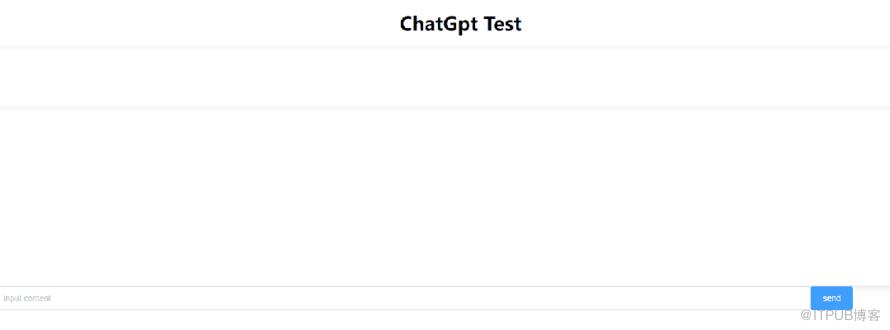
4.引用
https://github.com/hdwang123/GptTest
http://www.liuhaihua.cn/archives/710637.html
原文作者:HBLOG;如有侵权,请联系管理员删除。

