1.什么是webrtc?
WebRTC 是 Web 实时通信(Real-Time Communication)的缩写,它既是 API 也是协议。WebRTC 协议是两个 WebRTC Agent 协商双向安全实时通信的一组规则。开发人员可以通过 WebRTC API 使用 WebRTC 协议。目前 WebRTC API 仅有 JavaScript 版本。 可以用 HTTP 和 Fetch API 之间的关系作为类比。WebRTC 协议就是 HTTP,而 WebRTC API 就是 Fetch API。 除了 JavaScript 语言,WebRTC 协议也可以在其他 API 和语言中使用。你还可以找到 WebRTC 的服务器和特定领域的工具。所有这些实现都使用 WebRTC 协议,以便它们可以彼此交互。 WebRTC 协议由 IETF 工作组在rtcweb中维护。WebRTC API 的 W3C 文档在webrtc。
WebSocket
WebSocket是一种在单个TCP连接上进行全双工通信的协议。WebSocket通信协议于2011年被IETF定为标准RFC 6455,并由RFC7936补充规范。WebSocket API也被W3C定为标准。WebSocket使得客户端和服务器之间的数据交换变得更加简单,允许服务端主动向客户端推送数据。在WebSocket API中,浏览器和服务器只需要完成一次握手,两者之间就直接可以创建持久性的连接,并进行双向数据传输
webrtc架构
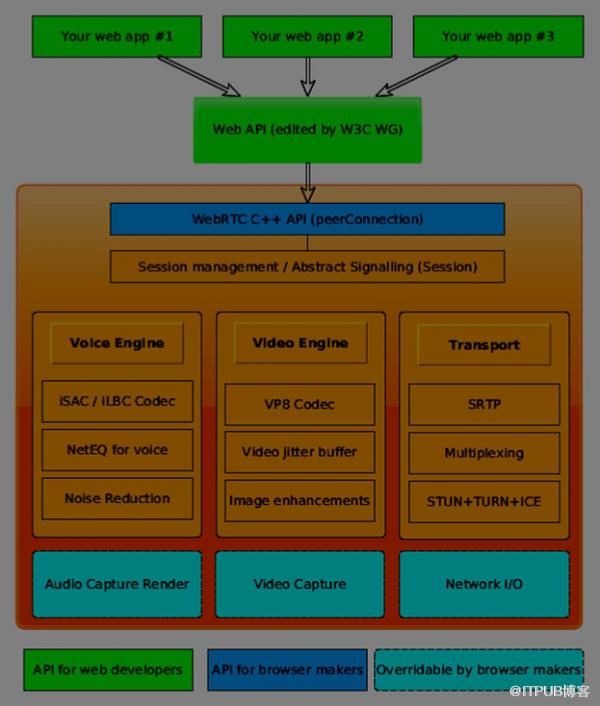
2.代码工程
实验目标
实现视频通话功能
pom.xml
<project xmlns="http://maven.apache.org/POM/4.0.0"xmlns:xsi="http://www.w3.org/2001/XMLSchema-instance"xsi:schemaLocation="http://maven.apache.org/POM/4.0.0 http://maven.apache.org/xsd/maven-4.0.0.xsd"><parent><artifactId>springboot-demo</artifactId><groupId>com.et</groupId><version>1.0-SNAPSHOT</version></parent><modelVersion>4.0.0</modelVersion><artifactId>WebRTC</artifactId><properties><maven.compiler.source>8</maven.compiler.source><maven.compiler.target>8</maven.compiler.target></properties><dependencies><dependency><groupId>org.springframework.boot</groupId><artifactId>spring-boot-starter-web</artifactId></dependency><dependency><groupId>org.springframework.boot</groupId><artifactId>spring-boot-autoconfigure</artifactId></dependency><dependency><groupId>org.springframework.boot</groupId><artifactId>spring-boot-starter-test</artifactId><scope>test</scope></dependency><dependency><groupId>org.projectlombok</groupId><artifactId>lombok</artifactId></dependency><dependency><groupId>org.springframework.boot</groupId><artifactId>spring-boot-starter-websocket</artifactId></dependency><dependency><groupId>org.springframework.boot</groupId><artifactId>spring-boot-starter-thymeleaf</artifactId></dependency></dependencies></project>
controller
package com.et.webrtc.controller;import org.springframework.web.bind.annotation.PathVariable;import org.springframework.web.bind.annotation.RequestMapping;import org.springframework.web.bind.annotation.RestController;import org.springframework.web.servlet.ModelAndView;import java.util.HashMap;import java.util.Map;public class HelloWorldController {public Map<String, Object> showHelloWorld(){Map<String, Object> map = new HashMap<>();map.put("msg", "HelloWorld");return map;}/*** WebRTC + WebSocket*/public ModelAndView socketChartPage( String username) {ModelAndView modelAndView = new ModelAndView();modelAndView.setViewName("webrtc.html");modelAndView.addObject("username",username);return modelAndView;}}
config
package com.et.webrtc.config;import com.fasterxml.jackson.databind.DeserializationFeature;import com.fasterxml.jackson.databind.ObjectMapper;import lombok.extern.slf4j.Slf4j;import org.springframework.stereotype.Component;import javax.websocket.*;import javax.websocket.server.PathParam;import javax.websocket.server.ServerEndpoint;import java.text.SimpleDateFormat;import java.util.HashMap;import java.util.Map;import java.util.concurrent.ConcurrentHashMap;/*** WebRTC + WebSocket*/(value = "/webrtc/{username}")public class WebRtcWSServer {/*** 连接集合*/private static final Map<String, Session> sessionMap = new ConcurrentHashMap<>();/*** 连接建立成功调用的方法*/public void onOpen(Session session, ("username") String username, ("publicKey") String publicKey) {sessionMap.put(username, session);}/*** 连接关闭调用的方法*/public void onClose(Session session) {for (Map.Entry<String, Session> entry : sessionMap.entrySet()) {if (entry.getValue() == session) {sessionMap.remove(entry.getKey());break;}}}/*** 发生错误时调用*/public void onError(Session session, Throwable error) {error.printStackTrace();}/*** 服务器接收到客户端消息时调用的方法*/public void onMessage(String message, Session session) {try{//jacksonObjectMapper mapper = new ObjectMapper();mapper.setDateFormat(new SimpleDateFormat("yyyy-MM-dd HH:mm:ss"));mapper.configure(DeserializationFeature.FAIL_ON_UNKNOWN_PROPERTIES, false);//JSON字符串转 HashMapHashMap hashMap = mapper.readValue(message, HashMap.class);//消息类型String type = (String) hashMap.get("type");//to userString toUser = (String) hashMap.get("toUser");Session toUserSession = sessionMap.get(toUser);String fromUser = (String) hashMap.get("fromUser");//msgString msg = (String) hashMap.get("msg");//sdpString sdp = (String) hashMap.get("sdp");//iceMap iceCandidate = (Map) hashMap.get("iceCandidate");HashMap<String, Object> map = new HashMap<>();map.put("type",type);//呼叫的用户不在线if(toUserSession == null){toUserSession = session;map.put("type","call_back");map.put("fromUser","系统消息");map.put("msg","Sorry,呼叫的用户不在线!");send(toUserSession,mapper.writeValueAsString(map));return;}//对方挂断if ("hangup".equals(type)) {map.put("fromUser",fromUser);map.put("msg","对方挂断!");}//视频通话请求if ("call_start".equals(type)) {map.put("fromUser",fromUser);map.put("msg","1");}//视频通话请求回应if ("call_back".equals(type)) {map.put("fromUser",toUser);map.put("msg",msg);}//offerif ("offer".equals(type)) {map.put("fromUser",toUser);map.put("sdp",sdp);}//answerif ("answer".equals(type)) {map.put("fromUser",toUser);map.put("sdp",sdp);}//iceif ("_ice".equals(type)) {map.put("fromUser",toUser);map.put("iceCandidate",iceCandidate);}send(toUserSession,mapper.writeValueAsString(map));}catch(Exception e){e.printStackTrace();}}/*** 封装一个send方法,发送消息到前端*/private void send(Session session, String message) {try {System.out.println(message);session.getBasicRemote().sendText(message);} catch (Exception e) {e.printStackTrace();}}}
package com.et.webrtc.config;import org.springframework.context.annotation.Bean;import org.springframework.context.annotation.Configuration;import org.springframework.web.socket.config.annotation.EnableWebSocket;import org.springframework.web.socket.server.standard.ServerEndpointExporter;@Configuration@EnableWebSocketpublic class WebSocketConfiguration {@Beanpublic ServerEndpointExporter serverEndpointExporter() {return new ServerEndpointExporter();}}
前端页面
<!--解决idea thymeleaf 表达式模板报红波浪线--><!--suppress ALL --><html xmlns:th="http://www.thymeleaf.org"><head><meta charset="UTF-8"><title>WebRTC + WebSocket</title><meta name="viewport" content="width=device-width,initial-scale=1.0,user-scalable=no"><style>html,body{margin: 0;padding: 0;}#main{position: absolute;width: 370px;height: 550px;}#localVideo{position: absolute;background: #757474;top: 10px;right: 10px;width: 100px;height: 150px;z-index: 2;}#remoteVideo{position: absolute;top: 0px;left: 0px;width: 100%;height: 100%;background: #222;}#buttons{z-index: 3;bottom: 20px;left: 90px;position: absolute;}#toUser{border: 1px solid #ccc;padding: 7px 0px;border-radius: 5px;padding-left: 5px;margin-bottom: 5px;}#toUser:focus{border-color: #66afe9;outline: 0;-webkit-box-shadow: inset 0 1px 1px rgba(0,0,0,.075),0 0 8px rgba(102,175,233,.6);box-shadow: inset 0 1px 1px rgba(0,0,0,.075),0 0 8px rgba(102,175,233,.6)}#call{width: 70px;height: 35px;background-color: #00BB00;border: none;margin-right: 25px;color: white;border-radius: 5px;}#hangup{width:70px;height:35px;background-color:#FF5151;border:none;color:white;border-radius: 5px;}</style></head><body><div id="main"><video id="remoteVideo" playsinline autoplay></video><video id="localVideo" playsinline autoplay muted></video><div id="buttons"><input id="toUser" placeholder="输入在线好友账号"/><br/><button id="call">视频通话</button><button id="hangup">挂断</button></div></div></body><!-- 可引可不引 --><!--<script th:src="@{/js/adapter-2021.js}"></script>--><script type="text/javascript" th:inline="javascript">let username = /*[[${username}]]*/'';let localVideo = document.getElementById('localVideo');let remoteVideo = document.getElementById('remoteVideo');let websocket = null;let peer = null;WebSocketInit();ButtonFunInit();/* WebSocket */function WebSocketInit(){//判断当前浏览器是否支持WebSocketif ('WebSocket' in window) {websocket = new WebSocket("wss://192.168.0.104/webrtc/"+username);} else {alert("当前浏览器不支持WebSocket!");}//连接发生错误的回调方法websocket.onerror = function (e) {alert("WebSocket连接发生错误!");};//连接关闭的回调方法websocket.onclose = function () {console.error("WebSocket连接关闭");};//连接成功建立的回调方法websocket.onopen = function () {console.log("WebSocket连接成功");};//接收到消息的回调方法websocket.onmessage = async function (event) {let { type, fromUser, msg, sdp, iceCandidate } = JSON.parse(event.data.replace(/\n/g,"\\n").replace(/\r/g,"\\r"));console.log(type);if (type === 'hangup') {console.log(msg);document.getElementById('hangup').click();return;}if (type === 'call_start') {let msg = "0"if(confirm(fromUser + "发起视频通话,确定接听吗")==true){document.getElementById('toUser').value = fromUser;WebRTCInit();msg = "1"}websocket.send(JSON.stringify({type:"call_back",toUser:fromUser,fromUser:username,msg:msg}));return;}if (type === 'call_back') {if(msg === "1"){console.log(document.getElementById('toUser').value + "同意视频通话");//创建本地视频并发送offerlet stream = await navigator.mediaDevices.getUserMedia({ video: true, audio: true })localVideo.srcObject = stream;stream.getTracks().forEach(track => {peer.addTrack(track, stream);});let offer = await peer.createOffer();await peer.setLocalDescription(offer);let newOffer = offer.toJSON();newOffer["fromUser"] = username;newOffer["toUser"] = document.getElementById('toUser').value;websocket.send(JSON.stringify(newOffer));}else if(msg === "0"){alert(document.getElementById('toUser').value + "拒绝视频通话");document.getElementById('hangup').click();}else{alert(msg);document.getElementById('hangup').click();}return;}if (type === 'offer') {let stream = await navigator.mediaDevices.getUserMedia({ video: true, audio: true });localVideo.srcObject = stream;stream.getTracks().forEach(track => {peer.addTrack(track, stream);});await peer.setRemoteDescription(new RTCSessionDescription({ type, sdp }));let answer = await peer.createAnswer();let newAnswer = answer.toJSON();newAnswer["fromUser"] = username;newAnswer["toUser"] = document.getElementById('toUser').value;websocket.send(JSON.stringify(newAnswer));await peer.setLocalDescription(answer);return;}if (type === 'answer') {peer.setRemoteDescription(new RTCSessionDescription({ type, sdp }));return;}if (type === '_ice') {peer.addIceCandidate(iceCandidate);return;}}}/* WebRTC */function WebRTCInit(){peer = new RTCPeerConnection();//icepeer.onicecandidate = function (e) {if (e.candidate) {websocket.send(JSON.stringify({type: '_ice',toUser:document.getElementById('toUser').value,fromUser:username,iceCandidate: e.candidate}));}};//trackpeer.ontrack = function (e) {if (e && e.streams) {remoteVideo.srcObject = e.streams[0];}};}/* 按钮事件 */function ButtonFunInit(){//视频通话document.getElementById('call').onclick = function (e){document.getElementById('toUser').style.visibility = 'hidden';let toUser = document.getElementById('toUser').value;if(!toUser){alert("请先指定好友账号,再发起视频通话!");return;}if(peer == null){WebRTCInit();}websocket.send(JSON.stringify({type:"call_start",fromUser:username,toUser:toUser,}));}//挂断document.getElementById('hangup').onclick = function (e){document.getElementById('toUser').style.visibility = 'unset';if(localVideo.srcObject){const videoTracks = localVideo.srcObject.getVideoTracks();videoTracks.forEach(videoTrack => {videoTrack.stop();localVideo.srcObject.removeTrack(videoTrack);});}if(remoteVideo.srcObject){const videoTracks = remoteVideo.srcObject.getVideoTracks();videoTracks.forEach(videoTrack => {videoTrack.stop();remoteVideo.srcObject.removeTrack(videoTrack);});//挂断同时,通知对方websocket.send(JSON.stringify({type:"hangup",fromUser:username,toUser:document.getElementById('toUser').value,}));}if(peer){peer.ontrack = null;peer.onremovetrack = null;peer.onremovestream = null;peer.onicecandidate = null;peer.oniceconnectionstatechange = null;peer.onsignalingstatechange = null;peer.onicegatheringstatechange = null;peer.onnegotiationneeded = null;peer.close();peer = null;}localVideo.srcObject = null;remoteVideo.srcObject = null;}}</script></html>
DemoAppliciation.java
package com.et.webrtc;import org.springframework.boot.SpringApplication;import org.springframework.boot.autoconfigure.SpringBootApplication;public class DemoApplication {public static void main(String[] args) {SpringApplication.run(DemoApplication.class, args);}}
以上只是一些关键代码,所有代码请参见下面代码仓库
代码仓库
https://github.com/Harries/springboot-demo
3.测试
启动Spring Boot应用
测试视频通话
前置条件:必须是https协议,不然无法打开视频和语音权限
笔记本:https://192.168.0.104/webrtc/2.html
手机:https://192.168.0.104/webrtc/1.html
输入对方id,进行视屏通话
4.引用
https://webrtcforthecurious.com/zh/docs/01-what-why-and-how/
https://www.cnblogs.com/huanzi-qch/p/15716286.html
http://www.liuhaihua.cn/archives/710734.html
原文作者:HBLOG;如有侵权,请联系管理员删除。

