1.为什么需要压缩json?
由于业务需要,存入redis中的缓存数据过大,占用了10+G的内存,内存作为重要资源,需要优化一下大对象缓存,采用gzip压缩存储,可以将 redis 的 kv 对大小缩小大约 7-8 倍,加快存储、读取速度
2.环境搭建
详建redis模块的docker目录
version: '3'services:redis:image: registry.cn-hangzhou.aliyuncs.com/zhengqing/redis:6.0.8container_name: redisrestart: unless-stoppedcommand: redis-server /etc/redis/redis.conf --requirepass 123456 --appendonly no# command: redis-server --requirepass 123456 --appendonly yesenvironment:TZ: Asia/ShanghaiLANG: en_US.UTF-8volumes:"./redis/data:/data""./redis/config/redis.conf:/etc/redis/redis.conf"ports:"6379:6379"
3.代码工程
实验目标
实验存入redis的json数据压缩和解压缩
pom.xml
<project xmlns="http://maven.apache.org/POM/4.0.0"xmlns:xsi="http://www.w3.org/2001/XMLSchema-instance"xsi:schemaLocation="http://maven.apache.org/POM/4.0.0 http://maven.apache.org/xsd/maven-4.0.0.xsd"><parent><artifactId>springboot-demo</artifactId><groupId>com.et</groupId><version>1.0-SNAPSHOT</version></parent><modelVersion>4.0.0</modelVersion><artifactId>gzip</artifactId><properties><maven.compiler.source>8</maven.compiler.source><maven.compiler.target>8</maven.compiler.target></properties><dependencies><dependency><groupId>org.springframework.boot</groupId><artifactId>spring-boot-starter-web</artifactId></dependency><dependency><groupId>org.springframework.boot</groupId><artifactId>spring-boot-autoconfigure</artifactId></dependency><dependency><groupId>org.springframework.boot</groupId><artifactId>spring-boot-starter-test</artifactId><scope>test</scope></dependency><dependency><groupId>org.projectlombok</groupId><artifactId>lombok</artifactId></dependency><dependency><groupId>org.springframework.boot</groupId><artifactId>spring-boot-starter-data-redis</artifactId></dependency><dependency><groupId>org.apache.commons</groupId><artifactId>commons-pool2</artifactId><version>2.9.0</version></dependency></dependencies></project>
controller
package com.et.gzip.controller;import com.et.gzip.model.User;import lombok.extern.slf4j.Slf4j;import org.springframework.beans.factory.annotation.Autowired;import org.springframework.data.redis.core.RedisTemplate;import org.springframework.web.bind.annotation.PostMapping;import org.springframework.web.bind.annotation.RequestBody;import org.springframework.web.bind.annotation.RequestMapping;import org.springframework.web.bind.annotation.RestController;import java.util.HashMap;import java.util.Map;public class HelloWorldController {private RedisTemplate redisTemplateWithJackson;public User showHelloWorld( User user){log.info("user:"+ user);return user;}public User redis( User user){log.info("user:"+ user);redisTemplateWithJackson.opsForValue().set("user",user);User redisUser = (User) redisTemplateWithJackson.opsForValue().get("user");return redisUser;}}
redis压缩和解压缩配置
压缩类
package com.et.gzip.config;import com.et.gzip.model.User;import com.fasterxml.jackson.databind.ObjectMapper;import com.fasterxml.jackson.databind.annotation.JsonSerialize;import lombok.extern.slf4j.Slf4j;import org.apache.tomcat.util.http.fileupload.IOUtils;import org.springframework.data.redis.serializer.JdkSerializationRedisSerializer;import org.springframework.data.redis.serializer.SerializationException;import sun.misc.BASE64Encoder;import java.io.ByteArrayInputStream;import java.io.ByteArrayOutputStream;import java.text.SimpleDateFormat;import java.util.zip.GZIPInputStream;import java.util.zip.GZIPOutputStream;4jpublic class CompressRedis extends JdkSerializationRedisSerializer {public static final int BUFFER_SIZE = 4096;private JacksonRedisSerializer<User> jacksonRedisSerializer;public CompressRedis() {this.jacksonRedisSerializer = getValueSerializer();}public byte[] serialize(Object graph) throws SerializationException {if (graph == null) {return new byte[0];}ByteArrayOutputStream bos = null;GZIPOutputStream gzip = null;try {// serializebyte[] bytes = jacksonRedisSerializer.serialize(graph);log.info("bytes size{}",bytes.length);bos = new ByteArrayOutputStream();gzip = new GZIPOutputStream(bos);// compressgzip.write(bytes);gzip.finish();byte[] result = bos.toByteArray();log.info("result size{}",result.length);//return result;return new BASE64Encoder().encode(result).getBytes();} catch (Exception e) {throw new SerializationException("Gzip Serialization Error", e);} finally {IOUtils.closeQuietly(bos);IOUtils.closeQuietly(gzip);}}public Object deserialize(byte[] bytes) throws SerializationException {if (bytes == null || bytes.length == 0) {return null;}ByteArrayOutputStream bos = null;ByteArrayInputStream bis = null;GZIPInputStream gzip = null;try {bos = new ByteArrayOutputStream();byte[] compressed = new sun.misc.BASE64Decoder().decodeBuffer( new String(bytes));;bis = new ByteArrayInputStream(compressed);gzip = new GZIPInputStream(bis);byte[] buff = new byte[BUFFER_SIZE];int n;// uncompresswhile ((n = gzip.read(buff, 0, BUFFER_SIZE)) > 0) {bos.write(buff, 0, n);}//deserializeObject result = jacksonRedisSerializer.deserialize(bos.toByteArray());return result;} catch (Exception e) {throw new SerializationException("Gzip deserizelie error", e);} finally {IOUtils.closeQuietly(bos);IOUtils.closeQuietly(bis);IOUtils.closeQuietly(gzip);}}private static JacksonRedisSerializer<User> getValueSerializer() {JacksonRedisSerializer<User> jackson2JsonRedisSerializer = new JacksonRedisSerializer<>(User.class);ObjectMapper mapper=new ObjectMapper();jackson2JsonRedisSerializer.setObjectMapper(mapper);return jackson2JsonRedisSerializer;}}
java序列化
package com.et.gzip.config;import com.fasterxml.jackson.databind.JavaType;import com.fasterxml.jackson.databind.ObjectMapper;import com.fasterxml.jackson.databind.type.TypeFactory;import lombok.extern.slf4j.Slf4j;import org.springframework.data.redis.serializer.RedisSerializer;import org.springframework.data.redis.serializer.SerializationException;import org.springframework.lang.Nullable;import org.springframework.util.Assert;import java.nio.charset.Charset;import java.nio.charset.StandardCharsets;4jpublic class JacksonRedisSerializer<T> implements RedisSerializer<T> {public static final Charset DEFAULT_CHARSET;private final JavaType javaType;private ObjectMapper objectMapper = new ObjectMapper();public JacksonRedisSerializer(Class<T> type) {this.javaType = this.getJavaType(type);}public JacksonRedisSerializer(JavaType javaType) {this.javaType = javaType;}public T deserialize(@Nullable byte[] bytes) throws SerializationException {if (bytes == null || bytes.length == 0) {return null;} else {try {return this.objectMapper.readValue(bytes, 0, bytes.length, this.javaType);} catch (Exception var3) {throw new SerializationException("Could not read JSON: " + var3.getMessage(), var3);}}}public byte[] serialize( Object t) throws SerializationException {if (t == null) {return new byte[0];} else {try {return this.objectMapper.writeValueAsBytes(t);} catch (Exception var3) {throw new SerializationException("Could not write JSON: " + var3.getMessage(), var3);}}}public void setObjectMapper(ObjectMapper objectMapper) {Assert.notNull(objectMapper, "'objectMapper' must not be null");this.objectMapper = objectMapper;}protected JavaType getJavaType(Class<?> clazz) {return TypeFactory.defaultInstance().constructType(clazz);}static {DEFAULT_CHARSET = StandardCharsets.UTF_8;}}
redis序列化
package com.et.gzip.config;import com.et.gzip.model.User;import org.springframework.context.annotation.Bean;import org.springframework.context.annotation.Configuration;import org.springframework.data.redis.connection.lettuce.LettuceConnectionFactory;import org.springframework.data.redis.core.RedisTemplate;import org.springframework.data.redis.serializer.RedisSerializer;import org.springframework.data.redis.serializer.StringRedisSerializer;public class RedisWithJacksonConfig {public RedisTemplate<String, User> redisTemplate(LettuceConnectionFactory lettuceConnectionFactory) {CompressRedis compressRedis = new CompressRedis();//redisTemplateRedisTemplate<String, User> redisTemplate = new RedisTemplate<>();redisTemplate.setConnectionFactory(lettuceConnectionFactory);RedisSerializer<?> stringSerializer = new StringRedisSerializer();redisTemplate.setKeySerializer(stringSerializer);redisTemplate.setValueSerializer(compressRedis);redisTemplate.setHashKeySerializer(stringSerializer);redisTemplate.setHashValueSerializer(compressRedis);redisTemplate.afterPropertiesSet();return redisTemplate;}}
application.yaml
spring:redis:host: 127.0.0.1port: 6379database: 10password: 123456timeout: 10slettuce:pool:: 0: 8: 8: -1msserver:port: 8088compression:enabled: true: application/json,application/xml,text/html,text/plain,text/css,application/x-javascript
以上只是一些关键代码,所有代码请参见下面代码仓库
代码仓库
https://github.com/Harries/springboot-demo(gzip)
4.测试
启动spring boot应用
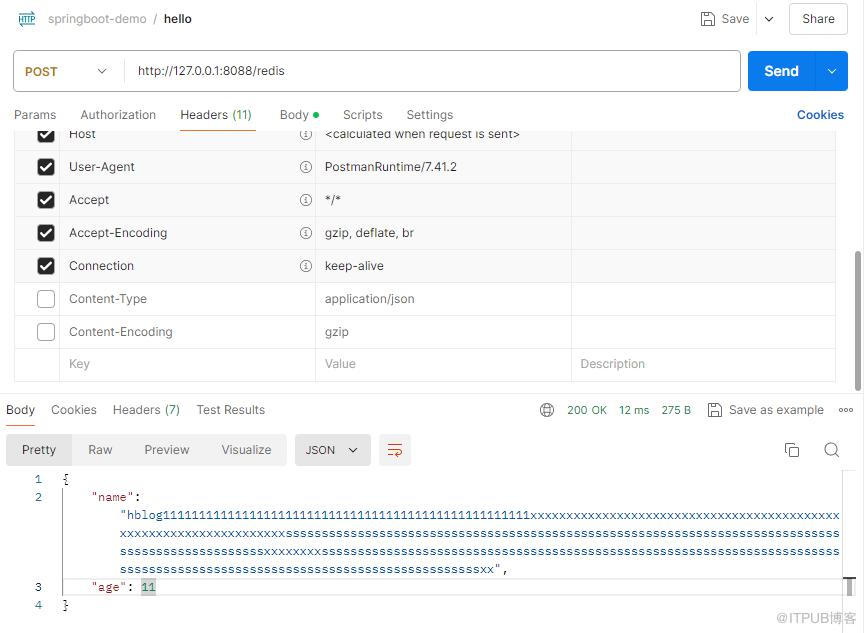
用postman访问http://127.0.0.1:8088/redis
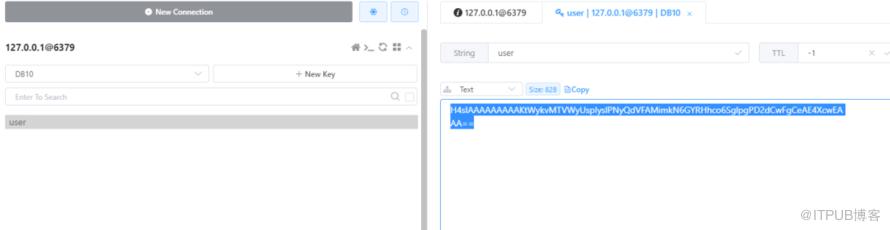
 可以看到redis里面存储的是gzip压缩的内容
 查看控制台日志
2024-08-26 14:37:56.445 INFO 43832 --- [nio-8088-exec-5] com.et.gzip.config.CompressRedis : bytes size3712024-08-26 14:37:56.445 INFO 43832 --- [nio-8088-exec-5] com.et.gzip.config.CompressRedis : result size58
JSON经过gzip压缩,371-->58, 数据大小减少7-8倍
5.引用
http://www.liuhaihua.cn/archives/711216.html

如果觉得文章对您有帮助的话,请帮忙关注/留言/转发!另外最近写的一个《Spring Boot快速入门》专栏,大家可以去看看,对新手友好,极简入门。没有冗余的理论知识,直接上干货代码。方便在实际项目中快速应用!
原文作者:HBLOG;如有侵权,请联系管理员删除。
上一篇:
Spring Boot如何解决跨域问题?
下一篇:
Spring Boot启用GZIP压缩

请登录后发表评论
登录
全部评论
