1.什么是kubernetes?
Kubernetes(也称 k8s 或 “kube”)是一个开源的容器编排平台,可以自动化在部署、管理和扩展容器化应用过程中涉及的许多手动操作。Kubernetes 最初是由 Google 工程师作为 Borg 项目开发和设计的,后于 2015 年捐赠给 云原生计算基金会(CNCF)。红帽® 是第一批与 Google 合作研发 Kubernetes 的公司之一,作为 Kubernetes 上游项目的第二大贡献者,我们甚至在这个项目启动之前就已参与其中。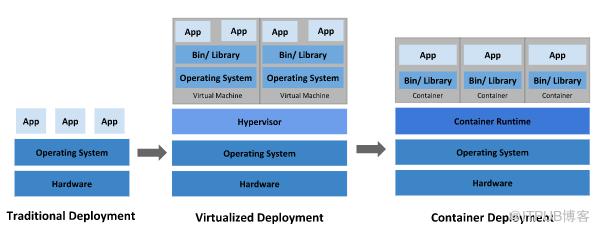
传统部署时代:
早期,各个组织是在物理服务器上运行应用程序。由于无法限制在物理服务器中运行的应用程序资源使用,因此会导致资源分配问题。例如,如果在同一台物理服务器上运行多个应用程序, 则可能会出现一个应用程序占用大部分资源的情况,而导致其他应用程序的性能下降。一种解决方案是将每个应用程序都运行在不同的物理服务器上, 但是当某个应用程序资源利用率不高时,剩余资源无法被分配给其他应用程序, 而且维护许多物理服务器的成本很高。
虚拟化部署时代:
因此,虚拟化技术被引入了。虚拟化技术允许你在单个物理服务器的 CPU 上运行多台虚拟机(VM)。虚拟化能使应用程序在不同 VM 之间被彼此隔离,且能提供一定程度的安全性, 因为一个应用程序的信息不能被另一应用程序随意访问。虚拟化技术能够更好地利用物理服务器的资源,并且因为可轻松地添加或更新应用程序, 而因此可以具有更高的可扩缩性,以及降低硬件成本等等的好处。通过虚拟化,你可以将一组物理资源呈现为可丢弃的虚拟机集群。每个 VM 是一台完整的计算机,在虚拟化硬件之上运行所有组件,包括其自己的操作系统。
容器部署时代:
容器类似于 VM,但是更宽松的隔离特性,使容器之间可以共享操作系统(OS)。因此,容器比起 VM 被认为是更轻量级的。且与 VM 类似,每个容器都具有自己的文件系统、CPU、内存、进程空间等。由于它们与基础架构分离,因此可以跨云和 OS 发行版本进行移植。容器因具有许多优势而变得流行起来,例如:
敏捷应用程序的创建和部署:与使用 VM 镜像相比,提高了容器镜像创建的简便性和效率。
持续开发、集成和部署:通过快速简单的回滚(由于镜像不可变性), 提供可靠且频繁的容器镜像构建和部署。
关注开发与运维的分离:在构建、发布时创建应用程序容器镜像,而不是在部署时, 从而将应用程序与基础架构分离。
可观察性:不仅可以显示 OS 级别的信息和指标,还可以显示应用程序的运行状况和其他指标信号。
跨开发、测试和生产的环境一致性:在笔记本计算机上也可以和在云中运行一样的应用程序。
跨云和操作系统发行版本的可移植性:可在 Ubuntu、RHEL、CoreOS、本地、 Google Kubernetes Engine 和其他任何地方运行。
以应用程序为中心的管理:提高抽象级别,从在虚拟硬件上运行 OS 到使用逻辑资源在 OS 上运行应用程序。
松散耦合、分布式、弹性、解放的微服务:应用程序被分解成较小的独立部分, 并且可以动态部署和管理 - 而不是在一台大型单机上整体运行。
资源隔离:可预测的应用程序性能。
资源利用:高效率和高密度
为什么需要 Kubernetes,它能做什么?
容器是打包和运行应用程序的好方式。在生产环境中, 你需要管理运行着应用程序的容器,并确保服务不会下线。例如,如果一个容器发生故障,则你需要启动另一个容器。如果此行为交由给系统处理,是不是会更容易一些?这就是 Kubernetes 要来做的事情!Kubernetes 为你提供了一个可弹性运行分布式系统的框架。Kubernetes 会满足你的扩展要求、故障转移你的应用、提供部署模式等。例如,Kubernetes 可以轻松管理系统的 Canary (金丝雀) 部署。
Kubernetes相关概念总结
k8s中配置客户端访问pod中应用的流程如下:
client->ingress->service->pod->containerINGRESS
Ingress 是对集群中服务的外部访问进行管理的 API 对象,典型的访问方式是 HTTP。Ingress 可以提供负载均衡、SSL 终结和基于名称的虚拟托管。
SERVICE
将运行在一组 Pods 上的应用程序公开为网络服务的抽象方法。Kubernetes Service 定义了这样一种抽象:逻辑上的一组 Pod,一种可以访问它们的策略 —— 通常称为微服务。Service 所针对的 Pods 集合通常是通过选择算符来确定的。
POD
Pod 是可以在 Kubernetes 中创建和管理的、最小的可部署的计算单元。 Pod (就像在鲸鱼荚或者豌豆荚中)是一组(一个或多个) 容器;这些容器共享存储、网络、以及怎样运行这些容器的声明。Pod 中的内容总是并置(colocated)的并且一同调度,在共享的上下文中运行。Pod 所建模的是特定于应用的“逻辑主机”,其中包含一个或多个应用容器, 这些容器是相对紧密的耦合在一起的。在非云环境中,在相同的物理机或虚拟机上运行的应用类似于 在同一逻辑主机上运行的云应用。
节点(Node)
Kubernetes 集群中其中一台工作机器,是集群的一部分。
k8s-client-java选型
目前通过java操作k8s,开源版本共有两个:
kubernetes-client/java
fabric8io/kubernetes-client
kubernetes-client/java和fabric8io/kubernetes-client对比
鉴于kubernetes-client/java和官网API一致性好,本文决定采用它
2.环境部署
Download and run the installer for the latest release.
Or if using PowerShell, use this command:
New-Item -Path 'c:\' -Name 'minikube' -ItemType Directory -ForceInvoke-WebRequest -OutFile 'c:\minikube\minikube.exe' -Uri 'https://github.com/kubernetes/minikube/releases/latest/download/minikube-windows-amd64.exe' -UseBasicParsing
Add the minikube.exe binary to your PATH.
Make sure to run PowerShell as Administrator.
$oldPath = [Environment]::GetEnvironmentVariable('Path', [EnvironmentVariableTarget]::Machine)if ($oldPath.Split(';') -inotcontains 'C:\minikube'){[Environment]::SetEnvironmentVariable('Path', $('{0};C:\minikube' -f $oldPath), [EnvironmentVariableTarget]::Machine)}
If you used a terminal (like powershell) for the installation, please close the terminal and reopen it before running minikube
other plateform,
please visit at:https://minikube.sigs.k8s.io/docs/start/?arch=%2Fwindows%2Fx86-64%2Fstable%2F.exe+download
install kubectl
https://kubernetes.io/docs/tasks/tools/install-kubectl-windows/
Start your cluster
minikube startInteract with your cluster
kubectl get po -AAlternatively, minikube can download the appropriate version of kubectl and you should be able to use it like this:
minikube kubectl -- get po -AYou can also make your life easier by adding the following to your shell config: (for more details see: kubectl)
alias kubectl="minikube kubectl --"Initially, some services such as the storage-provisioner, may not yet be in a Running state. This is a normal condition during cluster bring-up, and will resolve itself momentarily. For additional insight into your cluster state, minikube bundles the Kubernetes Dashboard, allowing you to get easily acclimated to your new environment:
minikube dashboard
3.代码工程
实验目标
实现java api获取pod信息
实现java api创建ingress
实现java api创建service
pom.xml
<?xml version="1.0" encoding="UTF-8"?><project xmlns="http://maven.apache.org/POM/4.0.0"xmlns:xsi="http://www.w3.org/2001/XMLSchema-instance"xsi:schemaLocation="http://maven.apache.org/POM/4.0.0 http://maven.apache.org/xsd/maven-4.0.0.xsd"><parent><artifactId>springboot-demo</artifactId><groupId>com.et</groupId><version>1.0-SNAPSHOT</version></parent><modelVersion>4.0.0</modelVersion><artifactId>Kubernetes</artifactId><properties><maven.compiler.source>8</maven.compiler.source><maven.compiler.target>8</maven.compiler.target></properties><dependencies><dependency><groupId>org.springframework.boot</groupId><artifactId>spring-boot-starter-web</artifactId></dependency><dependency><groupId>org.springframework.boot</groupId><artifactId>spring-boot-autoconfigure</artifactId></dependency><dependency><groupId>org.springframework.boot</groupId><artifactId>spring-boot-starter-test</artifactId><scope>test</scope></dependency><dependency><groupId>io.kubernetes</groupId><artifactId>client-java</artifactId><version>12.0.1</version><scope>compile</scope></dependency><dependency><groupId>org.projectlombok</groupId><artifactId>lombok</artifactId></dependency></dependencies></project>
kubernetes工具类
package com.et.k8s.client;import io.kubernetes.client.custom.IntOrString;import io.kubernetes.client.openapi.ApiClient;import io.kubernetes.client.openapi.ApiException;import io.kubernetes.client.openapi.apis.CoreV1Api;import io.kubernetes.client.openapi.apis.ExtensionsV1beta1Api;import io.kubernetes.client.openapi.apis.NetworkingV1Api;import io.kubernetes.client.openapi.models.*;import io.kubernetes.client.util.ClientBuilder;import io.kubernetes.client.util.KubeConfig;import lombok.extern.slf4j.Slf4j;import java.io.FileReader;import java.io.IOException;import java.util.Map;@Slf4jpublic class K8sClient {private ApiClient apiClient;/*** loading the in-cluster config, including:* 1. service-account CA* 2. service-account bearer-token* 3. service-account namespace* 4. master endpoints(ip, port) from pre-set environment variables*/public K8sClient() {try {this.apiClient = ClientBuilder.cluster().build();} catch (IOException e) {log.error("build K8s-Client error", e);throw new RuntimeException("build K8s-Client error");}}/*** loading the out-of-cluster config, a kubeconfig from file-system** @param kubeConfigPath*/public K8sClient(String kubeConfigPath) {try {this.apiClient = ClientBuilder.kubeconfig(KubeConfig.loadKubeConfig(new FileReader(kubeConfigPath))).build();} catch (IOException e) {log.error("read kubeConfigPath error", e);throw new RuntimeException("read kubeConfigPath error");} catch (Exception e) {log.error("build K8s-Client error", e);throw new RuntimeException("build K8s-Client error");}}/*** get all Pods** @return podList*/public V1PodList getAllPodList() {// new a CoreV1ApiCoreV1Api api = new CoreV1Api(apiClient);// invokes the CoreV1Api clienttry {V1PodList list = api.listPodForAllNamespaces(null, null, null, null, null, null, null, null, null, null);return list;} catch (ApiException e) {log.error("get podlist error:" + e.getResponseBody(), e);}return null;}/*** create k8s service** @param namespace* @param serviceName* @param port* @param selector* @return*/public V1Service createService(String namespace, String serviceName, Integer port, Map<String, String> selector) {V1Service svc = new V1ServiceBuilder().withNewMetadata().withName(serviceName).endMetadata().withNewSpec().addNewPort().withProtocol("TCP").withPort(port).withTargetPort(new IntOrString(port)).endPort().withSelector(selector).endSpec().build();// Deployment and StatefulSet is defined in apps/v1, so you should use AppsV1Api instead of CoreV1APICoreV1Api api = new CoreV1Api(apiClient);V1Service v1Service = null;try {v1Service = api.createNamespacedService(namespace, svc, null, null, null);} catch (ApiException e) {log.error("create service error:" + e.getResponseBody(), e);} catch (Exception e) {log.error("create service system error:", e);}return v1Service;}/*** create k8s V1Ingress** @param namespace* @param ingressName* @param annotations* @param path* @param serviceName* @param servicePort* @return*/public V1Ingress createV1Ingress(String namespace, String ingressName, Map<String, String> annotations, String path,String serviceName, Integer servicePort) {//build ingress yamlV1Ingress ingress = new V1IngressBuilder().withNewMetadata().withName(ingressName).withAnnotations(annotations).endMetadata().withNewSpec().addNewRule().withHttp(new V1HTTPIngressRuleValueBuilder().addToPaths(new V1HTTPIngressPathBuilder().withPath(path).withPathType("Prefix").withBackend(new V1IngressBackendBuilder().withService(new V1IngressServiceBackendBuilder().withName(serviceName).withPort(new V1ServiceBackendPortBuilder().withNumber(servicePort).build()).build()).build()).build()).build()).endRule().endSpec().build();NetworkingV1Api api = new NetworkingV1Api(apiClient);V1Ingress v1Ingress = null;try {v1Ingress = api.createNamespacedIngress(namespace, ingress, null, null, null);} catch (ApiException e) {log.error("create ingress error:" + e.getResponseBody(), e);} catch (Exception e) {log.error("create ingress system error:", e);}return v1Ingress;}/*** create k8s ExtensionIngress** @param namespace* @param ingressName* @param annotations* @param path* @param serviceName* @param servicePort* @return*/public ExtensionsV1beta1Ingress createExtensionIngress(String namespace, String ingressName, Map<String, String> annotations, String path,String serviceName, Integer servicePort) {//build ingress yamlExtensionsV1beta1Ingress ingress = new ExtensionsV1beta1IngressBuilder().withNewMetadata().withName(ingressName).withAnnotations(annotations).endMetadata().withNewSpec().addNewRule().withHttp(new ExtensionsV1beta1HTTPIngressRuleValueBuilder().addToPaths(new ExtensionsV1beta1HTTPIngressPathBuilder().withPath(path).withBackend(new ExtensionsV1beta1IngressBackendBuilder().withServiceName(serviceName).withServicePort(new IntOrString(servicePort)).build()).build()).build()).endRule().endSpec().build();ExtensionsV1beta1Api api = new ExtensionsV1beta1Api(apiClient);ExtensionsV1beta1Ingress extensionsV1beta1Ingress = null;try {extensionsV1beta1Ingress = api.createNamespacedIngress(namespace, ingress, null, null, null);} catch (ApiException e) {log.error("create ingress error:" + e.getResponseBody(), e);} catch (Exception e) {log.error("create ingress system error:", e);}return extensionsV1beta1Ingress;}}
以上只是一些关键代码,所有代码请参见下面代码仓库
代码仓库
https://github.com/Harries/springboot-demo(Kubernetes)
4.测试
获取pods
@Testpublic void getAllPodListTest() {String kubeConfigPath = "C:\\Users\\Dell\\.kube\\config";if (!new File(kubeConfigPath).exists()) {System.out.println("kubeConfig not exist,jump over");return;}K8sClient k8sClient = new K8sClient(kubeConfigPath);V1PodList podList = k8sClient.getAllPodList();for (V1Pod item : podList.getItems()) {System.out.println(item.getMetadata().getNamespace() + ":" + item.getMetadata().getName());}}
输出结果
default:nginx-6b5775b9c6-kqh5jkube-system:coredns-5dd5756b68-7f4mjkube-system:etcd-minikubekube-system:kube-apiserver-minikubekube-system:kube-controller-manager-minikubekube-system:kube-proxy-pnt5qkube-system:kube-scheduler-minikubekube-system:metrics-server-7c66d45ddc-4jp25kube-system:storage-provisionerkubernetes-dashboard:dashboard-metrics-scraper-7fd5cb4ddc-bpvvskubernetes-dashboard:kubernetes-dashboard-8694d4445c-98vfmmiddleware:mongodb-enterprise-operator-6dcd58f895-tmcr8middleware:ops-manager-0middleware:ops-manager-1middleware:ops-manager-2middleware:ops-manager-db-0middleware:ops-manager-db-1middleware:ops-manager-db-2

创建Ingress
@Testpublic void createV1IngressTest() {String kubeConfigPath = "C:\\Users\\Dell\\.kube\\config";if (!new File(kubeConfigPath).exists()) {System.out.println("kubeConfig not exist,jump over");return;}K8sClient k8sClient = new K8sClient(kubeConfigPath);String namespace = "default";String ingressName = "my-nginx-ingress";Map<String, String> annotations = new HashMap<>();annotations.put("nginx.ingress.kubernetes.io/rewrite-target", "/");String path = "/my-nginx";String serviceName = "my-nginx-service";Integer servicePort = 80;V1Ingress v1Ingress = k8sClient.createV1Ingress(namespace, ingressName, annotations, path, serviceName, servicePort);System.out.println(v1Ingress != null ? v1Ingress.getMetadata() : null);}

创建Service
@Testpublic void createServiceTest() {String kubeConfigPath = "C:\\Users\\Dell\\.kube\\config";if (!new File(kubeConfigPath).exists()) {System.out.println("kubeConfig not exist,jump over");return;}K8sClient k8sClient = new K8sClient(kubeConfigPath);String namespace = "default";String serviceName = "my-nginx-service";Integer port = 80;Map<String, String> selector = new HashMap<>();selector.put("run", "my-nginx");V1Service v1Service = k8sClient.createService(namespace, serviceName, port, selector);System.out.println(v1Service != null ? v1Service.getMetadata() : null);}

5.引用
https://kubernetes.io/docs/tasks/tools/install-kubectl-windows/
http://www.liuhaihua.cn/archives/711229.html

如果觉得文章对您有帮助的话,请帮忙关注/留言/转发!另外最近写的一个《Spring Boot快速入门》专栏,大家可以去看看,对新手友好,极简入门。没有冗余的理论知识,直接上干货代码。方便在实际项目中快速应用!
原文作者:HBLOG;如有侵权,请联系管理员删除。

