1.背景
项目中经常会有上传和下载的需求,这篇文章简述一下springboot项目中实现简单的上传和下载。
2.代码工程
实验目标
实现简单的文件上传和下载
pom.xml
<project xmlns="http://maven.apache.org/POM/4.0.0"xmlns:xsi="http://www.w3.org/2001/XMLSchema-instance"xsi:schemaLocation="http://maven.apache.org/POM/4.0.0 http://maven.apache.org/xsd/maven-4.0.0.xsd"><parent><artifactId>springboot-demo</artifactId><groupId>com.et</groupId><version>1.0-SNAPSHOT</version></parent><modelVersion>4.0.0</modelVersion><artifactId>file</artifactId><properties><maven.compiler.source>8</maven.compiler.source><maven.compiler.target>8</maven.compiler.target></properties><dependencies><dependency><groupId>org.springframework.boot</groupId><artifactId>spring-boot-starter-web</artifactId></dependency><dependency><groupId>org.springframework.boot</groupId><artifactId>spring-boot-autoconfigure</artifactId></dependency><dependency><groupId>org.springframework.boot</groupId><artifactId>spring-boot-starter-test</artifactId><scope>test</scope></dependency><dependency><groupId>org.apache.httpcomponents</groupId><artifactId>httpclient</artifactId></dependency><dependency><groupId>org.apache.httpcomponents</groupId><artifactId>httpmime</artifactId></dependency><dependency><groupId>org.projectlombok</groupId><artifactId>lombok</artifactId></dependency></dependencies></project>
controller
Web项目中,文件的上传和下载服务也是基于HTTP请求的,文件上传由于需要向服务接口提交数据,可以使用POST的请求方式,而文件的下载只是获取数据,因此可以使用GET请求方式。
package com.et.controller;import com.et.bean.FileInfo;import com.et.service.FileUploadService;import org.springframework.beans.factory.annotation.Autowired;import org.springframework.core.io.Resource;import org.springframework.http.HttpHeaders;import org.springframework.http.ResponseEntity;import org.springframework.web.bind.annotation.*;import org.springframework.web.multipart.MultipartFile;import java.util.HashMap;import java.util.List;import java.util.Map;public class HelloWorldController {public Map<String, Object> showHelloWorld(){Map<String, Object> map = new HashMap<>();map.put("msg", "HelloWorld");return map;}private FileUploadService fileUploadService;/*** upload** @param files* @return*/public ResponseEntity<String> upload( MultipartFile[] files) {fileUploadService.upload(files);return ResponseEntity.ok("File Upload Success");}/*** files** @return*/public ResponseEntity<List<FileInfo>> list() {return ResponseEntity.ok(fileUploadService.list());}/*** get file by name** @param fileName* @return*/public ResponseEntity<Resource> getFile( String fileName) {return ResponseEntity.ok().header(HttpHeaders.CONTENT_DISPOSITION,"attachment; filename=\"" + fileName + "\"").body(fileUploadService.getFile(fileName));}}
service
创建好指定的文件存放路径文件夹后,上传逻辑只需要将接收到的文件数据赋值到指定路径后即可。
file.getInputStream(),接收文件参数的对应字节流this.path.resolve(file.getOriginalFilename()),指定的path路径拼接接收文件的原始名称作为文件的路径信息Files.copy(),复制文件的方法
文件的下载逻辑是根据指定的文件名称到文件资源文件夹中获取,如果存在则返回文件。
this.path.resolve(fileName),构建文件全路径new UrlResource(file.toUri()),根据文件路径创建URL源resource.exists() && resource.isReadable(),文件存在并且可读时返回
package com.et.service;import com.et.bean.FileInfo;import org.springframework.core.io.Resource;import org.springframework.web.multipart.MultipartFile;import java.util.List;public interface FileUploadService {void upload(MultipartFile[] files);List<FileInfo> list();Resource getFile(String fileName);}
package com.et.service.impl;import com.et.bean.FileInfo;import com.et.service.FileUploadService;import lombok.extern.slf4j.Slf4j;import org.springframework.beans.factory.annotation.Value;import org.springframework.core.io.FileSystemResource;import org.springframework.core.io.Resource;import org.springframework.stereotype.Service;import org.springframework.util.FileCopyUtils;import org.springframework.web.multipart.MultipartFile;import java.io.File;import java.io.IOException;import java.io.InputStream;import java.io.OutputStream;import java.nio.file.Files;import java.nio.file.Paths;import java.text.SimpleDateFormat;import java.util.Date;import java.util.List;import java.util.concurrent.CopyOnWriteArrayList;public class FileUploadServiceImpl implements FileUploadService {("${upload.path:/data/upload/}")private String filePath;private static final List<FileInfo> FILE_STORAGE = new CopyOnWriteArrayList<>();public void upload(MultipartFile[] files) {SimpleDateFormat simpleDateFormat = new SimpleDateFormat("yyyy-MM-dd HH:mm:ss");for (MultipartFile file : files) {String fileName = file.getOriginalFilename();boolean match = FILE_STORAGE.stream().anyMatch(fileInfo -> fileInfo.getFileName().equals(fileName));if (match) {throw new RuntimeException("File [ " + fileName + " ] already exist");}String currentTime = simpleDateFormat.format(new Date());try (InputStream in = file.getInputStream();OutputStream out = Files.newOutputStream(Paths.get(filePath + fileName))) {FileCopyUtils.copy(in, out);} catch (IOException e) {log.error("File [{}] upload failed", fileName, e);throw new RuntimeException(e);}FileInfo fileInfo = new FileInfo().setFileName(fileName).setUploadTime(currentTime);FILE_STORAGE.add(fileInfo);}}public List<FileInfo> list() {return FILE_STORAGE;}public Resource getFile(String fileName) {FILE_STORAGE.stream().filter(info -> info.getFileName().equals(fileName)).findFirst().orElseThrow(() -> new RuntimeException("File [ " + fileName + " ] not exist"));File file = new File(filePath + fileName);return new FileSystemResource(file);}}
application.properties
spring.servlet.multipart.max-file-size=150MBspring.servlet.multipart.max-request-size=200MBspring.servlet.multipart.file-size-threshold=100MBupload.path=/Users/liuhaihua/tmp/
以上只是一些关键代码,所有代码请参见下面代码仓库
代码仓库
https://github.com/Harries/springboot-demo(File)
3.测试
启动Spring Boot应用
使用postman请求下载接口时,接口返回文件,postman会直接解析文件内容,如果无法正确解析则会显示乱码信息。如果在浏览器请求接口时,返回文件时浏览器会弹出下载文件的提示。
上传测试
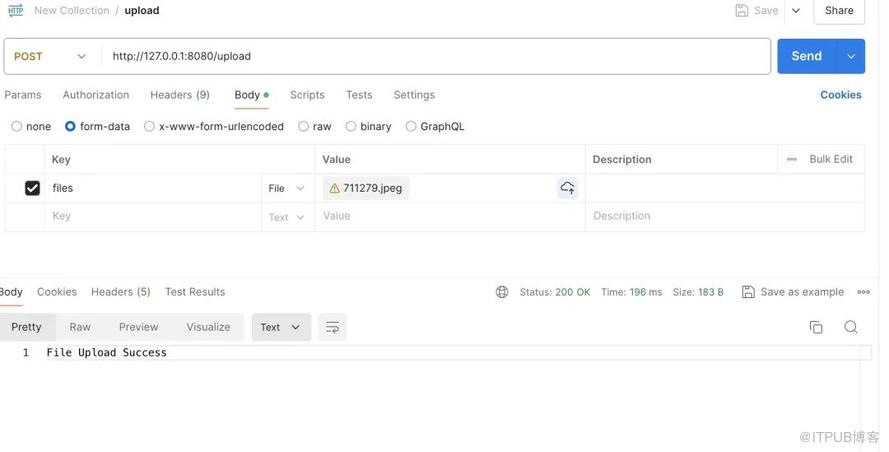
下载测试

4.引用
https://github.com/callicoder/spring-boot-file-upload-download-rest-api-example
http://www.liuhaihua.cn/archives/711291.html
原文作者:HBLOG;如有侵权,请联系管理员删除。

