画线
假设业务场景只需要画一个圆或者画一条线,而不是一个线框模型,或者说不是一个Mesh(网格)。 那么第一步我们要做的,是设置好renderer(渲染器)、scene(场景)和camera(相机)。
以下代码复制到一个html页面,浏览器打开将看到两条蓝色的线条。

代码如下:
<html><head><meta charset="utf-8"><title>My first three.js app</title><style>body { margin: 0;padding: 0s;}</style></head><body><script type="module">import * as THREE from 'https://unpkg.com/three/build/three.module.js';//1、创建一个渲染器const renderer = new THREE.WebGLRenderer();renderer.setSize( window.innerWidth, window.innerHeight );//2、将渲染器添加到html文档中document.body.appendChild( renderer.domElement );//3、定义一个相机、设置相机位置const camera = new THREE.PerspectiveCamera( 45, window.innerWidth / window.innerHeight, 1, 500 );camera.position.set( 0, 0, 100 );camera.lookAt( 0, 0, 0 );//4、定义一个场景const scene = new THREE.Scene();//5、创建一个材质const material = new THREE.LineBasicMaterial( { color: 0x0000ff } );//6、定义三个顶点,const points = [];points.push( new THREE.Vector3( - 10, 0, 0 ) );points.push( new THREE.Vector3( 0, 10, 0 ) );points.push( new THREE.Vector3( 10, 0, 0 ) );//7、三个顶点连成2条线const geometry = new THREE.BufferGeometry().setFromPoints( points );//将他们组合在一起,形成一条线const line = new THREE.Line( geometry, material );//将线条加入到场景中scene.add( line );//渲染生成renderer.render( scene, camera );</script></body></html>
创建文字(Creating text)
有时候,您可能需要在你的Three.js应用程序中使用到文本,这里有几种方法可以做到。
1. DOM + CSS
使用HTML通常是最简单、最快速的添加文本的方法,这是大多数的Three.js示例中用于添加描述性叠加文字的方法。
<div id="info">Description</div>然后使用CSS来将其绝对定位在其它具有z-index的元素之上,尤其是当你全屏运行three.js的时候。
#info {position: absolute;top: 10px;width: 100%;text-align: center;z-index: 100;display: block;color: white;}
示例如下:
在一个两条线的程序中添加描述文字“Description”
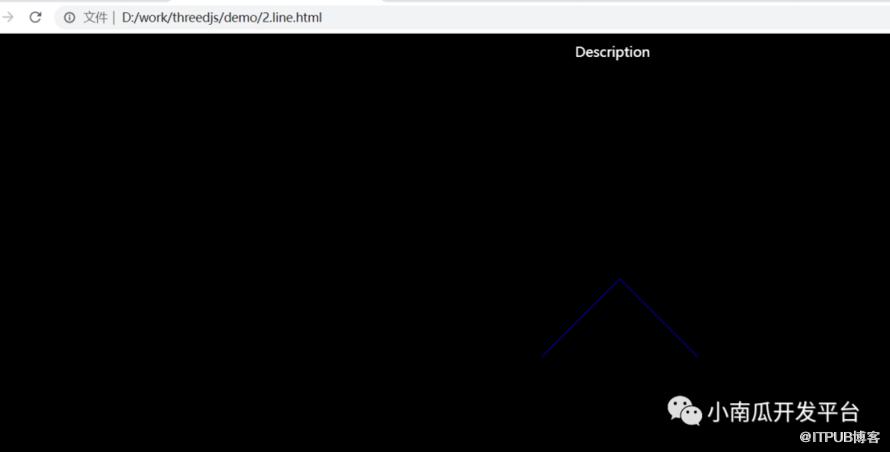
<html><head><meta charset="utf-8"><title>My first three.js app</title><style>body { margin: 0;padding: 0s;}#info {position: absolute;top: 10px;width: 100%;text-align: center;z-index: 100;display: block;color: white;}</style></head><body><div id="info">Description</div><script type="module">import * as THREE from 'https://unpkg.com/three/build/three.module.js';//1、创建一个渲染器const renderer = new THREE.WebGLRenderer();renderer.setSize( window.innerWidth, window.innerHeight );//2、将渲染器添加到html文档中document.body.appendChild( renderer.domElement );//3、定义一个相机、设置相机位置const camera = new THREE.PerspectiveCamera( 45, window.innerWidth / window.innerHeight, 1, 500 );camera.position.set( 0, 0, 100 );camera.lookAt( 0, 0, 0 );//4、定义一个场景const scene = new THREE.Scene();//5、创建一个材质const material = new THREE.LineBasicMaterial( { color: 0x0000ff } );//6、定义三个顶点,const points = [];points.push( new THREE.Vector3( - 10, 0, 0 ) );points.push( new THREE.Vector3( 0, 10, 0 ) );points.push( new THREE.Vector3( 10, 0, 0 ) );//7、三个顶点连成2条线const geometry = new THREE.BufferGeometry().setFromPoints( points );//将他们组合在一起,形成一条线const line = new THREE.Line( geometry, material );//将线条加入到场景中scene.add( line );//渲染生成renderer.render( scene, camera );</script></body></html>
2. 将文字绘制到画布中,并将其用作Texture(纹理)
如果你希望在three.js的场景中的平面上轻松地绘制文本,请使用此方法。
3. 在你所喜欢的3D软件里创建模型,并导出给three.js
如果你更喜欢使用3D建模软件来工作并导出模型到three.js,请使用这种方法。
4. three.js自带的文字几何体
如果你更喜欢使用纯three.js来工作,或者创建能够由程序改变的、动态的3D文字,你可以创建一个其几何体为THREE.TextGeometry的实例的网格:
new THREE.TextGeometry( text, parameters );然而,为了使得它能够工作,你的TextGeometry需要在其“font”参数上设置一个THREE.Font的实例。
请参阅 TextGeometry 页面来阅读如何完成此操作的详细信息,以及每一个接收的参数的描述,还有由three.js分发、自带的JSON字体的列表。
5. 位图字体
BMFonts (位图字体) 可以将字形批处理为单个BufferGeometry。BMFont的渲染支持自动换行、字母间距、字句调整、signed distance fields with standard derivatives、multi-channel signed distance fields、多纹理字体等特性。
原文作者:小南瓜开发平台;如有侵权,请联系管理员删除。

