批注是一种富文本注释 , 常用于 为 指定 的Excel 单元格添加提示或 附加 信息 。 Free Spire.XLS for Java 为开发人员 免费 提供了在Java 应用程序 中对 Excel 文件添加和 操作批注的功能 。 本文将介绍如何使用 Free Spire.XLS for Java 在Excel 文档 中添加,读取和删除 批注 。
安装
首先你需要下载 Spire. XLS JAR 并 将 其 作为依赖项添加到您的 Java程序中。如果您使用的是 maven ,您需要将以下依赖项添加到您的 pom.xml文件中 。
<repositories>
        <repository>
            <id>com.e-iceblue</id>
            <name>e-iceblue</name>
<url>http://repo.e-iceblue.com/nexus/content/groups/public/</url>
        </repository>
</repositories>
<dependencies>
    <dependency>
        <groupId>e-iceblue</groupId>
        <artifactId>spire.xls.free</artifactId>
        <version>2.2.0</version>
        </dependency>
</dependencies>
添加批注
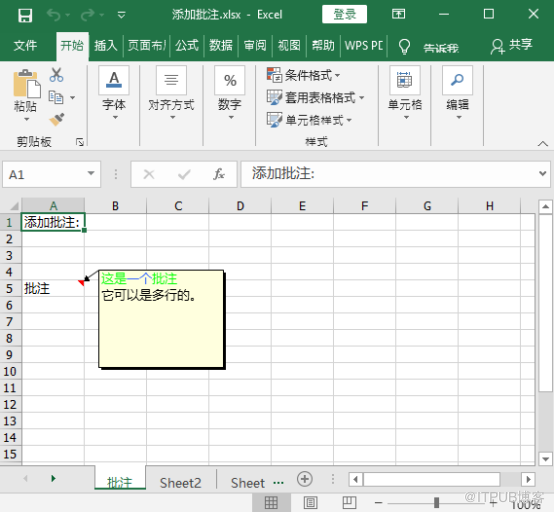
下面的示例将演示如何使用免费的Free Spire.XLS for Java将批注添加到Excel文件中,并为批注文本中各个字符设置不同的字体颜色。
import com.spire.xls.*;
public class AddComments {
    public static void main(String[] args){
        //新建Excel文档
        Workbook workbook = new Workbook();

        //获取第一张工作表
        Worksheet sheet = workbook.getWorksheets().get(0);

        //设置工作表名称
        sheet.setName("批注");

        //添加文本到单元格[1,1]
        CellRange range = sheet.getCellRange(1,1);
        range.setText("添加批注:");

        //添加文本到单元格 [5,1]
        CellRange range1 = sheet.getCellRange(5, 1);
        range1.setText("批注");

        //添加批注到单元格 [5,1]
        range1.getComment().setText("这是一个批注\n它可以是多行的。");

        //展示批注
        range1.getComment().setVisible(true);

        //设置批注高度
        range1.getComment().setHeight(100);

        //创建字体并设置字体颜色
        ExcelFont fontBlue = workbook.createFont();
        fontBlue.setKnownColor(ExcelColors.LightBlue);
        ExcelFont fontGreen = workbook.createFont();
        fontGreen.setKnownColor(ExcelColors.LightGreen);

        //设置批注文本中各个字符的字体
        range1.getComment().getRichText().setFont(0, 1, fontGreen);
        range1.getComment().getRichText().setFont(2, 3, fontBlue);
        range1.getComment().getRichText().setFont(4, 5, fontGreen);

        //保存结果文档

        workbook.saveToFile("添加批注.xlsx", ExcelVersion.Version2013);
    }
}
读取批注
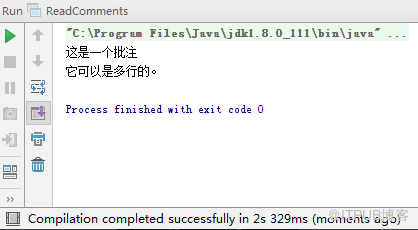
Free Spire.XLS for Java 支持读取所有批注以及与Excel工作表中指定单元格相关联的特定批注。
import com.spire.xls.*;
public class ReadComments {
    public static void main(String[] args){
        //加载Excel文档
        Workbook workbook = new Workbook();
        workbook.loadFromFile("添加批注.xlsx");

        //获取第一张工作表
        Worksheet sheet = workbook.getWorksheets().get(0);

        //打印工作表中所有的批注
        for(int i = 0; i < sheet.getComments().getCount(); i ++){
            String comment = sheet.getComments().get(i).getText();
            System.out.println(comment);
        }

        //打印与指定单元格相关联的批注
                //System.out.println(sheet.getCellRange(5,1).getComment().getText());
    }
}
删除 批注
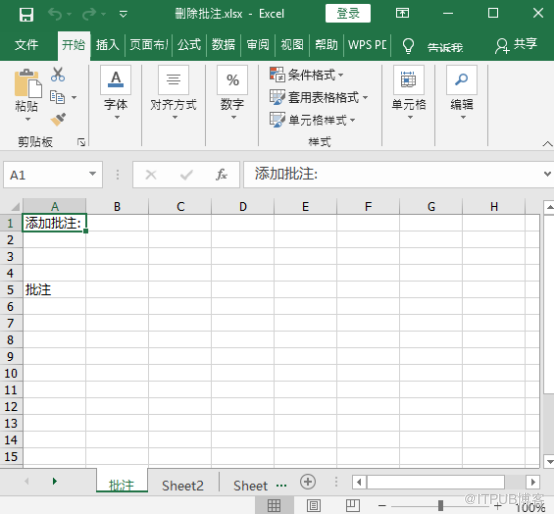
通过使用Free Spire.XLS for Java 我们可以删除所有注释,也可以删除与Excel 工作表中指定单元格 相 关联的特定 批注 。
import com.spire.xls.*;
public class DeleteComments {
    public static void main(String[] args){
        //加载Excel文档
        Workbook workbook = new Workbook();
        workbook.loadFromFile("添加批注.xlsx");

        //获取第一张工作表
        Worksheet sheet = workbook.getWorksheets().get(0);

        //删除工作表中所有批注
        for(int i = 0; i < sheet.getComments().getCount(); i ++){
            sheet.getComments().get(i).remove();
        }

        //删除与指定单元格相关联的批注
        sheet.getCellRange(5,1).getComment().remove();

        workbook.saveToFile("删除批注.xlsx", ExcelVersion.Version2013);
    }
}
来自 “ ITPUB博客 ” ,链接:https://blog.itpub.net/69968349/viewspace-2684044/ ,如需转载,请注明出处,否则将追究法律责任。

