SmartArt图形是信息和观点的视觉表示形式,它具有强大的文字转图示功能及排版功能。本文将演示如何使用Java代码在幻灯片中创建SmartArt图形并自定义布局。
使用工具:Free Spire.Presentation for Java (免费版)
JAR包导入
方法一:下载 Free Spire.Presentation for Java包并解压缩,然后将lib文件夹下的jar包作为依赖项直接导入到Java应用程序中。
方法二:通过Maven仓库安装jar包,配置pom.xml文件的代码如下:
<repositories>
    <repository>
        <id>com.e-iceblue</id>
        <url>http://repo.e-iceblue.cn/repository/maven-public/</url>
    </repository>
</repositories>
<dependencies>
    <dependency>
        <groupId>e-iceblue</groupId>
        <artifactId>spire.presentation.free</artifactId>
        <version>3.9.0</version>
    </dependency>
</dependencies>
Java代码示例
import com.spire.presentation.FileFormat;
import com.spire.presentation.ISlide;
import com.spire.presentation.Presentation;
import com.spire.presentation.diagrams.*;
public class AddSmartArt {
    public static void main(String[] args) throws Exception {
        //创建PowerPoint文档
        Presentation presentation = new Presentation();
        //获取第一张幻灯片
        ISlide slide = presentation.getSlides().get(0);
        //在幻灯片中创建组织结构图'Organization Chart'
        ISmartArt smartArt = slide.getShapes().appendSmartArt(60, 60, 500, 300, SmartArtLayoutType.ORGANIZATION_CHART);
        //设置SmartArt的样式和颜色
        smartArt.setStyle(SmartArtStyleType.MODERATE_EFFECT);
        smartArt.setColorStyle(SmartArtColorType.DARK_2_OUTLINE);
        //删除默认的节点(SmartArt中的图形)
        for (Object a : smartArt.getNodes()) {
            smartArt.getNodes().removeNode(0);
        }
        //添加一个母节点
        ISmartArtNode node1 = smartArt.getNodes().addNode();
        //在母节点下添加四个子节点
        ISmartArtNode node1_1 = node1.getChildNodes().addNode();
        ISmartArtNode node1_2 = node1.getChildNodes().addNode();
        ISmartArtNode node1_3 = node1.getChildNodes().addNode();
        ISmartArtNode node1_4 = node1.getChildNodes().addNode();
        //在节点上设置文字及文字大小
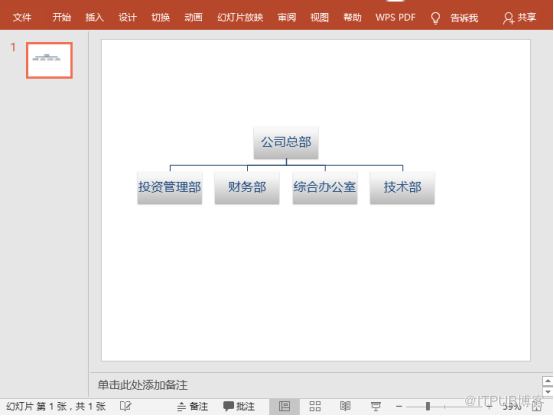
        node1.getTextFrame().setText("公司总部");
        node1.getTextFrame().getTextRange().setFontHeight(14f);
        node1_1.getTextFrame().setText("投资管理部");
        node1_1.getTextFrame().getTextRange().setFontHeight(12f);
        node1_2.getTextFrame().setText("财务部");
        node1_2.getTextFrame().getTextRange().setFontHeight(12f);
        node1_3.getTextFrame().setText("综合办公室");
        node1_3.getTextFrame().getTextRange().setFontHeight(12f);
        node1_4.getTextFrame().setText("技术部");
        node1_4.getTextFrame().getTextRange().setFontHeight(12f);
        //保存文档
        presentation.saveToFile("SmartArt.pptx", FileFormat.PPTX_2010);
        presentation.dispose();
    }
  }
添加SmartArt效果图:
来自 “ ITPUB博客 ” ,链接:https://blog.itpub.net/69968349/viewspace-2731891/ ,如需转载,请注明出处,否则将追究法律责任。
上一篇:
Java 替换 PPT 中的图片

请登录后发表评论
登录
全部评论
