当我们在计算处理Excel表格中的数据时,为了提高工作效率,我们常常会用到各种Excel函数公式, 本文将介绍如何使用Free Spire.XLS for Java添加公式到Excel单元格,以及如何读取单元格中的公式。
基本步骤:
1. 下载 Free Spire.XLS for Java包并解压缩,然后将lib文件夹下的Spire.Xls.jar包作为依赖项导入到Java应用程序中。(也可直接通过Maven仓库安装JAR包(配置pom.xml文件的代码见下文))
2. 在Java应用程序中新建一个Java Class(此处我命名为MergeCells 和 UnmergeCells), 然后输入相应的Java代码并运行。
配置pom.xml文件:
<repositories>
    <repository>
        <id>com.e-iceblue</id>
        <url>http://repo.e-iceblue.cn/repository/maven-public/</url>
    </repository>
</repositories>
<dependencies>
    <dependency>
        <groupId>e-iceblue</groupId>
        <artifactId>spire.xls.free</artifactId>
        <version>2.2.0</version>
    </dependency>
</dependencies>
添加公式
import com.spire.xls.*;
public class InsertFormulas {
    public static void main(String[] args) {

        //创建Workbook对象
        Workbook workbook = new Workbook();
        //获取第一个工作表
        Worksheet sheet = workbook.getWorksheets().get(0);

        //声明两个变量
        int currentRow = 1;
        String currentFormula = null;

        //设置列宽
        sheet.setColumnWidth(1, 26);
        sheet.setColumnWidth(2, 16);

        //写入用于测试的数据到单元格
        sheet.getCellRange(currentRow,1).setValue("测试数据:");
        sheet.getCellRange(currentRow,2).setNumberValue(1);
        sheet.getCellRange(currentRow,3).setNumberValue(2);
        sheet.getCellRange(currentRow,4).setNumberValue(3);
        sheet.getCellRange(currentRow,5).setNumberValue(4);
        sheet.getCellRange(currentRow,6).setNumberValue(5);

        //写入文本
        currentRow += 2;
        sheet.getCellRange(currentRow,1).setValue("公式:") ; ;
        sheet.getCellRange(currentRow,2).setValue("结果:");

        //设置单元格格式
        CellRange range = sheet.getCellRange(currentRow,1,currentRow,2);
        range.getStyle().getFont().isBold(true);
        range.getStyle().setKnownColor(ExcelColors.LightGreen1);
        range.getStyle().setFillPattern(ExcelPatternType.Solid);
        range.getStyle().getBorders().getByBordersLineType(BordersLineType.EdgeBottom).setLineStyle(LineStyleType.Medium);        //算数运算
        currentFormula = "=1/2+3*4";
        sheet.getCellRange(++currentRow,1).setText(currentFormula);
        sheet.getCellRange(currentRow,2).setFormula(currentFormula);

        //日期函数
        currentFormula = "=TODAY()";
        sheet.getCellRange(++currentRow,1).setText(currentFormula);
        sheet.getCellRange(currentRow,2).setFormula(currentFormula);
        sheet.getCellRange(currentRow,2).getStyle().setNumberFormat("YYYY/MM/DD");

        //时间函数
        currentFormula = "=NOW()";
        sheet.getCellRange(++currentRow,1).setText(currentFormula);
        sheet.getCellRange(currentRow,2).setFormula(currentFormula);
        sheet.getCellRange(currentRow,2).getStyle().setNumberFormat("H:MM AM/PM");

        //IF函数
        currentFormula = "=IF(B1=5,\"Yes\",\"No\")";
        sheet.getCellRange(++currentRow,1).setText(currentFormula);
        sheet.getCellRange(currentRow,2).setFormula(currentFormula);

        //PI函数
        currentFormula = "=PI()";
        sheet.getCellRange(++currentRow,1).setText(currentFormula);
        sheet.getCellRange(currentRow,2).setFormula(currentFormula);

        //三角函数
        currentFormula = "=SIN(PI()/6)";
        sheet.getCellRange(++currentRow,1).setText(currentFormula);
        sheet.getCellRange(currentRow,2).setFormula(currentFormula);

        //计数函数
        currentFormula = "=Count(B1:F1)";
        sheet.getCellRange(++currentRow,1).setText(currentFormula);
        sheet.getCellRange(currentRow,2).setFormula(currentFormula);

        //最大值函数
        currentFormula = "=MAX(B1:F1)";
        sheet.getCellRange(++currentRow,1).setText(currentFormula);
        sheet.getCellRange(currentRow,2).setFormula(currentFormula);

        //平均值函数
        currentFormula = "=AVERAGE(B1:F1)";
        sheet.getCellRange(++currentRow,1).setText(currentFormula);
        sheet.getCellRange(currentRow,2).setFormula(currentFormula);

        //求和函数
        currentFormula = "=SUM(B1:F1)";
        sheet.getCellRange(++currentRow,1).setText(currentFormula);
        sheet.getCellRange(currentRow,2).setFormula(currentFormula);

        //保存文档
        workbook.saveToFile("InsertFormulas.xlsx",FileFormat.Version2013);
    }
}
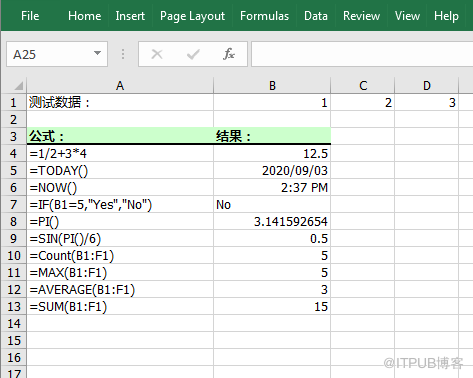
读取公式
import com.spire.xls.*;
public class ReadFormulas {
    public static void main(String[] args) {

        //创建Workbook对象
        Workbook workbook = new Workbook();

        //加载Excel文档
        workbook.loadFromFile("InsertFormulas.xlsx");

        //获取第一个工作表
        Worksheet sheet = workbook.getWorksheets().get(0);

        //遍历B1到B13的单元格
        for (Object cell : sheet.getCellRange("B1:B13")
                ) {
            CellRange cellRange = (CellRange) cell;

            //判断单元格是否含有公式
            if (cellRange.hasFormula()) {

            //打印单元格及公式
                String certainCell = String.format("单元格[%d, %d]含有公式:", cellRange.getRow(), cellRange.getColumn());
                System.out.println(certainCell + cellRange.getFormula());
            }
        }
    }
}
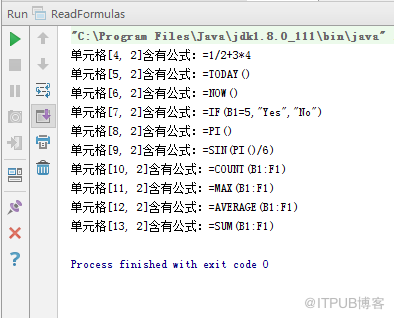
来自 “ ITPUB博客 ” ,链接:https://blog.itpub.net/69968349/viewspace-2716900/ ,如需转载,请注明出处,否则将追究法律责任。
下一篇:
Java 转换 PDF 版本

请登录后发表评论
登录
全部评论
