一、BlueOcean
1、BlueOcean 概念
提供了一套可视化操作界面来帮助创建、编辑 Pipeline 任务它为开发人员提供了更具乐趣的Jenkins使用方式实现了一种全新的、现代风格的用户界面有助于任何规模的团队实现持续交付
2、BlueOcean 特性
流水线编辑器:是一种直观并可视化的流水线编辑器流水线的可视化:对流水线的可视化表示流水线的诊断:即刻定位任务问题个性化仪表盘:用户可以自定义仪表盘,只显示与自身相关的流水线
3、BlueOcean 安装
需要在 Jenkins plugin 中安装 BlueOcean
二、Pipeline 简介
1、Jenkins Pipeline 概念
a、借用Unix 中的Pipeline思路,一种高内聚低耦合的工具b、Jenkins 2.0 以上才会有c、一系列 Jenkins 插件将整个持续集成用解释性代码 Jenkinsfile 来描述d、Jenkinsfile 使用方法:
Jenkins 任务页面输入源代码工程中编辑
2、Jenkinsfile 语法类型:
Declarative pipelineScripts pipeline
3、采用Jenkins 任务页面输入
a. Jenkins中创建一个 pipeline 任务
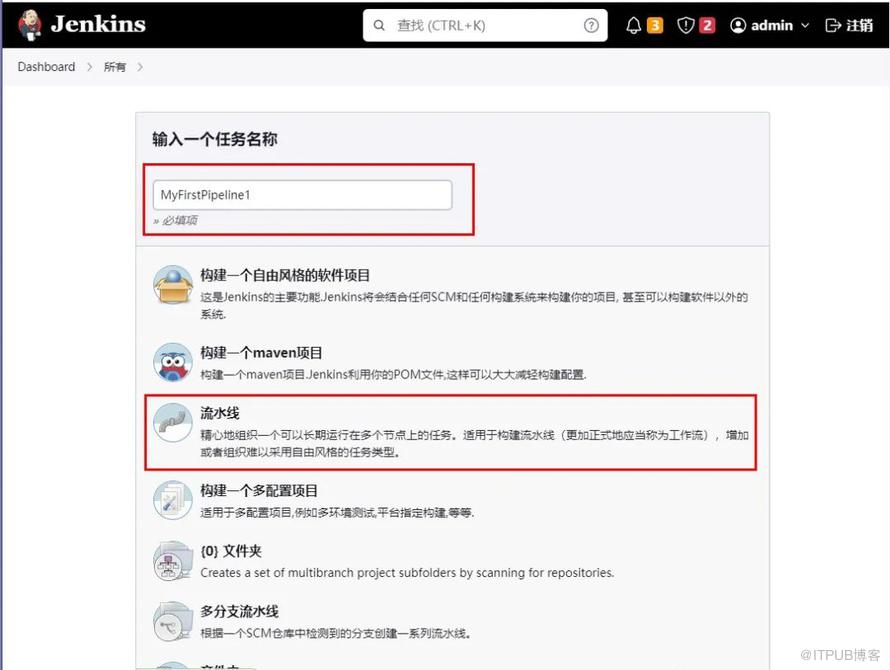
b. Definition 中选择 Pipeline Script
c. 在 Pipeline 模块添加Pipeline代码
pipeline {agent anystages {stage('Hello') {steps {echo 'Hello World'}}}
}

d. 运行
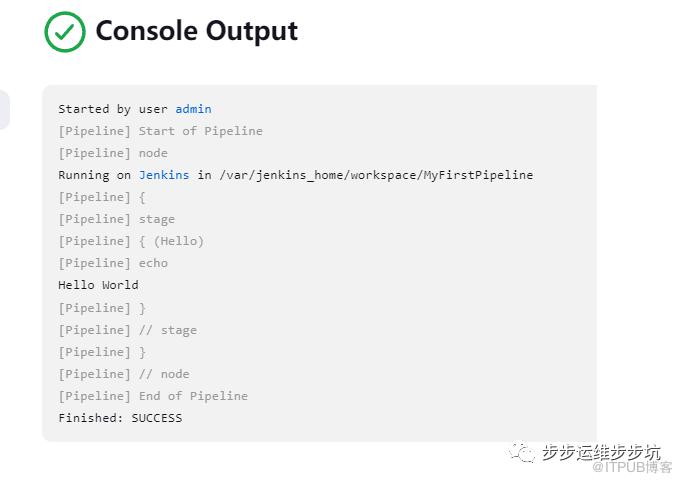
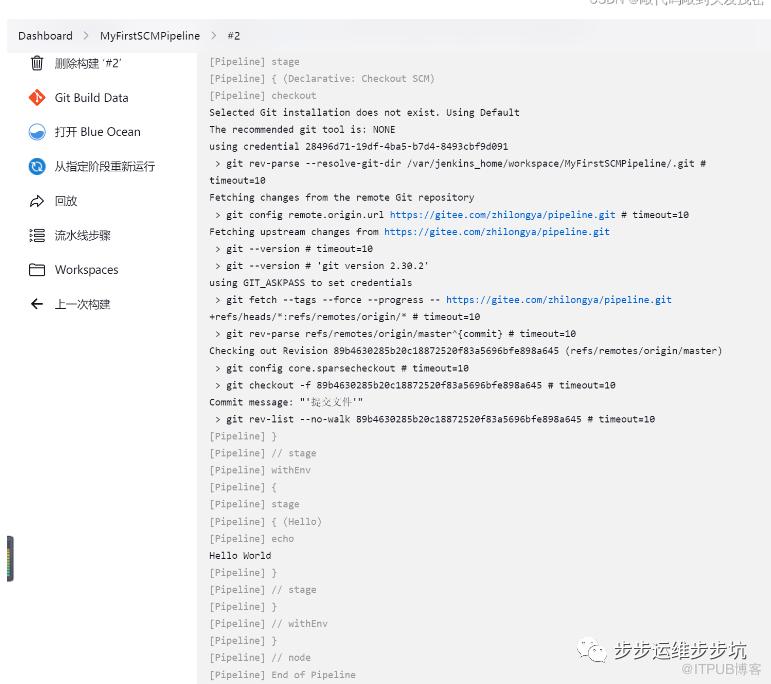
4、利用Git源码库导入 Jenkins Pipeline
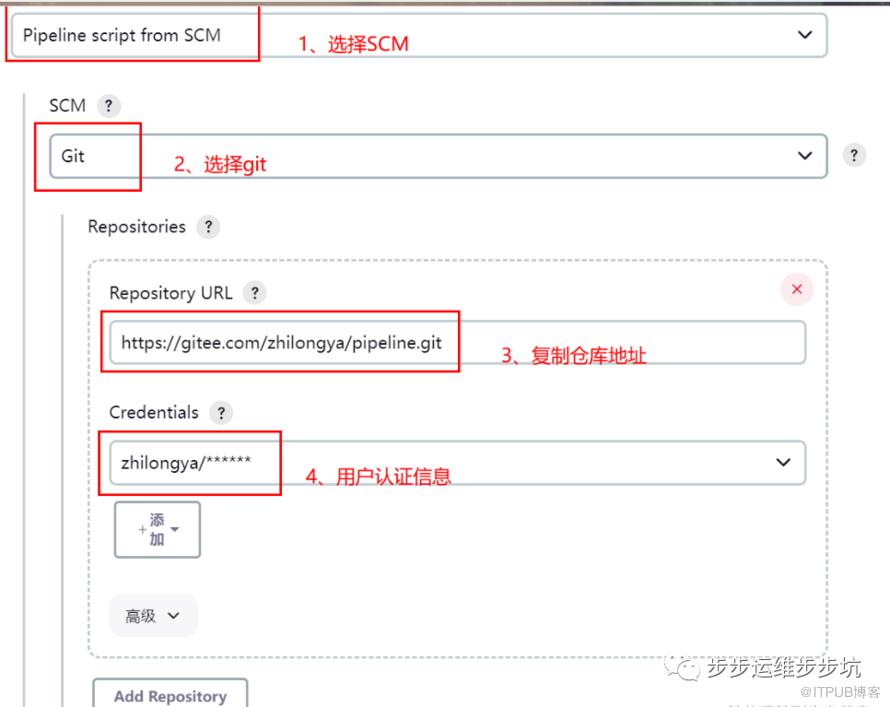
a. 在Jenkins Pipeline 任务中选择 Pipeline script from SCM,
b. 然后添加 git 源码地址,
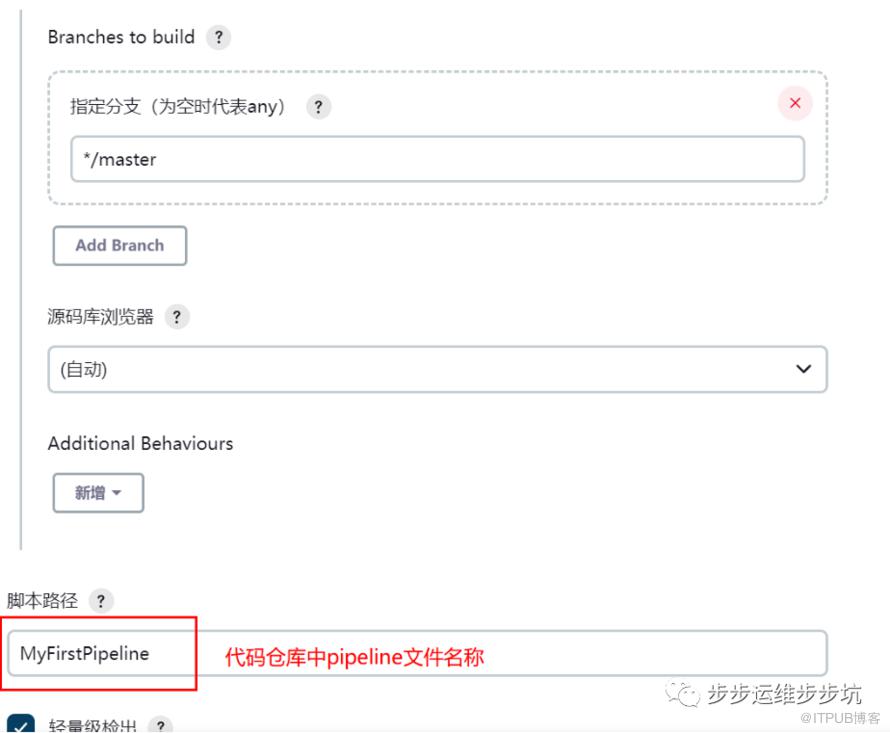
c. 在Script Path中填写需要运行的Jenkinsfile文件所在的地址
d. 运行
三、Jenkinsfile 语法简介
1、Jenkinsfile 支持两种语法形式 :
Declarative pipeline - v2.5之后引入,结构化方式Scripts pipeline - 基于 groovy 的语法

2、Jenkinsfile 语法一:Declarative Pipeline
a.必须包含在一个pipeline块内,具体来说是:*
pipeline {}*b.基本的部分是“steps”,steps 告诉Jenkins要做什么c.语句分类具体包含Sections, Steps,赋值等几大类
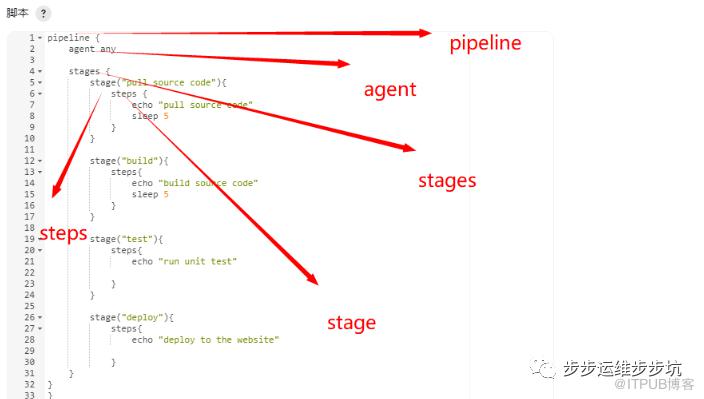
3、Declarative Pipeline - agent
agent :定义pipeline执行节点必须出现的指令参数
any:可以在任意agent上执行pipelinenone:pipeline将不分配全局agent, 每个stage分配自己的agentlabel:指定运行节点的Labelnode:自定义运行节点配置,
指定 label指定 customWorkspace
docker:控制目标节点上的docker运行相关内容
Declarative Pipeline - agent 代码举例
pipeline {agent {label 'master'customWorkspace 'myWorkspace'}
}
4、Declarative Pipeline - stages
必须出现的指令无参数包含一个或多个stage的序列,Pipeline的大部分工作在此执行;每个Pipeline 代码区间中必须只有一个stages
5、Declarative Pipeline - stage
必须出现的指令无参数包含在stages中Pipeline完成的所有实际工作都需要包含到stage中需要定义stage的名字
6、Declarative Pipeline - steps
必须出现的指令无参数具体执行步骤,包含在 stage 代码区间中
7、Declarative Pipeline - stages, stage, steps 代码举例
stages {stage('pull source code'){steps {echo 'pull source code'sleep 5}}}
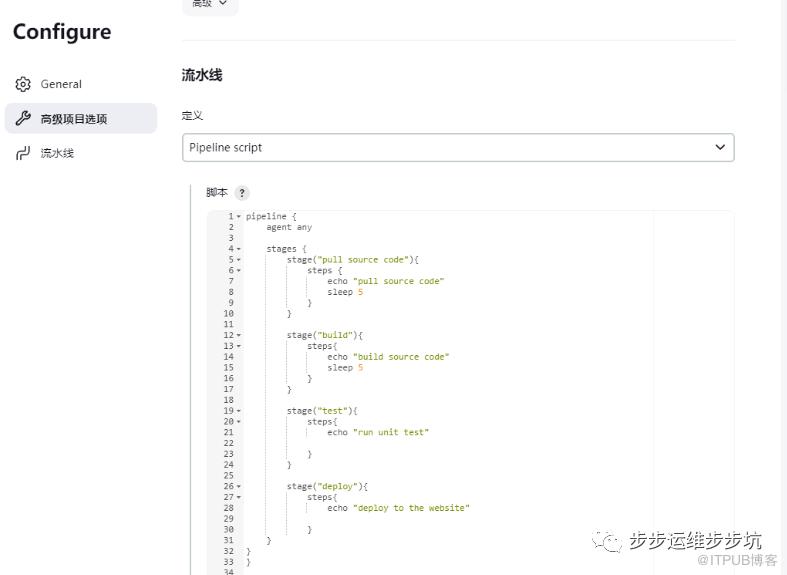
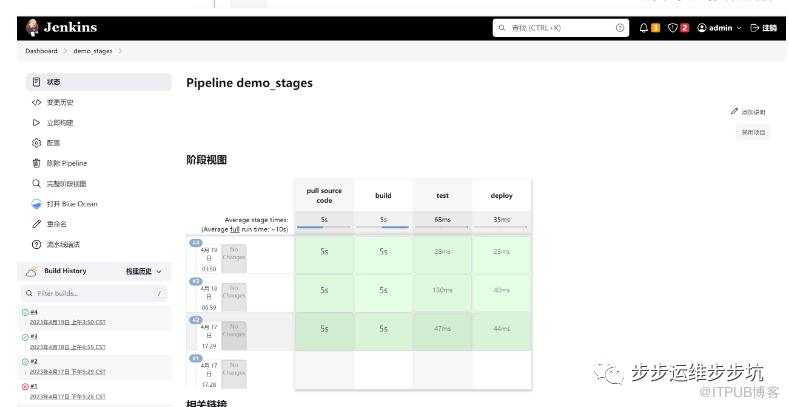
8、代码演示
pipeline {
    agent anystages {
        stage("pull source code"){
            steps {echo "pull source code"sleep 5}
        }
        stage("build"){
            steps{echo "build source code"sleep 5}
        }
        stage("test"){
            steps{echo "run unit test"}
        }
        stage("deploy"){
            steps{echo "deploy to the website"}
        }
}
}

四、JenkinsFile语法参数post
post :定义Pipeline或stage运行结束时的操作不是必须出现的指令参数:
always:无论Pipeline运行的完成状态如何都会运行changed:只有当前Pipeline运行的状态与先前完成的Pipeline的状态不同时,才能运行failure:仅当当前Pipeline处于“失败”状态时才运行success :仅当当前Pipeline具有“成功”状态时才运行unstable:只有当前Pipeline具有“不稳定”状态才能运行aborted:只有当前Pipeline处于“中止”状态时才能运行
案例1-执行失败
pipeline{
  agent any
  stages {
    stage('Test'){
      steps{
        echo "This is test code"
        sleep 2
        sh 'exit -1'
      }
    }
  }
  post{
    always{
      echo 'say goodby'
    }
    success{
      echo 'This is success exit'
    }
    failure{
      echo 'This is failure exit'
   }

  }

}

案例2-执行成功
pipeline{
    agent any

    stages {
        stage('Test'){
            steps{
                echo "This is test code"
                sleep 2
                sh 'exit 0'
            }
        }
    }

    post{
        always{
            echo 'say goodby'
        }
        success{
            echo 'This is success exit'
        }
        failure{
            echo 'This is failure exit'
        }
    }
}

五、JenkinsFile 语法参数 options
options :定义pipeline 的专有属性不是必须出现的指令参数:
buildDiscarder:保持构建的最大个数(历史构建个数)disableConcurrentBuilds:不允许并行执行pipeline任务timeout:pipeline 超时时间retry:失败后,重试整个Pipeline的次数timestamps:预定义由Pipeline生成的所有控制台输出时间skipStagesAfterUnstable:一旦构建状态进入了“Unstable”状态,就跳过此stage
1、正常情况
pipeline{
    agent {
        node{
            label 'docker_node'
            customWorkspace "pipelineWorkspace"
        }
    }

    options {
        timeout(time: 10,unit:"SECONDS")    //构建超过10s,就会超时
        buildDiscarder(logRotator(numToKeepStr:"2"))    //最多保留2个最新的构建
        retry(5)    //失败后尝试运行5次
    }
    stages {
        stage('begin'){
            steps{
                echo 'hello pipeline begin'
                sleep 2
            }

        }
        stage('running'){
            steps{
              echo 'hello pipeline running'
                sleep 2
            }

        }
        stage('finsh'){
            steps{
                echo 'hello pipeline finsh'
                sleep 2
                sh "exit 0"
            }

        }
    }

    post{
        always{
            echo 'say goodby'
        }
        success{
            echo 'This is success exit'
        }
        failure{
            echo 'This is failure exit'
        }
    }


}
控制台输出
Started by user admin
[Pipeline] Start of Pipeline
[Pipeline] node
Running on docker_node in /root/jenkins_mulu/workspace/pipeline_demo_options
[Pipeline] {
[Pipeline] ws
Running in /root/jenkins_mulu/pipelineWorkspace
[Pipeline] {
[Pipeline] timeout
Timeout set to expire in 10 sec
[Pipeline] {
[Pipeline] retry
[Pipeline] {
[Pipeline] stage
[Pipeline] { (begin)
[Pipeline] echo
hello pipeline begin
[Pipeline] sleep
Sleeping for 2 sec
[Pipeline] }
[Pipeline] // stage
[Pipeline] stage
[Pipeline] { (running)
[Pipeline] echo
hello pipeline running
[Pipeline] sleep
Sleeping for 2 sec
[Pipeline] }
[Pipeline] // stage
[Pipeline] stage
[Pipeline] { (finsh)
[Pipeline] echo
hello pipeline finsh
[Pipeline] sleep
Sleeping for 2 sec
[Pipeline] sh
+ exit 0
[Pipeline] }
[Pipeline] // stage
[Pipeline] stage
[Pipeline] { (Declarative: Post Actions)
[Pipeline] echo
say goodby
[Pipeline] echo
This is success exit
[Pipeline] }
[Pipeline] // stage
[Pipeline] }
[Pipeline] // retry
[Pipeline] }
[Pipeline] // timeout
[Pipeline] }
[Pipeline] // ws
[Pipeline] }
[Pipeline] // node
[Pipeline] End of Pipeline
Finished: SUCCESS
2、异常情况
pipeline{
    agent {
        node{
            label 'docker_node'
            customWorkspace "pipelineWorkspace"
        }
    }

    options {
        timeout(time: 10,unit:"SECONDS")    //构建超过10s,就会超时
        buildDiscarder(logRotator(numToKeepStr:"2"))    //最多保留2个最新的构建
        retry(5)    //失败后尝试运行5次
    }
    stages {
        stage('begin'){
            steps{
                echo 'hello pipeline begin'
                sleep 2
            }

        }
        stage('running'){
            steps{
              echo 'hello pipeline running'
                sleep 2
            }

        }
        stage('finsh'){
            steps{
                echo 'hello pipeline finsh'
                sleep 2
                sh "exit -1"
            }

        }
    }

    post{
        always{
            echo 'say goodby'
        }
        success{
            echo 'This is success exit'
        }
        failure{
            echo 'This is failure exit'
        }
    }


}
六、JenkinsFile 语法参数 parameters
parameters :定义pipeline 的专有参数列表不是必须出现的指令参数:
支持数据类型:booleanParam, choice, credentials, file, text, password, run, string类似参数化构建的选项
1、Declarative Pipeline - parameters 代码举例
parameters {
    string(name: 'PERSON', defaultValue: 'Jenkins', description: '输入的文本参数')
    choice(name: 'CHOICE', choices: ['One', 'Two', 'Three'], description: 'Pick something')
}
2、案例:以默认值构建
pipeline {
    agent{
        node{
            label 'docker_node'
            customWorkspace "myWorkspace"
        }
    }

    parameters{
        string(name:'PERSON',defaultValue:'Jenkins',description:'输入文本参数')
    }

    stages{
        stage('Test Parameters'){
            steps{
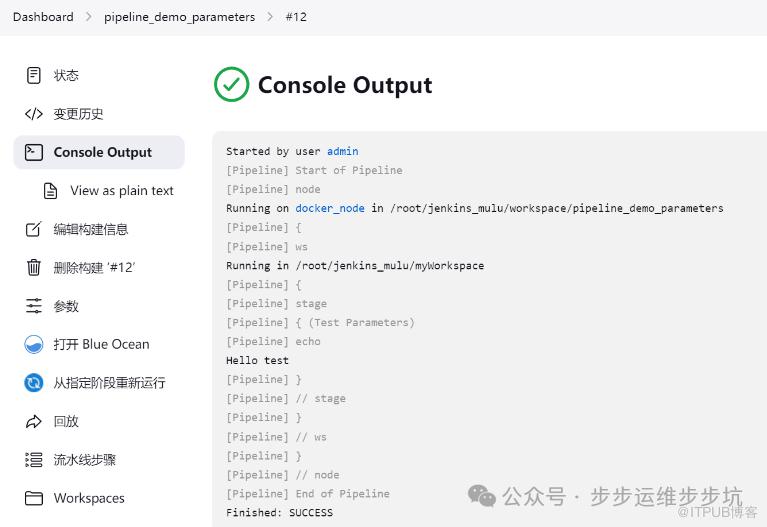
                echo "Hello ${PERSON}"
            }
        }
    }
}
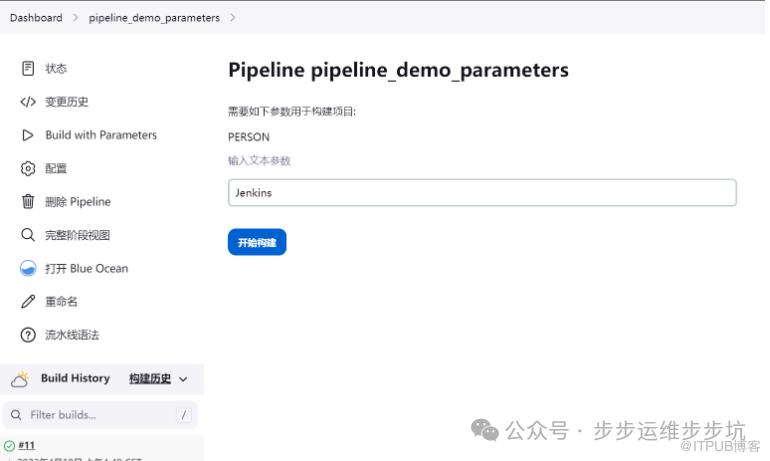
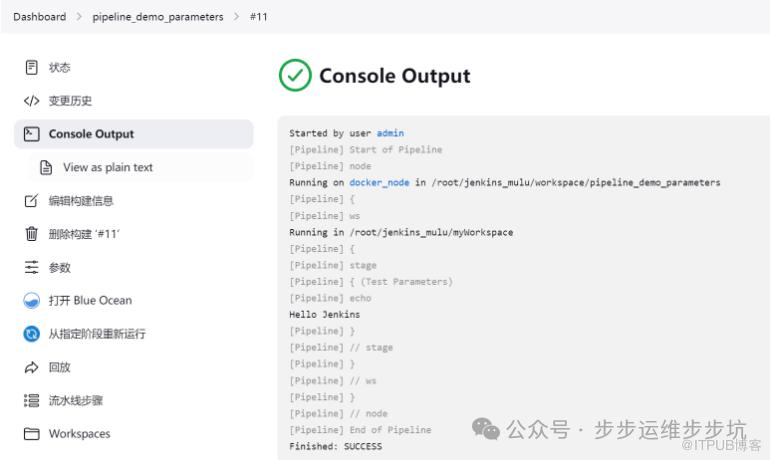
3、案例:非默认值构建

3、解决第一次运行失败的问题
pipeline {
    agent{
        node{
            label 'docker_node'
            customWorkspace "myWorkspace"
        }
    }

    parameters{
        string(name:'PERSON',defaultValue:'Jenkins',description:'输入文本参数')
    }

    environment{
        PERSON ="$params.PERSON"
    }

    stages{
        stage('Test Parameters'){
            steps{
                echo "Hello ${PERSON}"
            }
        }
    }
}
七、JenkinsFile 语法参数 env_tools(有问题)
1、Scripts pipeline: 环境变量定义与引用
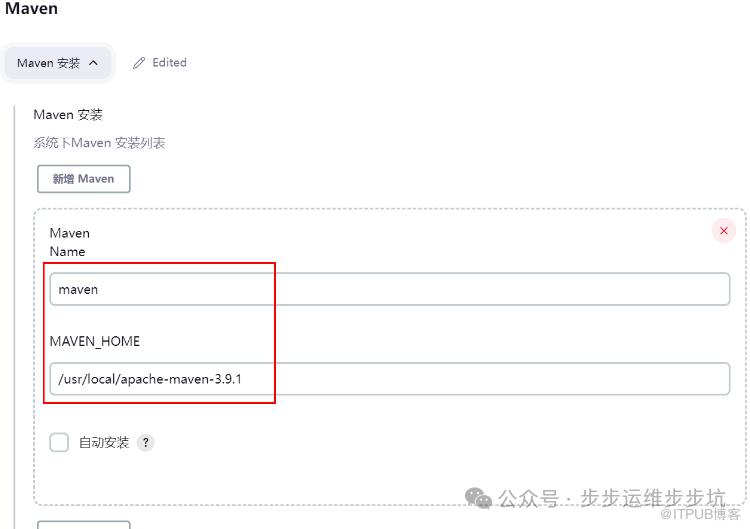
环境工具变量的定义设置位置:“Manage Jenkins”——> “Global Tool Configuration”
1.1、环境变量定义1:JDK Home的定义

1.2、环境变量定义2:Maven Home的定义
2、Script 代码中引用环境变量,调用java、maven工具
stage('env tools') {
    node('docker_node'){
        //定义maven java环境
        def mvnHome = tool 'maven'
        def jdkHome = tool 'jdk11'

        //引用环境变量,配置PATH变量
        env.PATH = "${mvnHome}/bin:${env.PATH}"
        env.PATH = "${jdkHome}/bin:${env.PATH}"

        //调用java mvn 工具
        sh "java -version"
        sh "mvn --version"
    }
}
运行结果

八、JenkinsFile 语法参数 if-else
1、Jenkinsfile 语法二:Scripts pipeline
基于 groovy 语法定制的一种DSL语言灵活性更高可扩展性更好Script pipeline 与 Declarative pipeline 程序构成方式有雷同之处,基本语句也有相似之处
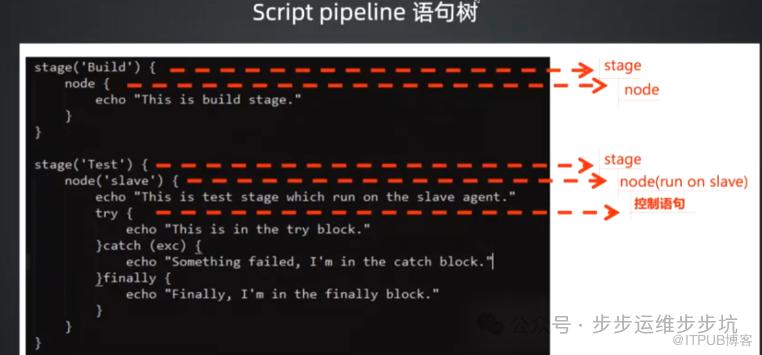
2、Scripts pipeline: 流程控制之 – if/else
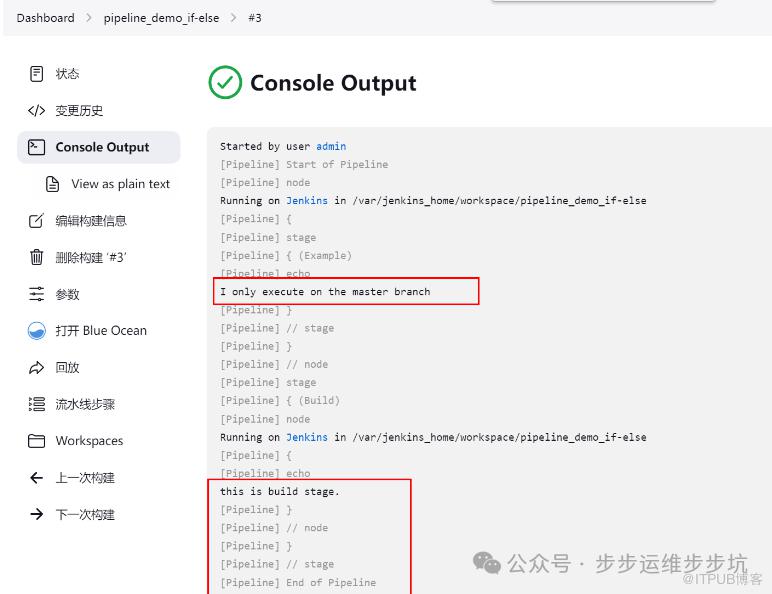
node {
    stage('Example') {
        if (env.BRANCH_NAME == 'master') {
            echo 'I only execute on the master branch'
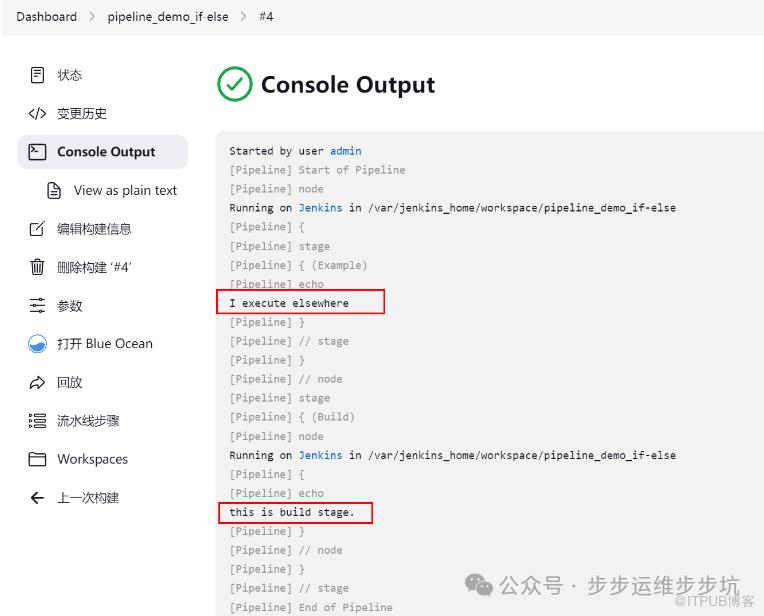
        } else {
            echo 'I execute elsewhere'
        }
    }
}

stage('Build'){
    node {
        echo 'this is build stage.'
    }
}
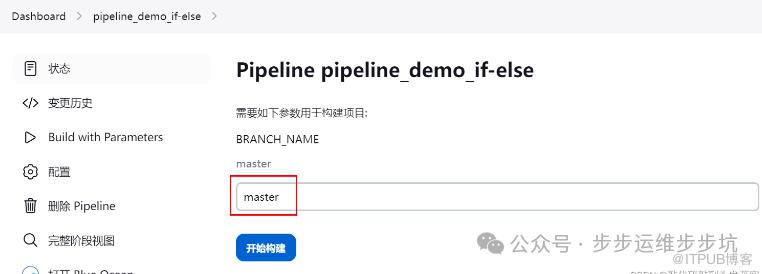
3、采用master构建
4、采用非master构建

九、JenkinsFile 语法参数 try-catch
1、Scripts pipeline: 流程控制之 – try/catch
场景:异常处理,在运行程序的时候,不希望代码的错误,导致程序的退出使用try进行捕获,使用catch对异常的代码进行处理
2、演示出现异常
stage('Test') {
    node{
        echo "This is test stage which run on the slave agent."

        try {

            echo "This is in the try block."

            sh 'exit 1'

        }catch (exc) {

            echo "Something failed, I'm in the catch block."

        }finally {

            echo "Finally, I'm in the finally block."

        }
    }
}
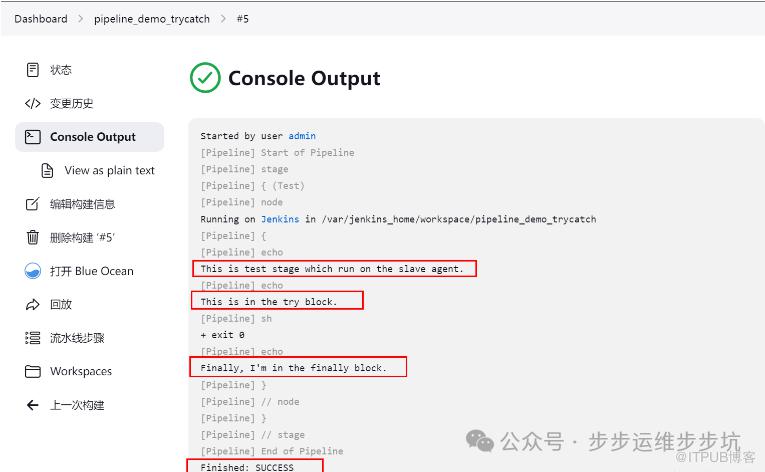
3、演示正常
stage('Test') {
    node{
        echo "This is test stage which run on the slave agent."

        try {

            echo "This is in the try block."

            sh 'exit 0'

        }catch (exc) {

            echo "Something failed, I'm in the catch block."

        }finally {

            echo "Finally, I'm in the finally block."

        }
    }
}
十、JenkinsFile 语法参数 environment
1、Declarative Pipeline - environment
environment: 定义Pipeline或stage运行时的环境变量不是必须出现的指令无参数
2、Declarative Pipeline - environment代码举例
environment {
    hlw = 'hello world'
}
3、environment 运行演示
pipeline {
    agent  {
        node{
            label 'docker_node'
            customWorkspace "myWorkspace"
        }

    }

    environment {
        hlw = 'hello world'
    }

    stages {
        stage('Print environment_1'){
            steps {
                echo hlw
                sleep 1
            }
        }

        stage('Print environment_2'){
            steps {
                sh 'echo ${hlw}'
                sleep 1
            }
        }
    }

    post {
        success {
            echo 'goodbye pipeline success!'
            sleep 5
        }

        failure {
            echo 'ops!!! pipeline failed....'
            sleep 5
        }

        always {
            echo 'always say goodbye'
        }
    }
}
运行结果
十一、JenkinsFile 语法参数 triggers
1、Declarative Pipeline - triggers
triggers:定义了Pipeline自动化触发的方式不是必须出现的指令参数:
cron:接受一个cron风格的字符串来定义Pipeline触发的常规间隔pollSCM:接受一个cron风格的字符串来定义 Jenkins 检查SCM源更改的常规间隔;如果存在新的更改,则Pipeline将被重新触发。
2、Declarative Pipeline - triggers 代码举例
triggers {cron('H/2 * * * *')
}
3、triggers 运行演示
pipeline {agent{node{label 'docker_node'customWorkspace "myWorkspace"}}triggers {cron('H/2 * * * *')}stages{stage('Test Parameters'){steps{echo "Hello"}}}
}
十二、Pipeline 总结
Pipeline 是 Jenkins 2.0之后推出的高阶工具有了Pipeline之后,Jenkins任务可以实现从简单持续集成到全面CI/CD流水线升级的转变可以选择在Jenkins 任务中填写Pipeline script也可以选择利用源码库对Pipeline script进行管理两种Jenkinsfile语法:Declarative Pipeline 与 Script Pipeline语句上有相似之处,可扩展性不同,灵活性也不同

添加博主
微信号|yfq940-
原文作者:步步运维步步坑;如有侵权,请联系管理员删除。

