学习新的语言,第一门课程当然是输出hello world。在这节你将能非常轻松得让单片机运行一段打印hello wolrd 的程序。
准备
在阅读本文之前,如果您还没有配置基础的Rust 开发环境,您可以阅读 环境搭建
本文将基于主板 Py32_Rust_Dev 1.2 演示,在此前你需要准备基本的硬件设备如下
Py32_Rust_dev 1.2 Jlink V9(或 Stlink V2)+ SWD 下载线 需要准备的软件环境如下: Rust (night) thumbv6m-none-eabi -
probe-rs 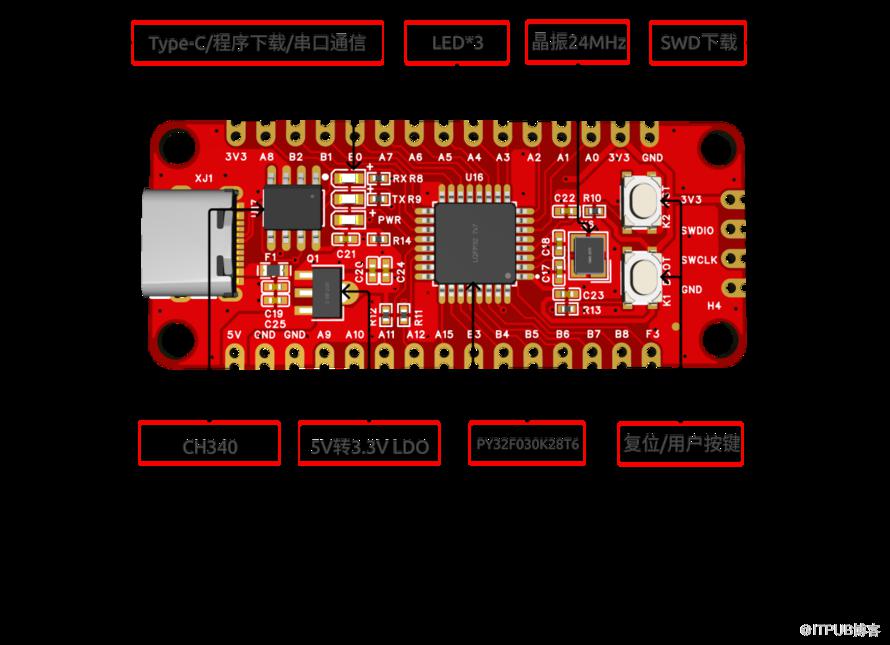
获取代码
你需要获取开发版 Py32_Rust_dev 的 Rust 驱动包,里面有芯片的 Rust 外设驱动以及提供了丰富的学习例程。
使用以下命令获取源码
git clone https://github.com/hysonglet/py32f030-hal.git
测试代码
#![no_std]
#![no_main]

use py32f030_hal as _;

use {defmt_rtt as _, panic_probe as _};

#[cortex_m_rt::entry]
fn main_fun() -> ! {
    defmt::info!("hello world");
    loop {
        cortex_m::asm::wfe();
    }
}
烧录和运行
使用以下命令即可快速编译代码,并且烧录固件到芯片,然后可以在终端中看到 py32f030 的输出打印内容
cargo run --example hello_world
实验结果
➜  py32f030-hal git:(main) ✗ cargo r --example hello_world
warning: unused manifest key: dependencies.embedded-io-async.option
    Finished `dev` profile [optimized + debuginfo] target(s) in 0.16s
     Running `probe-rs run --chip PY32F030x8 target/thumbv6m-none-eabi/debug/examples/hello_world`
      Erasing ✔ [00:00:00] [###############################################################] 12.00 KiB/12.00 KiB @ 92.09 KiB/s (eta 0s )
  Programming ✔ [00:00:02] [##################################################################] 9.50 KiB/9.50 KiB @ 4.18 KiB/s (eta 0s )    Finished in 2.444s
INFO  hello world
└─ hello_world::__cortex_m_rt_main_fun @ examples/hello_world.rs:10

原文作者:Rust嵌入式;如有侵权,请联系管理员删除。
上一篇:
国产芯片 Rust 快速点灯
下一篇:
SWM341单片机运行 Rust

请登录后发表评论
登录
全部评论
