Slint 的所有组件都可显式指定或通过布局约束关系来渲染组件。
几何属性
位置属性: 位置属性名为 x和y,通常可显示指定其值,也可通过表达式计算动态值, 其值为相对父组件的位置,而非相对屏幕的绝对位置。大小属性: 大小属性可由多个属性指定或限制 width,heightpreferred-width,preferred-height:用于指定优先渲染的大小,最终效果可能不为次值。min-width,min-height,max-width,max-height:用于限制最大和最小适应范围
集合属性可由两种单位表示:
物理像素: 使用 phx作为值的后缀,推荐使用逻辑像素: 使用 px作为值的后缀
对于大小的属性指定,可直接使用值来指定,也可使用X%表示该属性为父属性的占比。如 width: 50%表示宽度为父节点宽度的一半。示例如下:
export component Example inherits Window {
    width: 800px;
    height: 480px;
    background: blue;
    Rectangle {
        x: 100px;
        y: 10px;
        width: parent.width/2;
        height: 80%;
        background: red;
        Rectangle {
            x: root.x + 100px;
            y: root.y + 100px;
            width: 100px;
            height: 100px;
            background: green;
        }
    }
}
布局类组件
通常对于控件节点较多的界面,如果指定所有组件的位置和大小,则相对繁琐,且不便于修改。在设计中通常根据 GUI 的层级关系和对齐关系,可使用自动布局的属性,根据 Layout 的特性,让渲染器自动计算出合适的位置和大小。Slint 支持三种基本的布局组件来自动约束节点的位置和大小。
VerticalLayout: 竖直方向依次布局子组件HorizontalLayout: 水平方向依次布局子组件GridLayout: 网格方式依次布局子组件.
测试代码如下:
import { HorizontalBox } from "std-widgets.slint";
export component Example inherits Window {
    width: 800px;
    height: 480px;

    background: green;

    HorizontalLayout {
        VerticalLayout {
            horizontal-stretch: 2;
            spacing: 10px;
            Rectangle {
                background: red;
            }
            Rectangle {
                background: yellow;
            }
        }
        VerticalLayout {
            Rectangle {
                background: blue;
            }
            Rectangle {
                background: blueviolet;
            }
            Rectangle {
                GridLayout {
                    Rectangle {
                        background: gold;
                    }
                    Rectangle {
                        background: gainsboro;
                    }
                    Rectangle {
                        row: 2;
                        background: goldenrod;
                    }
                    Rectangle {
                        row: 2;
                        col: 2;
                        background: royalblue;
                    }
                }
            }
        }
    }
}
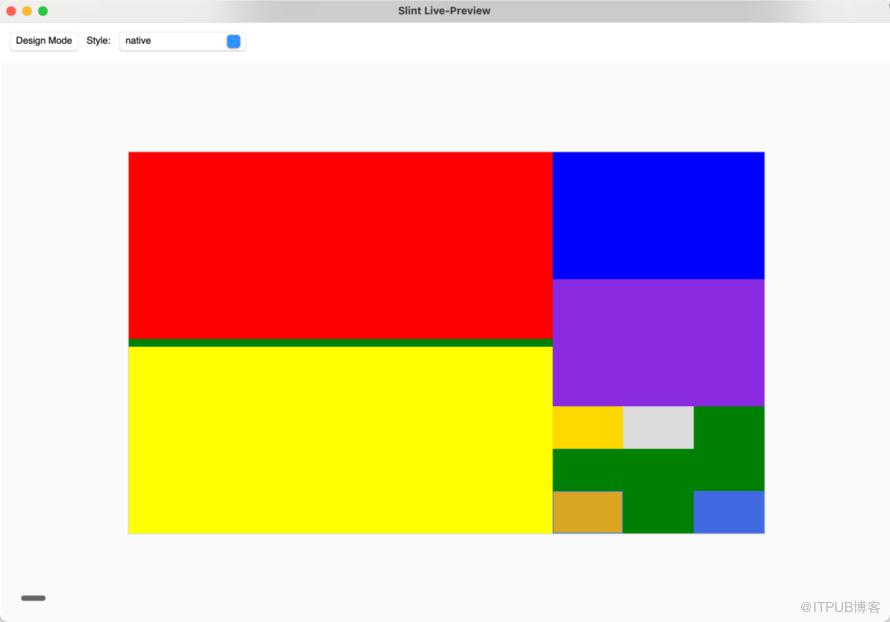 各组件有其他属性可指定大小和起始位置的计算规则,如
spacing: 指定子组件之间的间隔padding:指定子组件相隔父组件边框的间隔alignment:指定子组件的对齐方式
例子如下:
import { HorizontalBox } from "std-widgets.slint";
export component Example inherits Window {
    width: 800px;
    height: 480px;
    background: green;
    HorizontalLayout {
        VerticalLayout {
            spacing: 10px;
            padding: 10px;

            Rectangle {
                background: red;
            }
            Rectangle {
                background: yellow;
            }
        }
        VerticalLayout {
            alignment: LayoutAlignment.center;
            Rectangle {
                background: blue;
                height: 30%;
            }
            Rectangle {
                height: 40%;
                background: blueviolet;
            }
        }
    }
}
原文作者:Rust嵌入式;如有侵权,请联系管理员删除。
上一篇:
嵌入式 Rust 中断向量表详解
下一篇:
Slint 基础介绍(一)

请登录后发表评论
登录
全部评论
