
三、案例:豆瓣电影Top 250抓取
思路:
获取页面源代码;
编写正则表达式,提取页面数据;
保存数据。
需要用到的第三方库:
import requestsimport re
3.1 获取页面源代码
base_url = "https://movie.douban.com/top250"headers = {"User-Agent": "Mozilla/5.0 (Windows NT 10.0; Win64; x64) AppleWebKit/537.36 (KHTML, like Gecko) Chrome/102.0.0.0 Safari/537.36"}resp = requests.get(url=base_url, headers=headers)resp.encoding = 'utf-8'pageSource = resp.text
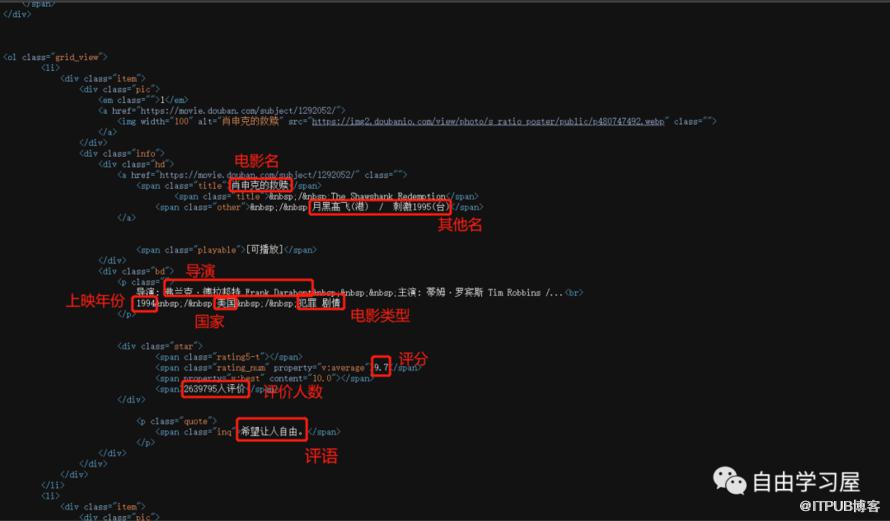
此处的 headers 是为了模仿人为操作浏览器行为,若缺少可能获取不到页面源代码。此外,若获取到的页面源代码中出现中文乱码,则加上 resp.encoding = 'utf-8' 将编码字符集设为 utf-8即可。获取到的页面源代码如下所示:
3.2 正则表达式编写
我们想抓取的目标信息为上图中红框标注的内容,主要包括:电影名称、其他名称、导演、上映年份、国家、电影类型、评分、评价人数、第一引用评语。
根据此html结构以及每个待抓取信息的特征,可编写如下正则表达式:
obj = re.compile(r'<div class="item">.*?<span class="title">(?P<movieName>.*?)</span>.*?'r'<span class="other"> / (?P<otherName>.*?)</span>.*?'r'<p class="">.*?导演: (?P<director>.*?) .*?<br>'r'(?P<year>.*?) / 'r'(?P<country>.*?) / 'r'(?P<category>.*?)</p>.*?'r'<span class="rating_num" property="v:average">(?P<score>.*?)</span>.*?'r'<span>(?P<evalNum>.*?)人评价</span>.*?'r'<span class="inq">(?P<quote>.*?)</span>.*?', re.S)
其中,re.S 可以让正则表达式中的点.匹配换行符。而compile()函数用于提前将正则表达式编译好,需要时直接拿来用即可,这样更方便且能在一定程度上节省开销。
3.3 提取页面数据
我们使用前面讲过的finditer()函数匹配结果,然后循环取出数据:
result = obj.finditer(pageSource)for item in result:movieName = item.group("movieName")otherName = item.group("otherName")director = item.group("director")year = item.group("year").strip()country = item.group("country")category = item.group("category").strip()score = item.group("score")evalNum = item.group("evalNum")quote = item.group("quote")
注意:group()函数中的名称必须正则表达式中?P后面的名称一致,否则取不到数据。
3.4 保存数据
将提取到的数据保存到CSV文件中:
f = open("豆瓣电影top250.csv", mode="w", encoding="utf-8")f.write(f"{movieName},{otherName},{director},{year},{country},{category},{score},{evalNum},{quote}\n")# 关闭文件,释放资源f.close()resp.close()
注意:实际上此处的保存数据代码应该放到3.3中的循环中,即边提取边写入文件。只不过是为了逻辑表述清晰,才单独拿出来说明。
3.5 拓展:翻页提取
翻页提取其实只需要使用合适的循环即可实现,这其中有两个关键点:
-
最大页数的获取。可通过正则从页面源代码中匹配得到:
pages = re.findall(r'<a href="\?start=225&filter=" >(\d+)</a>', pageSource, re.S)[0]注意:由于该正则表达式中含有元字符?,因此必须使用转义字符(\)对其进行转义,否则无法提取到最大页数。 每页的URL地址。通过观察,我们发现每页的URL跟当前页数有关,URL(https://movie.douban.com/top250?start=25&filter=)中
start的值等于当前页减去1后再乘以25,即start=(curPage-1)*25。因此,可通过页数循环来得到每页的URL地址。
通过以上分析,翻页提取的实现代码如下:
for page in range(1, int(pages)+1):url = base_url + f'?start={(page-1)*25}&filter='resp = requests.get(url=url, headers=headers)resp.encoding = 'utf-8'pageSource = resp.textresult = obj.finditer(pageSource)for item in result:movieName = item.group("movieName")otherName = item.group("otherName")director = item.group("director")year = item.group("year").strip()country = item.group("country")category = item.group("category").strip()score = item.group("score")evalNum = item.group("evalNum")quote = item.group("quote")f.write(f"{movieName},{otherName},{director},{year},{country},{category},{score},{evalNum},{quote}\n")
完整代码:
import requestsimport ref = open("豆瓣电影top250.csv", mode="w", encoding="utf-8")base_url = "https://movie.douban.com/top250"headers = {"User-Agent": "Mozilla/5.0 (Windows NT 10.0; Win64; x64) AppleWebKit/537.36 (KHTML, like Gecko) Chrome/102.0.0.0 Safari/537.36"}resp = requests.get(url=base_url, headers=headers)resp.encoding = 'utf-8' # 解决中文乱码问题pageSource = resp.textpages = re.findall(r'<a href="\?start=225&filter=" >(\d+)</a>', pageSource, re.S)[0]obj = re.compile(r'<div class="item">.*?<span class="title">(?P<movieName>.*?)</span>.*?'r'<span class="other"> / (?P<otherName>.*?)</span>.*?'r'<p class="">.*?导演: (?P<director>.*?) .*?<br>'r'(?P<year>.*?) / 'r'(?P<country>.*?) / 'r'(?P<category>.*?)</p>.*?'r'<span class="rating_num" property="v:average">(?P<score>.*?)</span>.*?'r'<span>(?P<evalNum>.*?)人评价</span>.*?'r'<span class="inq">(?P<quote>.*?)</span>.*?', re.S)# 翻页抓取for page in range(1, int(pages)+1):url = base_url + f'?start={(page-1)*25}&filter='resp = requests.get(url=url, headers=headers)resp.encoding = 'utf-8' # 解决中文乱码问题pageSource = resp.textresult = obj.finditer(pageSource)for item in result:movieName = item.group("movieName")otherName = item.group("otherName")director = item.group("director")year = item.group("year").strip() # strip():去除字符串左右两端的空格country = item.group("country")category = item.group("category").strip()score = item.group("score")evalNum = item.group("evalNum")quote = item.group("quote")# print(movieName, otherName, director, year, country, category, score, evalNum, quote)# 保存到CSV文件f.write(f"{movieName},{otherName},{director},{year},{country},{category},{score},{evalNum},{quote}\n")# 关闭文件,释放资源f.close()resp.close()print("豆瓣电影250提取完毕!")
提取结果如下图所示:

爬虫前进之路,任!我!行!

原文作者:数据派探险家;如有侵权,请联系管理员删除。

最新文章
- 5个被过度高估的Python库(你绝对想不到)!
- 不掌握这10个Python概念,请不要自称高级开发人员(二)~~
- 不掌握这10个Python概念,请不要自称高级开发人员(一)~~
- 数据分析面试:你认为数据分析的价值如何体现?
- Python必知必会:使用 dedent() 方法优雅地展示多行字符串!
- Python必知必会:39个Python关键字详解,你的编程查阅小手册,收藏!
- Python必知必会:每个程序员都必须知道的22个Python单行代码!
- Python必知必会:15个令人相见恨晚的Python字符串格式化技巧!
- 24个令人眼前一亮的Python技巧—提升你的代码水平和质量(二)
- 24个令人眼前一亮的Python技巧—提升你的代码水平和质量(一)
