关注并标星 3分钟秒懂大数据
每天1次,打卡阅读
获取AI、大数据技术和面经
大家好,我是土哥。
目前在某互联网大厂担任大数据算法工程师。
今天有位粉丝在群里发信息,问有没有Flink DDL的使用资料,说自己是Flink刚入门的学习者。
为了让这位粉丝快速学会 Flink DDL 使用步骤,下面我将通过Kafka - Flink -Hive这个案例,讲解一下原理,并附上实战代码。
1、Flink-Hive理论
1.1、Flink-Hive介绍
在Flink 1.11 版本中,社区新增了一大功能是实时数仓,可以通过kafka,将kafka sink端的数据实时写入到Hive中。
为实现这个功能、Flink1.11 版本主要做了以下改变:
将 FlieSystemStreaming Sink 重新修改,增加了分区提交和滚动策略机制。 让HiveStreaming sink 重新使用文件系统流作为接收器。
可以通过Flink社区,查看FLIP-85 Filesystem connector in Table的设计思路。
1.2、Flink-Hive集成原理
Flink与Hive集成原理图如下:
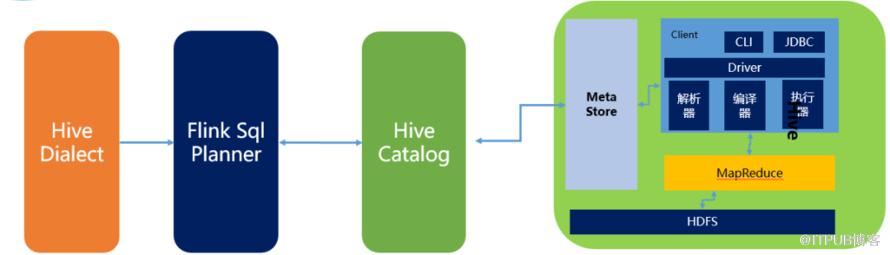 主要包含三部分内容:
HiveDialect。 Flink1.1新引入了Hive方言,所以在Flink SQL中可以编写HIve语法,即Hive Dialect。编写HIve SQL后, FlinkSQL Planner会将SQL进行解析,验证,转换成逻辑计划,物理计划,最终变成Jobgraph。HiveCatalog。 HiveCatalog作为Flink和Hive的持久化介质,会将不同会话的Flink元数据存储到Hive Metastore中。
1.3、Flink-Hive版本支持
Flink目前支持Hive的1.x、2.x、3.x,每个大的版本对于的Flink依赖如下:
1.4、Flink SQL支持Hive语言
Flink SQL支持两种SQL语言,分别为default和hive。
配置方式也包含两种,配置如下图所示:
通过客户端配置。
通过SQL配置。
2、kafka-Flink-Hive 集群配置
需求:实时将kafka中的数据通过flink Sql 计算 存储到hive数据仓库中。
2.1集群部署
配置信息如下:
Hadoop: hadoop2.6.4 Kafka: kafka_2.11-2.2.0 Flink: flink1.13.0 Hive: hive-2.3.4-bin Zookeeper: zookeeper-3.4.5
2.2 查询结果要求
希望Flink Sql 查询kafka输入的数据的表结构如下:
希望FlinkSQL实时将kafka中的数据插入Hive 查询的结果根据分区查询如下:
2.3 kafka启动命令
kafka启动
nohup ./kafka-server-start.sh ../config/server.properties &
查看kafka Topic
./kafka-topics.sh --list --bootstrap-server 192.168.244.161:9092 //查看是否有需要用到的topic主题
创建kafka Topic
kafka-topics.sh --create --bootstrap-server 192.168.244.161:9092 --topic test --partitions 10 --replication-factor 1
启动kafka生产者 让批量传输数据
kafka-console-producer.sh --broker-list 192.168.244.161:9092 --topic test
往kafka中批量传入的数据源
{"user_id": "1", "order_amount":"124.5", "log_ts": "2020-08-24 10:20:15"}
{"user_id": "2", "order_amount":"38.4", "log_ts": "2020-08-24 11:20:15"}
{"user_id": "3", "order_amount":"176.9", "log_ts": "2020-08-25 13:20:15"}
{"user_id": "4", "order_amount":"302", "log_ts": "2020-08-25 14:20:15"}
{"user_id": "5", "order_amount":"124.5", "log_ts": "2020-08-26 14:26:15"}
{"user_id": "6", "order_amount":"38.4", "log_ts": "2020-08-26 15:20:15"}
{"user_id": "7", "order_amount":"176.9", "log_ts": "2020-08-27 16:20:15"}
{"user_id": "8", "order_amount":"302", "log_ts": "2020-08-27 17:20:15"}
{"user_id": "9", "order_amount":"124.5", "log_ts": "2020-08-24 10:20:15"}
{"user_id": "10", "order_amount":"124.6", "log_ts": "2020-08-24 10:21:15"}
{"user_id": "11", "order_amount":"124.7", "log_ts": "2020-08-24 10:22:15"}
{"user_id": "12", "order_amount":"124.8", "log_ts": "2020-08-24 10:23:15"}
{"user_id": "13", "order_amount":"124.9", "log_ts": "2020-08-24 10:24:15"}
{"user_id": "14", "order_amount":"125.5", "log_ts": "2020-08-24 10:25:15"}
{"user_id": "15", "order_amount":"126.5", "log_ts": "2020-08-24 10:26:15"}
2.4 Hive集成Flink
hive安装 修改hive-env.sh
# Set HADOOP_HOME to point to a specific hadoop install directory
HADOOP_HOME=/root/sd/hadoop-2.6.4

# Hive Configuration Directory can be controlled by:
export HIVE_CONF_DIR=/root/sd/apache-hive-2.3.4-bin/conf

# Folder containing extra libraries required for hive compilation/execution can be controlled by:
export HIVE_AUX_JARS_PATH=/root/sd/apache-hive-2.3.4-bin/lib
由于hive的文件本身就在hdfs中保存的,所以需要指定Hadoop_Home的路径,同时指定配置文件路径和依赖包的路径。
修改hive-site.xml文件
<!--指定mysql数据库连接的database-->
<property>
<name>javax.jdo.option.ConnectionURL</name>
<value>jdbc:mysql://192.168.244.161:3306/hive?createDatabaseIfNotExist=true</value>
<description>JDBC connect string for a JDBC metastore</description>
</property>
<property>
<name>javax.jdo.option.ConnectionDriverName</name>
<value>com.mysql.jdbc.Driver</value>
<description>Driver class name for a JDBC metastore</description>
</property>
<property>
<name>javax.jdo.option.ConnectionUserName</name>
<value>root</value>
<description>username to use against metastore database</description>
</property>
<property>
<name>javax.jdo.option.ConnectionPassword</name>
<value>123456</value>
<description>password to use against metastore database</description>
</property>
<property>
<name>hive.metastore.uris</name>
<value>thrift://hlink163:9083</value>
<description>Thrift URI for the remote metastore. Used by metastore client to connect to remote metastore.</description>
</property>
<property>
<name>datanucleus.schema.autoCreateAll</name>
<value>true</value>
</property>
<property>
<name>hive.server2.logging.operation.log.location</name>
<value>/root/sd/apache-hive-2.3.4-bin/tmp/operation_logs</value>
<description>Top level directory where operation logs are stored if logging functionality is enabled</description>
</property>
<property>
<name>hive.exec.scratchdir</name>
<value>/root/sd/apache-hive-2.3.4-bin/tmp/hive</value>
<description>HDFS root scratch dir for Hive jobs which gets created with write all (733) permission. For each connecting user, an HDFS scratch dir: ${hive.exec.scratchdir}/<username> is created, with ${hive.scratch.dir.permission}. </description>
</property>
<property>
<name>hive.exec.local.scratchdir</name>
<value>/root/sd/apache-hive-2.3.4-bin/tmp/hive/local</value>
<description>Local scratch space for Hive jobs</description>
</property>
<property>
<name>hive.downloaded.resources.dir</name>
<value>/root/sd/apache-hive-2.3.4-bin/tmp/hive/resources</value>
<description>Temporary local directory for added resources in the remote file system.</description>
</property>
添加Flink与Hadoop的依赖 在flink-conf.yaml 中添加hadoop依赖.
2.5 Hive集群启动
启动hive服务器
hive --service metastore //端口号9083
可以使用命令查询一下,看是否启动成功
netstat -ntpl | grep 90832.6 Flink集群启动
启动Flink SQL(在bin目录下)
./sql-client.sh embedded -d ../conf/sql-client-defaults.yaml
在flink sql 下查看hive的catalogs
show catalogs
结果如下: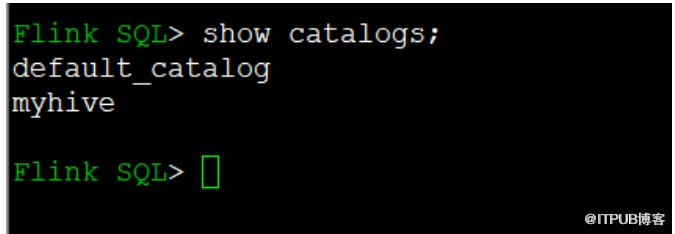
使用myhive catalog
use catalog myhive;
show tables;
3、kafka-Flink-Hive DDL
3.1、创建flink读取kafka的表(source)
# 指定使用flink sql默认的语言
SET table.sql-dialect=default;
CREATE TABLE log_kafka (
  user_id STRING,
  order_amount DOUBLE,
  log_ts TIMESTAMP(3),
  WATERMARK FOR log_ts AS log_ts - INTERVAL '5' SECOND
) WITH (
   'connector' = 'kafka',
   'topic' = 'test',
   'properties.bootstrap.servers' = '192.168.244.161:9092',
   'scan.startup.mode' = 'earliest-offset',
   'format' = 'json',
   'json.ignore-parse-errors' = 'true',
   'json.fail-on-missing-field' = 'false',
   'properties.group.id' = 'flink1'
);
kafka消费的启动模式有 'earliest-offset', 'latest-offset', 'group-offsets', 'timestamp', 'specific-offsets'等
3.2、创建flink写入hive表(sink)
SET table.sql-dialect=hive;
CREATE TABLE log_hive (
  user_id STRING,
  order_amount DOUBLE
) PARTITIONED BY (dt STRING, hr STRING) STORED AS parquet TBLPROPERTIES (
  'partition.time-extractor.timestamp-pattern'='$dt $hr:00:00',
  'sink.partition-commit.trigger'='partition-time',
  'sink.partition-commit.delay'='1min',
  'sink.semantic' = 'exactly-once',
  'sink.rolling-policy.file-size'='128MB',
  'sink.rolling-policy.rollover-interval' ='1min',
  'sink.rolling-policy.check-interval'='1min',
  'sink.partition-commit.policy.kind'='metastore,success-file'
);
配置解释:
'sink.partition-commit.trigger'='partition-time',
-- 使用partition中抽取时间,加上watermark决定partiton commit的时机'partition.time-extractor.timestamp-pattern'='$dt $hour:00:00',
-- 配置hour级别的partition时间抽取策略,这个例子中dt字段是yyyy-MM-dd格式的天,hour是0-23的小时,timestamp-pattern定义了如何从这两个partition字段推出完整的timestamp'sink.partition-commit.delay'='1 min',
-- 配置dalay为分钟级,当 watermark > partition时间 + 1分钟,会commit这个partition'sink.partition-commit.policy.kind’='metastore,success-file'
-- partitiion commit的策略是:先更新metastore(addPartition),再写SUCCESS文件
3.3、将数据插入hive中
INSERT INTO TABLE log_hive SELECT user_id, order_amount,DATE_FORMAT(log_ts, 'yyyy-MM-dd'), DATE_FORMAT(log_ts, 'HH') FROM log_kafka;
3.4、查询结果
-- batch sql, select with partition pruning
SELECT * FROM hive_table WHERE dt='2020-08-25' and hr='16';
4、kafka-Flink-Hive Table API编写
4.1 pom.xml配置
<?xml version="1.0" encoding="UTF-8"?>
<project xmlns="http://maven.apache.org/POM/4.0.0"
         xmlns:xsi="http://www.w3.org/2001/XMLSchema-instance"
         xsi:schemaLocation="http://maven.apache.org/POM/4.0.0 http://maven.apache.org/xsd/maven-4.0.0.xsd">
    <modelVersion>4.0.0</modelVersion>

    <groupId>com.flink</groupId>
    <artifactId>flinkhive</artifactId>
    <packaging>jar</packaging>
    <version>1.0-SNAPSHOT</version>
    <properties>
        <scala.bin.version>2.11</scala.bin.version>
        <flink.version>1.13.0</flink.version>
        <hadoop.version>2.6.4</hadoop.version>
        <hive.version>2.3.4</hive.version>
    </properties>

    <dependencies>
    <dependency>
        <groupId>org.apache.flink</groupId>
        <artifactId>flink-streaming-scala_${scala.bin.version}</artifactId>
        <version>${flink.version}</version>
    </dependency>
    <dependency>
        <groupId>org.apache.flink</groupId>
        <artifactId>flink-streaming-java_${scala.binary.version}</artifactId>
        <version>${flink.version}</version>
    </dependency>
    <dependency>
        <groupId>org.apache.flink</groupId>
        <artifactId>flink-clients_${scala.bin.version}</artifactId>
        <version>${flink.version}</version>
    </dependency>
    <dependency>
        <groupId>org.apache.flink</groupId>
        <artifactId>flink-table-common</artifactId>
        <version>${flink.version}</version>
    </dependency>
    <dependency>
        <groupId>org.apache.flink</groupId>
        <artifactId>flink-table-api-scala-bridge_${scala.bin.version}</artifactId>
        <version>${flink.version}</version>
    </dependency>
    <dependency>
        <groupId>org.apache.flink</groupId>
        <artifactId>flink-table-planner-blink_${scala.bin.version}</artifactId>
        <version>${flink.version}</version>
    </dependency>
    <dependency>
        <groupId>org.apache.flink</groupId>
        <artifactId>flink-connector-hive_${scala.bin.version}</artifactId>
        <version>${flink.version}</version>
    </dependency>
    <dependency>
        <groupId>org.apache.flink</groupId>
        <artifactId>flink-sql-connector-kafka_${scala.bin.version}</artifactId>
        <version>${flink.version}</version>
    </dependency>
    <dependency>
        <groupId>org.apache.flink</groupId>
        <artifactId>flink-json</artifactId>
        <version>${flink.version}</version>
    </dependency>
        <dependency>
            <groupId>org.apache.hadoop</groupId>
            <artifactId>hadoop-common</artifactId>
            <version>${hadoop.version}</version>
        </dependency>

        <dependency>
            <groupId>org.apache.hadoop</groupId>
            <artifactId>hadoop-hdfs</artifactId>
            <version>${hadoop.version}</version>
        </dependency>

        <dependency>
            <groupId>org.apache.hadoop</groupId>
            <artifactId>hadoop-yarn-client</artifactId>
            <version>${hadoop.version}</version>
        </dependency>

        <dependency>
            <groupId>org.apache.hadoop</groupId>
            <artifactId>hadoop-mapreduce-client-core</artifactId>
            <version>${hadoop.version}</version>
        </dependency>
    <dependency>
        <groupId>org.apache.hive</groupId>
        <artifactId>hive-exec</artifactId>
        <version>${hive.version}</version>
    </dependency>
    </dependencies>
</project>
4.2 代码存放路径截图
Scala版本代码:
import java.time.Duration

import org.apache.flink.streaming.api.{CheckpointingMode, TimeCharacteristic}
import org.apache.flink.streaming.api.environment.ExecutionCheckpointingOptions
import org.apache.flink.streaming.api.scala.StreamExecutionEnvironment
import org.apache.flink.table.api.{EnvironmentSettings, SqlDialect}
import org.apache.flink.table.api.bridge.scala.StreamTableEnvironment
import org.apache.flink.table.catalog.hive.HiveCatalog

object KafkaToHive {
  def main(args: Array[String]): Unit = {
    val streamEnv = StreamExecutionEnvironment.getExecutionEnvironment
    streamEnv.setStreamTimeCharacteristic(TimeCharacteristic.EventTime)
    streamEnv.setParallelism(3)

    val tableEnvSettings = EnvironmentSettings.newInstance()
      .useBlinkPlanner()
      .inStreamingMode()
      .build()
    val tableEnv = StreamTableEnvironment.create(streamEnv, tableEnvSettings)
    tableEnv.getConfig.getConfiguration.set(ExecutionCheckpointingOptions.CHECKPOINTING_MODE, CheckpointingMode.EXACTLY_ONCE)
    tableEnv.getConfig.getConfiguration.set(ExecutionCheckpointingOptions.CHECKPOINTING_INTERVAL, Duration.ofSeconds(20))


    val catalogName = "my_catalog"
    val catalog = new HiveCatalog(
      catalogName,              // catalog name
      "default",                // default database
      "./src/main/resources",  // Hive config (hive-site.xml) directory
      "2.3.4"                   // Hive version
    )
    tableEnv.registerCatalog(catalogName, catalog)
    tableEnv.useCatalog(catalogName)

    tableEnv.executeSql("CREATE DATABASE IF NOT EXISTS stream_tmp")
    tableEnv.executeSql("DROP TABLE IF EXISTS stream_tmp.log_kafka")

    tableEnv.executeSql(
      """
        |CREATE TABLE stream_tmp.log_kafka (
        |  user_id STRING,
        |  order_amount DOUBLE,
        |  log_ts TIMESTAMP(3),
        |  WATERMARK FOR log_ts AS log_ts - INTERVAL '5' SECOND
        |) WITH (
        |  'connector' = 'kafka',
        |  'topic' = 'test',
        |  'properties.bootstrap.servers' = 'hlink163:9092',
        |  'properties.group.id' = 'flink1',
        |  'scan.startup.mode' = 'earliest-offset',
        |  'format' = 'json',
        |  'json.fail-on-missing-field' = 'false',
        |  'json.ignore-parse-errors' = 'true'
        |)
      """.stripMargin
    )


    tableEnv.getConfig.setSqlDialect(SqlDialect.HIVE)

    tableEnv.executeSql("CREATE DATABASE IF NOT EXISTS hive_tmp")
    tableEnv.executeSql("DROP TABLE IF EXISTS hive_tmp.log_hive")

    tableEnv.executeSql(
      """
        |CREATE TABLE hive_tmp.log_hive (
        |  user_id STRING,
        |  order_amount DOUBLE
        |) PARTITIONED BY (
        |   dt STRING,
        |   hr STRING
        |) STORED AS PARQUET
        |TBLPROPERTIES (
        |  'sink.partition-commit.trigger' = 'partition-time',
        |  'sink.partition-commit.delay' = '1 min',
        |  'format' = 'json',
        |  'sink.partition-commit.policy.kind' = 'metastore,success-file',
        |  'partition.time-extractor.timestamp-pattern'='$dt $hr:00:00'
        |)
      """.stripMargin
    )
    tableEnv.getConfig.setSqlDialect(SqlDialect.DEFAULT)
    tableEnv.executeSql(
      """
        |INSERT INTO hive_tmp.log_hive
        |SELECT
        |  user_id,
        |  order_amount,
        |  DATE_FORMAT(log_ts, 'yyyy-MM-dd'), DATE_FORMAT(log_ts, 'HH')
        |  FROM stream_tmp.log_kafka
      """.stripMargin
    )

  }
}
java版本代码:
import org.apache.flink.streaming.api.CheckpointingMode;
import org.apache.flink.streaming.api.TimeCharacteristic;
import org.apache.flink.streaming.api.environment.ExecutionCheckpointingOptions;
import org.apache.flink.streaming.api.environment.StreamExecutionEnvironment;
import org.apache.flink.table.api.EnvironmentSettings;
import org.apache.flink.table.api.SqlDialect;
import org.apache.flink.table.api.bridge.java.StreamTableEnvironment;
import org.apache.flink.table.catalog.hive.HiveCatalog;

import java.time.Duration;

/**
 * 类描述:
 *
 * @ClassName KafkaToHive
 * @Description:
 * @Author: lyz
 * @Date: 2021/9/6 下午9:50
 */
public class KafkaToHive {
    public static void main(String[] args) {
        StreamExecutionEnvironment senv = StreamExecutionEnvironment.getExecutionEnvironment();
        senv.setStreamTimeCharacteristic(TimeCharacteristic.EventTime);
        senv.setParallelism(3);
        EnvironmentSettings tableEnvSettings = EnvironmentSettings.newInstance().useBlinkPlanner().inStreamingMode()
                .build();

        StreamTableEnvironment tableEnv = StreamTableEnvironment.create(senv, tableEnvSettings);

        //
        tableEnv.getConfig().getConfiguration().set(ExecutionCheckpointingOptions.CHECKPOINTING_MODE, CheckpointingMode.EXACTLY_ONCE);

        tableEnv.getConfig().getConfiguration().set(ExecutionCheckpointingOptions.CHECKPOINTING_INTERVAL, Duration.ofSeconds(20));

        String catalogName = "my_catalog";

        HiveCatalog catalog = new HiveCatalog(
                catalogName,              // catalog name
                "default",                // default database
                "./src/main/resources",  // Hive config (hive-site.xml) directory
                "2.3.4"                   // Hive version
        );

        tableEnv.registerCatalog(catalogName, catalog);
        tableEnv.useCatalog(catalogName);

        tableEnv.executeSql("CREATE DATABASE IF NOT EXISTS stream_tmp");
        tableEnv.executeSql("DROP TABLE IF EXISTS stream_tmp.log_kafka");

        tableEnv.executeSql("create table stream_tmp.log_kafka(" +
                                "user_id String,\n" +
                                "order_amount Double,\n" +
                                "log_ts Timestamp(3),\n" +
                                "WATERMARK FOR log_ts AS log_ts -INTERVAL '5' SECOND" +
                        ")WITH(" +
                                " 'connector' = 'kafka',\n" +
                                "'topic' = 'test',\n" +
                                " 'properties.bootstrap.servers' = '192.168.244.161:9092',\n" +
                                "'properties.group.id' = 'flink1',\n" +
                                "'scan.startup.mode' = 'earliest-offset',\n" +
                                "'format' = 'json',\n" +
                                "'json.fail-on-missing-field' = 'false',\n" +
                                "'json.ignore-parse-errors' = 'true'" +
                        ")");
        tableEnv.getConfig().setSqlDialect(SqlDialect.HIVE);

        tableEnv.executeSql("CREATE DATABASE IF NOT EXISTS hive_tmp");
        tableEnv.executeSql("DROP TABLE IF EXISTS hive_tmp.log_hive");

        tableEnv.executeSql(" CREATE TABLE hive_tmp.log_hive (\n" +
                "                     user_id STRING,\n" +
                "                     order_amount DOUBLE\n" +
                "           ) PARTITIONED BY (\n" +
                "                     dt STRING,\n" +
                "                     hr STRING\n" +
                "           ) STORED AS PARQUET\n" +
                "             TBLPROPERTIES (\n" +
                "                    'sink.partition-commit.trigger' = 'partition-time',\n" +
                "                    'sink.partition-commit.delay' = '1 min',\n" +
                "                    'format' = 'json',\n" +
                "                    'sink.partition-commit.policy.kind' = 'metastore,success-file',\n" +
                "                    'partition.time-extractor.timestamp-pattern'='$dt $hr:00:00'" +
                "           )");
        tableEnv.getConfig().setSqlDialect(SqlDialect.DEFAULT);
        tableEnv.executeSql("" +
                "        INSERT INTO hive_tmp.log_hive\n" +
                "        SELECT\n" +
                "               user_id,\n" +
                "               order_amount,\n" +
                "               DATE_FORMAT(log_ts, 'yyyy-MM-dd'), DATE_FORMAT(log_ts, 'HH')\n" +
                "               FROM stream_tmp.log_kafka");
    }
}
以上就是Kafka-Flink-Hive的所有内容!觉得好的,点赞,在看,分享三连击,谢谢!!!
End
最近整理了一份计算机类的书籍,包含python、java、大数据、人工智能、算法等,种类特别齐全。 获取方式:关注公众号:3分钟秒懂大数据,回复:福利,就可以获得这份超级大礼! 往期推荐
史上最全干货!Flink面试大全总结(全文6万字、110个知识点、160张图)

原文作者:3分钟秒懂大数据;如有侵权,请联系管理员删除。

最新文章
- 大数据面试,被问到频率最高的三道考题,值得一看~
- 工作中常用的50+ Linux 命令,建议收藏~
- 字节面试sql题:有一张工资表,字段分别是:员工工号、部门、工资。要求各部门除去最高工资和最低工资后的平均工资
- 一篇忍不住看很多遍的数据建模理论与实践(7000字+25张图)
- 网易云音乐P0级事故!官方回应:未删库,未跑路!
- 我发现很多计算机专业的学生都长期处于迷茫中...
- 离职流程都走完了,领导又分了一个新任务让我要么工作日加班,要么周末加班,两周搞完...
- HR最认可的5个离职原因:1、个人发展空间受限;2、公司组织结构变化;3、工作内容与职业发展不匹配...
- 月薪4.5w,离职后每月只补偿2590元,违约就要赔100万!
- 这是雷军的简历,落魄时卡里只有冰冷的40亿...
