导读
有在关注小南瓜开发平台的同学们应该有印象,在上个月,每天都有发布关于three.js的使用案例。40篇文章中,每一篇文章、每一个案例都是一个个代码码出来后,通过多次验证后才进行发布。
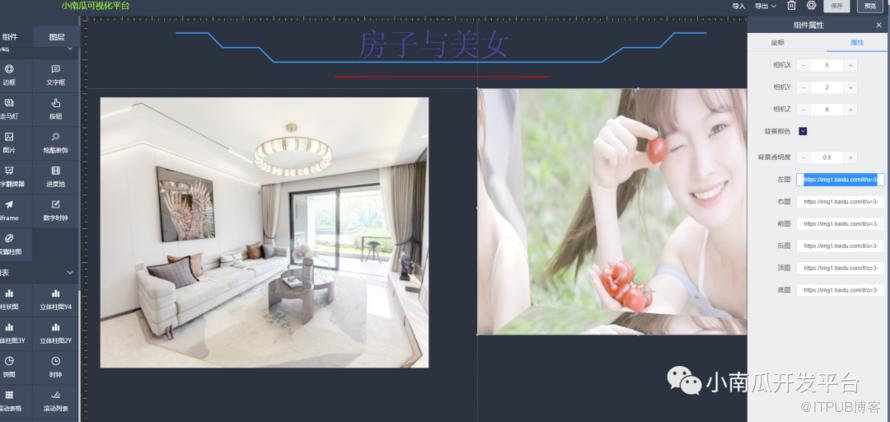
现已将组件与可视化平台进行集成,可在小南瓜可视化平台上通过拖拉拽的方式快速构建全景应用。
使用教程:
如需其他3D组件,也可以自定义开发扩展组件
示例演示地址:
http://www.nangs.vip:3389/#/view?id=050c7d8d2ef22b3fa73378b210e6bb38
代码:
<template><div :id="uuid" style="width: 100%;height:100%;"></div></template><script>import * as THREE from "three";import { OrbitControls } from 'three/examples/jsm/controls/OrbitControls.js';import { RoomEnvironment } from 'three/examples/jsm/environments/RoomEnvironment.js';import img4_l from "@/assets/living/4_l.jpg";import img4_r from "@/assets/living/4_r.jpg";import img4_u from "@/assets/living/4_u.jpg";import img4_d from "@/assets/living/4_d.jpg";import img4_b from "@/assets/living/4_b.jpg";import img4_f from "@/assets/living/4_f.jpg";export default {name: "cpt-threeJs-room",title: "VR全景",icon: 'el-icon-office-building',initWidth: 400,initHeight: 300,group: 'threeD',props:{width:Number,height:Number,option:Object},watch:{'option.attribute':{handler(obj,newObj) {this.reloadOption(newObj);},deep: true//深度监听},width(){this.renderer.setSize(this.width, this.height);},height(){this.renderer.setSize(this.width, this.height);}},data() {return {uuid:'',camera: null,scene: null,renderer: null,model:null,controls:null,clock:null,mixer:null,animate:null,roomLeft: null,roomRight: null,roomFront: null,roomBack: null,roomTop: null,roomDown: null};},created() {this.uuid = require('uuid').v1();},mounted() {this.initScene();},methods: {reloadOption(attribute){//配置项加载console.log("reloadOption");this.renderer.setClearColor(new THREE.Color( attribute.bgColor ), attribute.bgAlpha);this.camera.position.set( attribute.cameraX, attribute.cameraY, attribute.cameraZ );//环境光const pmremGenerator = new THREE.PMREMGenerator( this.renderer );this.scene.environment = pmremGenerator.fromScene( new RoomEnvironment(), 0.02 ).texture;//控件对象this.controls = new OrbitControls(this.camera, this.renderer.domElement);this.controls.target.set( 0, 0.5, 0 );this.controls.enablePan = true;this.controls.enableDamping = true;this.controls.maxDistance = 10;this.controls.minDistance = 1;this.roomBack=attribute.roomBack;this.roomDown=attribute.roomDown;this.roomFront=attribute.roomFront;this.roomLeft=attribute.roomLeft;this.roomRight=attribute.roomRight;this.roomTop=attribute.roomTop;if(attribute.roomLeft!=null){console.log(1);}else{console.log(2);}//添加立方体const gemetry = new THREE.BoxGeometry(10,10,10);//设置大小var boxMaterials = [];if(attribute.roomLeft!=null && attribute.roomLeft!=""){let texture = new THREE.TextureLoader().load(attribute.roomLeft);boxMaterials.push(new THREE.MeshBasicMaterial({map: texture}));}else{let texture = new THREE.TextureLoader().load(img4_l);boxMaterials.push(new THREE.MeshBasicMaterial({map: texture}));}if(attribute.roomRight!=null && attribute.roomRight!=""){let texture1 = new THREE.TextureLoader().load(attribute.roomRight);boxMaterials.push(new THREE.MeshBasicMaterial({map: texture1}));}else{let texture1 = new THREE.TextureLoader().load(img4_r);boxMaterials.push(new THREE.MeshBasicMaterial({map: texture1}));}if(attribute.roomTop!=null && attribute.roomTop!=""){let texture2 = new THREE.TextureLoader().load(attribute.roomTop);texture2.rotation = Math.PI;//如果是上和下的图片,则旋转180°texture2.center = new THREE.Vector2(0.5,0.5);//设置旋转中心boxMaterials.push(new THREE.MeshBasicMaterial({map: texture2}));}else{let texture2 = new THREE.TextureLoader().load(img4_u);texture2.rotation = Math.PI;//如果是上和下的图片,则旋转180°texture2.center = new THREE.Vector2(0.5,0.5);//设置旋转中心boxMaterials.push(new THREE.MeshBasicMaterial({map: texture2}));}if(attribute.roomDown!=null && attribute.roomDown!=""){let texture3 = new THREE.TextureLoader().load(attribute.roomDown);texture3.rotation = Math.PI;//如果是上和下的图片,则旋转180°texture3.center = new THREE.Vector2(0.5,0.5);//设置旋转中心boxMaterials.push(new THREE.MeshBasicMaterial({map: texture3}));}else{let texture3 = new THREE.TextureLoader().load(img4_d);texture3.rotation = Math.PI;//如果是上和下的图片,则旋转180°texture3.center = new THREE.Vector2(0.5,0.5);//设置旋转中心boxMaterials.push(new THREE.MeshBasicMaterial({map: texture3}));}if(attribute.roomBack!=null && attribute.roomBack!="") {let texture5 = new THREE.TextureLoader().load(attribute.roomBack);boxMaterials.push(new THREE.MeshBasicMaterial({map: texture5}));}else{let texture5 = new THREE.TextureLoader().load(img4_b);boxMaterials.push(new THREE.MeshBasicMaterial({map: texture5}));}if(attribute.roomFront!=null && attribute.roomFront!=""){let texture6 = new THREE.TextureLoader().load(attribute.roomFront);boxMaterials.push(new THREE.MeshBasicMaterial({map: texture6}));}else{let texture6 = new THREE.TextureLoader().load(img4_f);boxMaterials.push(new THREE.MeshBasicMaterial({map: texture6}));}const cube = new THREE.Mesh(gemetry,boxMaterials);cube.geometry.scale(1,1,-1);//调整几何体Z轴颠倒this.model = cube;},initScene() {//初始化const that = this;let container = document.getElementById(that.uuid);//相机this.camera = new THREE.PerspectiveCamera( 40, 1, 1, 100 );//渲染器this.renderer = new THREE.WebGLRenderer({ antialias: true, alpha:true });this.renderer.setSize(that.width, that.height);this.renderer.setPixelRatio( window.devicePixelRatio );this.renderer.outputEncoding = THREE.sRGBEncoding;container.appendChild(this.renderer.domElement);that.clock = new THREE.Clock();that.scene = new THREE.Scene();// 创建场景对象Scenethat.reloadOption(this.option.attribute);that.scene.add( that.model );that.mixer = new THREE.AnimationMixer( that.model );that.animateRun();},animateRun() {this.animate = requestAnimationFrame(this.animateRun);this.model.rotation.y += 0.001;const delta = this.clock.getDelta();this.mixer.update( delta );this.controls.update();this.renderer.render(this.scene, this.camera);},},beforeDestroy() {cancelAnimationFrame(this.animate);this.scene = null;this.renderer.clear();this.camera = null;this.controls.dispose();}}</script><style scoped></style>
<template><el-form label-width="100px" size="mini"><el-form-item label="相机X"><el-input-number v-model="attribute.cameraX" :min="-180" :max="180"/></el-form-item><el-form-item label="相机Y"><el-input-number v-model="attribute.cameraY" :min="-180" :max="180"/></el-form-item><el-form-item label="相机Z"><el-input-number v-model="attribute.cameraZ" :min="-180" :max="180"/></el-form-item><el-form-item label="背景颜色"><el-color-picker v-model="attribute.bgColor"/></el-form-item><el-form-item label="背景透明度"><el-input-number v-model="attribute.bgAlpha" :step="0.1" :min="0" :max="1"/></el-form-item><el-form-item label="左图"><el-input v-model="attribute.roomLeft" /></el-form-item><el-form-item label="右图"><el-input v-model="attribute.roomRight" /></el-form-item><el-form-item label="前图"><el-input v-model="attribute.roomFront" /></el-form-item><el-form-item label="后图"><el-input v-model="attribute.roomBack" /></el-form-item><el-form-item label="顶图"><el-input v-model="attribute.roomTop" /></el-form-item><el-form-item label="底图"><el-input v-model="attribute.roomDown" /></el-form-item></el-form></template><script>export default {name: "cpt-threeJs-room-option",props: {attribute: Object},}</script><style scoped></style>
原文作者:小南瓜开发平台;如有侵权,请联系管理员删除。

请登录后发表评论
登录
全部评论
