效果图:
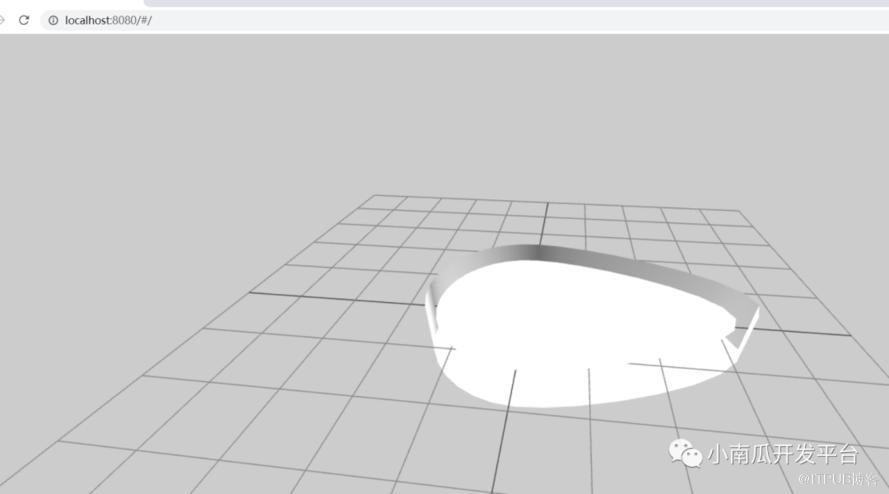
代码:
<template><div class="home"><div class="container" ref="container"></div></div></template><script >import * as THREE from "three";import { ref } from "vue";//添加一个轨道控制器import { OrbitControls} from "three/examples/jsm/controls/OrbitControls";//导入动画库import gsap from "gsap";//导入dat.guiimport * as dat from "dat.gui";//导入水面import {Water} from "three/examples/jsm/objects/Water2";//导入gltf载入库import { GLTFLoader } from "three/examples/jsm/loaders/GLTFLoader";//导入解压库import { DRACOLoader } from "three/examples/jsm/loaders/DRACOLoader";import { RGBELoader } from "three/examples/jsm/loaders/RGBELoader";export default {name: 'App',data() {return {renderer: null,scene: null,camera: null,cube: null,clock: null,animate1: null,controls: null,gui: null,directionalLight: null,smallBall: null}},mounted() {//初始化场景const scene = new THREE.Scene();//初始化相机const camera = new THREE.PerspectiveCamera(75,window.innerWidth/window.innerHeight,0.1,1000);//设置相机位置xyzcamera.position.set(0,2,6);//创建渲染器const renderer = new THREE.WebGLRenderer({//设置抗锯齿antialias: true,});//设置渲染器宽高renderer.setSize(window.innerWidth,window.innerHeight);//初始化渲染背景renderer.setClearColor("#000");scene.background = new THREE.Color("#ccc");scene.environment = new THREE.Color("#ccc");//添加网格地面const gridHelper = new THREE.GridHelper(10,10);scene.add(gridHelper);gridHelper.opacity = 0.2;gridHelper.material.transparent = true;//加入模型// 添加gltf汽车模型const loader = new GLTFLoader();const dracoLoader = new DRACOLoader();dracoLoader.setDecoderPath("./static/textures/textures/car/draco/");loader.setDRACOLoader(dracoLoader);loader.load("./static/textures/textures/yugang.glb", (gltf) => {const bmw = gltf.scene;console.log(gltf);bmw.position.set=(0,1,0);scene.add(bmw);});//添加灯光const light1 = new THREE.DirectionalLight(0xffffff,1);light1.position.set(0,0,10);scene.add(light1);const light2 = new THREE.DirectionalLight(0xffffff,1);light2.position.set(0,0,-10);scene.add(light2);const light3 = new THREE.DirectionalLight(0xffffff,1);light3.position.set(10,0,0);scene.add(light3);const light4 = new THREE.DirectionalLight(0xffffff,1);light4.position.set(-10,0,0);scene.add(light4);const light5 = new THREE.DirectionalLight(0xffffff,1);light5.position.set(0,10,0);scene.add(light5);const light6 = new THREE.DirectionalLight(0xffffff,1);light6.position.set(5,10,0);scene.add(light6);const light7 = new THREE.DirectionalLight(0xffffff,1);light7.position.set(0,10,5);scene.add(light7);const light8 = new THREE.DirectionalLight(0xffffff,1);light8.position.set(-5,10,0);scene.add(light8);//将渲染器添加到页面//将webgl渲染的canvas内容添加到div//document.body.append(renderer.domElement);this.$refs['container'].appendChild(renderer.domElement);this.renderer=renderer;this.camera=camera;this.scene=scene;//实例化控制器const controls = new OrbitControls(camera,renderer.domElement);//设置控制器阻尼,让控制器更有真实效果,必须在动画循环调用updatecontrols.enableDamping = true;this.controls=controls;this.renders();},methods: {renders(){this.renderer.render(this.scene,this.camera);// this.controls && this.controls.update();requestAnimationFrame(this.renders.bind(this));},}}</script><style>*{margin: 0;padding: 0;}.container{height: 100vh;width: 100vw;background-color: #f0f0f0;}</style>
原文作者:小南瓜开发平台;如有侵权,请联系管理员删除。
上一篇:
时光匆匆:追寻低代码的旅程【文末彩蛋】

请登录后发表评论
登录
全部评论
