一、ContainerCreating
这种报错其实不算报错,容器正在创建中,通常是我们配置问题导致的。
1、docker 服务问题
并且通过 exec 可以登陆的,logs 日志看不了,尝试重启 node 节点上的 kube-proxy、kubelet 后依然是不可用的,重启 docker 服务后创建成功就绪,原因未查明……
2、K8s 挂载远程存储问题
apiVersion: apps/v1kind: Deploymentmetadata: labels: app: nginx name: nginx namespace: defaultspec: replicas: 1 selector: matchLabels: app: nginx template: metadata: labels: app: nginx spec: containers: - image: nginx imagePullPolicy: Always name: nginx volumeMounts: - mountPath: /tmp/ name: www volumes: - name: www nfs: path: /nfs/web/date readOnly: true server: 192.168.1.21
这里 nfs 主机并不存在,如果直接去部署这个 yaml,会一直卡在创建中。
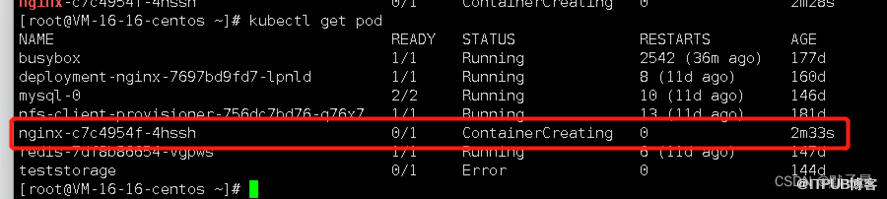
查看报错事件
类似 mount failed: exit status 32 的报错很多,比如:
nfs 挂载报错 mount failed: exit status 32 是存储nfs不存在nfs 挂载报错 mount failed: exit status 1 记不清了,反正在nfs的问题,试试挂载目录或者权限吧gfs 挂载报错 mount failed: exit status 32 是指 node节点上没有安装 gfs的客户端gfs 挂载报错 mount failed: exit status 1 可能是我们没有在gfs服务端创建要挂载的卷
3、configmap 问题
apiVersion: apps/v1kind: Deploymentmetadata: labels: app: nginx name: nginx namespace: defaultspec: replicas: 1 selector: matchLabels: app: nginx template: metadata: labels: app: nginx spec: containers: - image: nginx imagePullPolicy: Always name: nginx volumeMounts: - mountPath: /tmp/ name: www volumes: - name: www configMap: name: nginx-config

返回
Events: Type Reason Age From Message ---- ------ ---- ---- ------- Normal Scheduled 2m21s default-scheduler Successfully assigned default/nginx-59d6d76f78-2kh7n to vm-16-16-centos Warning FailedMount 18s kubelet Unable to attach or mount volumes: unmounted volumes=[www], unattached volumes=[www kube-api-access-hvk9s]: timed out waiting for the condition Warning FailedMount 13s (x9 over 2m21s) kubelet MountVolume.SetUp failed for volume "www" : configmap "nginx-config" not found
解决方法
-
每个人的环境不同,解决方法也不一样,如果是自己写错了名称,改一下就OK -
如果是别人开发的环境,最好找开发来看
二、ErrImagePull 或者 ImagePullBackOff
1、仓库镜像问题
apiVersion: apps/v1kind: Deploymentmetadata: labels: app: nginx name: nginx namespace: defaultspec: replicas: 1 selector: matchLabels: app: nginx template: metadata: labels: app: nginx spec: containers: - image: nginx:1111111111 #不存在的镜像 imagePullPolicy: Always name: nginx volumeMounts: - mountPath: /tmp/ name: www volumes: - name: www configMap: name: nginx-config
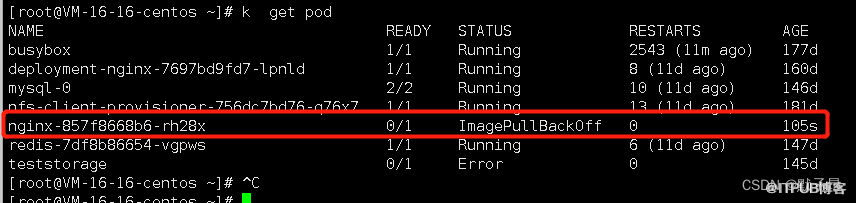
2、startContainer
三、Pending
pending 状态其实涉及的方向有很多的这里先简单列举一下
1、 K8调度组件 scheduler 组件异常, 集群组件挂了2、 sa 没有权限或者不存在3、 用户指定的匹配节点策略有问题 (nodeselector 容忍、污点等等调度策略) 通常是应用用户标签写错了4、 节点没有足够的资源满足调度 //测试环境通常资源较小,用户软限制太大无法调度5、pv 卷问题
四、CrashLoopBackOff 或者 ERROR
1、 容器服务配置有问题,导致容器服务的守护进程启动直接挂掉了,检查配置2、容器健康检查探针检查端口不正常会杀死容器重启,3、容器有什么启动后的操作,操作到一般发现跑不下去了,比如容器服务启动脚本里面有//ftp 链接//域名无法解析//远程主机端口无法通讯等等4、容器资源限制太小,内存软硬限制一般是1:1的 然后内存超出我们的硬限制后oom 导致容器重启报错
五、Terminating或Unknown
六、UnexpectedAdmissionError
kubectl get pods -A | grep UnexpectedAdmissionError | awk '{print("kubectl delete pod ", $2, " -n ", $1)}' | /bin/bash
七、一个误以为是 K8s 问题的 linux 问题
还原场景
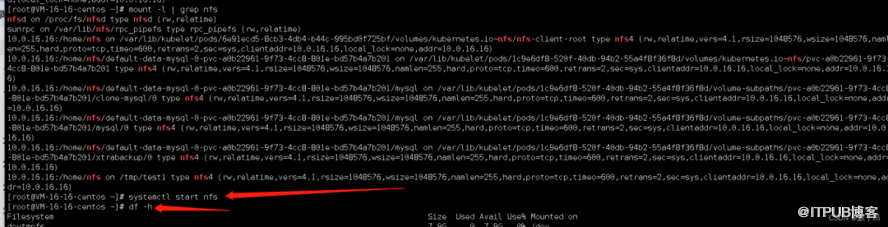
//部署nfs服务echo "/home/nfs *(rw,async,no_root_squash)" >> /etc/exports//启动nfssystemctl start nfs//登陆客户端创建目录mkdir -p /tmp/test1///挂载nfsmount -t nfs 10.0.16.16:/home/nfs /tmp/test1///查看df -h | grep /tmp/test1

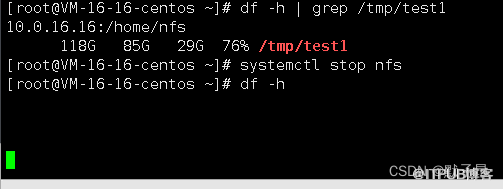
这个前提是 df -h 能用的情况下,下面演示 df -h 不可用的情况怎么查询
//停止nfs服务systemctl stop nfs//查看df命令df -h
mount -l | grep nfs
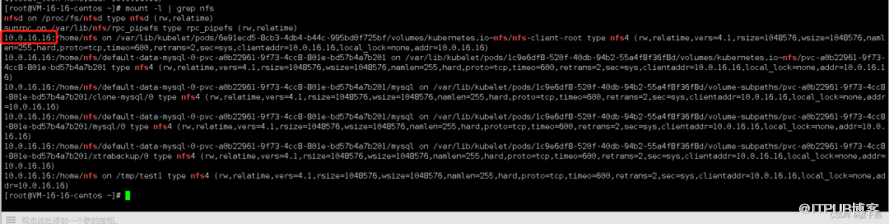
通过 mount 命令我们得知 nfs 地址是 10.0.16.16,登陆 nfs 主机重启服务恢复。
来源:https://blog.csdn.net/qq_42883074/article/details/126221693
来自 “ ITPUB博客 ” ,链接:https://blog.itpub.net/70013542/viewspace-2988048/ ,如需转载,请注明出处,否则将追究法律责任。

请登录后发表评论
登录
全部评论
