一、使用 Kubectl 查询、创建、编辑和删除资源

对于刚开始使用命令行工具的开发者,最保险的方法是提出问题(读取操作),而不是发出命令(写入操作),所以从使用
get
命令开始是个不错的选择。
-
Kubectl get
使用 get 命令可以获取当前集群中可用的资源列表,包括:
-
Namespace
-
Pod
-
Node
-
Deployment
-
Service
-
ReplicaSet
$ kubectl get nsNAME STATUS AGEcharts Active 8ddefault Active 9dkube-node-lease Active 9dkube-public Active 9dkube-system Active 9d
-
Kubectl create
可以查询资源后,下一步是创建资源。我们可以用 kubectl 在集群中创建任何类型的资源,包括:
-
Service
-
Cronjob
-
Deployment
-
Job
-
Namespace(ns)
其中,一些资源的创建需要设置配置文件、命名空间以及资源名称。例如,创建命名空间就需要一个额外参数来指定命名空间。
$ kubectl create ns hello-therenamespace/hello-there created
$ kubectl create cronjob my-cron --image=busybox --schedule="*/5 * * * *" -- echo hellocronjob.batch/my-namespaced-cron created
我们也可以使用 cronjob 的简写版本 cj。
$ kubectl create cj my-existing-cron --image=busybox --schedule="*/15 * * * *" -- echo hellocronjob.batch/my-existing-cron created
-
Kubectl edit
$ kubectl edit cronjob/my-existing-cron
我们要编辑的配置如下:
# Please edit the object below. Lines beginning with a '#' will be ignored,# and an empty file will abort the edit. If an error occurs while saving this file will be# reopened with the relevant failures.#apiVersion: batch/v1beta1kind: CronJobmetadata: creationTimestamp: "2020-04-19T16:06:06Z" managedFields: - apiVersion: batch/v1beta1 fieldsType: FieldsV1 fieldsV1: f:spec: f:concurrencyPolicy: {} f:failedJobsHistoryLimit: {} f:jobTemplate: f:metadata: f:name: {} f:spec: f:template: f:spec: f:containers: k:{"name":"my-new-cron"}: .: {} f:command: {} f:image: {} f:imagePullPolicy: {}
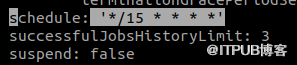
原本调度间隔设置为 15 秒:
我们将其更改为每 25 秒:
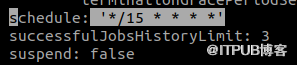
编写完成后,可以看到修改已生效。
$ kubectl edit cronjob/my-existing-croncronjob.batch/my-existing-cron edited
另外,我们可以通过 KUBE_EDITOR 命令来使用其他编辑器。
$ KUBE_EDITOR="nano" kubectl edit cronjob/my-existing-cron
-
Kubectl delete
$ kubectl delete cronjob my-existing-croncronjob.batch "my-existing-cron" deleted
-
Kubectl apply
$ kubectl apply -f commands.yamlserviceaccount/tiller createdclusterrolebinding.rbac.authorization.k8s.io/tiller created
二、使用 Kubectl 对 Kubernetes 进行故障排除
-
Kubectl describe
该命令可以查看的资源包括:
-
Nodes
-
Pods
-
Services
-
Deployments
-
Replica sets
-
Cronjobs
举个例子,我们用 describe 命令查看上文集群中 cronjob 的详细信息。
$ kubectl describe cronjob my-cron
以下是部分信息:
Name: my-cronNamespace: defaultLabels: <none>Annotations: <none>Schedule: */5 * * * *Concurrency Policy: AllowSuspend: FalseSuccessful Job History Limit: 3Failed Job History Limit: 1Starting Deadline Seconds: <unset>Selector: <unset>Parallelism: <unset>Completions: <unset>Pod Template: Labels: <none> Containers: my-cron: Image: busybox Port: <none> Host Port: <none>
-
Kubectl logs
$ kubectl logs cherry-chart-88d49478c-dmcfv -n charts
以上命令的部分输出结果如下:
172.17.0.1 - - [19/Apr/2020:16:01:15 +0000] "GET / HTTP/1.1" 200 612 "-" "kube-probe/1.18" "-"172.17.0.1 - - [19/Apr/2020:16:01:20 +0000] "GET / HTTP/1.1" 200 612 "-" "kube-probe/1.18" "-"172.17.0.1 - - [19/Apr/2020:16:01:25 +0000] "GET / HTTP/1.1" 200 612 "-" "kube-probe/1.18" "-"172.17.0.1 - - [19/Apr/2020:16:01:30 +0000] "GET / HTTP/1.1" 200 612 "-" "kube-probe/1.18" "-"172.17.0.1 - - [19/Apr/2020:16:01:35 +0000] "GET / HTTP/1.1" 200 612 "-" "kube-probe/1.18" "-"172.17.0.1 - - [19/Apr/2020:16:01:40 +0000] "GET / HTTP/1.1" 200 612 "-" "kube-probe/1.18" "-"172.17.0.1 - - [19/Apr/2020:16:01:45 +0000] "GET / HTTP/1.1" 200 612 "-" "kube-probe/1.18" "-"172.17.0.1 - - [19/Apr/2020:16:01:50 +0000] "GET / HTTP/1.1" 200 612 "-" "kube-probe/1.18" "-"172.17.0.1 - - [19/Apr/2020:16:01:55 +0000] "GET / HTTP/1.1" 200 612 "-" "kube-probe/1.18" "-"
$ kubectl logs cherry-chart-88d49478c-dmcfv -n charts | grep -vie kube-probe127.0.0.1 - - [10/Apr /2020:23:01:55 +0000] "GET / HTTP/1.1" 200 612 "-" "Mozilla/5.0 (X11; Ubuntu; Linux x86_64; rv:75.0) Gecko/20100101 Firefox/75.0" “-”
-c <容器名称>
,以查找指定容器的日志。-
Kubectl exec
$ kubectl exec -it cherry-chart-88d49478c-dmcfv -n charts -- /bin/bashroot@cherry-chart-88d49478c-dmcfv:/#
-
Kubectl cp
$ kubectl cp commands_copy.txt charts/cherry-chart-88d49478c-dmcfv:commands.txt$ kubectl exec -it cherry-chart-88d49478c-dmcfv -n charts -- /bin/bashroot@cherry-chart-88d49478c-dmcfv:/# lsbin boot commands.txt dev etc home lib lib64 media mnt opt proc root run sbin srv sys tmp usr var
$ kubectl cp charts/cherry-chart-88d49478c-dmcfv:commands.txt commands_copy.txt$ lscommands_copy.txt
来自 “ ITPUB博客 ” ,链接:https://blog.itpub.net/70013542/viewspace-2959449/ ,如需转载,请注明出处,否则将追究法律责任。

