我写的一个Androidapp直播源代码常用的动态消息发布模板,作为备忘和参考,在此记下。
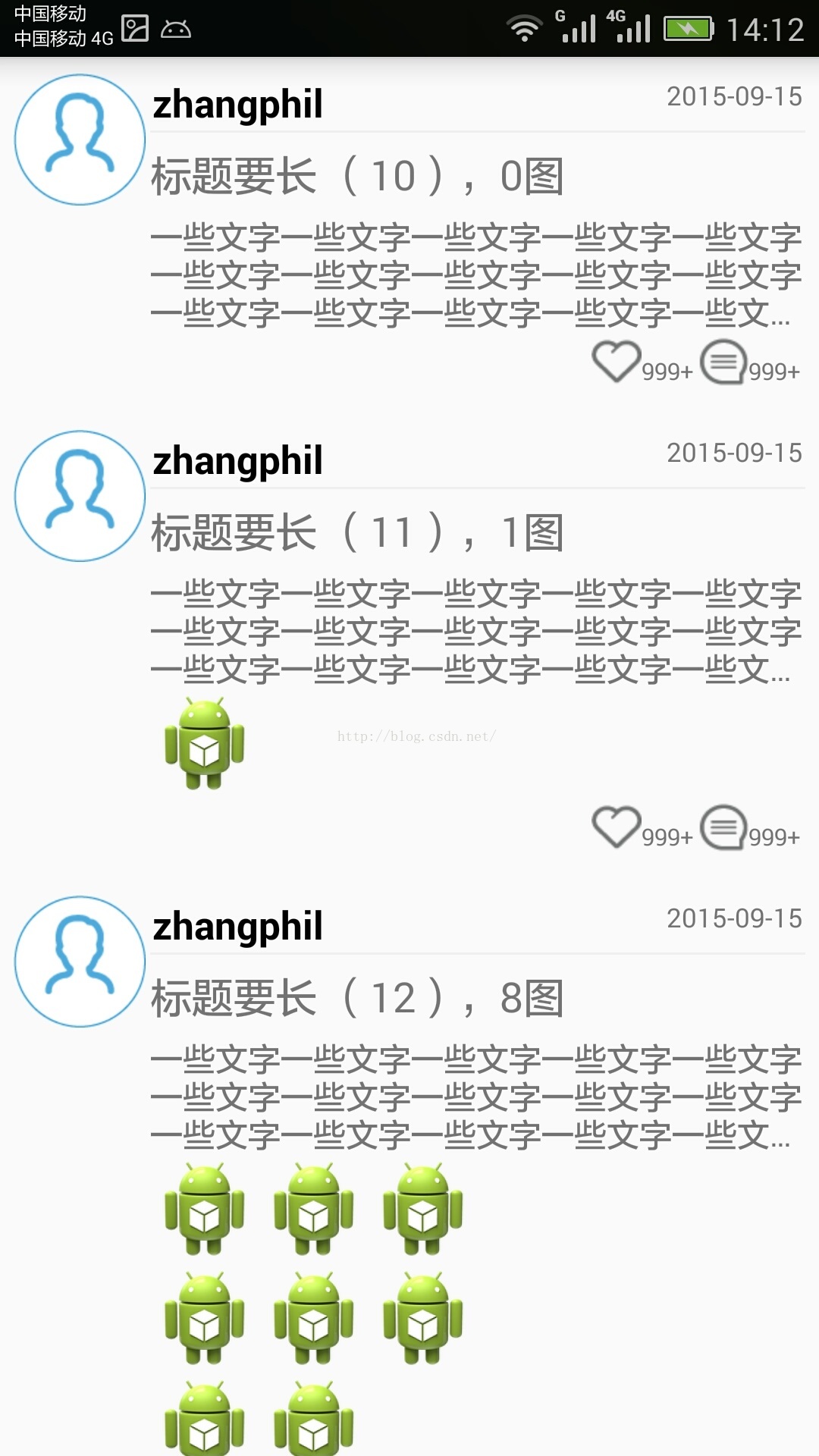
app直播源代码用户通常会发布一些信息(一般考虑装载到Android的ListView),每一条信息一般有图(ImageView)和文(TextView)组成。需要注意的是,每一条消息,有些有图,有些没有图只有文字,因此,在装载图片时候我使用TableLayout动态加载。
现在给出app直播源代码实现的全部源代码。
测试的主Activity MainActivity.java:
package zhangphil.weixin;
import java.util.ArrayList;
import java.util.Random;
import android.app.ListActivity;
import android.content.Context;
import android.os.Bundle;
import android.text.TextUtils.TruncateAt;
import android.view.LayoutInflater;
import android.view.View;
import android.view.ViewGroup;
import android.widget.ArrayAdapter;
import android.widget.ImageView;
import android.widget.TableLayout;
import android.widget.TableRow;
import android.widget.TextView;
public class MainActivity extends ListActivity {
	@Override
	protected void onCreate(Bundle savedInstanceState) {
		super.onCreate(savedInstanceState);
		// 随机生成一些测试数据量。
		Random rand = new Random();
		int cnt = 0;
		ArrayList<Integer> mArrayList = new ArrayList<Integer>();
		for (int i = 0; i < 50; i++) {
			cnt = rand.nextInt(10);
			mArrayList.add(cnt);
		}
		ArrayAdapter adapter = new MyArrayAdapter(this, -1, mArrayList);
		setListAdapter(adapter);
		// 隐藏Android ListView自带的分割线.
		getListView().setDivider(null);
	}
	private class MyArrayAdapter extends ArrayAdapter {
		private ArrayList<Integer> mItems;
		private LayoutInflater mLayoutInflater;
		private ViewHolder holder;
		private Context context;
		private class ViewHolder {
			public TableLayout tableLayout;
			public TextView title;
			public TextView detail;
		}
		public MyArrayAdapter(Context context, int resource, ArrayList<Integer> mArrayList) {
			super(context, resource);
			this.mLayoutInflater = LayoutInflater.from(context);
			this.mItems = mArrayList;
			this.context = context;
		}
		@Override
		public View getView(int pos, View convertView, ViewGroup parent) {
			if (convertView == null) {
				convertView = mLayoutInflater.inflate(R.layout.item, null);
				TextView title = (TextView) convertView.findViewById(R.id.title);
				TextView detail = (TextView) convertView.findViewById(R.id.detail);
				TableLayout tableLayout = (TableLayout) convertView.findViewById(R.id.tableLayout);
				holder = new ViewHolder();
				holder.title = title;
				holder.detail = detail;
				holder.tableLayout = tableLayout;
				holder.detail.setEllipsize(TruncateAt.END);
				holder.detail.setMaxLines(3);
				convertView.setTag(holder);
			} else
				holder = (ViewHolder) convertView.getTag();
			holder.title.setText("标题要长 (" + pos + ")," + mItems.get(pos) + "图");
			int total = getItem(pos);
			if (total == 0) {
				holder.tableLayout.setVisibility(View.GONE);
			} else {
				holder.tableLayout.removeAllViewsInLayout();
				holder.tableLayout.setVisibility(View.VISIBLE);
				int ROW = 0;
				int mod = total % 3;
				if (mod == 0)
					ROW = total / 3;
				else
					ROW = total / 3 + 1;
				int k = 0;
				for (int i = 0; i < ROW; i++) {
					TableRow tableRow = new TableRow(getContext());
					for (int j = 0; j < 3; j++) {
						if (k < total) {
							ImageView iv = new ImageView(context);
							iv.setImageResource(R.drawable.ic_launcher);
							tableRow.addView(iv);
							k++;
						}
					}
					holder.tableLayout.addView(tableRow, new TableLayout.LayoutParams(
							ViewGroup.LayoutParams.MATCH_PARENT, ViewGroup.LayoutParams.WRAP_CONTENT));
				}
			}
			return convertView;
		}
		@Override
		public Integer getItem(int pos) {
			return (Integer) mItems.get(pos);
		}
		@Override
		public int getCount() {
			return mItems.size();
		}
	}
}

MainActivity.java中ListView需要的item布局文件item.xml:
<?xml version="1.0" encoding="utf-8"?>
<RelativeLayout xmlns:android="http://schemas.android.com/apk/res/android"
    android:layout_width="match_parent"
    android:layout_height="match_parent"
    android:padding="5dip"
    android:paddingBottom="20dip" >
    <ImageView
        android:id="@+id/imageViewHead"
        android:layout_width="wrap_content"
        android:layout_height="wrap_content"
        android:layout_alignParentLeft="true"
        android:layout_alignParentTop="true"
        android:layout_marginTop="5dip"
        android:adjustViewBounds="true"
        android:maxHeight="60dip"
        android:maxWidth="60dip"
        android:padding="1dip"
        android:src="@drawable/head" />
    <LinearLayout
        android:layout_width="match_parent"
        android:layout_height="match_parent"
        android:layout_marginTop="5dip"
        android:layout_toRightOf="@+id/imageViewHead"
        android:orientation="vertical"
        android:padding="1dip" >
        <RelativeLayout
            android:layout_width="match_parent"
            android:layout_height="wrap_content"
            android:padding="1dip" >
            <TextView
                android:id="@+id/name"
                android:layout_width="wrap_content"
                android:layout_height="wrap_content"
                android:layout_alignParentTop="true"
                android:layout_centerVertical="true"
                android:text="zhangphil"
                android:textColor="@android:color/black"
                android:textSize="13sp"
                android:textStyle="bold" />
            <TextView
                android:id="@+id/time"
                android:layout_width="wrap_content"
                android:layout_height="wrap_content"
                android:layout_alignParentRight="true"
                android:layout_alignParentTop="true"
                android:layout_centerVertical="true"
                android:text="2015-09-15"
                android:textSize="9sp" />
        </RelativeLayout>
        <View
            android:layout_width="match_parent"
            android:layout_height="1dip"
            android:background="#EFEFEF"
            android:padding="1dip" />
        <TextView
            android:id="@+id/title"
            android:layout_width="wrap_content"
            android:layout_height="wrap_content"
            android:layout_marginTop="5dip"
            android:text="标题(可以是空或者不显示)" />
        <TextView
            android:id="@+id/detail"
            android:layout_width="match_parent"
            android:layout_height="wrap_content"
            android:layout_marginTop="5dip"
            android:text="一些文字一些文字一些文字一些文字一些文字一些文字一些文字一些文字一些文字一些文字一些文字一些文字一些文字一些文字一些文字一些文字一些文字一些文字一些文字一些文字一些文字一些文字一些文字一些文字一些文字一些文字"
            android:textSize="11sp" />
        <TableLayout
            android:id="@+id/tableLayout"
            android:layout_width="match_parent"
            android:layout_height="wrap_content"
            android:shrinkColumns="0,1,2" />
        <RelativeLayout
            android:layout_width="match_parent"
            android:layout_height="wrap_content"
            android:padding="1dip" >
            <LinearLayout
                android:layout_width="wrap_content"
                android:layout_height="wrap_content"
                android:layout_alignParentRight="true"
                android:orientation="horizontal" >
                <TextView
                    android:layout_width="wrap_content"
                    android:layout_height="wrap_content"
                    android:drawableLeft="@drawable/favorite"
                    android:gravity="bottom|right"
                    android:padding="1dip"
                    android:text="999+"
                    android:textSize="8sp" />
                <TextView
                    android:layout_width="wrap_content"
                    android:layout_height="wrap_content"
                    android:drawableLeft="@drawable/comment"
                    android:gravity="bottom|right"
                    android:padding="1dip"
                    android:text="999+"
                    android:textSize="8sp" />
            </LinearLayout>
        </RelativeLayout>
    </LinearLayout>
</RelativeLayout>
其中app直播源代码的item布局文件中的头像head、favorite、comment图标图片素材可以根据自己的情况选取。
app直播源代码的运行结果如图所示:
声明:本文由云豹科技转发自开开心心过博客,如有侵权请联系作者删除
来自 “ ITPUB博客 ” ,链接:https://blog.itpub.net/70002045/viewspace-2793842/ ,如需转载,请注明出处,否则将追究法律责任。
上一篇:
实现不同的导航条,看直播app开发怎么做
下一篇:
app直播源代码的分页样式怎么实现

请登录后发表评论
登录
全部评论
