在最新的Android support包中,增加了开发者期待的百分比布局PercentRelativeLayout和PercentFrameLayout,支持电商直播系统源码实现百分比布局。不过,Android官方是以support包的支持形式出现。电商直播系统源码使用百分比布局前,需要先导入在support支持包目录下名为“percent”的库,如图所示:
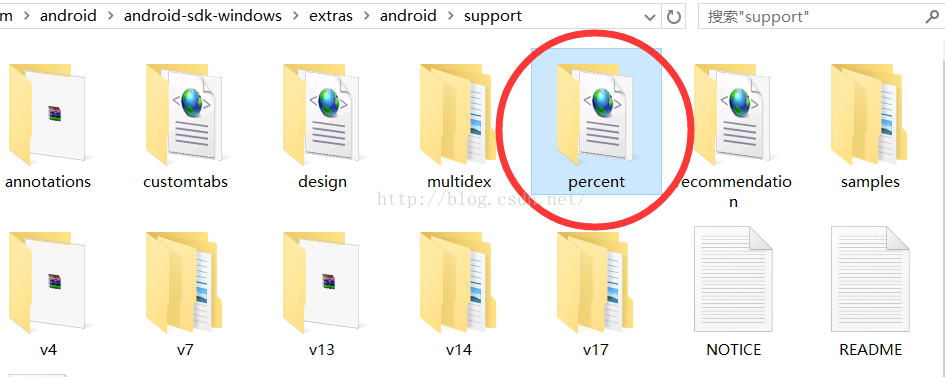
将percent导入到Eclipse作为一个lib,然后电商直播系统源码就可以使用百分比布局PercentRelativeLayout和PercentFrameLayout。
本文以PercentRelativeLayout为例加以说明。
PercentRelativeLayout在RelativeLayout增加了一些针对百分比布局的必要属性如:
layout_widthPercent 、 layout_heightPercent
layout_marginPercent
layout_marginLeftPercent
layout_marginTopPercent
layout_marginRightPercent
layout_marginBottomPercent
layout_marginStartPercent
layout_marginEndPercent
其中比较重要的是layout_widthPercent 和layout_heightPercent。顾名思义,该属性将控制子view在父布局中的宽高百分占比。
同样道理,又如layout_marginLeftPercent定义该子view距离父布局左边的百分占比。
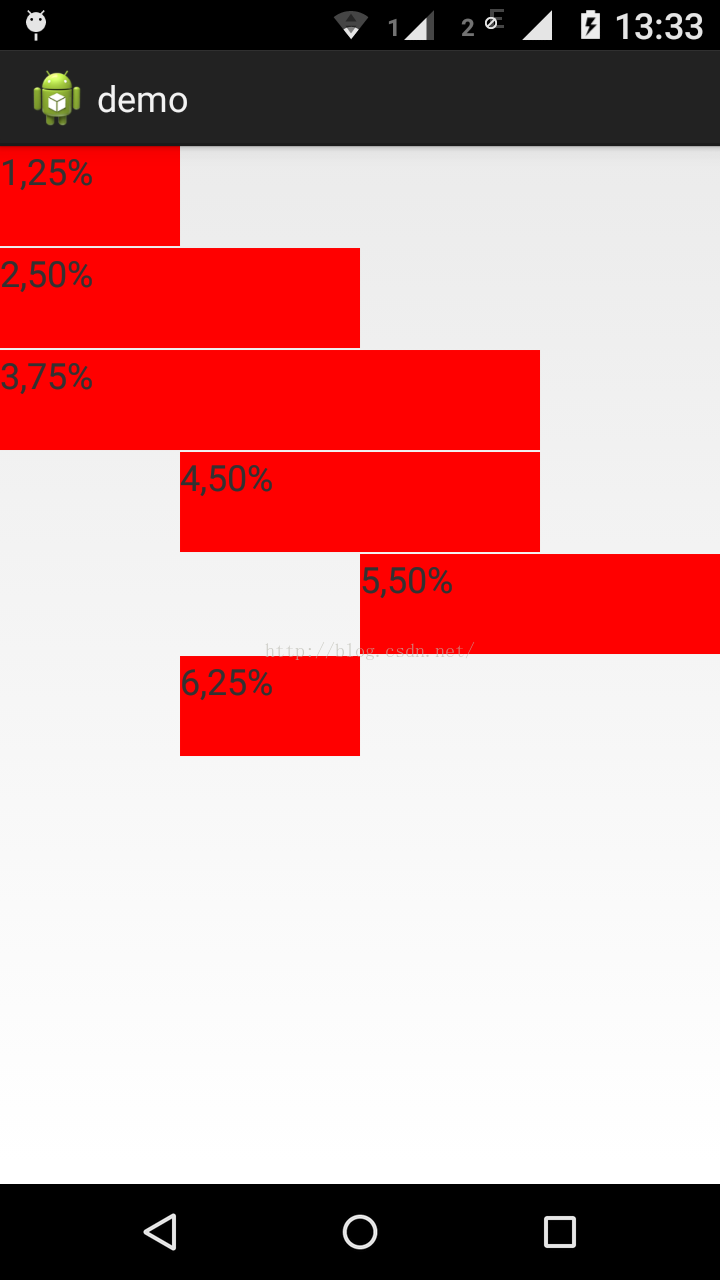
写一个布局文件跑起来看看效果就一目了然:
<android.support.percent.PercentRelativeLayout xmlns:android="http://schemas.android.com/apk/res/android"
    xmlns:app="http://schemas.android.com/apk/res-auto"
    android:layout_width="match_parent"
    android:layout_height="match_parent" >
    <TextView
        android:id="@+id/text1"
        android:layout_height="50dip"
        android:layout_alignParentTop="true"
        app:layout_widthPercent="25%"
        android:background="#ff0000"
        android:text="1,25%" />
    <TextView
        android:id="@+id/text2"
        android:layout_height="50dip"
        android:layout_below="@+id/text1"
        android:layout_marginTop="1dip"
        app:layout_widthPercent="50%"
        android:background="#ff0000"
        android:text="2,50%" />
    <TextView
        android:id="@+id/text3"
        android:layout_height="50dip"
        android:layout_below="@+id/text2"
        android:layout_marginTop="1dip"
        app:layout_widthPercent="75%"
        android:background="#ff0000"
        android:text="3,75%" />
    <TextView
        android:id="@+id/text4"
        android:layout_height="50dip"
        android:layout_below="@+id/text3"
        android:layout_marginTop="1dip"
        app:layout_marginLeftPercent="25%"
        app:layout_widthPercent="50%"
        android:background="#ff0000"
        android:text="4,50%" />
    <TextView
        android:id="@+id/text5"
        android:layout_height="50dip"
        android:layout_below="@+id/text4"
        android:layout_marginTop="1dip"
        app:layout_marginLeftPercent="50%"
        app:layout_widthPercent="50%"
        android:background="#ff0000"
        android:text="5,50%" />
    <TextView
        android:id="@+id/text6"
        android:layout_height="50dip"
        android:layout_below="@+id/text5"
        android:layout_marginTop="1dip"
        app:layout_marginLeftPercent="25%"
        app:layout_widthPercent="25%"
        android:background="#ff0000"
        android:text="6,25%" />
</android.support.percent.PercentRelativeLayout>

XML代码运行结果如图:
声明:本文由云豹科技转发自开开心心过博客,如有侵权请联系作者删除
来自 “ ITPUB博客 ” ,链接:https://blog.itpub.net/70002045/viewspace-2793837/ ,如需转载,请注明出处,否则将追究法律责任。

