上一章节中, 千锋 一一哥 给各位讲解了同源策略和跨域问题,以及跨域问题的解决方案,在本篇文章中,将会带大家进行代码实现,看看在Spring Security环境中如何解决跨域问题。
一. 启用Spring Security 的CORS支持
1. 创建web接口
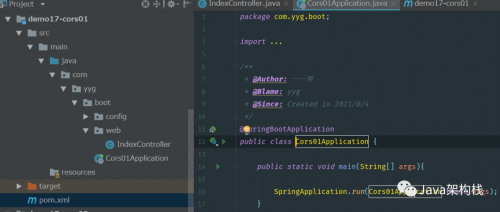
我先在SpringBoot环境中,创建一个端口号为8080的web项目,注意这个web项目没有引入Spring Security的依赖包。然后在其中创建一个IndexController,定义两个测试接口以便被ajax进行跨域访问。8080项目的代码结构:
@RestController
public class IndexController {
@GetMapping("/hello")
public String hello() {
return "get hello";
}
@PostMapping("/hello")
public String hello2() {
return "post hello";
}
}
请参考如下代码结构进行项目创建。
2. 执行ajax请求
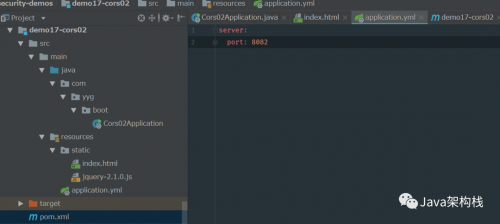
我们接下来再创建另一个端口号为8082的web项目,注意这个web项目也没有引入Spring Security的依赖包。接着在这里定义一个index.html页面,利用ajax跨域访问8080项目中的web接口。
8082项目的代码结构:
<!DOCTYPE html>
<html lang="en">
<head>
<meta charset="UTF-8">
<title>Index</title>
<script type="text/javascript" src="jquery-2.1.0.js"></script>
</head>
<body>
<div id="app"></div>
<input type="button" >
<input type="button" >
<script>
function btnClick() {
$. get('http://localhost:8080/hello', function (msg) {
$("#app").html(msg);
});
}
function btnClick2() {
$.post('http://localhost:8080/hello', function (msg) {
$("#app").html(msg);
});
}
</script>
</body>
</html>
请参考如下代码结构进行项目创建。
3. 发起跨域请求
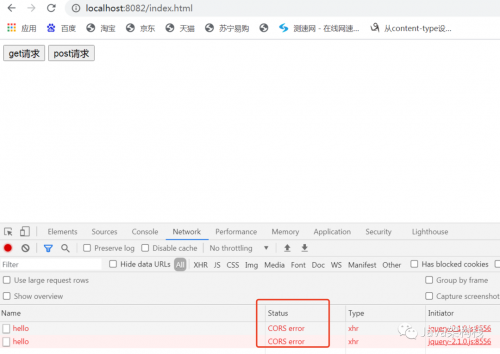
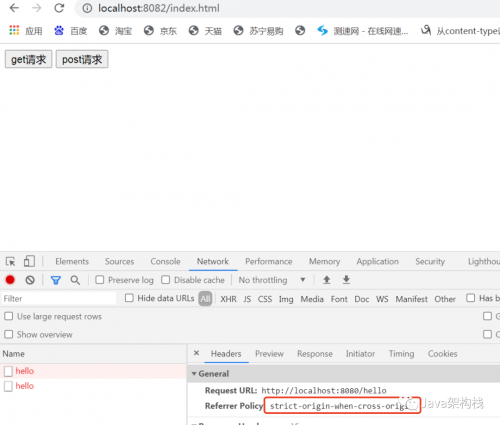
我们访问8082项目中的index.html页面,然后分别执行get与post请求,这时候就可以在浏览器的控制台上看到产生了CORS跨域问题,出现了CORS error状态,在请求头中出现了Referer Policy: strict-origin-when-cross-origin。
4. 解决跨域问题
既然现在产生了跨域问题,那么该怎么解决呢?其实我们可以采用如下两种方式之一来解决跨域问题。
方式1:在接口方法上利用@CrossOrigin注解解决跨域问题
@RestController
public class IndexController {
@CrossOrigin(value = "http://localhost:8082")
@GetMapping("/hello")
public String hello() {
return "get hello";
}
@CrossOrigin(value = "http://localhost:8082")
@PostMapping("/hello")
public String hello2() {
return "post hello";
}
}
方式2:通过实现WebMvcConfigurer接口来解决跨域问题
@Configuration
public class WebMvcConfig implements WebMvcConfigurer {
@Override
public void addCorsMappings(CorsRegistry registry) {
registry.addMapping("/**")
.allowedOrigins("http://localhost:8082")
.allowedMethods("*")
.allowedHeaders("*");
}
}
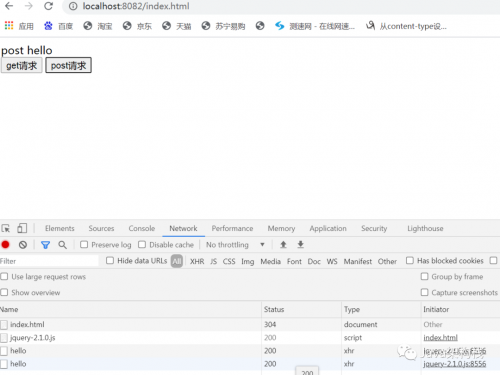
当进行了跨域设置之后,我们再次进行跨域请求,就可以看到请求成功了。

二. Spring Security环境下的跨域问题解决
1. 引入Spring Security依赖
通过上面的配置,我们已经解决了Ajax的跨域请求问题,但是这个案例中也有潜在的威胁存在,常见的就是 CSRF(Cross-site request forgery) 跨站请求伪造。跨站请求伪造也被称为 one-click attack 或者 session riding,通常缩写为 CSRF 或者 XSRF,是一种挟制用户在当前已登录的 Web 应用程序上执行非本意的操作的攻击方法。
所以为了提高网站的安全性,我在上面Spring Boot项目的基础之上,添加Spring Security的依赖包,但是暂时不进行任何别的操作。
<dependencies>
<dependency>
<groupId>org.springframework.boot</groupId>
<artifactId>spring-boot-starter-web</artifactId>
</dependency>
<dependency>
<groupId>org.springframework.boot</groupId>
<artifactId>spring-boot-starter-security</artifactId>
</dependency>
</dependencies>
2. 重启8080项目进行测试
接着我就重启8080这个Spring Boot项目,然后在8082项目中再次进行跨域请求,我们会发现在引入Spring Security后,再次产生了跨域问题。

3. 解决Spring Security环境下跨域问题的3种方案
通过实验可知,如果使用了 Spring Security,上面的跨域配置会失效,因为请求会被 Spring Security 拦截。那么在Spring Security环境中,如何解决跨域问题呢?这里我们有3种方式可以开启 Spring Security 对跨域的支持。
3.1 方式一:开启cors方法
我们在上面的案例之上,编写一个SecurityConfig配置类,在configure方法中,利用cors() 开启Spring Security 对 CORS 的支持:
@EnableWebSecurity
public class SecurityConfig extends WebSecurityConfigurerAdapter {
@Override
protected void configure(HttpSecurity http) throws Exception {
http.authorizeRequests()
.anyRequest()
.permitAll()
.and()
.formLogin()
.permitAll()
.and()
.httpBasic()
.and()
//支持跨域访问
.cors()
.and()
.csrf()
.disable();
}
}
3.2 方式二:进行全局配置
第二种方式是去除上面的跨域配置,直接在 Spring Security 中做全局配置,如下:
@EnableWebSecurity
public class SecurityConfig extends WebSecurityConfigurerAdapter {
@Override
protected void configure(HttpSecurity http) throws Exception {
http.authorizeRequests()
.anyRequest()
.permitAll()
.and()
.formLogin()
.permitAll()
.and()
.httpBasic()
.and()
//支持跨域访问
.cors()
.configurationSource(corsConfigurationSource())
.and()
.csrf()
.disable();
}
@Bean
public CorsConfigurationSource corsConfigurationSource() {
UrlBasedCorsConfigurationSource source = new UrlBasedCorsConfigurationSource();
CorsConfiguration configuration = new CorsConfiguration();
configuration.setAllowCredentials( true);
configuration.setAllowedOrigins(Collections.singletonList("*"));
configuration.setAllowedMethods(Collections.singletonList("*"));
configuration.setAllowedHeaders(Collections.singletonList("*"));
configuration.setMaxAge(Duration.ofHours(1));
source.registerCorsConfiguration("/**", configuration);
return source;
}
}
以上2个方法,都可以实现在Spring Security环境下的跨域访问。
3.3 方式三:支持OAuth2的跨域访问
我们开发时,还有一种情况就是支持 OAuth2 相关接口的跨域,比如用户要访问 OAuth2 中的 /oauth/token 等接口。我们可以配置一个全局的 CorsFilter 跨域过滤器类,核心代码如下:
/**
* 跨域配置方式3:定义全局跨域过滤器
**/
@Configuration
public class GlobalCorsConfiguration {
@Bean
public CorsFilter corsFilter() {
CorsConfiguration corsConfiguration = new CorsConfiguration();
corsConfiguration.setAllowCredentials( true);
corsConfiguration.addAllowedOrigin("*");
corsConfiguration.addAllowedHeader("*");
corsConfiguration.addAllowedMethod("*");
UrlBasedCorsConfigurationSource urlBasedCorsConfigurationSource = new UrlBasedCorsConfigurationSource();
urlBasedCorsConfigurationSource.registerCorsConfiguration("/**", corsConfiguration);
return new CorsFilter(urlBasedCorsConfigurationSource);
}
}
@EnableWebSecurity
public class SecurityConfig extends WebSecurityConfigurerAdapter {
@Override
protected void configure(HttpSecurity http) throws Exception {
//跨域方式3:
http.requestMatchers()
.antMatchers(HttpMethod.OPTIONS, "/oauth/**")
.and()
.csrf()
.disable()
.formLogin()
.and()
.cors();
}
}
该方式也可以实现Spring Security中的跨域访问。
4. 代码结构
以下是本案例的代码结构,可以参考下图进行项目创建:
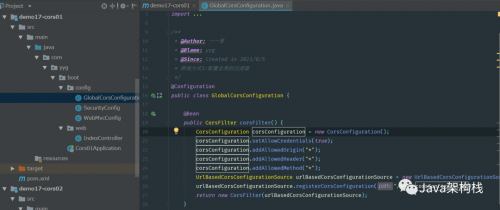
至此,我就带各位解决了Spring Security环境中的跨域问题,你学会了吗?
来自 “ ITPUB博客 ” ,链接:https://blog.itpub.net/69916964/viewspace-2839775/ ,如需转载,请注明出处,否则将追究法律责任。

