Android中控件很多,下面简单的通过demo讲解几种常见的控件。这些控件都在android.widget.*这个包中,由于本人水平有限,不能够总结的很全面,还请大家见谅,如果文章中出现错误,请大家指正,本人不甚感激!
1.ImageView,ImageButton
关于这两个控件的详细说明,请参考API文档http://www.android-doc.com/reference/android/widget/package-summary.html,由于墙太高,普通的一些翻墙代理软件不能进入android官方提供的API文档网页,这里提供的是国内的在线API查阅网址,关于翻墙方法这里不多说~_~。
下面给出布局文件activity_main.xml中的代码:
MainActivity中的代码:
运行结果:
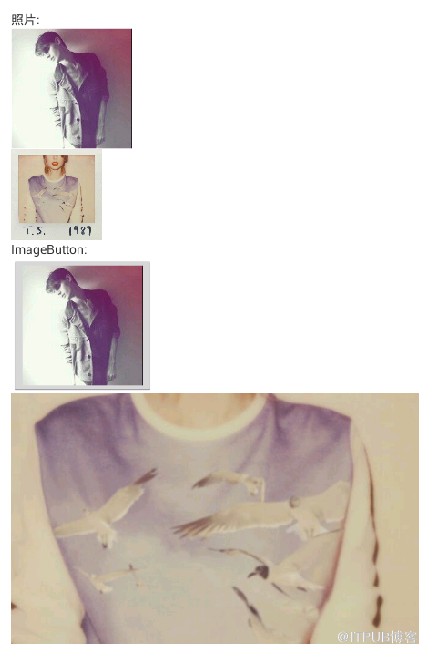
由上面的代码可知,点击第三张图片时,退出当前Activity。上面只是简单的一个demo,没有更过的功能实现。更多的功能读者可以根据文档提供的属性设置。
2.TextView,EditText,Button:
下面还是通过一个简单的demo来演示:
activity_main.xml中的代码:
上面简单的实现一个两个数相加的demo
MainActivity中的代码:
运行结果:
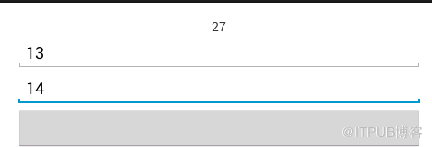
上面代码也比较简单,这里不过多介绍。
3.RadioGroup(单选按钮),CheckBox多选(复选)框,Spinner(下拉列表框)
RadioGroup,CheckBox相对简单,这里不作叙述。下面通过在布局文件中和具体代码来实现Spinner:
MainActivity中的代码:
在下拉列表框中,要在资源文件values/*中新建资源文件:
books.xml:
city.xml:
language.xml:
运行结果:
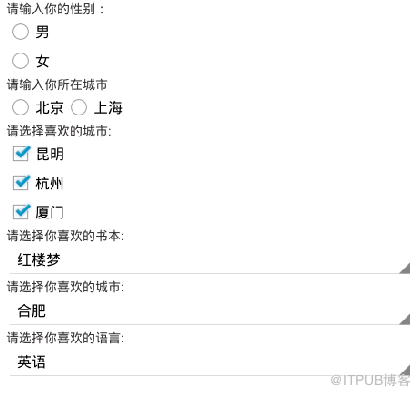
由于时间仓促,本文只是简单的通过demo感性的介绍这几种控件,还有很多属性没有细说,后续会补充更过的细节。
关于这两个控件的详细说明,请参考API文档http://www.android-doc.com/reference/android/widget/package-summary.html,由于墙太高,普通的一些翻墙代理软件不能进入android官方提供的API文档网页,这里提供的是国内的在线API查阅网址,关于翻墙方法这里不多说~_~。
下面给出布局文件activity_main.xml中的代码:
点击(此处)折叠或打开
-
<LinearLayout xmlns:android="http://schemas.android.com/apk/res/android"
-
xmlns:tools="http://schemas.android.com/tools"
-
android:layout_width="match_parent"
-
android:layout_height="match_parent"
-
android:paddingBottom="@dimen/activity_vertical_margin"
-
android:paddingLeft="@dimen/activity_horizontal_margin"
-
android:paddingRight="@dimen/activity_horizontal_margin"
-
android:paddingTop="@dimen/activity_vertical_margin"
-
android:orientation="vertical"
-
tools:context="com.example.activitytest.MainActivity" >
-
<TextView
-
android:layout_width="match_parent"
-
android:layout_height="wrap_content"
-
android:text="@string/textt" />
-
<ImageView
-
android:id="@+id/imge1"
- android:scaleType="center" //保持原图的大小,在ImageView的中心
-
android:layout_width="wrap_content"
-
android:layout_height="wrap_content" />
-
<ImageView
-
android:id="@+id/imge2"
-
android:scaleType=" fitStart"
-
android:layout_width="100dip //google建议像素用dip
-
android:layout_height="100dip"
-
android:contentDescription="@string/sf"
- android:src="@drawable/png2" /> //图片可以在这里设置,也可以通过代码实现
-
-
<TextView
-
android:layout_width="wrap_content"
-
android:layout_height="wrap_content"
-
android:text="@string/imagebut" />
-
<ImageButton
-
android:id="@+id/image1"
-
android:contentDescription="@string/touxiang"
-
android:layout_height="wrap_content"
-
android:layout_width="wrap_content" />
-
<ImageButton
-
android:id="@+id/image2"
-
android:src="@drawable/png2"
-
android:contentDescription="@string/sf"
-
android:layout_height="wrap_content"
-
android:layout_width="wrap_content" />
-
- </LinearLayout>
点击(此处)折叠或打开
- public class MainActivity extends Activity {
-
private ImageView imag1;
-
private ImageView imag2;
-
private ImageButton imagbut1;
-
private ImageButton imagbut2;
-
@SuppressWarnings("unused")
-
private List<CharSequence> datalaguage;
-
@Override
-
protected void onCreate(Bundle savedInstanceState) {
-
super.onCreate(savedInstanceState);
-
setContentView(R.layout.activity_main);
-
imag1 = (ImageView)findViewById(R.id.imge1); //获取图片资源的id
-
imag2 = (ImageView)findViewById(R.id.imge2);
-
imagbut1 = (ImageButton)findViewById(R.id.image1);
-
imagbut2 = (ImageButton)findViewById(R.id.image2);
-
imag1.setImageResource(R.drawable.png1);//设置图片资源
-
-
imag1.setContentDescription(getString(R.string.touxiang));//设置ContentDescription
-
imagbut1.setImageResource(R.drawable.png1);
-
imagbut1.setOnClickListener(new OnClickListener() {
-
-
@Override
-
public void onClick(View v) {
-
// TODO 自动生成的方法存根
-
finish();
-
}
- });
- }
- }
由上面的代码可知,点击第三张图片时,退出当前Activity。上面只是简单的一个demo,没有更过的功能实现。更多的功能读者可以根据文档提供的属性设置。
2.TextView,EditText,Button:
下面还是通过一个简单的demo来演示:
activity_main.xml中的代码:
点击(此处)折叠或打开
-
<LinearLayout xmlns:android="http://schemas.android.com/apk/res/android"
-
xmlns:tools="http://schemas.android.com/tools"
-
android:layout_width="match_parent"
-
android:layout_height="match_parent"
-
android:paddingBottom="@dimen/activity_vertical_margin"
-
android:paddingLeft="@dimen/activity_horizontal_margin"
-
android:paddingRight="@dimen/activity_horizontal_margin"
-
android:paddingTop="@dimen/activity_vertical_margin"
-
android:orientation="vertical"
-
tools:context="com.example.activitytest.MainActivity" >
-
-
<TextView
-
android:id="@+id/mytext"
-
android:layout_width="match_parent"
-
android:layout_height="wrap_content"
-
android:gravity="center"
-
android:layout_gravity="center" />
-
-
<EditText
-
android:id="@+id/myedit1"
-
android:layout_width="match_parent"
-
android:layout_height="wrap_content"
-
android:hint="@string/hint1" />
-
-
<EditText
-
android:id="@+id/myedit2"
-
android:layout_width="match_parent"
-
android:layout_height="wrap_content"
-
android:hint="@string/hint2" />
-
-
<Button
-
android:id="@+id/mybut"
-
android:layout_width="match_parent"
-
android:layout_height="wrap_content" />
-
- </LinearLayout>
MainActivity中的代码:
点击(此处)折叠或打开
-
public class MainActivity extends Activity {
-
private EditText edit1,edit2;
-
private TextView text;
- private Button but;
-
@SuppressWarnings("unused")
-
private List<CharSequence> datalaguage;
-
@Override
-
protected void onCreate(Bundle savedInstanceState) {
-
super.onCreate(savedInstanceState);
- setContentView(R.layout.activity_main);
-
text = (TextView)findViewById(R.id.mytext);
-
but = (Button)findViewById(R.id.mybut);
-
edit1 = (EditText)findViewById(R.id.myedit1);
-
edit2 = (EditText)findViewById(R.id.myedit2);
-
but.setOnClickListener(new OnClickListener() {
-
@Override
-
public void onClick(View v) {
-
// TODO 自动生成的方法存根
-
int ss1=Integer.parseInt(edit1.getText().toString());//转换成int类型
-
int ss2=Integer.parseInt(edit2.getText().toString());//转换成int类型
-
text.setText(String.valueOf(ss1+ss2));text.setText()接受的是String类型的参数,所以把相加后的int类型转换成String类型
-
}
- });
- }
- }
-
上面代码也比较简单,这里不过多介绍。
3.RadioGroup(单选按钮),CheckBox多选(复选)框,Spinner(下拉列表框)
点击(此处)折叠或打开
-
<LinearLayout xmlns:android="http://schemas.android.com/apk/res/android"
-
xmlns:tools="http://schemas.android.com/tools"
-
android:layout_width="match_parent"
-
android:layout_height="match_parent"
-
android:paddingBottom="@dimen/activity_vertical_margin"
-
android:paddingLeft="@dimen/activity_horizontal_margin"
-
android:paddingRight="@dimen/activity_horizontal_margin"
-
android:paddingTop="@dimen/activity_vertical_margin"
-
android:orientation="vertical"
-
tools:context="com.example.activitytest.MainActivity" >
-
-
<TextView
-
android:layout_width="match_parent"
-
android:layout_height="wrap_content"
-
android:text="@string/text1"/>
-
-
<RadioGroup
-
android:id="@+id/myradio"
-
android:layout_width="match_parent"
-
android:layout_height="wrap_content"
-
android:orientation="vertical"
-
android:checkedButton="@+id/button">
-
<RadioButton
-
android:id="@+id/button1"
-
android:text="@string/nan" />
-
<RadioButton
-
android:id="@+id/button2"
-
android:text="@string/nv" />
-
</RadioGroup>
-
-
<TextView
-
android:layout_width="match_parent"
-
android:layout_height="wrap_content"
-
android:text="@string/text2" />
-
-
<RadioGroup
-
android:id="@+id/myradio2"
-
android:layout_width="match_parent"
-
android:layout_height="wrap_content"
-
android:orientation="horizontal"
-
android:checkedButton="@+id/button2" >
-
-
<RadioButton
-
android:id="@+id/button3"
-
android:text="@string/beijing"/>
-
<RadioButton
-
android:id="@+id/button4"
-
android:text="@string/shanghai" />
-
-
</RadioGroup>
-
-
<TextView
-
android:id="@+id/boxtext"
-
android:layout_width="match_parent"
-
android:layout_height="wrap_content"
-
android:text="@string/boxstr" />
-
-
<CheckBox
-
android:id="@+id/box1"
-
android:layout_width="match_parent"
-
android:layout_height="wrap_content"
-
android:text="@string/km"
-
android:checked="true" />
-
-
<CheckBox
-
android:id="@+id/box2"
-
android:layout_width="match_parent"
-
android:layout_height="wrap_content"
-
android:text="@string/hz" />
-
-
<CheckBox
-
android:id="@+id/box3"
-
android:layout_width="match_parent"
-
android:layout_height="wrap_content"
-
android:text="@string/xm" />
-
<TextView
-
android:layout_width="match_parent"
-
android:layout_height="wrap_content"
-
android:text="@string/booklist" />
-
<Spinner
-
android:id="@+id/spinner1"
-
android:prompt="@string/book"
-
android:layout_height="wrap_content"
-
android:layout_width="match_parent"
-
android:entries="@array/book" /> //引用资源条目时,需用array/xxx,具体看下面设置的array资源文件
-
<TextView
-
android:layout_width="match_parent"
-
android:layout_height="wrap_content"
-
android:text="@string/citylist" />
-
<Spinner
-
android:id="@+id/spinner2"
-
android:layout_width="match_parent"
-
android:layout_height="wrap_content"
-
android:prompt="@string/citylist"/>
-
<TextView
-
android:layout_width="match_parent"
-
android:layout_height="wrap_content"
-
android:text="@string/languagelist" />
-
<Spinner
-
android:id="@+id/spinner3"
-
android:layout_width="match_parent"
-
android:layout_height="wrap_content"
-
android:prompt="@string/languagelist" />
- </LinearLayout>
MainActivity中的代码:
点击(此处)折叠或打开
- public class MainActivity extends Activity {
-
private Spinner spcity;
-
private Spinner splanguage;
-
private ArrayAdapter<CharSequence> adaptercity;
- private ArrayAdapter<CharSequence> adapterlaguage;
-
@SuppressWarnings("unused")
-
-
@Override
-
protected void onCreate(Bundle savedInstanceState) {
-
super.onCreate(savedInstanceState);
- setContentView(R.layout.activity_main);
-
spcity= (Spinner)findViewById(R.id.spinner2);
-
spcity.setPrompt("请选择你喜欢的城市:");
-
adaptercity = ArrayAdapter.createFromResource(this,R.array.city,android.R.layout.simple_spinner_item);//代码设置下拉资源条目
-
adaptercity.setDropDownViewResource(android.R.layout.simple_spinner_dropdown_item);
-
spcity.setAdapter(adaptercity);
-
-
splanguage = (Spinner)findViewById(R.id.spinner3);
-
splanguage.setPrompt("请选择你最喜爱的语言");
-
adapterlaguage = ArrayAdapter.createFromResource(this,R.array.language,android.R.layout.simple_spinner_item);
-
adapterlaguage.setDropDownViewResource(android.R.layout.simple_spinner_dropdown_item);
-
splanguage.setAdapter(adapterlaguage);
-
-
}
-
- }
books.xml:
点击(此处)折叠或打开
-
<?xml version="1.0" encoding="UTF-8"?>
-
<resources>
-
<string-array name="book">
-
<item>红楼梦</item>
-
<item>水浒传</item>
-
<item>西游记</item>
-
<item>三国演义</item>
-
</string-array>
- </resources>
点击(此处)折叠或打开
-
<?xml version="1.0" encoding="UTF-8"?>
-
<resources>
-
<string-array name="city">
-
<item>合肥</item>
-
<item>芜湖</item>
-
<item>马鞍山</item>
-
</string-array>
- </resources>
点击(此处)折叠或打开
-
<?xml version="1.0" encoding="UTF-8"?>
-
<resources>
-
<string-array name="language">
-
<item>英语</item>
-
<item>汉语</item>
-
<item>法语</item>
-
</string-array>
- </resources>
由于时间仓促,本文只是简单的通过demo感性的介绍这几种控件,还有很多属性没有细说,后续会补充更过的细节。
来自 “ ITPUB博客 ” ,链接:https://blog.itpub.net/29876893/viewspace-1872165/ ,如需转载,请注明出处,否则将追究法律责任。

请登录后发表评论
登录
全部评论
