03 掌握Docker核心架构:镜像、仓库、容器及运行管理的深度解析
03 掌握Docker核心架构:镜像、仓库、容器及运行管理的深度解析 一 概述 1.1 镜像 1.2 镜像仓库 1.3 容器 二、镜像及镜像仓库 2.1 本地镜像仓库 2.2 镜像仓库简介 2.3 使用远端仓库 2.3.1 从远端镜像仓库拉取apache镜像 2.3.2 从远端镜像仓库拉取指定版本apache镜像 2.4 使用国内docker镜像仓库加速 2.4.1 阿⾥云docker镜像加速配置 2.4.2 查看docker运⾏状态汇总信息 2.4.3 拉取apache 2.2版本镜像 2.4.4 查看docker镜像 三 docker 容器基础操作 3.1 查看正在运行中的docker容器 3.2 查看所有的docker容器 3.3 删除⼀个容器ID=da9d839a96b1 3.4 删除镜像 3.5 删除lastest 3.6 删除指定版本 四 第一次正式运行 docker 容器 4.1 运行apache2.4版本容器 4.2 运行hello-world容器 4.3 查看所有的docker容器 4.4 查看docker镜像 4.5 运行容器最后一个版本 4.6 docker运行时对镜像加载流程 五 docker 运行状态管理基础操作 5.1 查看docker守护进程 5.2 查看docker运行状态 5.3 查看docker版本简要信息 5.4 查看docker版本详细信息 5.5 查看docker运行状态汇总信息
03 掌握Docker核心架构:镜像、仓库、容器及运行管理的深度解析
一 概述
Docker核心框架主要包括镜像、镜像仓库和容器三个关键组件。
1.1 镜像
Docker镜像是创建容器的只读模板,包含应用程序及其运行所需的基本操作系统环境。它类似于虚拟机的快照,但更加轻量级和高效。
1.2 镜像仓库
用于存储和共享Docker镜像的服务,类似于代码仓库。Docker Hub是Docker提供的公共镜像仓库服务,用户可以从中拉取或推送镜像。此外,还可以搭建私有镜像仓库,以满足企业内部需求。
1.3 容器
容器是基于Docker镜像创建的实例,可以看作是镜像的运行时状态。每个容器都拥有独立的文件系统、进程空间和网络栈,提供了应用程序运行的隔离环境;容器container是通过镜像复制创建的,可读可写。
二、镜像及镜像仓库
2.1 本地镜像仓库
[superman@docker ~]
$ docker images


REPOSITORY    TAG       IMAGE ID       CREATED        SIZE


hello-world   latest    d2c94e258dcb
8 months ago
13.3kB


[superman@docker ~]
$
2.2 镜像仓库简介
REPOSITORY : 镜像名称 TAG :镜像标签 - 通常⽤于表达镜像版本|latest 最新版本 IMAGE ID :镜像ID CREATED :镜像创建时间 SIZE :镜像大小
2.3 使用远端仓库
远端镜像仓库 私有 :本地个人自己搭建/本地公司自己搭建(docker) 公有 :官方 docker hub | https://hub.docker.com 非官方 - 通常官方镜像源 aliyun
2.3.1 从远端镜像仓库拉取apache镜像
默认docker hub拉取httpd镜像|默认latest
[superman@docker ~]
$ docker pull httpd


[superman@docker ~]
$ docker images


REPOSITORY    TAG       IMAGE ID       CREATED        SIZE


httpd         latest    6fd77d7e5eb7
2 months ago   167MB


hello-world   latest    d2c94e258dcb
8 months ago
13.3kB


[superman@docker ~]
$


#Using default tag: latest
2.3.2 从远端镜像仓库拉取指定版本apache镜像
[superman@docker ~]
$ docker pull httpd:2.4


[superman@docker ~]
$ docker images


REPOSITORY    TAG       IMAGE ID       CREATED        SIZE


httpd
2.4       6fd77d7e5eb7
2 months ago   167MB


httpd         latest    6fd77d7e5eb7
2 months ago   167MB


hello-world   latest    d2c94e258dcb
8 months ago
13.3kB


[superman@docker ~]
$
2.4 使用国内docker镜像仓库加速
阿⾥云docker镜像加速 1.注册阿⾥云账号 - https://cn.aliyun.com/ 2.登录阿⾥云 - 控制台 - 搜素容器镜像服务 - 镜像工具 - 镜像加速器 3.复制如下信息到Docker主机 (添加/etc/docker/daemon.json配置⽂件)
2.4.1 阿⾥云docker镜像加速配置
[superman@docker ~]
$ sudo
mkdir
-p /etc/docker


[superman@docker ~]
$ sudo
tee /etc/docker/daemon.json <<-
'EOF'


{


"registry-mirrors": [
"https://d0xlru8b.mirror.aliyuncs.com"]


}


EOF


[superman@docker ~]
$ sudo systemctl daemon-reload


[superman@docker ~]
$ sudo systemctl
restart docker
2.4.2 查看docker运⾏状态汇总信息
[superman@docker ~]
$ docker info


Client: Docker Engine
- Community


 Version:
24.0.7


 Context:    default


 Debug Mode:
false


 Plugins:


  buildx: Docker Buildx (Docker Inc.)


    Version:  v0.11.2


    Path:     /usr/libexec/docker/cli-plugins/docker-buildx


  compose: Docker Compose (Docker Inc.)


    Version:  v2.21.0


    Path:     /usr/libexec/docker/cli-plugins/docker-compose


Server:


 Containers:
1


  Running:
0


  Paused:
0


  Stopped:
1


 Images:
2


 Server Version:
24.0.7


 Storage Driver: overlay2


  Backing Filesystem: xfs


  Supports d_type:
true


  Using metacopy:
false


  Native Overlay Diff:
true


  userxattr:
false


 Logging Driver: json-file


 Cgroup Driver: cgroupfs


 Cgroup Version:
1


 Plugins:


  Volume: local


  Network: bridge host ipvlan macvlan null overlay


  Log: awslogs fluentd gcplogs gelf journald json-file local logentries splunk syslog


 Swarm: inactive


 Runtimes: io.containerd.runc.v2 runc


 Default Runtime: runc


 Init Binary: docker-init


 containerd version: 3dd1e886e55dd695541fdcd67420c2888645a495


 runc version: v1.1.10-0-g18a0cb0


 init version: de40ad0


 Security Options:


  seccomp


   Profile: builtin


 Kernel Version:
3.10.0-957.el7.x86_64


 Operating System: CentOS Linux
7 (Core)


 OSType: linux


 Architecture: x86_64


 CPUs:
1


 Total Memory:
3.683GiB


 Name: superman


 ID: 70cdde2c-be80-48b8-bfbb-f562145167a6


 Docker Root Dir: /var/lib/docker


 Debug Mode:
false


 Experimental:
false


 Insecure Registries:


127.0.0.0/8


 Registry Mirrors:


  https://d0xlru8b.mirror.aliyuncs.com/


 Live Restore Enabled:
false


[superman@docker ~]
$
2.4.3 拉取apache 2.2版本镜像
[superman@docker ~]
$ docker pull httpd:2.2


2.2: Pulling from library/httpd


f49cf87b52c1: Pull complete


24b1e09cbcb7: Pull complete


8a4e0d64e915: Pull complete


bcbe0eb4ca51: Pull complete


16e370c15d38: Pull complete


Digest: sha256:9784d70c8ea466fabd52b0bc8cde84980324f9612380d22fbad2151df9a430eb


Status: Downloaded newer image
for httpd:2.2


docker.io/library/httpd:2.2
2.4.4 查看docker镜像
[superman@docker ~]
$ docker images


REPOSITORY    TAG       IMAGE ID       CREATED        SIZE


httpd
2.4       6fd77d7e5eb7
2 months ago   167MB


httpd         latest    6fd77d7e5eb7
2 months ago   167MB


hello-world   latest    d2c94e258dcb
8 months ago
13.3kB


httpd
2.2       e06c3dbbfe23
5 years ago    171MB


[superman@docker ~]
$
三 docker 容器基础操作
3.1 查看正在运行中的docker容器
[superman@docker ~]
$ docker
ps


CONTAINER ID IMAGE COMMAND CREATED STATUS PORTS NAMES


[superman@docker ~]
$
3.2 查看所有的docker容器
[superman@docker ~]
$ docker
ps
-a


CONTAINER ID   IMAGE         COMMAND    CREATED       STATUS                   PORTS     NAMES


da9d839a96b1   hello-world
"/hello"
7 hours ago   Exited (0)
7 hours ago             competent_burnell


 gracious_davinci


[superman@docker ~]
$
3.3 删除⼀个容器ID=da9d839a96b1
[superman@docker ~]
$ docker
rm da9d839a96b1


da9d839a96b1


[superman@docker ~]
$ docker
ps
-a


CONTAINER ID IMAGE COMMAND CREATED STATUS PORTS NAMES


[superman@docker ~]
$
3.4 删除镜像
[superman@docker ~]
$ docker rmi hello-world


Untagged: hello-world:latest


Untagged: hello-world@sha256:ac69084025c660510933cca701f615283cdbb3aa0963188770b54c31c8962493


Deleted: sha256:d2c94e258dcb3c5ac2798d32e1249e42ef01cba4841c2234249495f87264ac5a


Deleted: sha256:ac28800ec8bb38d5c35b49d45a6ac4777544941199075dff8c4eb63e093aa81e


[superman@docker ~]
$ docker images


REPOSITORY   TAG       IMAGE ID       CREATED        SIZE


httpd
2.4       6fd77d7e5eb7
2 months ago   167MB


httpd        latest    6fd77d7e5eb7
2 months ago   167MB


httpd
2.2       e06c3dbbfe23
5 years ago    171MB


[superman@docker ~]
$
3.5 删除lastest
[superman@docker ~]
$ docker rmi httpd


Untagged: httpd:latest


[superman@docker ~]
$ docker images


REPOSITORY   TAG       IMAGE ID       CREATED        SIZE


httpd
2.4       6fd77d7e5eb7
2 months ago   167MB


httpd
2.2       e06c3dbbfe23
5 years ago    171MB


[superman@docker ~]
$
3.6 删除指定版本
建议使用该方法(添加tag)。
[superman@docker ~]
$ docker rmi httpd:2.2


Untagged: httpd:2.2


Untagged: httpd@sha256:9784d70c8ea466fabd52b0bc8cde84980324f9612380d22fbad2151df9a430eb


Deleted: sha256:e06c3dbbfe239c6fca50b6ab6935b3122930fa2eea2136979e5b46ad77ecb685


Deleted: sha256:aefd81e57d336a46bb1eb4c4626a3f971759e0e9651e348d5e83b301614b4522


Deleted: sha256:b85fe9130aef01e870e6d0a108fd003cf803d5da7fe479513a21de0643d7ecae


Deleted: sha256:40154da5ddb3570d82395b9c632880baca5f12ad21ea8c699f3897cd5ed9b237


Deleted: sha256:f5863aa45770c31d7555287f821930e41bc466b97464733ccf980f16393d99d9


Deleted: sha256:4bcdffd70da292293d059d2435c7056711fab2655f8b74f48ad0abe042b63687


[superman@docker ~]
$ docker images


REPOSITORY   TAG       IMAGE ID       CREATED        SIZE


httpd
2.4       6fd77d7e5eb7
2 months ago   167MB


[superman@docker ~]
$
四 第一次正式运行 docker 容器
4.1 运行apache2.4版本容器
[superman@docker ~]
$ docker run httpd:2.4


AH00558: httpd: Could not reliably determine the server
's fully qualified domain name, using 172.17.0.2. Set the 'ServerName
' directive globally to suppress this message


AH00558: httpd: Could not reliably determine the server
's fully qualified domain name, using 172.17.0.2. Set the 'ServerName
' directive globally to suppress this message


[Mon Jan
01
09:26:16.466594
2024] [mpm_event:notice] [pid
1:tid
140565572528000] AH00489: Apache/2.4.58 (Unix) configured
-- resuming normal operations


[Mon Jan
01
09:26:16.468377
2024] [core:notice] [pid
1:tid
140565572528000] AH00094: Command line:
'httpd -D FOREGROUND'


^C[Mon Jan
01
09:29:12.537696
2024] [mpm_event:notice] [pid
1:tid
140565572528000] AH00491: caught SIGTERM, shutting down


[superman@docker ~]
$
4.2 运行hello-world容器
[superman@docker ~]
$ docker run hello-world


Unable to
find image
'hello-world:latest' locally


latest: Pulling from library/hello-world


2db29710123e: Pull complete


Digest: sha256:cc15c5b292d8525effc0f89cb299f1804f3a725c8d05e158653a563f15e4f685


Status: Downloaded newer image
for hello-world:latest


Hello from Docker!


This message shows that your installation appears to be working correctly.


To generate this message, Docker took the following steps:


1. The Docker client contacted the Docker daemon.


2. The Docker daemon pulled the
"hello-world" image from the Docker Hub.


   (amd64)


3. The Docker daemon created a new container from that image which runs the


   executable that produces the output you are currently reading.


4. The Docker daemon streamed that output to the Docker client, which sent it


   to your terminal.


   To try something more ambitious, you can run an nginx container with:


$ docker run
-it nginx
bash


Share images, automate workflows, and more with a free Docker ID:


 https://hub.docker.com/


For more examples and ideas, visit:


 https://docs.docker.com/get-started/


[superman@docker ~]
$
4.3 查看所有的docker容器
[superman@docker ~]
$ docker
ps
-a


CONTAINER ID   IMAGE         COMMAND              CREATED          STATUS                      PORTS     NAMES


b762aaefa6c8   hello-world
"/hello"
22 seconds ago   Exited (0)
21 seconds ago             dazzling_mendeleev


3c59d7d7d6f5   httpd:2.4
"httpd-foreground"
3 minutes ago    Exited (0)
37 seconds ago             exciting_pare


[superman@docker ~]
$
4.4 查看docker镜像
[superman@docker ~]
$ docker images


REPOSITORY    TAG       IMAGE ID       CREATED        SIZE


httpd
2.4       6fd77d7e5eb7
2 months ago   167MB


hello-world   latest    feb5d9fea6a5
2 years ago
13.3kB


[superman@docker ~]
$
4.5 运行容器最后一个版本
[superman@docker ~]
$ docker run hello-world:latest


Hello from Docker!


This message shows that your installation appears to be working correctly.


To generate this message, Docker took the following steps:


1. The Docker client contacted the Docker daemon.


2. The Docker daemon pulled the
"hello-world" image from the Docker Hub.


     (amd64)


3. The Docker daemon created a new container from that image which runs the


     executable that produces the output you are currently reading.


4. The Docker daemon streamed that output to the Docker client, which sent it


     to your terminal.


To try something more ambitious, you can run an nginx container with:


$ docker run
-it nginx
bash


Share images, automate workflows, and more with a free Docker ID:


 https://hub.docker.com/


For more examples and ideas, visit:


 https://docs.docker.com/get-started/


[superman@docker ~]
$
4.6 docker运行时对镜像加载流程
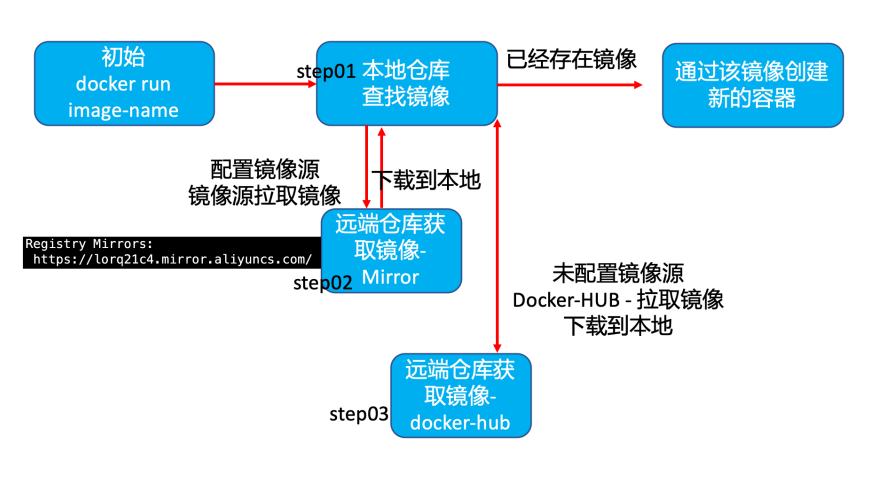
五 docker 运行状态管理基础操作
docker框架client/server client - 发送docker命令到docker server dockerd server - 维护本地仓库镜像管理,容器管理(存储/网络/运行状态...)
5.1 查看docker守护进程
[superman@docker ~]
$ ps
-ef |
grep
-i dockerd


root
16821
1
0
11:32 ?
00:00:08 /usr/bin/dockerd
-H fd://
--containerd
=/run/containerd/containerd.sock


superman
20969
20221
0
17:40 pts/1
00:00:00
grep
--color
=auto
-i dockerd


[superman@docker ~]
$
5.2 查看docker运行状态
[superman@docker ~]
$ systemctl status docker


● docker.service
- Docker Application Container Engine


   Loaded: loaded (/usr/lib/systemd/system/docker.service; enabled; vendor preset: disabled)


   Active: active (running) since 一
2024
-01-01
11:32:11 CST; 6h ago


     Docs: https://docs.docker.com


 Main PID:
16821 (dockerd)


    Tasks:
10


   Memory:
29.6M


   CGroup: /system.slice/docker.service


           └─16821 /usr/bin/dockerd
-H fd://
--containerd
=/run/containerd/containerd.sock


[superman@docker ~]
$
5.3 查看docker版本简要信息
[superman@docker ~]
$ docker
--version


Docker version
24.0.7, build afdd53b


[superman@docker ~]
$
5.4 查看docker版本详细信息
[superman@docker ~]
$ docker version


Client: Docker Engine
- Community


 Version:
24.0.7


 API version:
1.43


 Go version:        go1.20.10


 Git commit:        afdd53b


 Built:             Thu Oct
26
09:11:35
2023


 OS/Arch:           linux/amd64


 Context:           default


Server: Docker Engine
- Community


 Engine:


  Version:
24.0.7


  API version:
1.43 (minimum version
1.12)


  Go version:       go1.20.10


  Git commit:       311b9ff


  Built:            Thu Oct
26
09:10:36
2023


  OS/Arch:          linux/amd64


  Experimental:
false


 containerd:


  Version:
1.6.26


  GitCommit:        3dd1e886e55dd695541fdcd67420c2888645a495


 runc:


  Version:
1.1.10


  GitCommit:        v1.1.10-0-g18a0cb0


 docker-init:


  Version:
0.19.0


  GitCommit:        de40ad0


[superman@docker ~]
$
5.5 查看docker运行状态汇总信息
[superman@docker ~]
$ docker info


Client: Docker Engine
- Community


 Version:
24.0.7


 Context:    default


 Debug Mode:
false


 Plugins:


  buildx: Docker Buildx (Docker Inc.)


    Version:  v0.11.2


    Path:     /usr/libexec/docker/cli-plugins/docker-buildx


  compose: Docker Compose (Docker Inc.)


    Version:  v2.21.0


    Path:     /usr/libexec/docker/cli-plugins/docker-compose


Server:


 Containers:
3


  Running:
0


  Paused:
0


  Stopped:
3


 Images:
2


 Server Version:
24.0.7


 Storage Driver: overlay2


  Backing Filesystem: xfs


  Supports d_type:
true


  Using metacopy:
false


  Native Overlay Diff:
true


  userxattr:
false


 Logging Driver: json-file


 Cgroup Driver: cgroupfs


 Cgroup Version:
1


 Plugins:


  Volume: local


  Network: bridge host ipvlan macvlan null overlay


  Log: awslogs fluentd gcplogs gelf journald json-file local logentries splunk syslog


 Swarm: inactive


 Runtimes: runc io.containerd.runc.v2


 Default Runtime: runc


 Init Binary: docker-init


 containerd version: 3dd1e886e55dd695541fdcd67420c2888645a495


 runc version: v1.1.10-0-g18a0cb0


 init version: de40ad0


 Security Options:


  seccomp


   Profile: builtin


 Kernel Version:
3.10.0-957.el7.x86_64


 Operating System: CentOS Linux
7 (Core)


 OSType: linux


 Architecture: x86_64


 CPUs:
1


 Total Memory:
3.683GiB


 Name: docker


 ID: 70cdde2c-be80-48b8-bfbb-f562145167a6


 Docker Root Dir: /var/lib/docker


 Debug Mode:
false


 Experimental:
false


 Insecure Registries:


127.0.0.0/8


 Registry Mirrors:


  https://d0xlru8b.mirror.aliyuncs.com/


 Live Restore Enabled:
false


[superman@docker ~]
$
👍 点赞,你的认可是我创作的动力!
⭐️ 收藏,你的青睐是我努力的方向!
✏️ 评论,你的意见是我进步的财富!

来自 “ ITPUB博客 ” ,链接:https://blog.itpub.net/291614/viewspace-3045004/ ,如需转载,请注明出处,否则将追究法律责任。

最新文章
- 06 ASM存储入门——Oracle 19c的“存储管家”(可选,针对需要ASM的场景)
- 05 手把手部署Oracle 19c RAC——2节点实例安装全流程(图形化+静默)
- 04 手把手部署Oracle 19c——单实例ASM安装全流程(图形化+静默)
- 03 Oracle 19c初始化配置——让数据库“好用又安全”
- 02 手把手部署Oracle 19c——单实例安装全流程(图形化+静默)
- 01 Oracle 19c部署前的“避坑指南”——环境规划与准备
- 开源堡垒机 JumpServer 社区版实战教程:发布机的配置与Website资产配置使用
- 开源堡垒机 JumpServer 社区版实战教程:一步步构建企业安全运维环境
- 基于 Ubuntu 22.04 离线安装 JumpServer 社区版 v4.4.1
- Harbor镜像仓库实战指南:从安装到高级管理的全面解析
