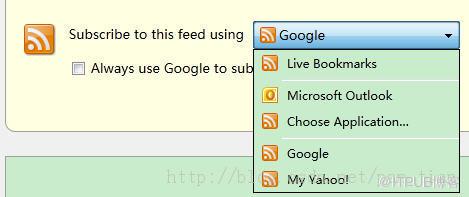
Google Reader之后,就主要使用Feedly,InoReader阅读RSS了,但Firefox默认订阅列表里默认是没有Feedly,InoReader(或者其他RSS订阅系统)的,如何把Feedly,InoReader添加到订阅列表中,方法如下:
browser.contentHandlers.types.0.type - application/vnd.mozilla.maybe.feed
browser.contentHandlers.types.0.uri - http://cloud.feedly.com/#subscription/feed/%s
<!-- Baidu Button BEGIN -->
1.地址栏输入about:config
2.搜索contentHandlers,你将会看到browser.contentHandlers.types.#.*样式的列表集,这个列表包含了所有可以订阅的RSS系统
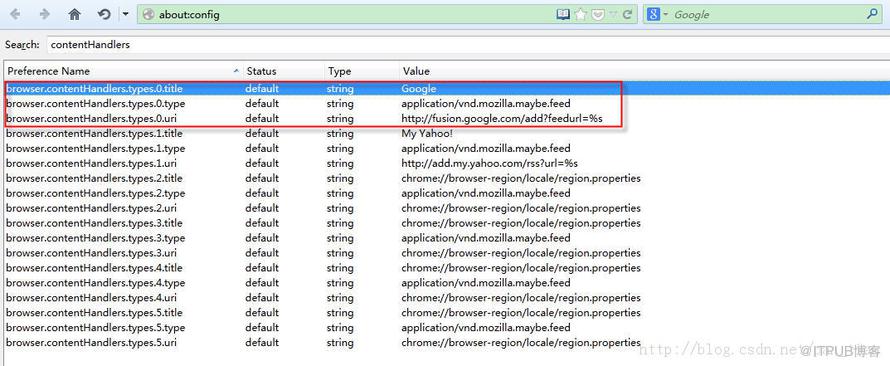
3.因为Google Reader已经无法使用,所以可以把Google阅读器换成Feedly,InoReader,修改参数
Feedly
browser.contentHandlers.types.0.type - application/vnd.mozilla.maybe.feed
browser.contentHandlers.types.0.uri - http://cloud.feedly.com/#subscription/feed/%s
InoReader
browser.contentHandlers.types.x.title    user set    string    InoReader
browser.contentHandlers.types.x.type     default     string    application/vnd.mozilla.maybe.feed
browser.contentHandlers.types.x.uri      user set    string    https://www.inoreader.com/?add_feed=%s
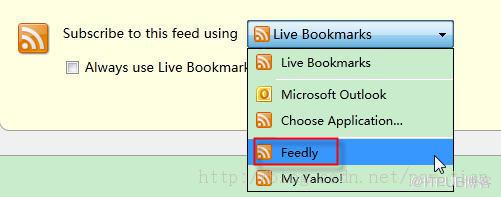
修改后,重启Firefox,在订阅列表中就能看到Feedly、InoReader了
来自 “ ITPUB博客 ” ,链接:https://blog.itpub.net/26687597/viewspace-1207533/ ,如需转载,请注明出处,否则将追究法律责任。

