FRM-91500: Unable to start/complete the build.
Reason:frmcmp.sh需要GUI显示,如果通过putty之类的SSH客户端连上服务器的话,无法GUI展示,所以命令会报错。
Solution 1:
The only catch is when you use frmcmp.sh you need to be able to launch an X session. The easiest way to check is by running xclock and seeing that the clock appears. If not you need to set the DISPLAY env variable to your computers IP. Such as: export DISPLAY=
(refer:http://oracleformsinfo.wordpress.com/2012/01/10/frm-91500-linux/)
export TNS_ADMIN=$ORACLE_HOME/network/admin
export TERM=vt220
export DISPLAY="127.0.0.1:10.0"
cd /path/of/forms
frmcmp.sh userid=cadena-conexion module=Forma.fmb
(refer:http://www.orafaq.com/forum/t/58100/2/ )
Solution 2:
使用frmcmp_batch命令来编译你的Form或者Library
Compile Form
frmcmp_batch module=ABCDEFG.fmb userid=apps/apps@instance output_file=ABCDEFG.fmx
Compile Library
frmcmp_batch module=ABCDEFG.pld module_type=LIBRARY parse=yes userid=apps/password@yourinstance
frmcmp_batch module=ABCDEFG.pll userid=apps/password@yourinstance module_type=LIBRARY compile_all=yes
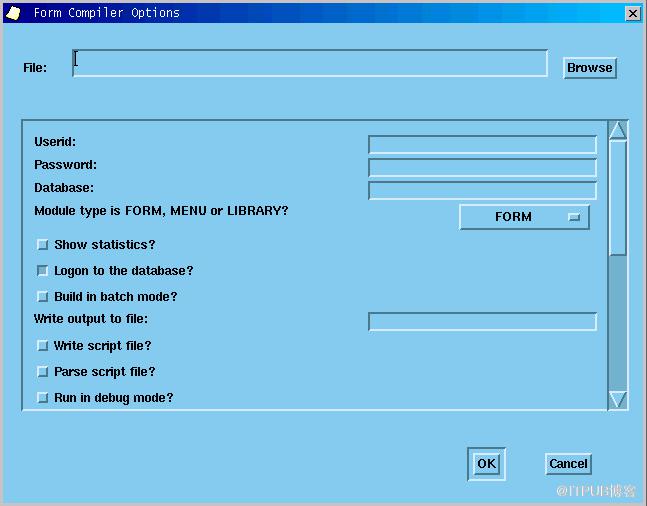
ps:下图为在有GUI展示的linux环境,单独运行frmcmp.sh命令所调出的界面
来自 “ ITPUB博客 ” ,链接:https://blog.itpub.net/26687597/viewspace-1204816/ ,如需转载,请注明出处,否则将追究法律责任。

