How to populate poplist item?
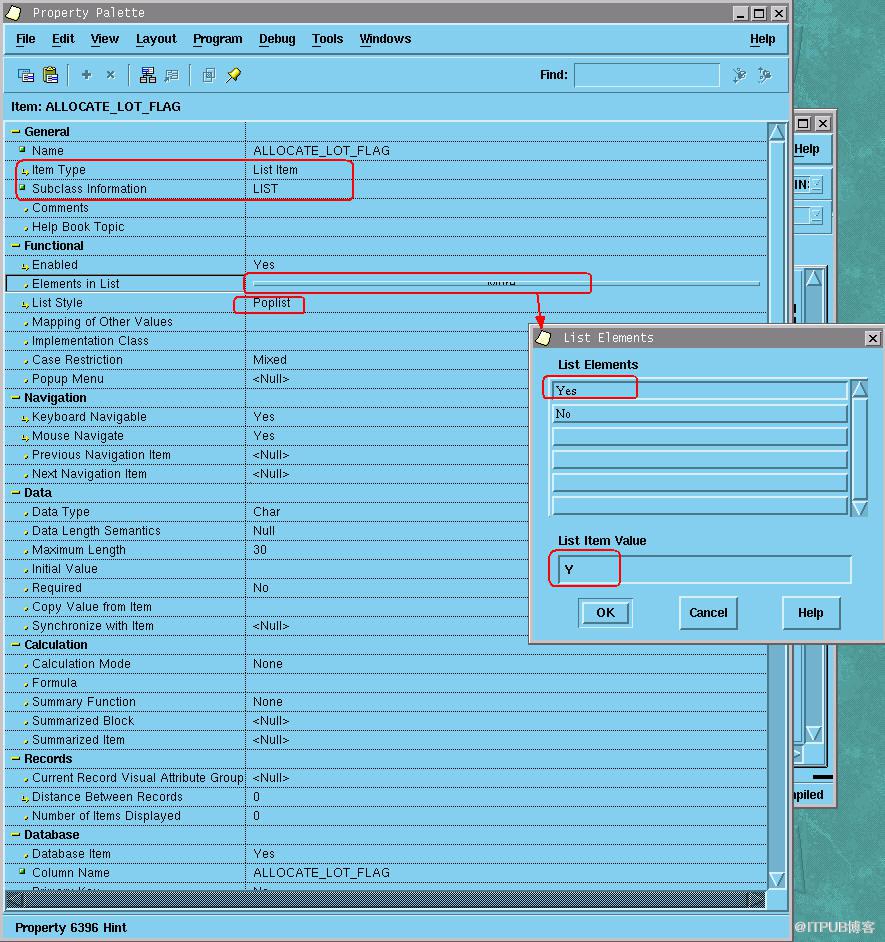
Your client has a form that contains a product description. They don’t want that their data entry staffs to type a product description. You, as a programmer, have been asked to change their form so that the product description item is populated from the PRODUCT table. They therefore are able to select the product description. You need to change the “text item” object to the “list item” object with the item type as “poplist.”
Solution:
=========
Assuming that you have a form that has an item that contains the product description.
1- Go to the object navigator window and open the “product description” property palette.
2- Change “item type” to “list item.”
3- Make sure that “list style” is “poplist.”
4- Open the “Elements in list.” You do this just to avoid getting an error regarding with the “No value defined in the list item” error message.
5- Type “A” in “List Elements.”
6- Type “A” in “List Item Value.”
7- Close the “product description” property palette.
8- Create a record group and name it “rg_prod_desc” with the
following query:
(Make sure that the “Based on the query below” option is selected.)
SELECT descrip A, descrip B
FROM product
ORDER BY 1 -- do not type “;” at the end.
Note that you must define the descrip column twice. The first one is for label, and the second one is for the value.
9- Open the “rg_prod_desc” property palette and change the “Name” item and the “Record Group Fetch Size” item to your desire value.
For example:
Change “Name” to “rg_prod_desc.”
Change “Record Group Fetch Size” to 10.
10-Close the property palette.
11- Create the “WHEN_NEW_FORM_INSTANCE” trigger with the following code:
DECLARE
STATUS NUMBER;
Problem EXCEPTION;
BEGIN
-- to populate the group
STATUS:=POPULATE_GROUP(\'RG_PROD_DESC\');
-- Check that the select statement was executed successfully.
IF STATUS <> 0 THEN
RAISE problem;
ELSE
-- to populate the list item
POPULATE_LIST(\'DESCRIP\', \'RG_PROD_DESC\');
END IF;
EXCEPTION
WHEN problem THEN
MESSGAE (\'We have a problem to query the PRODUCT table.\');
END;
12- Compile and close the trigger.
13- Run the form, go to the product description item, and click on the description poplist. You should see the items listed.
来自 “ ITPUB博客 ” ,链接:https://blog.itpub.net/26687597/viewspace-1204310/ ,如需转载,请注明出处,否则将追究法律责任。

