Flexfields FNDSQF Debugger
The global variable GLOBAL.FND_FLEX_FNDSQF_DEBUG takes one of the following values: ’OFF’, ’EXCEPTION’, ’FAILURE’, ’DEBUG’.
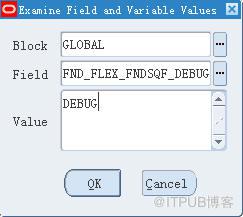
You set GLOBAL.FND_FLEX_FNDSQF_DEBUG through the Examine window before you open your form.
1. From the Help menu, navigate to Diagnostics > Examine.14 – 70 Oracle Applications Developer’s Guide
2. Enter GLOBAL for Block, and FND_FLEX_FNDSQF_DEBUG for Field. Tab to Value field. (If you get a ”variable doesn’t exist” error, ignore it.) Enter one of the values below and click OK.
The following are valid values for GLOBAL.FND_FLEX_FNDSQF_DEBUG:
* OFF – The default value. The debugger is turned off. Debug messages
*EXCEPTION – Only exception debug messages will be displayed. These messages come from ’EXCEPTION WHEN OTHERS THEN’ parts of the code. Flexfields will still RAISE the exceptions, that is, these exceptions will not be handled by the flexfields code.)
*FAILURE – Failure and exception debug messages will be displayed. In general, these messages are from IF (NOT FORM_SUCCESS) THEN parts of the code.
*DEBUG – All debug messages will be displayed.
Examin Setup
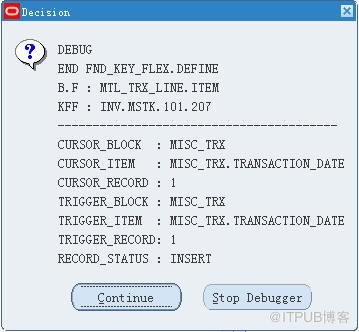
Debug Sample
详见《Oracle Applicaiton Developer Guide》
<!-- Baidu Button BEGIN -->
The global variable GLOBAL.FND_FLEX_FNDSQF_DEBUG takes one of the following values: ’OFF’, ’EXCEPTION’, ’FAILURE’, ’DEBUG’.
You set GLOBAL.FND_FLEX_FNDSQF_DEBUG through the Examine window before you open your form.
1. From the Help menu, navigate to Diagnostics > Examine.14 – 70 Oracle Applications Developer’s Guide
2. Enter GLOBAL for Block, and FND_FLEX_FNDSQF_DEBUG for Field. Tab to Value field. (If you get a ”variable doesn’t exist” error, ignore it.) Enter one of the values below and click OK.
The following are valid values for GLOBAL.FND_FLEX_FNDSQF_DEBUG:
* OFF – The default value. The debugger is turned off. Debug messages
*EXCEPTION – Only exception debug messages will be displayed. These messages come from ’EXCEPTION WHEN OTHERS THEN’ parts of the code. Flexfields will still RAISE the exceptions, that is, these exceptions will not be handled by the flexfields code.)
*FAILURE – Failure and exception debug messages will be displayed. In general, these messages are from IF (NOT FORM_SUCCESS) THEN parts of the code.
*DEBUG – All debug messages will be displayed.
Examin Setup
Debug Sample
详见《Oracle Applicaiton Developer Guide》
来自 “ ITPUB博客 ” ,链接:https://blog.itpub.net/26687597/viewspace-1203628/ ,如需转载,请注明出处,否则将追究法律责任。

