前言
毕业答辩告一段落,接下来好好努力工作。
Redis遇到的一些问题
DENIED Redis is running in protected mode because protected mode is enabled, no bind address was specified, no authentication password is requested to clients. In this mode connections are only accepted from the loopback interface. If you want to connect from external computers to Redis you may adopt one of the following solutions: 1) Just disable protected mode sending the command 'CONFIG SET protected-mode no' from the loopback interface by connecting to Redis from the same host the server is running, however MAKE SURE Redis is not publicly accessible from internet if you do so. Use CONFIG REWRITE to make this change permanent. 2) Alternatively you can just disable the protected mode by editing the Redis configuration file, and setting the protected mode option to 'no', and then restarting the server. 3) If you started the server manually just for testing, restart it with the '--protected-mode no' option. 4) Setup a bind address or an authentication password. NOTE: You only need to do one of the above things in order for the server to start accepting connections from the outside.这是redis的保护机制,连接redis只能是127.0.0.1这个ip,我们远程连接是拒绝的。所以我们需要在redis.conf进行如下配置。
- 1.配置protected-mode no,禁用redis默认保护机制。

-
2.配置daemonize yes,让redis后台启动。

-
3.注释掉bind 127.0.0.1这行代码

-
4.然后通过指定配置文件启动方式启动redis。
redis-server redis.conf - 5.通过telnet 111.230.11.184 6379,发现远程登录成功。

Jmeter遇到的一些问题
- 1.设置Jmeter在linux上环境变量,vim /etc/profile,进行如下配置,然后source /etc/profile保存配置让其生效。
export JMETER_HOME=/usr/local/apache-jmeter-4.0
export CLASSPATH=$JMETER_HOME/lib/ext/ApacheJMeter_core.jar:$JMETER_HOME/lib/jorphan.jar:$CLASSPATH
export PATH=$JMETER_HOME/bin:$PATH
MySQL遇到的问题
- 1.当我在做秒杀商品压测的时候,发现会频繁的访问数据库。于是将数据源连接池中的spring.datasource.druid.inital-size(初始化连接)设置为500,spring.datasource.druid.min.idle(最小空闲连接,连接池容许保持空闲状态的最小连接,低于这个数量将会创建新的连接)设置为500,spring.datasource.druid.max-active(最大活动连接,连接池在同一时间能够分配的最大活动连接的数量)设置为1000。然后看输出台抛出了
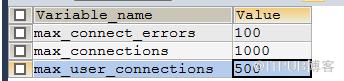
Data source rejected establishment of connection, message from server: "Too many connections"。这是由于太多的连接数量超过了mysql默认的连接数,我们只需要在/etc/my.cnf添加如下配置(初始化连接数设置的过大,会导致应用启动变得很慢):max_connections=1000 所有用户连接数的最大值 max_user_connections=520 单一用户连接数的最大值 wait_timeout=60 60s后关闭空闲连接,对正在工作的连接不受影响 - 3.学习Linux命令:netstat -anp|grep 8086,查看占用8086端口的程序的pid。
- 4.学习Linux命令 :cat /var/log/mysqld.log|grep ERROR,查看mysqld.log日志文件中ERROR级别的日志内容。
- 5.学习Linux命令:mysql -uroot -p,登录mysql。SHOW VARIABLES LIKE "%max%connec%",查看参数配置。
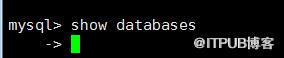
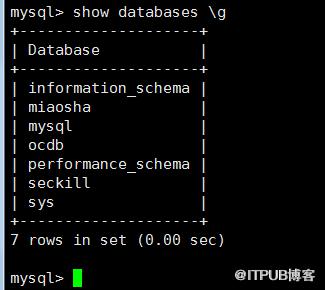
- 6.当我在linux下,登录mysql后,输入show databases,发现没有反应。百度后,发现必须要在每行命令结尾加上 g。
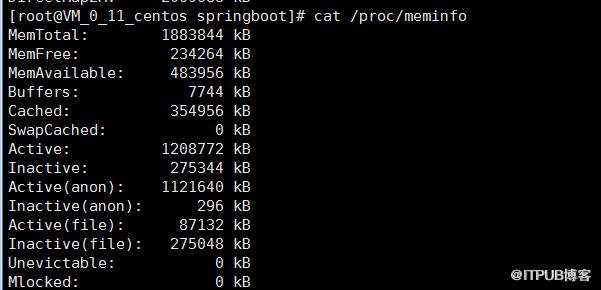
- 7.学习Linux命令:cat /proc/meminfo,查看linux服务器当前可用内存。真正可用的内存=MemFree+Buffers+Cached
尾言
mayday
来自 “ ITPUB博客 ” ,链接:https://blog.itpub.net/1469/viewspace-2802843/ ,如需转载,请注明出处,否则将追究法律责任。

请登录后发表评论
登录
全部评论
