OpenEuler 20.03 安装oracle21C
部署环境
1.操作系统:openEuler 20.03 (LTS-SP1)
2.数据库版本:21C
3.安装方式: 图形化界面
操作系统设置
1.防火墙
systemctl stop firewalld
systemctl disable firewalld
2.配置selinux
#sed -i 's/^SELINUX=.*/SELINUX=disabled/g' /etc/sysconfig/selinux
#setenforce 0
3.配置时区
# rm -fr /etc/localtime
# ln -s /usr/share/zoneinfo/Asia/Shanghai /etc/localtime
安装系统依赖包
1.配置yum源
mkdir -p /mnt/cdrom 新建cdrom挂载目录
mount /root/openEuler-20.03-LTS-SP1-x86_64-dvd.iso /mnt/cdrom -o loop
rm -f *
cat <> mnt.repo
[mnt]
name=/mnt
baseurl=file:///mnt/cdrom
gpgcheck=0
enable=1y
EOF
2.安装依赖包
[root@oula19c /]
#

yum
install -y bc

yum
install -y binutils

yum
install -y elfutils-libelf

yum
install -y elfutils-libelf-devel

yum
install -y fontconfig-devel

yum
install -y glibc

yum
install -y glibc-devel

yum
install -y ksh

yum
install -y libaio

yum
install -y libaio-devel

yum
install -y libXrender

yum
install -y libX11

yum
install -y libXau

yum
install -y libXi

yum
install -y libXtst

yum
install -y libgcc

yum
install -y libnsl

yum
install -y librdmacm

yum
install -y libstdc++

yum
install -y libstdc++-devel

yum
install -y libxcb

yum
install -y libibverbs

yum
install -y make

yum
install -y policycoreutils

yum
install -y policycoreutils-python-utils

yum
install -y smartmontools

yum
install -y sysstat

yum
install -y psmisc

yum
install -y xorg-x11-utils

yum
install -y lsof

yum
install -y libnsl libnsl2

yum
install -y vim

yum
install -y net-tools

yum
install -y openssl-devel

yum
install -y glibc-compat
-2.17

yum
install -y unixODBC unixODBC-devel

yum
install -y libXrender-devel

yum
install -y libXtst-devel

yum
install -y librdmacm-devel

yum
install -y xorg-x11-utils

yum
install -y nfs-utils

yum
install -y tigervnc-
server


####3.下载open没有的包


get
-1.10
-7.el7.x86_64.rpm

wget
-33
-3.2
.3-

[root@oula19c ~]
# rpm -ivh compat-libcap1-1.10-7.el7.x86_64.rpm


warning: compat-libcap1
-1.10
-7.el7.x86_64.rpm: Header V3 RSA/SHA256 Signature,
key
ID ec551f03: NOKEY

Verifying...
################################# [100%]

Preparing...
################################# [100%]

Updating / installing...


1:compat-libcap1
-1.10
-7.el7
################################# [100%]

/sbin/ldconfig: /usr/lib64/libLLVM
-7.so
is
not a symbolic
link


/sbin/ldconfig: /usr/lib64/libLLVM
-7.so
is
not a symbolic
link


[root@oula19c ~]
# rpm -ivh compat-lib

compat-libcap1
-1.10
-7.el7.x86_64.rpm         compat-libstdc++
-33
-3.2
.3
-72.el7.x86_64.rpm

[root@oula19c ~]
# rpm -ivh compat-libstdc++-33-3.2.3-72.el7.x86_64.rpm


warning: compat-libstdc++
-33
-3.2
.3
-72.el7.x86_64.rpm: Header V3 RSA/SHA256 Signature,
key
ID ec551f03: NOKEY

Verifying...
################################# [100%]

Preparing...
################################# [100%]

Updating / installing...


1:compat-libstdc++
-33
-3.2
.3
-72.el7
################################# [100%]

/sbin/ldconfig: /usr/lib64/libLLVM
-7.so
is
not a symbolic
link


/sbin/ldconfig: /usr/lib64/libLLVM
-7.so
is
not a symbolic
link
初始化oracle用户配置
1.建oracle用户
[root@oula19c ~]
#

[root@oula19c ~]
#

[root@oula19c ~]
#

[root@oula19c ~]
# groupadd oinstall

[root@oula19c ~]
# groupadd dba

[root@oula19c ~]
# groupadd oper

[root@oula19c ~]
# useradd -g oinstall -G dba,oper oracle
2.安装路径
 root@oula19c ~]
# mkdir /u01

[root@oula19c ~]
# chown -R oracle:oinstall /u01

[root@oula19c ~]
# su - oracle


Welcome to
4.19.
90-
2109.1.
0.
0108.oe1.x86_64


System information as of
time:  Wed Jan
17
21
:
37
:
38 CST
2024


System
load:
0.
10


Processes:
150

Memory
used:
17.1%

Swap
used:
0.
7%

Usage
On:
17%

IP
address:
192.168.
137.129

Users
online:
2

[oracle@oula19c ~]$ cd /u01

[oracle@oula19c ~]$ cd /u01

[oracle@oula19c u01]$

[oracle@oula19c u01]$ mkdir app

[oracle@oula19c u01]$ mkdir -p app/oracle/product/
19c
3.设置环境变量
[oracle@oula19c ~]$ cat .bash_profile


# Source /root/.bashrc if user has one

[ -f ~/.bashrc ] && . ~/.bashrc


export ORACLE_SID=orcl


export ORACLE_BASE=/u01/app/oracle


export ORACLE_HOME=
$ORACLE_BASE/product/19c


export TNS_ADMIN=
$ORACLE_HOME/network/admin


#export LD_LIBRARY_PATH=$ORACLE_HOME/lib:/usr/lib64:/usr/lib


export  LD_LIBRARY_PATH=
$ORACLE_HOME/lib


export PATH=
$PATH:
$ORACLE_HOME/bin

[oracle@oula19c ~]$
4.解压缩oracle安装包
[oracle@oula19c ~]$ mv LINUX.X64_213000_db_home.zip $ORACLE_HOME
5.安装
[root@oula19c /]
# export DISPLAY=192.168.137.1:0.0

[root@oula19c /]
# xhost +

access control disabled, clients can connect
from any host

[root@oula19c /]
#

[root@oula19c /]
# su - oracle

Last login: Wed Jan
17
21:
43:
19 CST
2024
on pts/
0


Welcome to
4.19
.90
-2109.1
.0
.0108.oe1.x86_64


System information
as
of time:  Wed Jan
17
21:
48:
34 CST
2024


System load:
0.85

Processes:
148

Memory used:
11.9%

Swap used:
5.9%

Usage On:
26%

IP address:
192.168
.137
.129

Users online:
2


[oracle@oula19c ~]$
export DISPLAY=
192.168
.137
.1:
0.0

[oracle@oula19c ~]$ cd $ORACLE_HOME

[oracle@oula19c
19c]$ ./runInstaller
21C特性说明
1.与之前所有的版本不同,21c将dbs和network目录从ORACLE_HOME中剥离到ORACLE_BASE下
 /u01/app/oracle

[oracle@oula19c oracle]$ pwd

/u01/app/oracle

[oracle@oula19c oracle]$ ls -ls

total
36


4 drwxr-x---.
3 oracle oinstall
4096 Jan
17
23
:
40 admin


4 drwxr-x---.
3 oracle oinstall
4096 Jan
17
23
:
43 audit


4 drwxr-x---.
4 oracle oinstall
4096 Jan
17
23
:
30 cfgtoollogs


4 drwxr-x---.
2 oracle oinstall
4096 Jan
17
23
:
57 dbs


4 drwxrwxr-x.
23 oracle oinstall
4096 Jan
17
23
:
22 diag


4 drwxr-x---.
3 oracle oinstall
4096 Jan
17
23
:
40 fast_recovery_area


4 drwxr-x---.
3 oracle oinstall
4096 Jan
17
23
:
22 homes


4 drwxr-x---.
3 oracle oinstall
4096 Jan
17
23
:
40 oradata


4 drwxr-xr-x.
3 oracle oinstall
4096 Jan
17
21
:
38 product

[oracle@oula19c OraDB21Home1]$ pwd

/u01/app/oracle/homes/OraDB21Home1

[oracle@oula19c OraDB21Home1]$ ls

assistants   dbs     hs       log  network  sqlpatch

cfgtoollogs  drdaas  install  mgw  rdbms
2.CDB是安装的必选项
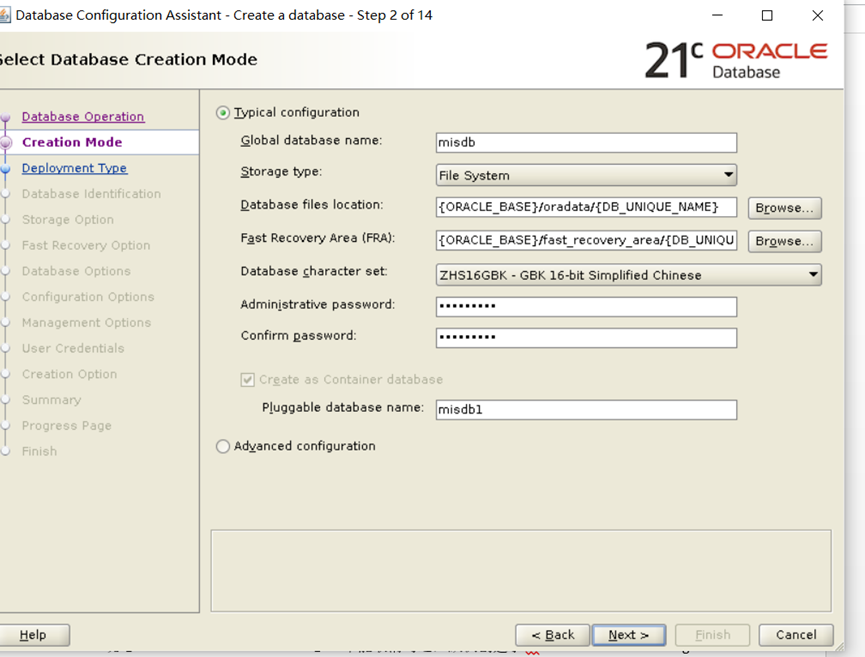 3.新特性
3.新特性
1)区块链表
区块链表提出的背景:
当今大多数应用程序都具有中央权限(银行,代管公司,交易交易所,政府办公室等),并且借助Oracle数据库中的区块链表,可以使这些应用程序更安全,而无需增加更改为托管服务器的复杂性去中心化模型
使用的基本原则:
1.空的区块链表,可以删除(drop);
2.区块链表不能建立在Root容器中;
3.NO DROP/DELETE 选项定义了区块链表的删除特性和保留期;
4.在保留期内,有数据的区块链表不能被删除(drop);
5.包含保护期内都区块链表的用户不能递归删除;
6.可以通过删除数据库,清除区块链表;
7.INSERT操作不会彼此阻塞,HASH 值是提交时计算的;
8.仅插入操作,不允许进行任何更新和其他修改
来自 “ ITPUB博客 ” ,链接:https://blog.itpub.net/10201716/viewspace-3004385/ ,如需转载,请注明出处,否则将追究法律责任。

最新文章
- Oracle 迁移到 PostgreSQL:难度最低的迁移路线,但这些细节依然能让你栽跟头
- PostgreSQL 迁移到 MySQL 全指南:这些"隐形陷阱"不提前排查,上线后必踩
- Oracle 迁移数据到 MySQL,你需要注意这些事项
- 同样的 SQL,Oracle 跑得飞快,达梦却慢成狗?
- MySQL 迁移 PostgreSQL 时 DDL 需要注意的事项
- MySQL 5.7 与 MySQL 8.0 区别(特性)
- ogg 延迟传输 怎么排查
- oracle 19c 客户端链接报ORA-01017: invalid username/password的排查方法
- 查找oracle归档日志 产生的原因
- Oracle 数据库巡检脚本(增强版)
