ogg 同步pg数据到oracle--步骤
环境准备
操作系统: ORACLE Linux7.9-64bit
pg 版本:14.8
ogg for pg 版本:21.3
oracle版本: 11.2.0.4
ogg for oracle 版本:19.1(版本太高和oralce版本不兼容,导致无法复制)
2台测试服务器:(源) 192.168.137.103;(目标)192.168.137.102
pg14.8 安装:
https://blog.itpub.net/10201716/viewspace-3002437/
实现原理
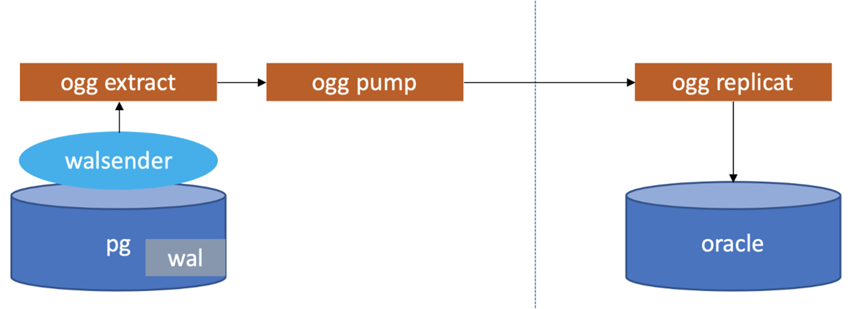
OGG准备专用schema和专用用户并授权
在正式开始配置OGG流程前,根据官方推荐,最好给OGG准备一个专门的schema和专门的用户,并对该用户授予必要的权限,操作如下:
(1)创建数据库
创建演示库-test_db
psql -h /data/pgsql/run


alter
user postgres
password
'Cloud_4u';
##初始化密码


create
DATABASE test_db; 测试数据库

\q

 切换到OGG专库,创建schema

psql -h /data/pgsql/run -d test_db -U postgres


create
SCHEMA ggsch; ogg专用数据库shcema

 切换到演示库,创建测试用的表

psql -d test_db -U postgres


create
schema test_schema;


CREATE
TABLE test_schema.COMPANY(


ID
INT PRIMARY
KEY
NOT
NULL,


NAME
TEXT   ,

   AGE
INT     ,

   ADDRESS
CHAR(
50),

   SALARY
REAL

);


CREATE
TABLE  test_schema.DEPARTMENT(


ID
INT PRIMARY
KEY     ,

   DEPT
CHAR(
50) ,

   EMP_ID
INT

);

test_db=
# insert into test_schema.COMPANY values (1,'du',30,'beijing','222');

test_db=
#  insert into test_schema.DEPARTMENT values (1,'tech',3);

————————————————
创建OGG专用用户,并授权
create
role gguser login
password
'Cloud_4u' ;


GRANT
CONNECT
ON
DATABASE postgres
TO gguser;


ALTER
USER gguser
WITH
REPLICATION;


ALTER
USER gguser
WITH SUPERUSER;

psql -d test_db -U postgres


GRANT
USAGE
ON
SCHEMA ggsch
TO gguser;


GRANT
SELECT
ON ALL
TABLES
IN
SCHEMA ggsch
TO gguser;


GRANT
INSERT,
UPDATE,
DELETE,
TRUNCATE
ON ALL
TABLES
IN
SCHEMA ggsch
TO gguser;


-- 心跳和检查点权限


GRANT
CREATE
ON
DATABASE gg_db
TO gguser;


GRANT
CREATE,
USAGE
ON
SCHEMA ggsch
TO gguser;


GRANT
EXECUTE
ON ALL FUNCTIONS
IN
SCHEMA ggsch
TO gguser;


GRANT
SELECT,
INSERT,
UPDATE,
DELETE
ON ALL
TABLES
IN
SCHEMA ggsch
TO gguser;

————————————————
安装ODBC驱动,配置DNS
cd /data/ogg
[postgres@pgdb ogg]$ cat   odbc.ini

[ODBC Data Sources]

PGDSN=DataDirect 14.8 PostgreSQL Wire Protocol

postgres=DataDirect 14.8 PostgreSQL Wire Protocol

scott=DataDirect 14.8 PostgreSQL Wire Protocol


[ODBC]

IANAAppCodePage=106

InstallDir=/data/ogg


[TESTPDB]

Driver=/data/ogg/lib/GGpsql25.so

Description=DataDirect 14.8 PostgreSQL Wire Protocol

Database=test_db

HostName=192.168.137.103

PortNumber=5432


#LogonID=ogguser


#Password=ogg123

TransactionErrorBehavior=2
OGG进程配置
- 管理服务进程
- 配置数据源的提取进程
- 配置目标库的复制进程
配置管理进程
GGSCI(pgdb,作为 gguser@testpdb)
91> edit  param mgr

PORT
7810

DYNAMICPORTLIST
7810
-7820

purgeoldextracts .
/dirdat/*, usecheckpoints,minkeephours
24

AUTORESTART ER *, RETRIES
3, WAITMINUTES
2,RESETMINUTES
10
源端postgresql参数调整
log_directory = '/data/pgsql/data/log'
# directory where log files are written,


# can be absolute or relative to PGDATA

log_filename = 'pg-%Y-%m-%d_%H%M%S.log'

wal_level = logical
#minimal, replica, or logical


max_replication_slots = 10
#max number of replication slots


max_wal_sender = 10
#maximum number of wal sender processes

wal_receiver_status_interval=10s
#optional, keep the system default


wal_sender_timeout
#optional, keep the system default


track_commit_timestamp
#optional, keep the system default

wal_receiver_status_interval=10s

wal_sender_timeout = 60s

track_commit_timestamp=off
调整后重启源端postgresql
开启表级别附加日志
[postgres@pgdb ogg]$
export  ODBCINI=/data/ogg/odbc.ini

[postgres@pgdb ogg]$

[postgres@pgdb ogg]$ ./ggsci


Oracle GoldenGate Command Interpreter
for PostgreSQL

Version
21.3.
0.0.
0 OGGCORE_21.
3.0.
0.0_PLATFORMS_210728.
1047

Oracle Linux
7, x64,
64bit (optimized), PostgreSQL
on Aug
4
2021
20:
27:
55

操作系统字符集标识为 UTF-
8。


Copyright (C)
1995,
2021, Oracle
and/
or its affiliates. All rights reserved.


GGSCI (pgdb)
1> dblogin sourcedb testpdb, userid gguser, password Cloud_4u


2024-
01-
06
20:
25:
49  INFO    OGG-
03036  数据库字符集被标识为 UTF-
8。区域设置:zh_CN.UTF-
8.


2024-
01-
06
20:
25:
49  INFO    OGG-
03037  会话字符集被标识为 UTF-
8。.

GGSCI(pgdb,作为 gguser@testpdb)
48>  add trandata test_schema.COMPANY

 add trandata test_schema.DEPARTMENT

Logging
of supplemental log data
is already enabled
for table test_schema.company
with REPLICA IDENTITY
set
to
DEFAULT


GGSCI(pgdb,作为 gguser@testpdb)
49>


Logging
of supplemental log data
is already enabled
for table test_schema.department
with REPLICA IDENTITY
set
to
DEFAULT

GGSCI(pgdb,作为 gguser@testpdb)
50> info trandata test_schema.COMPANY


Logging
of supplemental log data
is enabled
for table test_schema.company
with REPLICA IDENTITY
set
to
DEFAULT
在pg上注册抽取进程
在pg库上注册抽取进程,实际上就是创建了一个复制槽,output plugin 默认使用test_decoding
GGSCI(pgdb,作为 gguser@testpdb)
53> register extract ext_pg


2024
-01
-06
17:
25:
08  INFO    OGG
-25355  已成功在数据库
'test_db' 中创建用于提取组
'EXT_PG' 的复制插槽
'ext_pg_de21e46e9800bf64'。
配置抽取进程和投递进程
配置抽取进程
GGSCI(
pgdb,作为
gguser@
testpdb)
3> edit  param EXT_PG

EXTRACT ext_pg

SETENV(PGCLIENTENCODING =
"UTF8" )

SETENV(ODBCINI=
"/data/ogg/odbc.ini" )

sourcedb testpdb, userid gguser, password Cloud_4u

LOGALLSUPCOLS

NOCOMPRESSUPDATES

UPDATERECORDFORMAT FULL

--TRANLOGOPTIONS MINEFROMACTIVEDG

DISCARDFILE ./dirrpt/pg.dsc, APPEND, MEGABYTES
4000

CACHEMGR CACHESIZE
1024MB, CACHEDIRECTORY ./dirtmp

REPORTCOUNT EVERY
10000 records, RATE

EXTTRAIL ./dirdat/pg

GETTRUNCATES

TABLE test_schema.COMPANY;


TABLE
test_schema
.DEPARTMENT;
GGSCI(pgdb,作为 gguser@testpdb)
53> register extract ext_pg


2024-
01-
06
17
:
25
:08  INFO    OGG-
25355  已成功在数据库
'test_db' 中创建用于提取组
'EXT_PG' 的复制插槽
'ext_pg_de21e46e9800bf64'。

GGSCI(pgdb,作为 gguser@testpdb)
57> ADD extract ext_pg, TRANLOG,
BEGIN now

已添加提取。


GGSCI(pgdb,作为 gguser@testpdb)
58> add exttrail ./dirdat/pg,extract ext_pg,megabytes
500

已添加 EXTTRAIL。
配置投递进程
GGSCI(
pgdb,作为
gguser@
testpdb)
4> edit param pump_pg1

extract pump_pg1

SETENV(PGCLIENTENCODING =
"UTF8" )

RMTHOST
192.168.
137.102, MGRPORT
7809, COMPRESS

PASSTHRU

NUMFILES
1000

RMTTRAIL ./dirdat/gp

TABLE test_schema.COMPANY;


TABLE
test_schema
.DEPARTMENT;


GGSCI(
pgdb,作为
gguser@
testpdb)
68>add extract pump_pg1,exttrailsource ./dirdat/pg


GGSCI(pgdb,作为 gguser@testpdb)
69> add rmttrail ./dirdat/gp,extract pump_pg1,megabytes
500
配置defgen
说明
利用DEFGEN工具可以为源端和目标端表生成数据定义文件,当源库和目标库类型不一致时,或源端的表和目标端的表结构不一致时,数据定义文件时必须要有的
如果表结构一直可以配置参数ASSUMETARGETDEFS
GGSCI(
pgdb,作为
gguser@
testpdb)
121> edit param defg

DEFSFILE ./dirdef/tb.def, PURGE

sourcedb testpdb, userid gguser, password Cloud_4u

TABLE test_schema.COMPANY;


TABLE
test_schema
.DEPARTMENT;
生成表定义文件
[postgres@pgdb ogg]$ ./defgen paramfile /data/ogg/dirprm/defg.prm

[postgres@pgdb dirdef]$ ls

demo.def  tb.def
拷贝defgen文件到目标端的dirdef目录下
scp tb.def oracle@192.168.137.102
启动复制及投递进程
GGSCI(pgdb,作为 gguser@testpdb)
6> start EXT_PG

GGSCI(pgdb,作为 gguser@testpdb)
6> start pump_pg1

GGSCI(pgdb,作为 gguser@testpdb)
123> info all

Program     Status      Group       Lag at Chkpt  Time Since Chkpt


MANAGER     RUNNING

EXTRACT     ABENDED     E1
00:
00:
00
06:
50:
26

EXTRACT     RUNNING     E2
00:
00:
00
00:
00:
11

EXTRACT     RUNNING     EXT_PG
00:
00:
00
00:
00:
02

EXTRACT     STOPPED     PU2
00:
00:
00
06:
52:
28

EXTRACT     RUNNING     PUMP_PG
00:
00:
00
00:
00:
05

EXTRACT     RUNNING     PUMP_PG1
00:
00:
00
00:
00:
06
目标端oracle配置
oracle库的用户和权限
create
user goldengate
identified
by
"123456";


grant
create
session,
alter
session
to goldengate;


grant
alter
system
to goldengate;


grant
resource
to goldengate;


grant
connect
to goldengate;


grant
select
any dictionary
to goldengate;


grant
flashback
any
table
to goldengate;


grant
select
any
table
to goldengate;


grant
select
any
table
to goldengate;


grant
insert
any
table
to goldengate;


grant
update
any
table
to goldengate;


grant
delete
any
table
to goldengate;


grant
select
on dba_clusters
to goldengate;


grant
execute
on dbms_flashback
to goldengate;


grant
create
table
to goldengate;


grant
create
sequence
to goldengate;


grant
alter
any
table
to goldengate;


grant dba
to goldengate;


grant
lock
any
table
to goldengate;
ogg for oracle 安装(略)
安装的版本是19.1 图像化界面安装
mgr配置
edit param mgr


PORT
7809

DYNAMICPORTLIST
7810
-7980

PURGEOLDEXTRACTS .
/dirdat/*, USECHECKPOINTS, MINKEEPDAYS
3

PURGEDDLHISTORY MINKEEPDAYS
7, MAXKEEPDAYS
10

LAGREPORTHOURS
1

LAGINFOMINUTES
30

LAGCRITICALMINUTES
45

start mgr
目标端配置复制进程
dblogin USERID goldengate
@misdb,password
123456

Successfully logged into database.

GGSCI (Node1 as goldengate
@misdb)
2> edit param rep_pg1

REPLICAT rep_pg1

SETENV (NLS_LANG=
"AMERICAN_AMERICA.AL32UTF8")

USERID goldengate
@misdb,password
123456

SOURCEDEFS ./dirdef/tb.def

MAP test_schema.COMPANY, TARGET togg.COMPANY;


MAP test_schema.DEPARTMENT,TARGET togg.DEPARTMENT;


add checkpointtable goldengate.chkt

add checkpointtable goldengate.checkpointtab

add replicat rep_pg1,exttrail ./dirdat/gp,checkpointtable goldengate.checkpointtab

start rep_pg1


GGSCI (Node1 as goldengate
@misdb)
3>
info all


Program     Status      Group       Lag at Chkpt  Time Since Chkpt


MANAGER     RUNNING

REPLICAT    RUNNING     REP_PG
00:
00:
00
00:
00:
01

REPLICAT    RUNNING     REP_PG1
00:
00:
00
00:
00:
06
测试
test_db=# insert into test_schema.COMPANY values (
3,
'w2',
'33',
'au',
'556');

GGSCI(pgdb,作为 gguser@testpdb)
7> stats PUMP_PG1 , total


正在将 STATS 请求发送到提取组 PUMP_PG1 ...


统计信息开始于
2024-
01-
06
21:
01:
02。


到 ./dirdat/gp 的输出:


从 test_schema.department 提取到 test_schema.department:


*** 自
2024-
01-
06
17:
53:
37 以来的统计信息总计 ***

    插入总数
1.00

    更新总数
0.00

    删除总数
0.00

    更新插入总数
0.00

    放弃总数
0.00

    操作总数
1.00


从 test_schema.company 提取到 test_schema.company:


*** 自
2024-
01-
06
17:
53:
37 以来的统计信息总计 ***

    插入总数
2.00

    更新总数
0.00

    删除总数
0.00

    更新插入总数
0.00

    放弃总数
0.00

    操作总数
2.00

目标端状态


GGSCI (Node1
as goldengate@misdb)
26> stats rep_pg1, total


Sending STATS request
to REPLICAT REP_PG1 ...


Start
of Statistics at
2024-
01-
06
21:
01:
41.


Replicating from test_schema.company
to TOGG.COMPANY:


*** Total statistics since
2024-
01-
06
17:
53:
39 ***

        Total inserts
2.00

        Total updates
0.00

        Total deletes
0.00

        Total upserts
0.00

        Total discards
0.00

        Total operations
2.00


Replicating from test_schema.department
to TOGG.DEPARTMENT:


*** Total statistics since
2024-
01-
06
17:
53:
39 ***

        Total inserts
1.00

        Total updates
0.00

        Total deletes
0.00

        Total upserts
0.00

        Total discards
0.00

        Total operations
1.00


 ID
NAME                AGE ADDRESS                                            SALARY

--- ------------ ---------- -------------------------------------------------- --------------------


2 yang
28 taiyuan
3333


3 w2
33 au
556
来自 “ ITPUB博客 ” ,链接:https://blog.itpub.net/10201716/viewspace-3002939/ ,如需转载,请注明出处,否则将追究法律责任。

最新文章
- Oracle 迁移到 PostgreSQL:难度最低的迁移路线,但这些细节依然能让你栽跟头
- PostgreSQL 迁移到 MySQL 全指南:这些"隐形陷阱"不提前排查,上线后必踩
- Oracle 迁移数据到 MySQL,你需要注意这些事项
- 同样的 SQL,Oracle 跑得飞快,达梦却慢成狗?
- MySQL 迁移 PostgreSQL 时 DDL 需要注意的事项
- MySQL 5.7 与 MySQL 8.0 区别(特性)
- ogg 延迟传输 怎么排查
- oracle 19c 客户端链接报ORA-01017: invalid username/password的排查方法
- 查找oracle归档日志 产生的原因
- Oracle 数据库巡检脚本(增强版)
