和19c安装相关的历史文章,
《非Oracle Linux下Oracle 19c CDB数据库安装》
因为有个场景,需要用到Oracle 21c的环境中,打算在云主机上安装一个。看了一下官网的安装文件下载,目前提供了三个平台(Linux x86-64、HP-UX ia64和Windows x64)的介质,
https://www.oracle.com/database/technologies/oracle-database-software-downloads.html
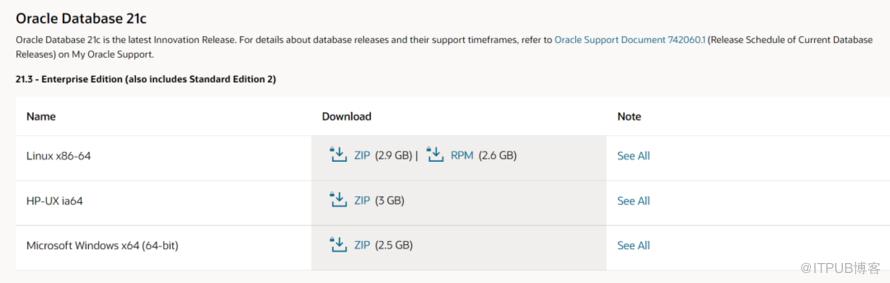
Linux平台,官网提供了rpm和home两种安装途径,这点和19c是相同的,因此安装过程,应该是相同的,

我们选择rpm安装,19c的rpm安装CDB和非CDB都做过测试,如下所示,
《非Oracle Linux下Oracle 19c CDB数据库安装》
参照19c的安装过程,尝试安装21c。
1. 安装preinstall
rpm安装的前奏,是通过安装preinstall来给环境做一些准备,如下是针对Oracle Linux 7和Oracle Linux 8的preinstall包下载地址,
https://yum.oracle.com/repo/OracleLinux/OL7/latest/x86_64/getPackage/oracle-database-preinstall-21c-1.0-1.el7.x86_64.rpm
https://yum.oracle.com/repo/OracleLinux/OL8/appstream/x86_64/getPackage/oracle-database-preinstall-21c-1.0-1.el8.x86_64.rpm
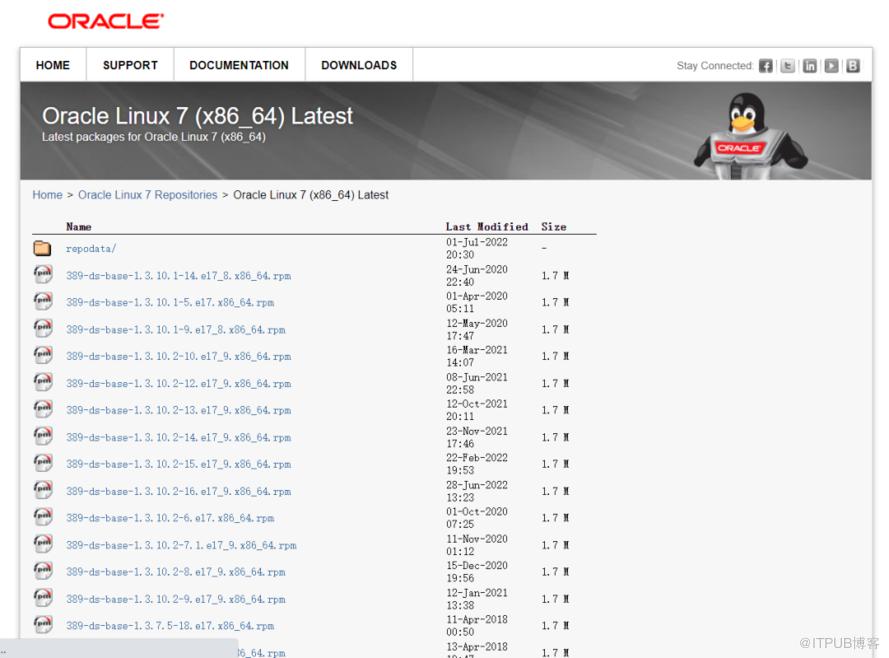
虽然此处说的都是针对Oracle Linux,但实际我这次安装的环境是CentOS 7.9,Linux内核的同样适用。
preinstall其实就是装了一些安装过程中需要的依赖包,之前版本中我们都是手工做的准备,从19c开始,集成到了preinstall中,便于自动化安装,降低安装难度,如果安装过程中提示少了一些辅助包,就得自行安装,
[]warning: oracle-database-preinstall-21c-1.0-1.el7.x86_64.rpm: Header V3 RSA/SHA256 Signature, key ID ec551f03: NOKEYerror: Failed dependencies:ksh is needed by oracle-database-preinstall-21c-1.0-1.el7.x86_64nfs-utils is needed by oracle-database-preinstall-21c-1.0-1.el7.x86_64policycoreutils-python is needed by oracle-database-preinstall-21c-1.0-1.el7.x86_64smartmontools is needed by oracle-database-preinstall-21c-1.0-1.el7.x86_64sysstat is needed by oracle-database-preinstall-21c-1.0-1.el7.x86_64xorg-x11-utils is needed by oracle-database-preinstall-21c-1.0-1.el7.x86_64xorg-x11-xauth is needed by oracle-database-preinstall-21c-1.0-1.el7.x86_64
安装这些缺少的依赖包,再次执行,
[]warning: oracle-database-preinstall-21c-1.0-1.el7.x86_64.rpm: Header V3 RSA/SHA256 Signature, key ID ec551f03: NOKEYPreparing...package oracle-database-preinstall-21c-1.0-1.el7.x86_64 is already installed
2. 安装21c数据库软件
CentOS 7.9用oracle-database-ee-21c-1.0-1.ol7.x86_64.rpm来安装。rpm安装Oracle默认的路径是/opt/oracle,安装前需要确认该路径的权限是oracle可用的,如果是root,执行安装时,就会提示错误,
[root@bisal software]# rpm -ivh oracle-database-ee-19c-1.0-1.x86_64.rpmwarning: oracle-database-ee-19c-1.0-1.x86_64.rpm: Header V3 RSA/SHA256 Signature, key ID ec551f03: NOKEYPreparing... ################################# [100%][SEVERE] The install cannot proceed because ORACLE_BASE directory (/opt/oracle)is not owned by "oracle" user. You must change the ownership of ORACLE_BASEdirectory to "oracle" user and retry the installation.error: %pre(oracle-database-ee-19c-1.0-1.x86_64) scriptlet failed, exit status 1error: oracle-database-ee-19c-1.0-1.x86_64: install failed
此时要改下权限,
chown -R oracle:oinstall /opt/oracle再次执行,就会正常安装,
[root@VM-20-15-centos software]# rpm -ivh oracle-database-ee-21c-1.0-1.ol7.x86_64.rpmwarning: oracle-database-ee-21c-1.0-1.ol7.x86_64.rpm: Header V3 RSA/SHA256 Signature, key ID ec551f03: NOKEYPreparing... ################################# [100%]Updating / installing...1:oracle-database-ee-21c-1.0-1 ################################# [100%][INFO] Executing post installation scripts...[INFO] Oracle home installed successfully and ready to be configured.To configure a sample Oracle Database you can execute the following service configuration script as root: /etc/init.d/oracledb_ORCLCDB-21c configure
此处碰到了坑,正常情况下,安装软件,/opt/oracle中应该至少包括这些文件夹,如果不是这些,很可能是有问题,关注控制台活着日志中有无错误,
cd /opt/oracledrwxr-x--- 3 oracle oinstall 4096 Jul 1 23:50 cfgtoollogsdrwxr-x--- 2 oracle oinstall 4096 Jul 1 23:50 dbsdrwxrwxr-x 23 oracle oinstall 4096 Jul 1 23:50 diagdrwxr-x--- 3 oracle oinstall 4096 Jul 1 23:50 homesdrwxrwx--- 4 oracle oinstall 4096 Jul 1 23:50 oraInventorydrwxr-xr-x 3 oracle oinstall 4096 Jul 1 23:46 product
另外,可能由于我的路径权限问题,提示我很多文件权限错误,
[root@VM-20-15-centos init.d]# /etc/init.d/oracledb_BISALCDB_21c configureConfiguring Oracle Database BISALCDB.[FATAL] [DBT-10011] Incorrect ownership/permissions detected for the file (/opt/oracle/product/21c/dbhome_1/bin/oradism).CAUSE: Following nodes does not have required file ownership/permissions: Node :vm-20-15-centosPRVG-11960 : Set user ID bit is not set for file "/opt/oracle/product/21c/dbhome_1/bin/oradism" on node "vm-20-15-centos".PRVG-2031 : Owner of file "/opt/oracle/product/21c/dbhome_1/bin/oradism" did not match the expected value on node "vm-20-15-centos". [Expected = "root(0)" ; Found = "oracle(54321)"]ACTION: Run the Oracle Home root script as the "root" user to fix the permissions.[FATAL] [DBT-05509] Failed to connect to the specified database (BISALCDB).CAUSE: OS Authentication might be disabled for this database (BISALCDB).ACTION: Specify a valid sysdba user name and password to connect to the database.Database configuration failed.
例如$ORACLE_HOME/bin中这个文件应该是个链接文件,
[]-rwsr-x--- 1 root oinstall 1867552 Jul 28 2021 oradism
但是我安装的环境中该文件是个文件,
[]-rwxr-x--- 1 root oinstall 1867552 Jul 28 2021 oradism
此时再通过chown调整文件夹时,可能还是有问题,一定要在执行configure前就调整好/opt/oracle的权限。
3. 安装21c数据库
和19c相同,21c可以通过配置oracledb_$ORACLE_SID_21c这个文件来安装数据库,
P.S. 如果改了原始的oracledb_ORCLCDB_21c名称为
oracledb_BISALCDB_21c,
则/etc/sysconfig的oracledb_ORCLCDB-21c.conf要改为
oracledb_BISALCDB-21c.conf,
[root@VM-20-15-centos init.d]# ./oracledb_BISALCDB_21c configureConfiguring Oracle Database BISALCDB.Prepare for db operation8% completeCopying database files31% complete100% complete[FATAL]Parsing command line arguments:Parameter "silent" = trueParameter "local" = trueParameter "inscomp" = serverParameter "insprtcl" = TCPParameter "orahome" = /opt/oracle/product/21c/dbhome_1Parameter "instype" = customParameter "listener" = LISTENERParameter "lisport" = 1521Parameter "cfg" = localParameter "responsefile" = /opt/oracle/product/21c/dbhome_1/network/install/netca_typ.rspDone parsing command line arguments.Oracle Net Services Configuration:LISTENER:No valid IP Address returned for the host VM-20-15-centos.Profile configuration complete.Check the trace file for details: /opt/oracle/cfgtoollogs/netca/trace_OraDBHome21cEE-22070212AM1239.logOracle Net Services configuration failed. The exit code is 18% complete0% completeLook at the log file "/opt/oracle/cfgtoollogs/dbca/BISALCDB/BISALCDB.log" for further details.Database configuration failed.
此处报错了,看下提示,说的是配置Listener时,找不到主机名对应的有效IP地址,从netca日志,可以再次确认,
[] [ 2022-07-02 00:12:40.913 CST ] [ConfigureListener.isPortFree:1330] InetAddress.getByName(127.0.0.1): /127.0.0.1[] [ 2022-07-02 00:12:40.913 CST ] [ConfigureListener.isPortFree:1332] Local host IP address: VM-20-15-centos/127.0.0.1[] [ 2022-07-02 00:12:40.913 CST ] [ConfigureListener.isPortFree:1334] Local host name: VM-20-15-centos[] [ 2022-07-02 00:12:40.913 CST ] [ConfigureListener.isPortFree:1345] Address VM-20-15-centos[] [ 2022-07-02 00:12:40.913 CST ] [ConfigureListener.isPortFree:1345] Address VM-20-15-centos[] [ 2022-07-02 00:12:40.913 CST ] [ConfigureListener.isPortFree:1407] No IP address returned for host. VM-20-15-centos[] [ 2022-07-02 00:12:40.913 CST ] [SilentConfigure.silentConfigureListener:398] oracle.net.ca.IllegalEndpointException: No valid IP Address returned for the host VM-20-15-centos.
这种情况下,需要配置/etc/hosts,增加主机名和当前内网IP的关系,
vi /etc/hostsx.x.x.x VM-20-15-centos
重新安装,就可以正常执行,
[root@VM-20-15-centos init.d]# ./oracledb_BISALCDB_21c configureConfiguring Oracle Database BISALCDB.Prepare for db operation8% completeCopying database files31% completeCreating and starting Oracle instance32% complete36% complete40% complete43% complete46% completeCompleting Database Creation51% complete54% completeCreating Pluggable Databases58% complete77% completeExecuting Post Configuration Actions100% completeDatabase creation complete. For details check the logfiles at:/opt/oracle/cfgtoollogs/dbca/BISALCDB.Database Information:Global Database Name:BISALCDBSystem Identifier(SID):BISALCDBLook at the log file "/opt/oracle/cfgtoollogs/dbca/BISALCDB/BISALCDB0.log" for further details.Database configuration completed successfully. The passwords were auto generated, you must change them by connecting to the database using 'sqlplus / as sysdba' as the oracle user.
4. 连接数据库
数据库安装完成,可以登录了,因为21c不支持非CDB,所以sqlplus / as sysdba登录的就是CDB,我们安装时配置了一个PDB,可以通过alter session set container或者tns等方式登录到这个PDB,

此处又碰到了一个坑,我在$ORACLE_HOME/network/admin的tnsnames.ora中配置了,
BISALPDB = (DESCRIPTION =(ADDRESS = (PROTOCOL = TCP)(HOST = VM-20-15-centos)(PORT = 1521))(CONNECT_DATA =(SERVER = DEDICATED)(SERVICE_NAME = BISALPDB1)))
正常来讲,sqlplus user/password@bisalpdb就可以登陆,但是一直提示,

ORA-12514的错误就是TNS配置有误,但看了下文件,确实没什么错误。经过多次尝试,即使我删除了$ORACLE_HOME/network/admin/
tnsnames.ora的内容,都能执行tnsping BISALCDB,这就奇怪了。
"事出反常必有妖",对比了多次配置文件、监听配置等信息,发现一个疑点,lsnrctl status中的Listener Parameter File的路径是/opt/oracle/homes/,并不是/opt/oracle/product/...,
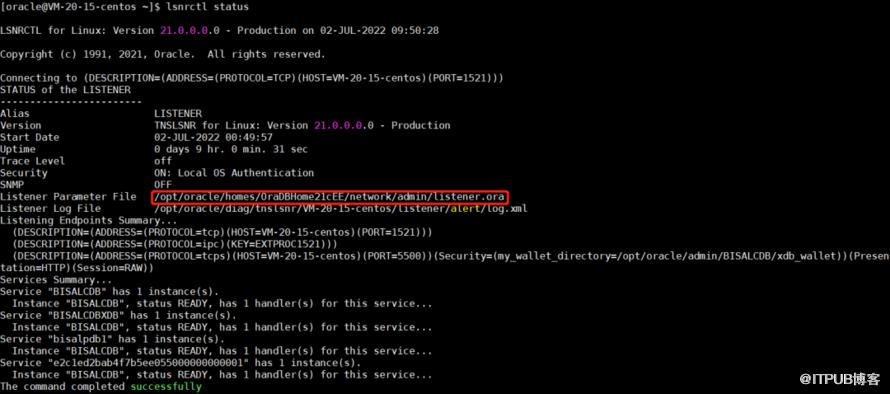
再看下/opt/oracle/homs/的tnsnames配置文件,确实只存在上述测试的BISALCDB,难怪删了/opt/oracle/product的tnsnames.ora内容,并未生效,原来改错了文件,但是为什么此处监听参数文件是这个,不太能考究了,很可能是初次安装的时候,配置有些问题,某个参数采用了默认的,
[oracle@VM-20-15-centos admin]$ cat tnsnames.ora# tnsnames.ora Network Configuration File: /opt/oracle/homes/OraDBHome21cEE/network/admin/tnsnames.ora# Generated by Oracle configuration tools.LISTENER_BISALCDB =(ADDRESS = (PROTOCOL = TCP)(HOST = VM-20-15-centos)(PORT = 1521))BISALCDB =(DESCRIPTION =(ADDRESS = (PROTOCOL = TCP)(HOST = VM-20-15-centos)(PORT = 1521))(CONNECT_DATA =(SERVER = DEDICATED)(SERVICE_NAME = BISALCDB)))
为了解决这个,我是删除了/opt/oracle/homes错误路径的tnsnames.ora、listener.ora,重启监听,就会找$ORACLE_HOME/network/admin的tnsnames.ora,
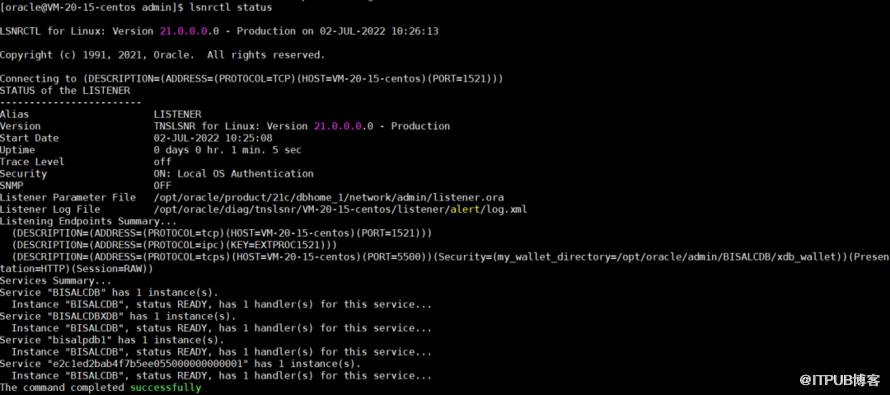
如果哪位朋友知道更准确地改Listener Parameter File值的方式,还请指教。
此时就可以用TNS正常登录到PDB,
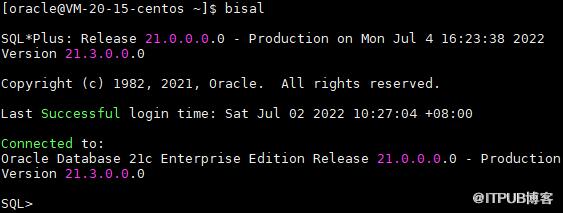
21c的整体使用操作上,和19c相差不太大,新特性的方面,还需要测试了解。
近期更新的文章:
《小白学习MySQL - 增量统计SQL的需求 - 开窗函数的方案》
近期的热文:
文章分类和索引:
原文作者:bisal的个人杂货铺;如有侵权,请联系管理员删除。

