一、发布前必知:价值与前提
为什么要发布到 Maven 中央仓库?
- 全局可访问:任何使用 Maven、Gradle 的开发者都能轻松引入,无需额外配置私有仓库
- 标准化保障:遵循严格的发布规范,提升组件的可信度与安全性
- 版本自动管理:中央仓库会妥善保存各版本,避免依赖冲突与版本混乱
- 社区认可:开源共享是技术成长的重要途径,优质组件能获得更多反馈与迭代
发布前提
- 组件非敏感信息:中央仓库所有内容公开,严禁发布企业私有代码或涉密逻辑
- 遵守开源协议:推荐使用 Apache License 2.0 等主流开源协议,避免版权纠纷
- 准备必要工具:已安装 Maven(配置好环境变量)、可访问 GitHub/Gitee 等代码仓库
二、核心步骤:从配置到发布全流程
第一步:Sonatype 平台配置(获取发布权限)
Maven 中央仓库由 Sonatype 维护,所有发布操作需通过其平台授权:
- 访问 Sonatype 官网注册或登录账号,建议绑定常用邮箱
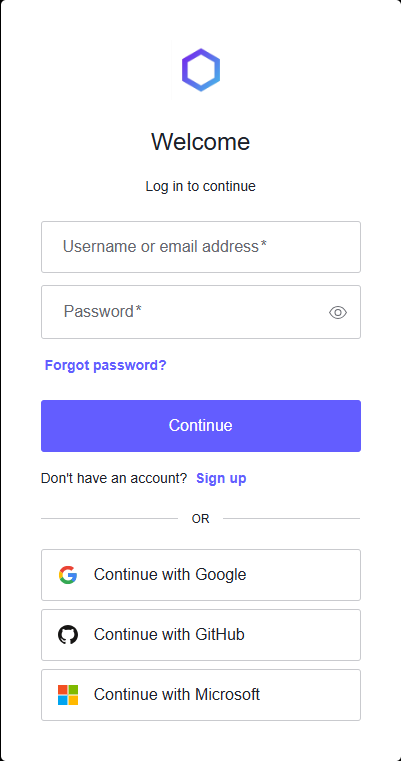
- 申请 Namespace:登录后进入 Publish 页面,点击 "Add Namespace",格式需遵循反向 DNS 规则
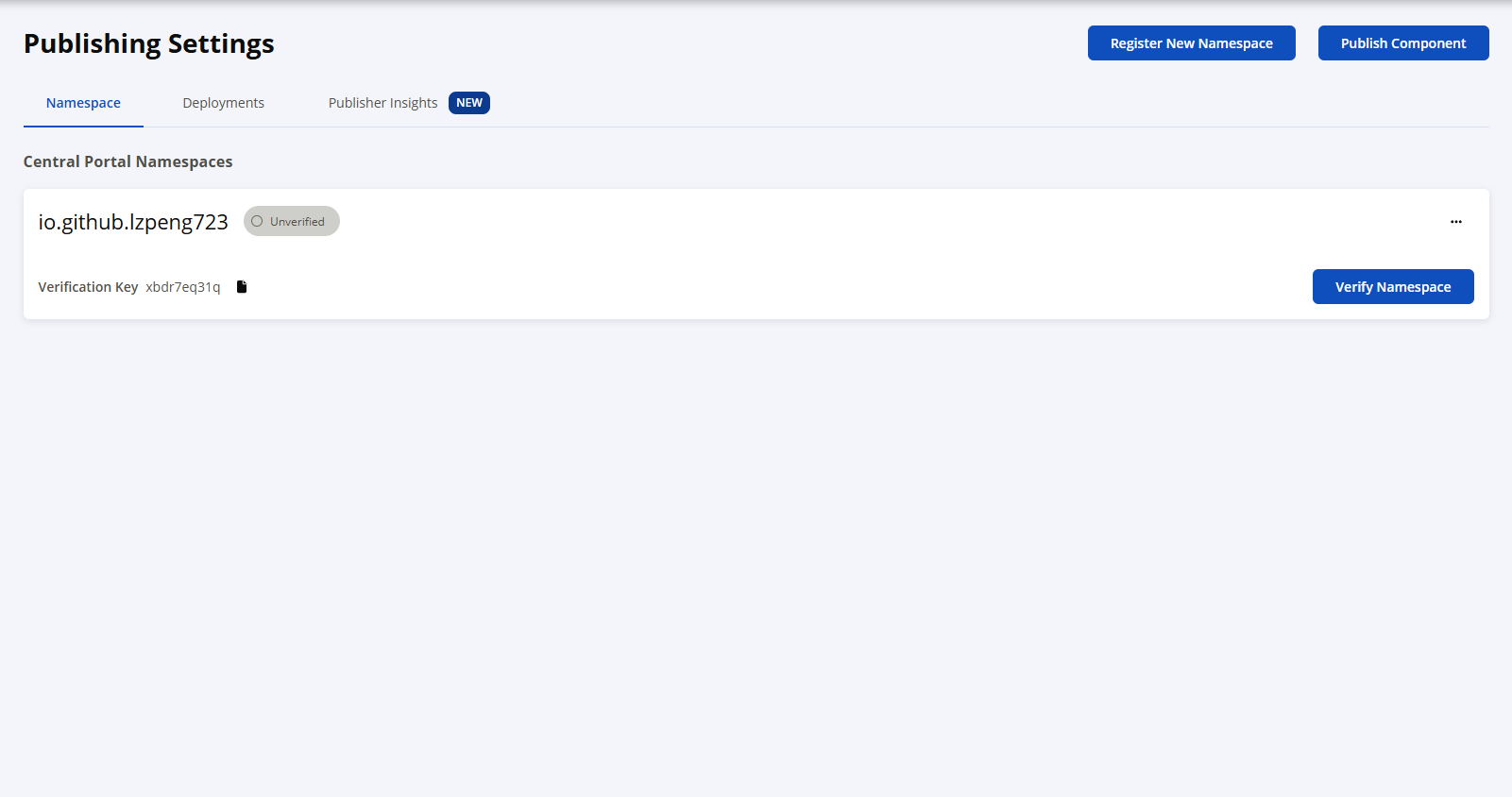
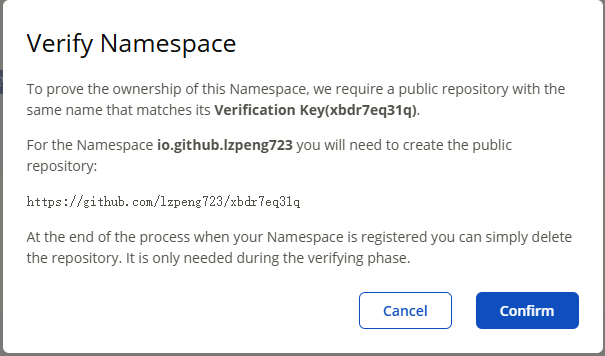
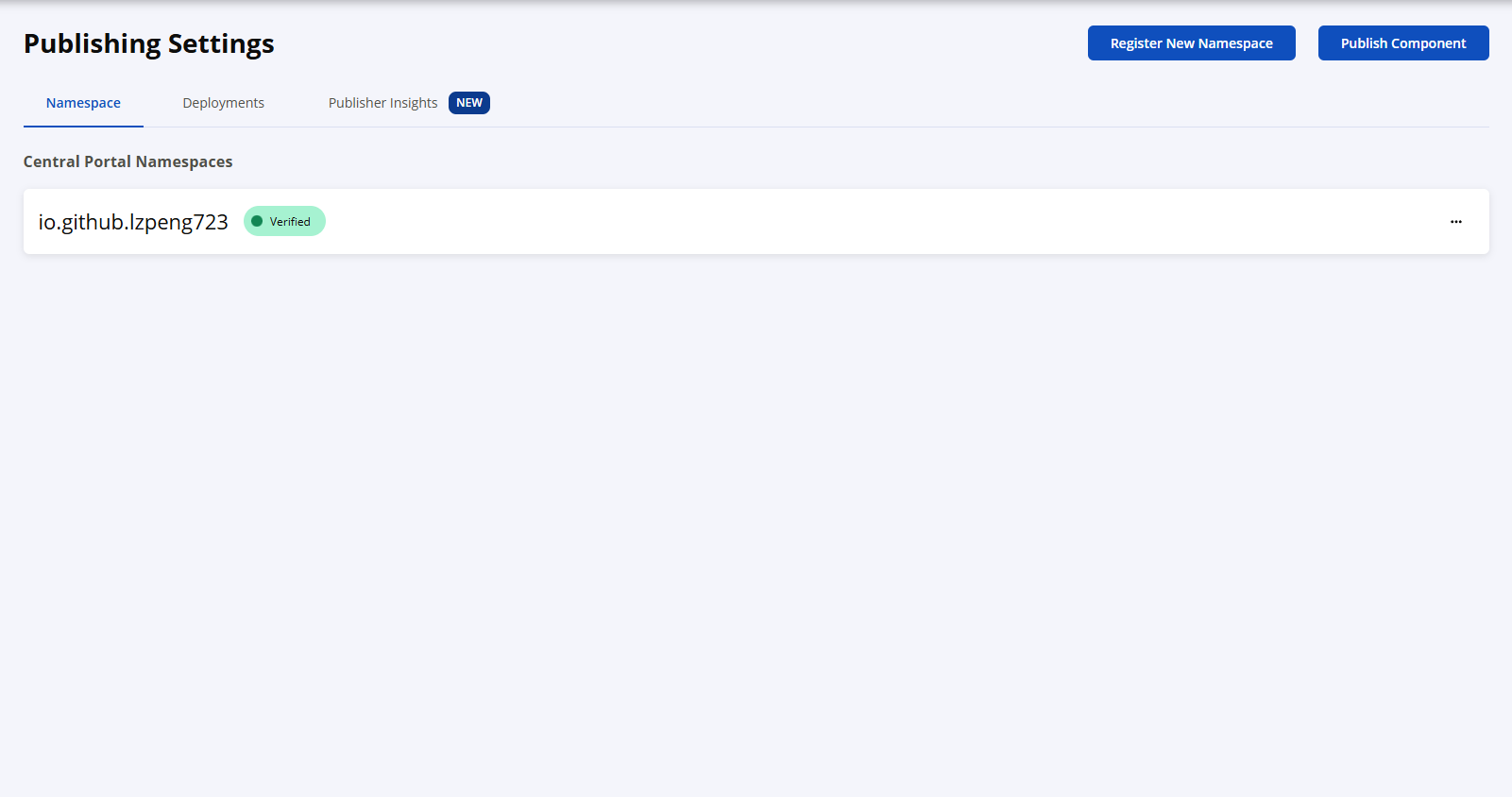
- 验证 Namespace:点击 "Verify Namespace",系统会生成验证密钥,需在对应代码仓库创建同名公开仓库,完成后点击 "Verify Namespace",显示 "Verified" 即通过
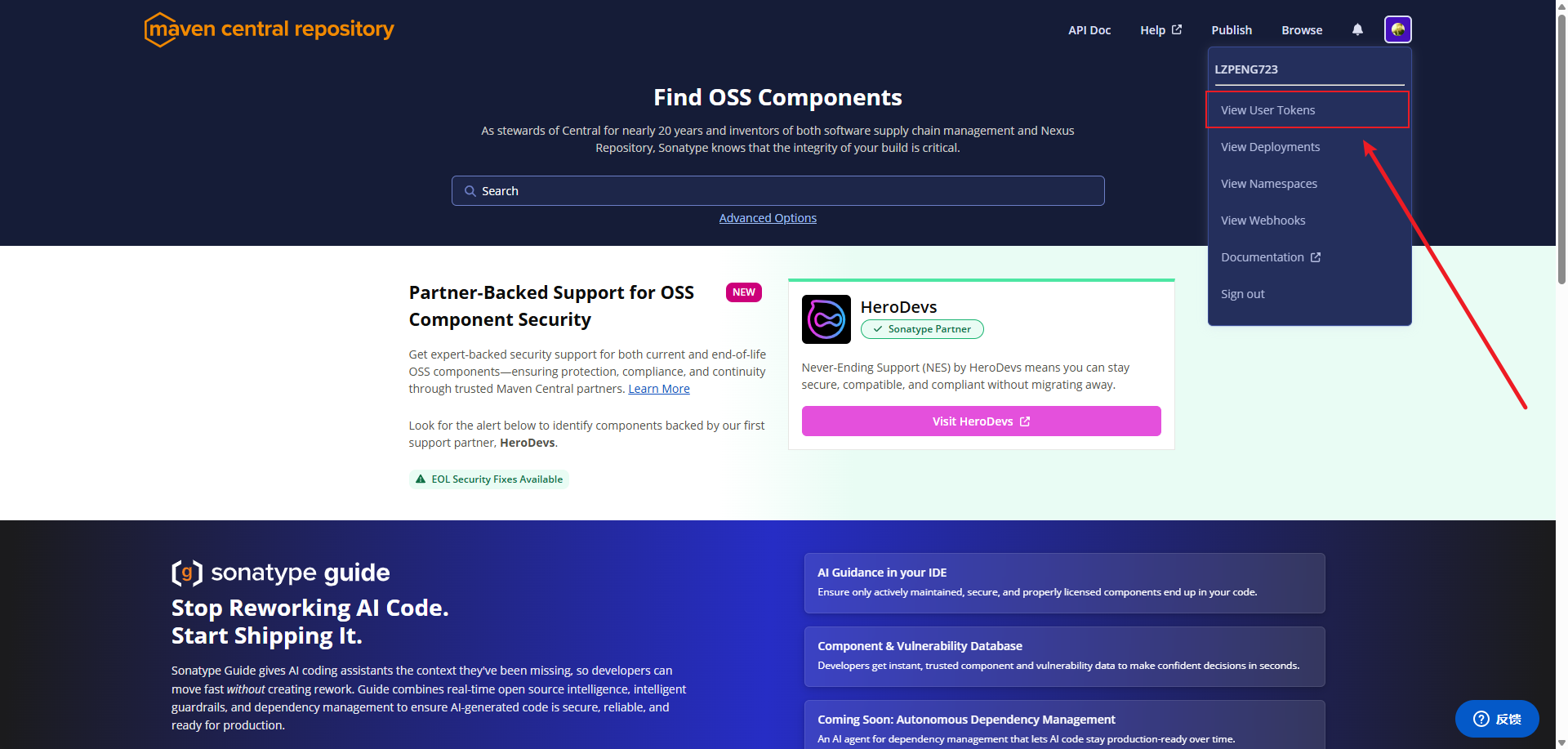
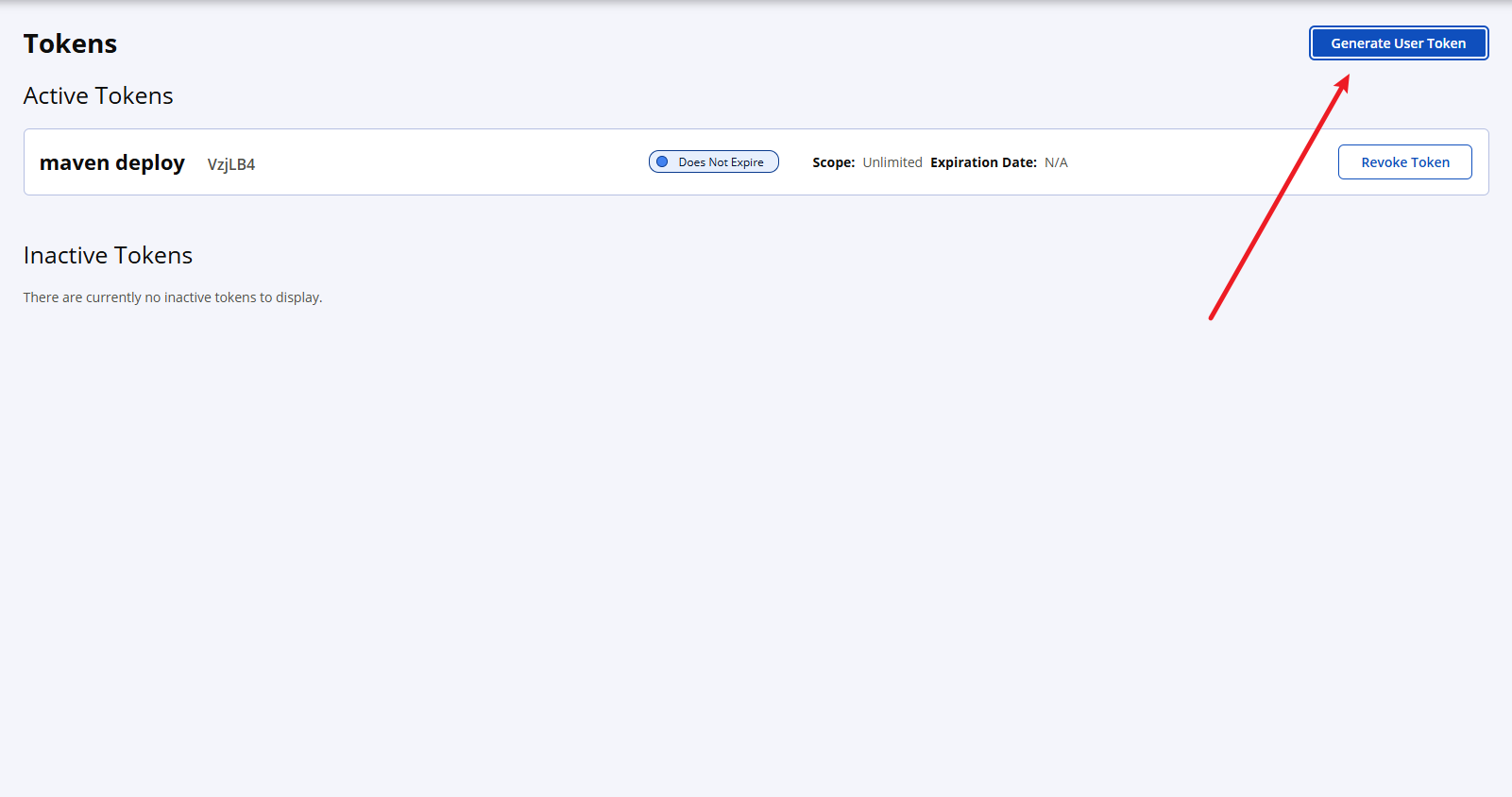
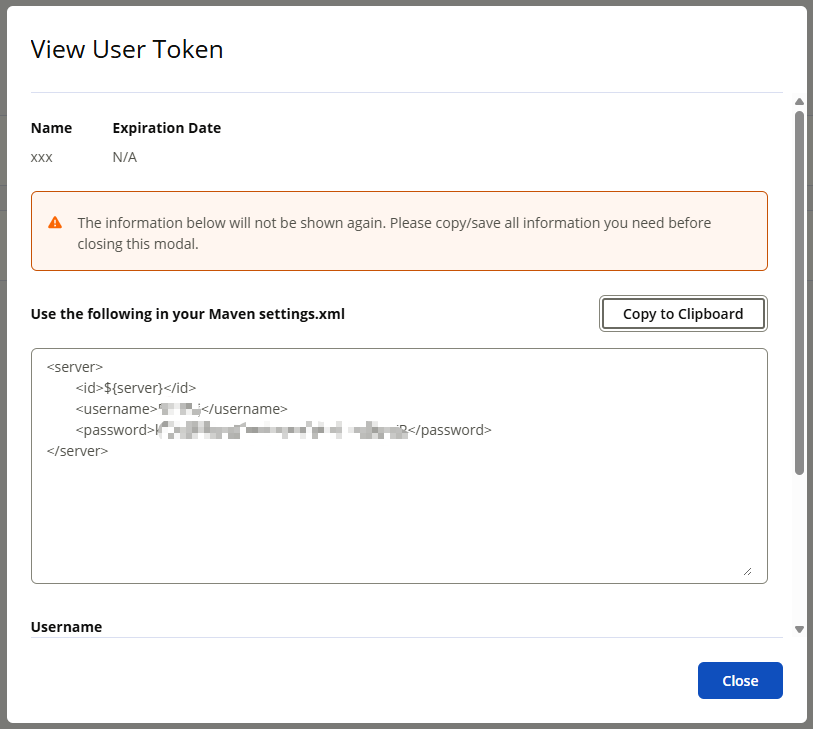
- 生成访问 Token:点击右上角用户名 →View Account→Generate User Token,复制生成的用户名和密码,后续用于 Maven 认证(仅显示一次,务必保存)
第二步:GPG 密钥配置(保障代码安全)
为防止组件被篡改,中央仓库要求所有发布的文件必须经过 GPG 签名:
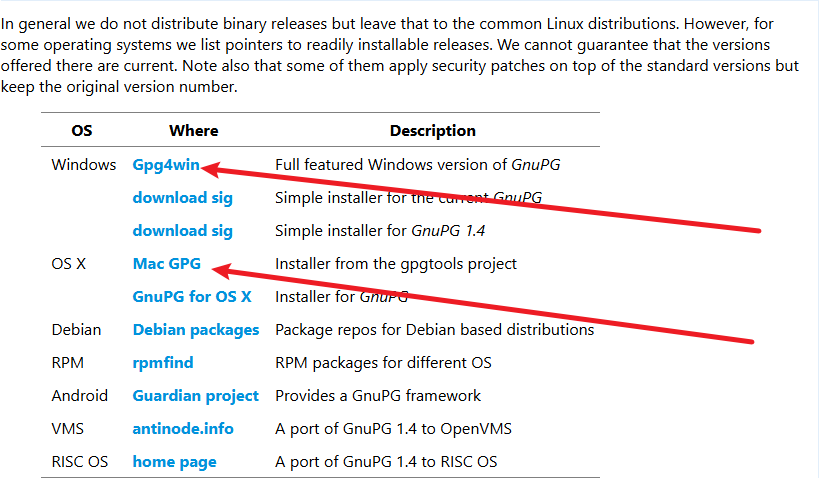
- 下载安装 GPG:前往 GnuPG 官网,根据系统选择对应版本(Windows 选 Gpg4win,Mac 选 Mac GPG)
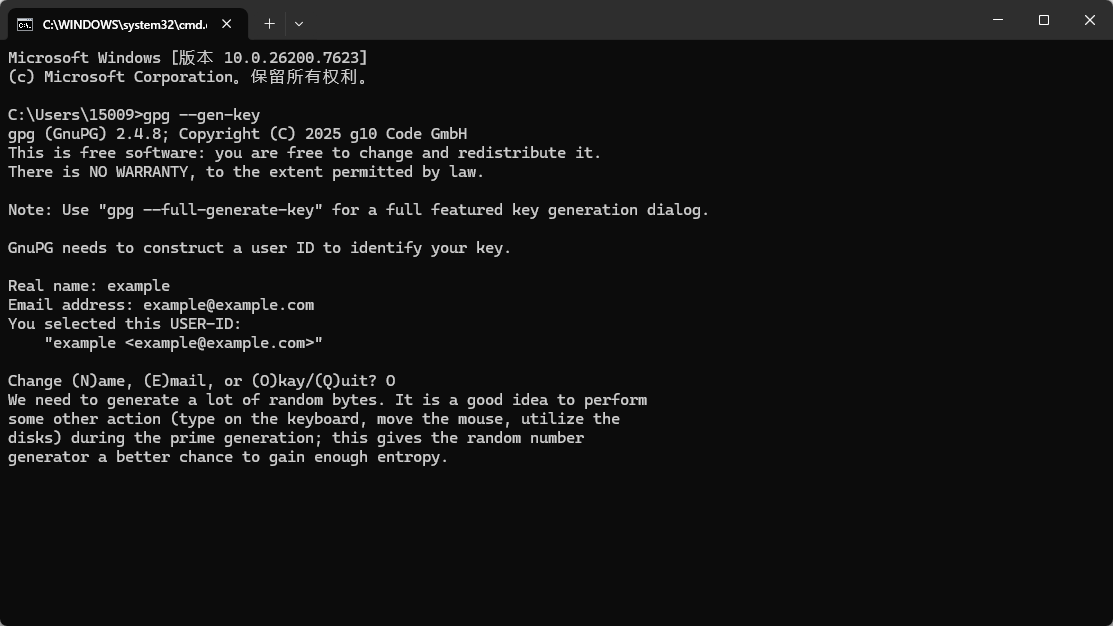
- 生成密钥对:打开终端 / 命令提示符,输入
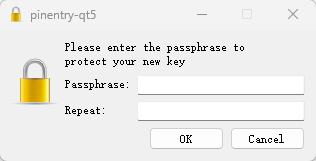
gpg --gen-key,按提示填写真实姓名、邮箱(与 Sonatype 账号一致),设置密钥密码并牢记
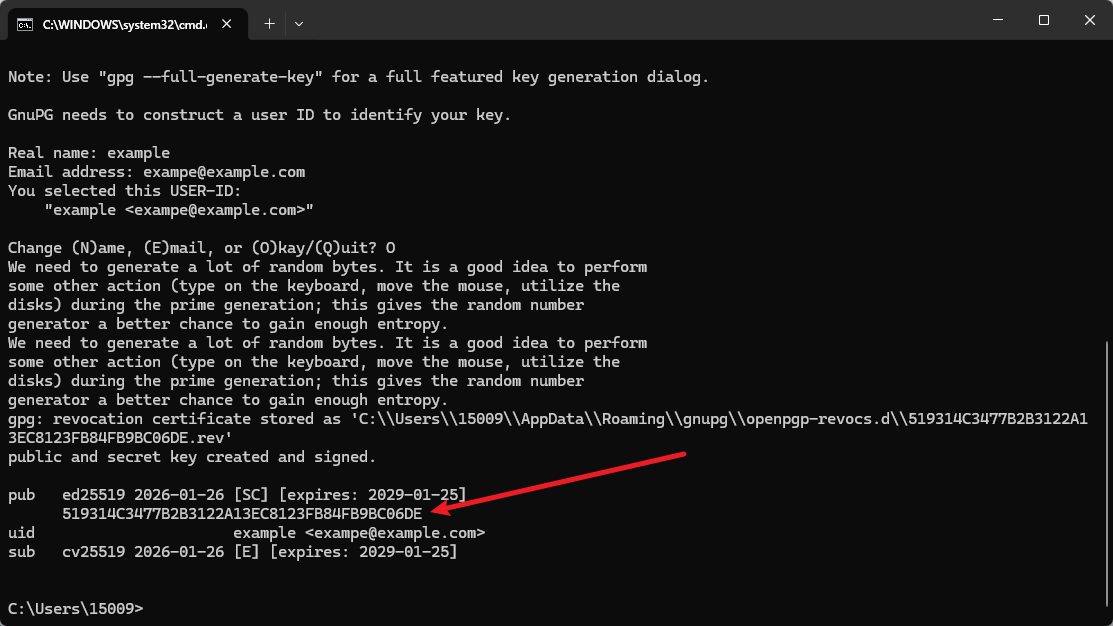
- 记录密钥 ID:生成成功后,找到输出中 "pub" 行后的一串字符(如 519314C3477B2B3122A13EC8123FB84FB9BC06DE),这是你的公钥 ID
- 上传公钥至公共服务器:执行
gpg --keyserver h@k@p://keyserver.ubuntu.com:11371 --send-keys 你的密钥ID,让中央仓库能验证签名合法性 (删除命令中的@) - 验证 gpg 秘钥: 有两种方式可以验证秘钥,一种是通过 gpg 命令:
gpg --keyserver keyserver.ubuntu.com --recv-keys xxxxxx;另外一种方式直接到 https://keyserver.ubuntu.com/秘钥平台查询:
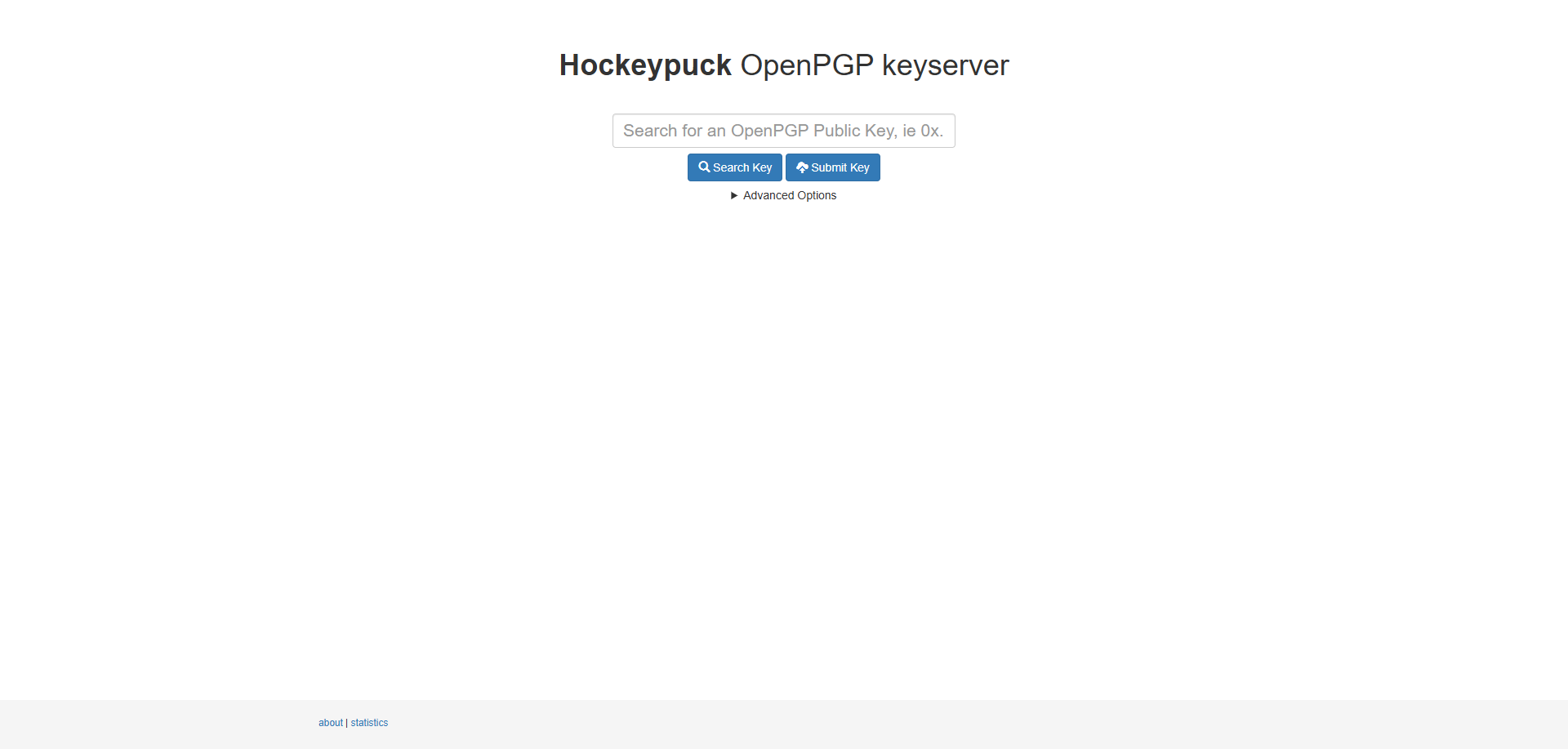
 出现以上内容表明秘钥发布成功。
第三步:Maven 环境配置(关联认证信息)
打开 Maven 的 settings.xml 文件(通常在 conf 目录下),添加以下配置:
<!-- Sonatype访问权限配置 -->
<servers>
	<server>
		<id>central</id>
		<username>Sonatype生成的Token用户名</username>
		<password>Sonatype生成的Token密码</password>
	</server>
</servers>
<!-- GPG签名配置 -->
<profiles>
	<profile>
		<id>gpg</id>
		<properties>
			<gpg.executable>gpg</gpg.executable>
			<gpg.keyname>你的GPG绑定邮箱</gpg.keyname>
			<gpg.passphrase>你的GPG密钥密码</gpg.passphrase>
			<gpg.useagent>true</gpg.useagent>
		</properties>
	</profile>
</profiles>
第四步:项目 POM 文件配置(标准化组件信息)
修改待发布项目的 pom.xml,补充必要信息(直接复制替换占位符即可):
<project>
	<!-- 核心信息:GroupID需与验证通过的Namespace一致 -->
	<groupId>io.github.你的用户名</groupId>
	<artifactId>组件名称</artifactId>
	<version>1.0.0.RELEASE</version>
	<!-- 必须是正式版本,禁止SNAPSHOT -->
	<url>你的代码仓库地址(如https://github.com/用户名/仓库名)</url>
	<!-- 许可证信息(推荐Apache 2.0) -->
	<licenses>
		<license>
			<name>The Apache License, Version 2.0</name>
			<url>https://www.apache.org/licenses/LICENSE-2.0</url>
		</license>
	</licenses>
	<!-- 开发者信息 -->
	<developers>
		<developer>
			<name>你的姓名</name>
			<email>你的邮箱</email>
		</developer>
	</developers>
	<!-- 代码仓库信息 -->
	<scm>
		<connection>scm:git:你的仓库克隆地址(如https://github.com/用户名/仓库名.git)</connection>
		<developerConnection>scm:git:你的仓库SSH地址(如git@github.com:用户名/仓库名.git)</developerConnection>
		<url>你的仓库网页地址</url>
	</scm>
	<!-- 必要插件配置 -->
	<build>
		<plugins>
			<!-- 源码打包插件 -->
			<plugin>
				<groupId>org.apache.maven.plugins</groupId>
				<artifactId>maven-source-plugin</artifactId>
				<version>3.3.0</version>
				<executions>
					<execution>
						<id>attach-sources</id>
						<goals>
							<goal>jar-no-fork</goal>
						</goals>
					</execution>
				</executions>
			</plugin>
			<!-- Javadoc打包插件 -->
			<plugin>
				<groupId>org.apache.maven.plugins</groupId>
				<artifactId>maven-javadoc-plugin</artifactId>
				<version>2.9.1</version>
				<configuration>
					<charset>UTF-8</charset>
					<encoding>UTF-8</encoding>
					<docencoding>UTF-8</docencoding>
					<additionalparam>-Xdoclint:none</additionalparam>
				</configuration>
				<executions>
					<execution>
						<id>attach-javadocs</id>
						<goals>
							<goal>jar</goal>
						</goals>
					</execution>
				</executions>
			</plugin>
			<!-- GPG签名插件 -->
			<plugin>
				<groupId>org.apache.maven.plugins</groupId>
				<artifactId>maven-gpg-plugin</artifactId>
				<version>3.1.0</version>
				<executions>
					<execution>
						<id>sign-artifacts</id>
						<phase>verify</phase>
						<goals>
							<goal>sign</goal>
						</goals>
					</execution>
				</executions>
			</plugin>
			<!-- 中央仓库发布插件 -->
			<plugin>
				<groupId>org.sonatype.central</groupId>
				<artifactId>central-publishing-maven-plugin</artifactId>
				<version>0.4.0</version>
				<extensions>true</extensions>
				<configuration>
					<publishingServerId>central</publishingServerId>
					<tokenAuth>true</tokenAuth>
				</configuration>
			</plugin>
		</plugins>
	</build>
</project>
第五步:打包上传与发布
- 推送项目代码:将配置好的项目推送到对应的 GitHub/Gitee 仓库(确保仓库公开)
- 执行部署命令:打开终端,进入项目根目录,执行
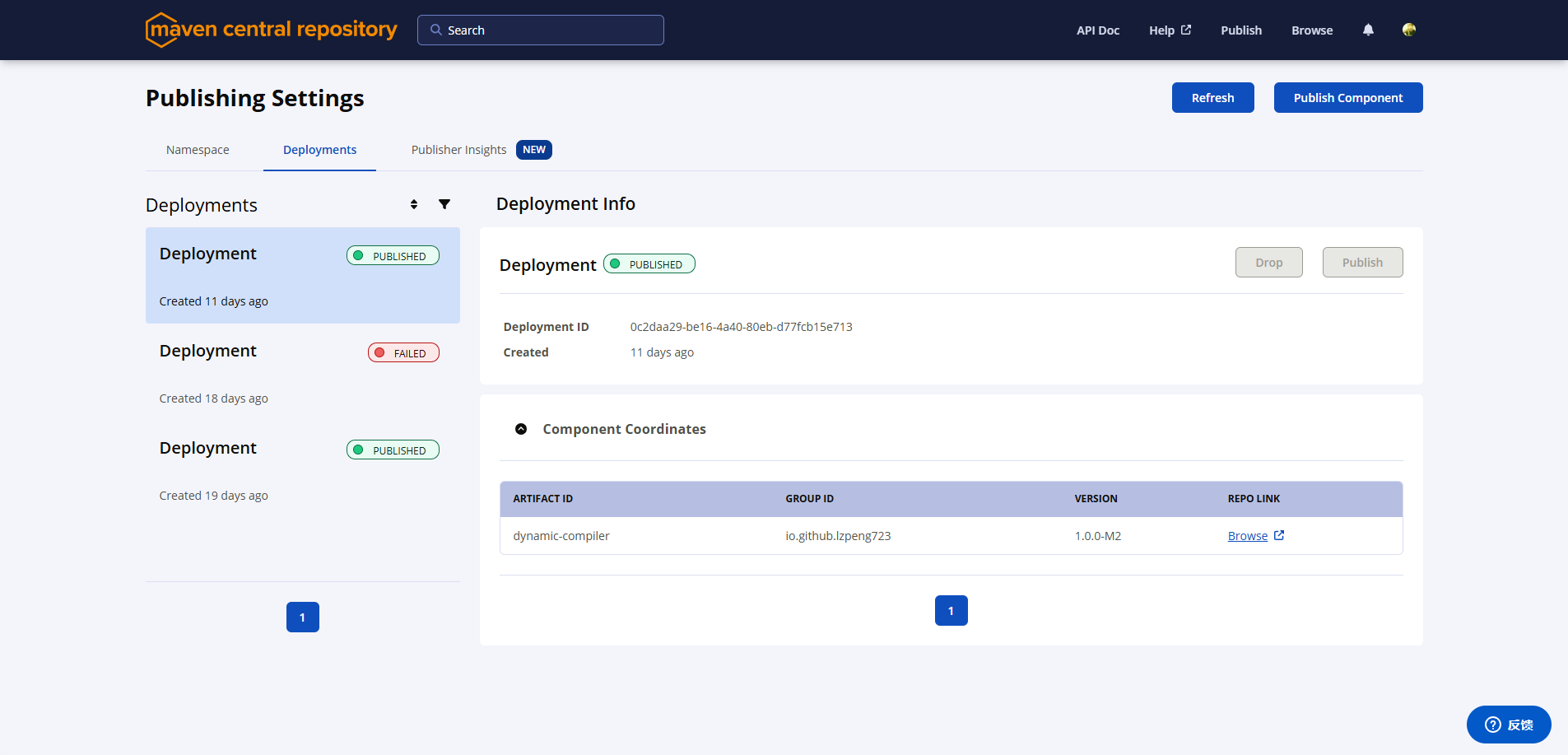
mvn clean deploy -Dmaven.test.skip=true,过程中会提示输入 GPG 密钥密码,输入后等待执行完成 - 等待 Sonatype 审核:登录 Sonatype 平台,在 Deployments 中可看到状态(PUBLISHING 为审核中),审核时间通常为几小时到 1 天,状态变为 PUBLISHED 即发布成功
三、验证与使用:让别人轻松引入你的组件
发布成功后,可通过 Maven 中央仓库搜索页,输入 GroupID 或组件名称查询你的组件。其他开发者只需在 pom.xml 中添加以下依赖,即可直接使用:
<dependency>
	<groupId>io.github.你的用户名</groupId>
	<artifactId>组件名称</artifactId>
	<version>1.0.0.RELEASE</version>
</dependency>
四、注意事项与避坑指南
- 版本不可逆:发布后的版本无法删除或修改,务必做好测试再发布,建议遵循语义化版本规范
- 隐私保护:严禁发布包含密钥、敏感业务逻辑的组件,一旦发布无法撤回
- 常见错误处理:
- 提示 "Namespace 不允许":检查 POM 文件的 GroupID 与 Sonatype 验证通过的 Namespace 完全一致
- 提示 "SNAPSHOT 不被允许":将版本号改为正式版本(如 1.0.0.RELEASE),中央仓库不接受快照版本
- 签名验证失败:确认 GPG 密钥已上传至公共服务器,且 settings.xml 中 GPG 配置信息正确
至此,你的组件就正式加入 Maven 中央仓库的生态了!从自己用的工具到全球开发者可复用的组件,只差这一套标准化的发布流程。如果遇到问题,可参考 Sonatype 官方文档或留言交流,祝你发布顺利 ~
来自 “ ITPUB博客 ” ,链接:https://blog.itpub.net/70049421/viewspace-3109057/ ,如需转载,请注明出处,否则将追究法律责任。
上一篇:
没有了~
下一篇:
没有了~

请登录后发表评论
登录
全部评论
