本文详细介绍一套完整的多端知识付费小程序解决方案,该系统集成了在线教育、考试答题、付费课程等核心功能,采用前后端分离架构,支持微信小程序、H5等多端适配,代码完全开源并支持二次开发。文章将从技术架构、核心功能、代码实现、部署方案等方面进行全面解析。
源码:zx.xcxyms.top
一、技术架构设计
1.1整体架构概述
本系统采用微服务架构设计,前后端完全分离,支持高并发、高可用的在线教育场景需求。 ┌─────────────────────────────────────────────────────┐
  │客户端层│
  │┌─────────┐┌─────────┐┌─────────┐│
  ││微信小程序││H5页面││管理后台││
  │└─────────┘└─────────┘└─────────┘│
  └─────────────────────────────────────────────────────┘
  ┌─────────────────────────────────────────────────────┐
  │网关层│
  │┌─────────────────┐│
  ││API网关/Nginx││
  │└─────────────────┘│
  └─────────────────────────────────────────────────────┘
  ┌─────────────────────────────────────────────────────┐
  │微服务层│
  │┌─────────┐┌─────────┐┌─────────┐┌─────────┐│
  ││用户服务││课程服务││考试服务││支付服务││
  │└─────────┘└─────────┘└─────────┘└─────────┘│
  └─────────────────────────────────────────────────────┘
  ┌─────────────────────────────────────────────────────┐
  │基础设施层│
  │┌─────────┐┌─────────┐┌─────────┐│
  ││MySQL││Redis││MinIO││
  │└─────────┘└─────────┘└─────────┘│
  └─────────────────────────────────────────────────────┘
1.2技术栈选型
•后端技术栈:
•框架:Spring Boot 2.7+Spring Cloud Alibaba
•认证授权:Spring Security+JWT
•数据库:MySQL 8.0+Redis 7.0
•消息队列:RocketMQ
•文件存储:MinIO(兼容S3协议)
•服务注册与发现:Nacos
•配置中心:Nacos Config
•服务监控:Spring Boot Admin+Prometheus
•前端技术栈:
•小程序端:Uni-app+Vue 3
•管理后台:Vue 3+Element Plus
•状态管理:Pinia
•构建工具:Vite
•包管理:pnpm
二、核心功能模块详解
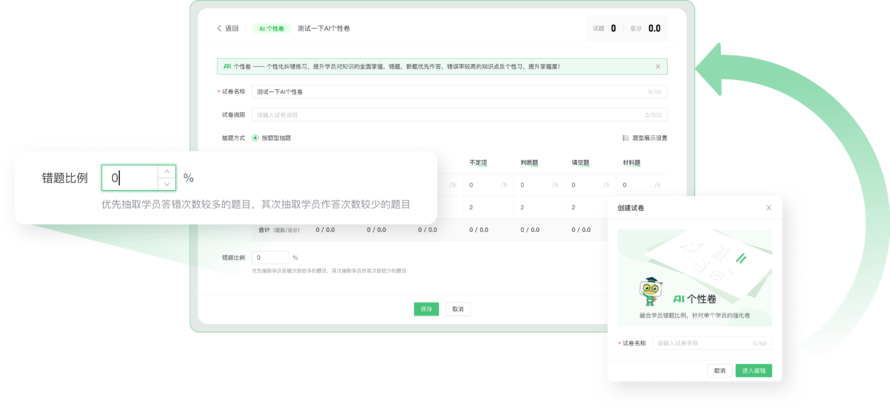
2.1知识付费模块
2.1.1课程体系设计
  //课程实体类设计
  Entity
  Table(name="course")
  Data
  public class Course{
  Id
  GeneratedValue(strategy=GenerationType.IDENTITY)
  private Long id;
  private String title;//课程标题
  private String coverImage;//封面图
  private String description;//课程描述
  Enumerated(EnumType.STRING)
  private CourseStatus status;//课程状态
  Enumerated(EnumType.STRING)
  private CourseType type;//课程类型(免费/付费)
  private BigDecimal price;//价格
  private BigDecimal discountPrice;//折扣价
  ManyToOne
  JoinColumn(name="teacher_id")
  private User teacher;//讲师
  OneToMany(mappedBy="course",cascade=CascadeType.ALL)
  private List<Chapter>chapters;//章节列表
  private Integer sortOrder;//排序
  private LocalDateTime createTime;
  private LocalDateTime updateTime;
  }
  //章节实体
  Entity
  Table(name="chapter")
  Data
  public class Chapter{
  Id
  GeneratedValue(strategy=GenerationType.IDENTITY)
  private Long id;
  private String title;
  private String description;
  private Integer sortOrder;
  ManyToOne
  JoinColumn(name="course_id")
  private Course course;
  OneToMany(mappedBy="chapter",cascade=CascadeType.ALL)
  private List<Lesson>lessons;
  }
  //课时实体
  Entity
  Table(name="lesson")
  Data
  public class Lesson{
  Id
  GeneratedValue(strategy=GenerationType.IDENTITY)
  private Long id;
  private String title;
  private String videoUrl;//视频地址
  private String attachmentUrl;//附件地址
  private Integer duration;//时长(秒)
  private Boolean freePreview;//是否可试看
  ManyToOne
  JoinColumn(name="chapter_id")
  private Chapter chapter;
  }
2.1.2支付集成实现

  //支付服务接口
  Service
  Slf4j
  public class PaymentServiceImpl implements PaymentService{
  Autowired
  private WxPayService wxPayService;
  Autowired
  private CourseOrderRepository orderRepository;
  /**
  *创建课程订单
  */
  Override
  Transactional
  public CreateOrderResult createCourseOrder(CreateOrderRequest request){
  //1.验证课程信息
  Course course=courseService.getCourseById(request.getCourseId());
  if(course==null){
  throw new BusinessException("课程不存在");
  }
  //2.检查是否已购买
  if(courseOrderRepository.existsByUserIdAndCourseId(
  request.getUserId(),request.getCourseId())){
  throw new BusinessException("您已购买此课程");
  }
  //3.创建订单
  CourseOrder order=new CourseOrder();
  order.setOrderNo(generateOrderNo());
  order.setUserId(request.getUserId());
  order.setCourseId(request.getCourseId());
  order.setAmount(course.getPrice());
  order.setActualAmount(course.getDiscountPrice());
  order.setStatus(OrderStatus.PENDING);
  order.setCreateTime(LocalDateTime.now());
  order=orderRepository.save(order);
  //4.调用微信支付
  WxPayUnifiedOrderRequest wxRequest=new WxPayUnifiedOrderRequest();
  wxRequest.setOutTradeNo(order.getOrderNo());
  wxRequest.setTotalFee(order.getActualAmount()
  .multiply(BigDecimal.valueOf(100)).intValue());
  wxRequest.setBody("购买课程:"+course.getTitle());
  wxRequest.setTradeType(WxPayConstants.TradeType.JSAPI);
  wxRequest.setOpenid(request.getOpenid());
  WxPayUnifiedOrderResult wxResult=
  wxPayService.unifiedOrder(wxRequest);
  //5.返回支付参数
  return CreateOrderResult.builder()
  .orderId(order.getId())
  .orderNo(order.getOrderNo())
  .timeStamp(String.valueOf(System.currentTimeMillis()/1000))
  .nonceStr(RandomStringUtils.randomAlphanumeric(32))
  .packageStr("prepay_id="+wxResult.getPrepayId())
  .signType("RSA")
  .paySign(generatePaySign(wxResult))
  .build();
  }
  /**
  *支付回调处理
  */
  Override
  Transactional
  public void handlePayNotify(WxPayOrderNotifyResult notifyResult){
  String orderNo=notifyResult.getOutTradeNo();
  //1.查询订单
  CourseOrder order=orderRepository.findByOrderNo(orderNo)
  .orElseThrow(()->new BusinessException("订单不存在"));
  //2.验证订单状态和金额
  if(order.getStatus()!=OrderStatus.PENDING){
  log.warn("订单状态异常,订单号:{}",orderNo);
  return;
  }
  BigDecimal notifyAmount=BigDecimal.valueOf(notifyResult.getTotalFee())
  .divide(BigDecimal.valueOf(100));
  if(notifyAmount.compareTo(order.getActualAmount())!=0){
  log.error("金额不一致,订单号:{}",orderNo);
  return;
  }
  //3.更新订单状态
  order.setStatus(OrderStatus.PAID);
  order.setPayTime(LocalDateTime.now());
  order.setTransactionId(notifyResult.getTransactionId());
  orderRepository.save(order);
  //4.创建购买记录
  UserCourse userCourse=new UserCourse();
  userCourse.setUserId(order.getUserId());
  userCourse.setCourseId(order.getCourseId());
  userCourse.setOrderId(order.getId());
  userCourse.setCreateTime(LocalDateTime.now());
  userCourseRepository.save(userCourse);
  //5.发送消息通知
  rocketMQTemplate.convertAndSend("course-purchase-topic",
  new PurchaseMessage(order.getUserId(),order.getCourseId()));
  }
  }
2.2在线考试模块
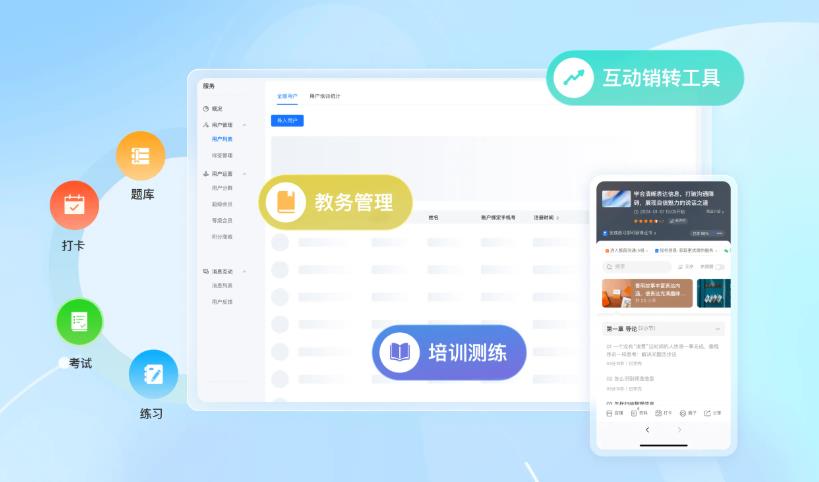
2.2.1题库管理系统
 //题目实体设计
  Entity
  Table(name="question")
  Inheritance(strategy=InheritanceType.SINGLE_TABLE)
  DiscriminatorColumn(name="type",discriminatorType=DiscriminatorType.STRING)
  Data
  public abstract class Question{
  Id
  GeneratedValue(strategy=GenerationType.IDENTITY)
  private Long id;
  private String content;//题目内容
  private String analysis;//答案解析
  Enumerated(EnumType.STRING)
  private DifficultyLevel difficulty;//难度级别
  ManyToOne
  JoinColumn(name="category_id")
  private QuestionCategory category;//分类
  ManyToMany
  JoinTable(name="question_tag_relation",
  joinColumns=JoinColumn(name="question_id"),
  inverseJoinColumns=JoinColumn(name="tag_id"))
  private Set<QuestionTag>tags;//标签
  private Integer score;//分值
  private LocalDateTime createTime;
  }
  //单选题实体
  Entity
  DiscriminatorValue("SINGLE_CHOICE")
  Data
  EqualsAndHashCode(callSuper=true)
  public class SingleChoiceQuestion extends Question{
  ElementCollection
  CollectionTable(name="question_option",
  joinColumns=JoinColumn(name="question_id"))
  OrderColumn(name="option_order")
  private List<QuestionOption>options;//选项列表
  private Integer correctOptionIndex;//正确答案索引
  }
  //多选题实体
  Entity
  DiscriminatorValue("MULTIPLE_CHOICE")
  Data
  EqualsAndHashCode(callSuper=true)
  public class MultipleChoiceQuestion extends Question{
  ElementCollection
  CollectionTable(name="question_option",
  joinColumns=JoinColumn(name="question_id"))
  OrderColumn(name="option_order")
  private List<QuestionOption>options;
  ElementCollection
  CollectionTable(name="question_correct_option",
  joinColumns=JoinColumn(name="question_id"))
  private Set<Integer>correctOptionIndexes;//多个正确答案索引
  }
  //试卷实体
  Entity
  Table(name="exam_paper")
  Data
  public class ExamPaper{
  Id
  GeneratedValue(strategy=GenerationType.IDENTITY)
  private Long id;
  private String title;//试卷标题
  private String description;//试卷描述
  Enumerated(EnumType.STRING)
  private ExamType type;//考试类型
  private Integer totalScore;//总分
  private Integer timeLimit;//时间限制(分钟)
  private Integer passScore;//及格分数
  OneToMany(mappedBy="examPaper",cascade=CascadeType.ALL)
  OrderBy("sortOrder ASC")
  private List<ExamPaperQuestion>questions;
  private LocalDateTime createTime;
  private LocalDateTime updateTime;
  }
2.2.2考试引擎实现

  //考试服务核心类
  Service
  Slf4j
  public class ExamServiceImpl implements ExamService{
  Autowired
  private ExamRecordRepository examRecordRepository;
  Autowired
  private QuestionRepository questionRepository;
  Autowired
  private RedisTemplate<String,Object>redisTemplate;
  /**
  *开始考试
  */
  Override
  Transactional
  public ExamStartResult startExam(StartExamRequest request){
  Long userId=SecurityUtils.getCurrentUserId();
  Long paperId=request.getPaperId();
  //1.检查考试次数限制
  Integer todayCount=examRecordRepository.countTodayExams(userId,paperId);
  Integer maxAttempts=examPaperService.getMaxAttempts(paperId);
  if(todayCount>=maxAttempts){
  throw new BusinessException("今日考试次数已达上限");
  }
  //2.生成考试记录
  ExamRecord record=new ExamRecord();
  record.setUserId(userId);
  record.setExamPaperId(paperId);
  record.setStartTime(LocalDateTime.now());
  record.setStatus(ExamStatus.IN_PROGRESS);
  record.setExamCode(generateExamCode());
  record=examRecordRepository.save(record);
  //3.从题库中随机抽题
  ExamPaper paper=examPaperRepository.findById(paperId)
  .orElseThrow(()->new BusinessException("试卷不存在"));
  List<ExamQuestionVO>questions=generateExamQuestions(paper);
  //4.将题目和答案缓存到Redis
  String examKey="exam:"+record.getId();
  Map<String,Object>examData=new HashMap<>();
  examData.put("questions",questions);
  examData.put("startTime",record.getStartTime().toString());
  examData.put("paperId",paperId);
  redisTemplate.opsForHash().putAll(examKey,examData);
  //设置过期时间=考试时间+10分钟缓冲
  redisTemplate.expire(examKey,
  paper.getTimeLimit()+10,TimeUnit.MINUTES);
  //5.返回考试信息
  return ExamStartResult.builder()
  .examRecordId(record.getId())
  .examCode(record.getExamCode())
  .questions(questions)
  .timeLimit(paper.getTimeLimit())
  .startTime(record.getStartTime())
  .totalScore(paper.getTotalScore())
  .build();
  }
  /**
  *提交答案
  */
  Override
  Transactional
  public ExamSubmitResult submitAnswer(SubmitAnswerRequest request){
  Long examRecordId=request.getExamRecordId();
  Long userId=SecurityUtils.getCurrentUserId();
  //1.验证考试记录
  ExamRecord record=examRecordRepository.findByIdAndUserId(
  examRecordId,userId)
  .orElseThrow(()->new BusinessException("考试记录不存在"));
  if(record.getStatus()!=ExamStatus.IN_PROGRESS){
  throw new BusinessException("考试已结束");
  }
  //2.验证考试时间
  ExamPaper paper=examPaperRepository.findById(record.getExamPaperId())
  .orElseThrow(()->new BusinessException("试卷不存在"));
  LocalDateTime now=LocalDateTime.now();
  long duration=ChronoUnit.MINUTES.between(
  record.getStartTime(),now);
  if(duration>paper.getTimeLimit()){
  throw new BusinessException("考试时间已结束");
  }
  //3.从Redis获取题目信息
  String examKey="exam:"+examRecordId;
  Map<Object,Object>examData=redisTemplate.opsForHash()
  .entries(examKey);
  if(examData.isEmpty()){
  throw new BusinessException("考试信息已过期");
  }
  //4.保存答案
  ExamAnswer answer=new ExamAnswer();
  answer.setExamRecordId(examRecordId);
  answer.setQuestionId(request.getQuestionId());
  answer.setUserAnswer(request.getAnswer());
  answer.setSubmitTime(now);
  examAnswerRepository.save(answer);
  //5.更新Redis中的答案
  String answerKey="answer:"+request.getQuestionId();
  redisTemplate.opsForHash().put(examKey,answerKey,request.getAnswer());
  return ExamSubmitResult.builder()
  .success(true)
  .message("答案提交成功")
  .build();
  }
  /**
  *自动阅卷
  */
  private ExamResult autoGrade(Long examRecordId){
  //1.获取所有题目和用户答案
  List<ExamAnswer>answers=examAnswerRepository
  .findByExamRecordId(examRecordId);
  //2.批量获取题目信息
  List<Long>questionIds=answers.stream()
  .map(ExamAnswer::getQuestionId)
  .collect(Collectors.toList());
  Map<Long,Question>questionMap=questionRepository
  .findAllById(questionIds).stream()
  .collect(Collectors.toMap(Question::getId,q->q));
  //3.计算得分
  Integer totalScore=0;
  Integer correctCount=0;
  List<QuestionResult>questionResults=new ArrayList<>();
  for(ExamAnswer answer:answers){
  Question question=questionMap.get(answer.getQuestionId());
  if(question==null)continue;
  QuestionResult result=gradeSingleQuestion(
  question,answer.getUserAnswer());
  questionResults.add(result);
  if(result.isCorrect()){
  correctCount++;
  totalScore+=result.getScore();
  }
  }
  //4.生成考试结果
  return ExamResult.builder()
  .totalScore(totalScore)
  .correctCount(correctCount)
  .totalQuestions(answers.size())
  .questionResults(questionResults)
  .build();
  }
  }
2.3多端方案
2.3.1 Uni-app多端配置
  //manifest.json配置文件
  {
  "name":"知识付费小程序",
  "appid":"__UNI__APPID",
  "description":"多端知识付费解决方案",
  "versionName":"1.0.0",
  "versionCode":"100",
  /*小程序特有配置*/
  "mp-weixin":{
  "appid":"wx-your-appid",
  "setting":{
  "urlCheck":false,
  "es6":true,
  "postcss":true,
  "minified":true
  },
  "usingComponents":true,
  "permission":{
  "scope.userLocation":{
  "desc":"获取地理位置用于附近课程推荐"
  }
  }
  },
  /*H5配置*/
  "h5":{
  "template":"index.h5.html",
  "router":{
  "mode":"history",
  "base":"/"
  },
  "devServer":{
  "port":8080,
  "disableHostCheck":true,
  "proxy":{
  "/api":{
  "target":"https://api.yourdomain.com",
  "changeOrigin":true,
  "secure":false
  }
  }
  }
  },
  /*通用配置*/
  "uniStatistics":{
  "enable":true
  }
  }
2.3.2统一API接口设计
  //api/index.ts-统一API管理
  import request from'/utils/request'
  //课程相关接口
  export const courseApi={
  //获取课程列表
  getCourseList(params:CourseListParams){
  return request.get<ApiResponse<PageResult<CourseVO>>>('/api/course/list',{params})
  },
  //获取课程详情
  getCourseDetail(id:number){
  return request.get<ApiResponse<CourseDetailVO>>(`/api/course/detail/${id}`)
  },
  //购买课程
  purchaseCourse(data:PurchaseRequest){
  return request.post<ApiResponse<PurchaseResult>>('/api/course/purchase',data)
  }
  }
  //考试相关接口
  export const examApi={
  //获取试卷列表
  getExamPaperList(params:ExamListParams){
  return request.get<ApiResponse<PageResult<ExamPaperVO>>>('/api/exam/paper/list',{params})
  },
  //开始考试
  startExam(data:StartExamRequest){
  return request.post<ApiResponse<StartExamResult>>('/api/exam/start',data)
  },
  //提交答案
  submitAnswer(data:SubmitAnswerRequest){
  return request.post<ApiResponse<SubmitAnswerResult>>('/api/exam/submit',data)
  },
  //获取考试结果
  getExamResult(examRecordId:number){
  return request.get<ApiResponse<ExamResultVO>>(`/api/exam/result/${examRecordId}`)
  }
  }
  //用户相关接口
  export const userApi={
  //微信登录
  wxLogin(code:string){
  return request.post<ApiResponse<LoginResult>>('/api/user/wx-login',{code})
  },
  //获取用户信息
  getUserInfo(){
  return request.get<ApiResponse<UserInfoVO>>('/api/user/info')
  },
  //更新用户信息
  updateUserInfo(data:UpdateUserInfoRequest){
  return request.put<ApiResponse<void>>('/api/user/info',data)
  }
  }
三、核心功能代码实现
3.1微服务网关配置
  #application.yml
  spring:
  application:
  name:gateway-service
  cloud:
  nacos:
  discovery:
  server-addr:${NACOS_HOST:localhost}:8848
  config:
  server-addr:${NACOS_HOST:localhost}:8848
  file-extension:yaml
  gateway:
  discovery:
  locator:
  enabled:true
  routes:
  #用户服务路由
  -id:user-service
  uri:lb://user-service
  predicates:
  -Path=/api/user/**
  filters:
  -StripPrefix=1
  -name:RequestRateLimiter
  args:
  redis-rate-limiter.replenishRate:10
  redis-rate-limiter.burstCapacity:20
  key-resolver:"#{userKeyResolver}"
  #课程服务路由
  -id:course-service
  uri:lb://course-service
  predicates:
  -Path=/api/course/**
  filters:
  -StripPrefix=1
  #考试服务路由
  -id:exam-service
  uri:lb://exam-service
  predicates:
  -Path=/api/exam/**
  filters:
  -StripPrefix=1
  #支付服务路由
  -id:payment-service
  uri:lb://payment-service
  predicates:
  -Path=/api/payment/**
  filters:
  -StripPrefix=1
  #全局过滤器配置
  default-filters:
  -DedupeResponseHeader=Access-Control-Allow-Origin Access-Control-Allow-Credentials
  #限流配置
  redis:
  host:${REDIS_HOST:localhost}
  port:6379
  password:${REDIS_PASSWORD:}
  database:0
  #安全配置
  security:
  oauth2:
  resourceserver:
  jwt:
  issuer-uri:${JWT_ISSUER_URI:http://localhost:9000}
3.2微信小程序页面示例
  <!--pages/course/detail.vue-->
  <template>
  <view class="course-detail">
  <!--课程封面-->
  <view class="course-cover">
  <image:src="courseInfo.coverImage"mode="widthFix"/>
  <view class="course-price"v-if="courseInfo.type==='PAID'">
  <text class="current-price">¥{{courseInfo.discountPrice}}</text>
  <text class="original-price"v-if="courseInfo.discountPrice<courseInfo.price">
  ¥{{courseInfo.price}}
  </text>
  </view>
  </view>
  <!--课程信息-->
  <view class="course-info">
  <view class="course-title">{{courseInfo.title}}</view>
  <view class="course-meta">
  <view class="meta-item">
  <uni-icons type="person"size="16"></uni-icons>
  <text>{{courseInfo.teacher.nickname}}</text>
  </view>
  <view class="meta-item">
  <uni-icons type="eye"size="16"></uni-icons>
  <text>{{courseInfo.viewCount}}人学习</text>
  </view>
  <view class="meta-item">
  <uni-icons type="time"size="16"></uni-icons>
  <text>{{formatDate(courseInfo.createTime)}}</text>
  </view>
  </view>
  </view>
  <!--课程章节-->
  <view class="course-chapters">
  <view class="section-title">课程章节</view>
  <view class="chapter-list">
  <view
  v-for="(chapter,index)in courseInfo.chapters"
  :key="chapter.id"
  class="chapter-item"
  >
  <view class="chapter-header"click="toggleChapter(index)">
  <text class="chapter-index">第{{index+1}}章</text>
  <text class="chapter-title">{{chapter.title}}</text>
  <uni-icons
  :type="expandedChapter===index?'arrowup':'arrowdown'"
  size="16"
  ></uni-icons>
  </view>
  <view
  class="lesson-list"
  v-if="expandedChapter===index"
  >
  <view
  v-for="lesson in chapter.lessons"
  :key="lesson.id"
  class="lesson-item"
  click="playLesson(lesson)"
  >
  <view class="lesson-info">
  <text class="lesson-title">{{lesson.title}}</text>
  <text class="lesson-duration">
  {{formatDuration(lesson.duration)}}
  </text>
  </view>
  <view class="lesson-status">
  <text
  v-if="lesson.freePreview"
  class="free-tag"
  >
  试看
  </text>
  <uni-icons
  v-if="isLessonFinished(lesson.id)"
  type="checkmarkempty"
  color="#07c160"
  size="20"
  ></uni-icons>
  </view>
  </view>
  </view>
  </view>
  </view>
  </view>
  <!--操作按钮-->
  <view class="action-bar"v-if="!isPurchased">
  <button
  v-if="courseInfo.type==='FREE'"
  class="action-btn free-btn"
  click="startLearning"
  >
  立即学习
  </button>
  <button
  v-else
  class="action-btn buy-btn"
  click="handlePurchase"
  >
  立即购买¥{{courseInfo.discountPrice}}
  </button>
  </view>
  </view>
  </template>
  <script setup>
  import{ref,onMounted}from'vue'
  import{onLoad}from'dcloudio/uni-app'
  import{courseApi}from'/api/course'
  import{userApi}from'/api/user'
  const courseInfo=ref({})
  const expandedChapter=ref(0)
  const isPurchased=ref(false)
  const courseId=ref('')
  onLoad((options)=>{
  courseId.value=options.id
  loadCourseDetail()
  checkPurchaseStatus()
  })
  //加载课程详情
  const loadCourseDetail=async()=>{
  try{
  const res=await courseApi.getCourseDetail(courseId.value)
  if(res.code===200){
  courseInfo.value=res.data
  }
  }catch(error){
  uni.showToast({
  title:'加载失败',
  icon:'error'
  })
  }
  }
  //检查购买状态
  const checkPurchaseStatus=async()=>{
  const res=await courseApi.checkPurchaseStatus(courseId.value)
  isPurchased.value=res.data.purchased
  }
  //切换章节展开
  const toggleChapter=(index)=>{
  expandedChapter.value=expandedChapter.value===index?-1:index
  }
  //播放课时
  const playLesson=(lesson)=>{
  if(!isPurchased.value&&!lesson.freePreview){
  uni.showModal({
  title:'提示',
  content:'此课程需要购买后才能观看',
  success:(res)=>{
  if(res.confirm){
  handlePurchase()
  }
  }
  })
  return
  }
  uni.navigateTo({
  url:`/pages/course/player?id=${lesson.id}`
  })
  }
  //处理购买
  const handlePurchase=async()=>{
  //检查登录状态
  const isLogin=await checkLogin()
  if(!isLogin){
  uni.navigateTo({
  url:'/pages/login/login'
  })
  return
  }
  //发起购买
  uni.showLoading({title:'创建订单中...'})
  try{
  const res=await courseApi.purchaseCourse({
  courseId:courseId.value
  })
  if(res.code===200){
  //调用微信支付
  const paymentResult=await requestPayment(res.data)
  if(paymentResult){
  uni.showToast({
  title:'购买成功',
  icon:'success'
  })
  isPurchased.value=true
  }
  }
  }catch(error){
  uni.showToast({
  title:error.message||'购买失败',
  icon:'error'
  })
  }finally{
  uni.hideLoading()
  }
  }
  //微信支付
  const requestPayment=(paymentParams)=>{
  return new Promise((resolve,reject)=>{
  uni.requestPayment({
  provider:'wxpay',
  timeStamp:paymentParams.timeStamp,
  nonceStr:paymentParams.nonceStr,
  package:paymentParams.packageStr,
  signType:paymentParams.signType,
  paySign:paymentParams.paySign,
  success:(res)=>{
  resolve(true)
  },
  fail:(err)=>{
  reject(new Error('支付取消或失败'))
  }
  })
  })
  }
  </script>
  <style scoped>
  .course-detail{
  padding-bottom:100rpx;
  }
  .course-cover{
  position:relative;
  width:100%;
  height:420rpx;
  }
  .course-cover image{
  width:100%;
  height:100%;
  }
  .course-price{
  position:absolute;
  bottom:20rpx;
  right:20rpx;
  background:rgba(0,0,0,0.7);
  padding:10rpx 20rpx;
  border-radius:8rpx;
  display:flex;
  align-items:center;
  }
  .current-price{
  color:#ff6b6b;
  font-size:36rpx;
  font-weight:bold;
  }
  .original-price{
  color:#999;
  font-size:24rpx;
  text-decoration:line-through;
  margin-left:10rpx;
  }
  .course-info{
  padding:30rpx;
  background:#fff;
  }
  .course-title{
  font-size:36rpx;
  font-weight:bold;
  line-height:1.4;
  margin-bottom:20rpx;
  }
  .course-meta{
  display:flex;
  flex-wrap:wrap;
  gap:20rpx;
  font-size:24rpx;
  color:#666;
  }
  .meta-item{
  display:flex;
  align-items:center;
  gap:8rpx;
  }
  .course-chapters{
  margin-top:20rpx;
  background:#fff;
  padding:30rpx;
  }
  .section-title{
  font-size:32rpx;
  font-weight:bold;
  margin-bottom:30rpx;
  padding-left:10rpx;
  border-left:6rpx solid#007aff;
  }
  .chapter-item{
  border-radius:12rpx;
  overflow:hidden;
  margin-bottom:20rpx;
  box-shadow:0 2rpx 12rpx rgba(0,0,0,0.1);
  }
  .chapter-header{
  padding:30rpx;
  background:#f8f9fa;
  display:flex;
  align-items:center;
  justify-content:space-between;
  font-size:28rpx;
  cursor:pointer;
  }
  .chapter-index{
  color:#007aff;
  font-weight:bold;
  margin-right:20rpx;
  }
  .chapter-title{
  flex:1;
  font-weight:500;
  }
  .lesson-list{
  background:#fff;
  }
  .lesson-item{
  padding:25rpx 30rpx;
  border-top:1rpx solid#eee;
  display:flex;
  align-items:center;
  justify-content:space-between;
  transition:background-color 0.3s;
  }
  .lesson-item:active{
  background-color:#f5f5f5;
  }
  .lesson-info{
  flex:1;
  }
  .lesson-title{
  display:block;
  font-size:28rpx;
  margin-bottom:10rpx;
  }
  .lesson-duration{
  font-size:24rpx;
  color:#999;
  }
  .lesson-status{
  display:flex;
  align-items:center;
  gap:15rpx;
  }
  .free-tag{
  background:#07c160;
  color:#fff;
  font-size:20rpx;
  padding:4rpx 12rpx;
  border-radius:20rpx;
  }
  .action-bar{
  position:fixed;
  bottom:0;
  left:0;
  right:0;
  background:#fff;
  padding:20rpx 30rpx;
  box-shadow:0-2rpx 12rpx rgba(0,0,0,0.1);
  display:flex;
  gap:20rpx;
  }
  .action-btn{
  flex:1;
  height:80rpx;
  line-height:80rpx;
  border-radius:40rpx;
  font-size:32rpx;
  border:none;
  }
  .free-btn{
  background:#07c160;
  color:#fff;
  }
  .buy-btn{
  background:linear-gradient(135deg,#ff6b6b,#ff8e53);
  color:#fff;
  }
  </style>
四、部署与运维
4.1 Docker容器化部署
#Dockerfile for backend service
FROM openjdk:11-jre-slim
#设置时区
ENV TZ=Asia/Shanghai
 RUN ln-snf/usr/share/zoneinfo/$TZ/etc/localtime&&echo$TZ>/etc/timezone
  #创建应用目录
  RUN mkdir-p/app
  WORKDIR/app
  #复制JAR文件
  COPY target/*.jar app.jar
  #创建非root用户运行
  RUN addgroup-g 1000 appuser&&
  adduser-u 1000-G appuser-D appuser
  USER appuser
  #暴露端口
  EXPOSE 8080
  #启动应用
  ENTRYPOINT["java","-jar","app.jar"]
  #docker-compose.yml
  version:'3.8'
  services:
  #MySQL数据库
  mysql:
  image:mysql:8.0
  container_name:edu-mysql
  environment:
  MYSQL_ROOT_PASSWORD:${MYSQL_ROOT_PASSWORD}
  MYSQL_DATABASE:edu_db
  MYSQL_USER:edu_user
  MYSQL_PASSWORD:${MYSQL_PASSWORD}
  ports:
  -"3306:3306"
  volumes:
  -mysql_data:/var/lib/mysql
  -./config/mysql/init.sql:/docker-entrypoint-initdb.d/init.sql
  command:
  ---default-authentication-plugin=mysql_native_password
  ---character-set-server=utf8mb4
  ---collation-server=utf8mb4_unicode_ci
  networks:
  -edu-network
  #Redis缓存
  redis:
  image:redis:7-alpine
  container_name:edu-redis
  ports:
  -"6379:6379"
  volumes:
  -redis_data:/data
  command:redis-server--requirepass${REDIS_PASSWORD}
  networks:
  -edu-network
  #Nacos服务注册中心
  nacos:
  image:nacos/nacos-server:v2.2.0
  container_name:edu-nacos
  environment:
  -MODE=standalone
  -SPRING_DATASOURCE_PLATFORM=mysql
  -MYSQL_SERVICE_HOST=mysql
  -MYSQL_SERVICE_DB_NAME=nacos
  -MYSQL_SERVICE_PORT=3306
  -MYSQL_SERVICE_USER=root
  -MYSQL_SERVICE_PASSWORD=${MYSQL_ROOT_PASSWORD}
  volumes:
  -nacos_logs:/home/nacos/logs
  ports:
  -"8848:8848"
  depends_on:
  -mysql
  networks:
  -edu-network
  #MinIO文件存储
  minio:
  image:minio/minio:latest
  container_name:edu-minio
  ports:
  -"9000:9000"
  -"9001:9001"
  environment:
  MINIO_ROOT_USER:${MINIO_ROOT_USER}
  MINIO_ROOT_PASSWORD:${MINIO_ROOT_PASSWORD}
  volumes:
  -minio_data:/data
  command:server/data--console-address":9001"
  networks:
  -edu-network
  #用户服务
  user-service:
  build:./user-service
  container_name:edu-user-service
  environment:
  -SPRING_PROFILES_ACTIVE=docker
  -EUREKA_CLIENT_SERVICEURL_DEFAULTZONE=http://nacos:8848/nacos
  ports:
  -"8081:8080"
  depends_on:
  -mysql
  -redis
  -nacos
  networks:
  -edu-network
  deploy:
  replicas:2
  restart_policy:
  condition:on-failure
  #课程服务
  course-service:
  build:./course-service
  container_name:edu-course-service
  environment:
  -SPRING_PROFILES_ACTIVE=docker
  ports:
  -"8082:8080"
  depends_on:
  -mysql
  -redis
  -nacos
  -minio
  networks:
  -edu-network
  #API网关
  api-gateway:
  build:./api-gateway
  container_name:edu-api-gateway
  ports:
  -"8080:8080"
  depends_on:
  -nacos
  networks:
  -edu-network
  networks:
  edu-network:
  driver:bridge
  volumes:
  mysql_data:
  redis_data:
  nacos_logs:
  minio_data:
  4.2性能优化方案
  //使用Redis缓存优化
  Configuration
  EnableCaching
  public class CacheConfig{
  Bean
  public RedisCacheManager cacheManager(RedisConnectionFactory factory){
  RedisCacheConfiguration config=RedisCacheConfiguration.defaultCacheConfig()
  .entryTtl(Duration.ofMinutes(30))//默认缓存30分钟
  .disableCachingNullValues()
  .serializeKeysWith(RedisSerializationContext
  .SerializationPair.fromSerializer(new StringRedisSerializer()))
  .serializeValuesWith(RedisSerializationContext
  .SerializationPair.fromSerializer(new GenericJackson2JsonRedisSerializer()));
  //特殊缓存配置
  Map<String,RedisCacheConfiguration>cacheConfigs=new HashMap<>();
  cacheConfigs.put("courseDetail",
  config.entryTtl(Duration.ofHours(1)));
  cacheConfigs.put("hotCourses",
  config.entryTtl(Duration.ofMinutes(10)));
  cacheConfigs.put("userInfo",
  config.entryTtl(Duration.ofDays(1)));
  return RedisCacheManager.builder(factory)
  .cacheDefaults(config)
  .withInitialCacheConfigurations(cacheConfigs)
  .build();
  }
  }
  //数据库查询优化
  Repository
  public class CourseRepositoryImpl implements CourseCustomRepository{
  PersistenceContext
  private EntityManager entityManager;
  Override
  public Page<CourseVO>findCoursesWithCondition(CourseQuery query,Pageable pageable){
  String sql="""
  SELECT new com.edu.vo.CourseVO(
  c.id,c.title,c.coverImage,c.description,
  c.price,c.discountPrice,c.viewCount,c.studentCount,
  t.id,t.nickname,t.avatar,
  COUNT(DISTINCT l.id)as lessonCount
  )
  FROM Course c
  LEFT JOIN c.teacher t
  LEFT JOIN c.chapters ch
  LEFT JOIN ch.lessons l
  WHERE 1=1
  """;
  Map<String,Object>params=new HashMap<>();
  StringBuilder whereClause=new StringBuilder();
  if(StringUtils.hasText(query.getKeyword())){
  whereClause.append("AND(c.title LIKE:keyword OR c.description LIKE:keyword)");
  params.put("keyword","%"+query.getKeyword()+"%");
  }
  if(query.getCategoryId()!=null){
  whereClause.append("AND c.category.id=:categoryId");
  params.put("categoryId",query.getCategoryId());
  }
  if(query.getMinPrice()!=null){
  whereClause.append("AND c.discountPrice>=:minPrice");
  params.put("minPrice",query.getMinPrice());
  }
  if(query.getMaxPrice()!=null){
  whereClause.append("AND c.discountPrice<=:maxPrice");
  params.put("maxPrice",query.getMaxPrice());
  }
  sql+=whereClause.toString()+"GROUP BY c.id";
  //查询总数
  String countSql="SELECT COUNT(DISTINCT c.id)FROM Course c WHERE 1=1"+whereClause;
  Long total=(Long)entityManager.createQuery(countSql)
  .setProperties(params)
  .getSingleResult();
  //查询数据
  List<CourseVO>content=entityManager.createQuery(sql,CourseVO.class)
  .setProperties(params)
  .setFirstResult((int)pageable.getOffset())
  .setMaxResults(pageable.getPageSize())
  .getResultList();
  return new PageImpl<>(content,pageable,total);
  }
  }
  五、安全与监控
  5.1接口安全防护
  //接口限流配置
  Configuration
  public class RateLimitConfig{
  Bean(name="userKeyResolver")
  public KeyResolver userKeyResolver(){
  return exchange->{
  String userId=exchange.getRequest()
  .getHeaders()
  .getFirst("X-User-Id");
  return Mono.just(userId!=null?userId:
  exchange.getRequest().getRemoteAddress().getAddress().getHostAddress());
  };
  }
  }
  //防刷策略
  Component
  public class AntiBrushFilter implements GlobalFilter,Ordered{
  Autowired
  private RedisTemplate<String,Object>redisTemplate;
  Override
  public Mono<Void>filter(ServerWebExchange exchange,GatewayFilterChain chain){
  ServerHttpRequest request=exchange.getRequest();
  String path=request.getURI().getPath();
  String ip=getClientIp(request);
  //检查关键接口访问频率
  if(path.contains("/api/exam/submit")||
  path.contains("/api/payment/create")){
  String key="rate_limit:"+ip+":"+path;
  Long count=redisTemplate.opsForValue().increment(key,1);
  if(count!=null&&count==1){
  redisTemplate.expire(key,60,TimeUnit.SECONDS);
  }
  if(count!=null&&count>10){//限制10次/分钟
  ServerHttpResponse response=exchange.getResponse();
  response.setStatusCode(HttpStatus.TOO_MANY_REQUESTS);
  return response.setComplete();
  }
  }
  return chain.filter(exchange);
  }
  Override
  public int getOrder(){
  return-1;
  }
  }
  六、二次开发指南
  6.1模块扩展示例
  //1.添加直播功能模块
  Service
  public class LiveStreamServiceImpl implements LiveStreamService{
  Autowired
  private LiveStreamRepository liveStreamRepository;
  Value("${live.push.url}")
  private String pushUrl;
  Value("${live.play.url}")
  private String playUrl;
  Override
  public LiveStreamVO createLiveStream(CreateLiveStreamRequest request){
  //生成推流地址
  String streamName="live_"+UUID.randomUUID().toString().replace("-","");
  String pushAddress=String.format("%s/%s",pushUrl,streamName);
  String playAddress=String.format("%s/%s.m3u8",playUrl,streamName);
  //创建直播记录
  LiveStream liveStream=new LiveStream();
  liveStream.setTitle(request.getTitle());
  liveStream.setDescription(request.getDescription());
  liveStream.setTeacherId(request.getTeacherId());
  liveStream.setCourseId(request.getCourseId());
  liveStream.setStreamName(streamName);
  liveStream.setPushUrl(pushAddress);
  liveStream.setPlayUrl(playAddress);
  liveStream.setStatus(LiveStatus.NOT_STARTED);
  liveStream.setStartTime(request.getStartTime());
  liveStream.setCreateTime(LocalDateTime.now());
  liveStream=liveStreamRepository.save(liveStream);
  return convertToVO(liveStream);
  }
  Override
  public void startLiveStream(Long liveId){
  LiveStream liveStream=liveStreamRepository.findById(liveId)
  .orElseThrow(()->new BusinessException("直播不存在"));
  liveStream.setStatus(LiveStatus.LIVING);
  liveStream.setActualStartTime(LocalDateTime.now());
  liveStreamRepository.save(liveStream);
  //发送开播通知
  notificationService.sendLiveStartNotification(liveStream);
  }
  Override
  public void endLiveStream(Long liveId){
  LiveStream liveStream=liveStreamRepository.findById(liveId)
  .orElseThrow(()->new BusinessException("直播不存在"));
  liveStream.setStatus(LiveStatus.ENDED);
  liveStream.setEndTime(LocalDateTime.now());
  liveStreamRepository.save(liveStream);
  //生成回放
  generateReplay(liveStream);
  }
  private void generateReplay(LiveStream liveStream){
  //调用视频处理服务生成回放
  VideoProcessRequest processRequest=new VideoProcessRequest();
  processRequest.setStreamName(liveStream.getStreamName());
  processRequest.setTitle(liveStream.getTitle()+"-回放");
  processRequest.setCourseId(liveStream.getCourseId());
  videoProcessService.processLiveReplay(processRequest);
  }
  }
  //2.添加积分系统
  Service
  Transactional
  public class PointServiceImpl implements PointService{
  Autowired
  private UserPointRepository pointRepository;
  Autowired
  private PointRuleRepository ruleRepository;
  Override
  public void addPoints(AddPointsRequest request){
  //查询积分规则
  PointRule rule=ruleRepository.findByAction(request.getAction())
  .orElseThrow(()->new BusinessException("积分规则不存在"));
  //检查重复操作
  if(rule.getUniqueAction()&&
  pointRepository.existsByUserIdAndActionAndUniqueKey(
  request.getUserId(),request.getAction(),request.getUniqueKey())){
  return;
  }
  //添加积分记录
  UserPoint point=new UserPoint();
  point.setUserId(request.getUserId());
  point.setAction(request.getAction());
  point.setPoints(rule.getPoints());
  point.setDescription(rule.getDescription());
  point.setUniqueKey(request.getUniqueKey());
  point.setCreateTime(LocalDateTime.now());
  pointRepository.save(point);
  //更新用户总积分
  userRepository.addPoints(request.getUserId(),rule.getPoints());
  //发送积分变动通知
  notificationService.sendPointChangeNotification(
  request.getUserId(),rule.getPoints(),point.getDescription());
  }
  Override
  public boolean deductPoints(DeductPointsRequest request){
  Integer currentPoints=userRepository.getUserPoints(request.getUserId());
  if(currentPoints<request.getPoints()){
  throw new BusinessException("积分不足");
  }
  UserPoint point=new UserPoint();
  point.setUserId(request.getUserId());
  point.setAction("POINTS_DEDUCT");
  point.setPoints(-request.getPoints());
  point.setDescription(request.getReason());
  point.setCreateTime(LocalDateTime.now());
  pointRepository.save(point);
  //更新用户积分
  userRepository.deductPoints(request.getUserId(),request.getPoints());
  return true;
  }
  }
总结
本文详细介绍了多端知识付费小程序的完整技术解决方案,涵盖了系统架构、核心功能实现、代码示例、部署方案和扩展指南。该系统具有以下特点:
1.架构先进:采用微服务架构,支持高并发、高可用场景
2.功能全面:集知识付费、在线教育、考试系统于一体
3.多端支持:基于Uni-app实现一套代码多端运行
4.安全可靠:完善的权限控制和防刷策略
5.易于扩展:模块化设计,支持快速二次开发
6.性能优化:多级缓存、数据库优化等性能保障措施
该源码完全开源,开发者可以根据实际业务需求进行二次开发,快速构建自己的知识付费平台。系统采用MIT开源协议,允许商业使用和修改,为教育行业数字化转型提供了强有力的技术支撑。
来自 “ ITPUB博客 ” ,链接:https://blog.itpub.net/70049050/viewspace-3105961/ ,如需转载,请注明出处,否则将追究法律责任。

