打开链接即可点亮社区Star,照亮技术的前进之路。
Github 地址: https://github.com/secretflow/kuscia*
Kuscia支持自动拉取远程的应用镜像(比如:SecretFlow 等),这样可以不用手动导入镜像到容器中。可以在
Kuscia 配置文件中配置私有(or 公开)镜像仓库地址。 配置文件中的
如果有一个私有镜像仓库(示例:
如果使用公开的镜像仓库(示例:
配置文件中有
注:Kuscia推荐在
当发现镜像拉取失败时,请确认 配置文件中仓库地址,以及账密相关配置是否正确, 以及参考上文,确保 AppImage 的镜像地址配置正确.如何配置使用自定义镜像仓库
image 字段用来配置自定义仓库。相关含义参考
Kuscia 配置文件说明私有镜像仓库
private.registry.com),对应的配置如下:- image:
- defaultRegistry: private # It doesn't matter, as long as it corresponds to <image.registries[0].name>
- registries:
- name: private
endpoint: private.registry.com/test
username: testname
password: testpass
公开镜像仓库
secretflow-registry.cn-hangzhou.cr.aliyuncs.com),对应的配置如下:- image:
- defaultRegistry: aliyun # It doesn't matter, as long as it corresponds to <image.registries[0].name>
- registries:
- name: aliyun
endpoint: secretflow-registry.cn-hangzhou.cr.aliyuncs.com/secretflow
关于镜像仓库和AppImage的搭配使用
image字段,
AppImage 中也存在image相关的配置,他们的搭配关系示例如下: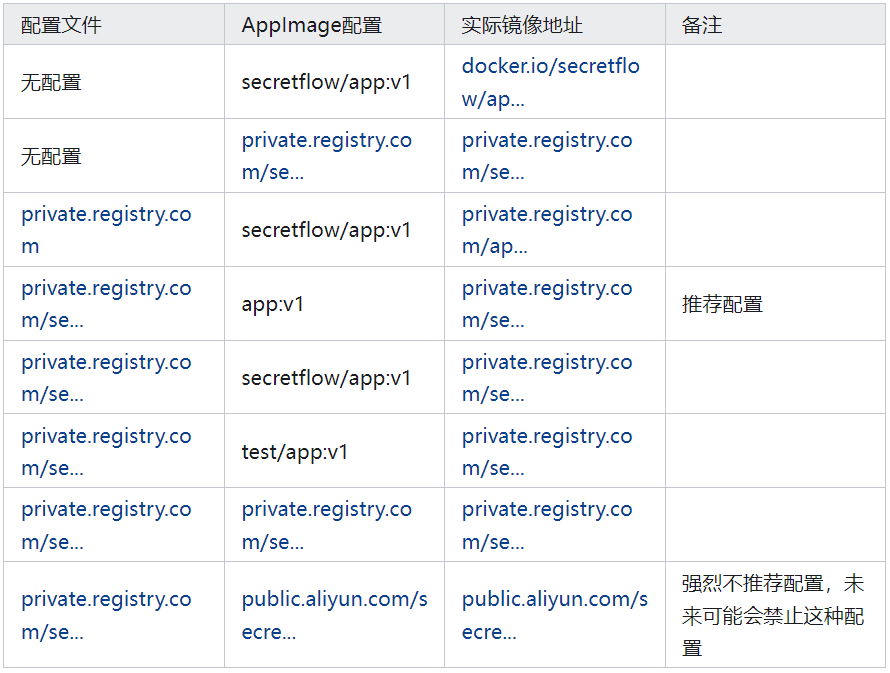
AppImage 中只配置镜像名(不带镜像仓库地址),否则切换仓库的时候,需要批量修改
AppImage,所以不建议如此配置。镜像拉取失败
2024-06-06 13:33:00.534 ERROR framework/pod_workers.go:978 Error syncing pod "ant-test-0_ant(7fd5285b-2a5c-4a75-930a-2908e98c8799)", skipping: failed to "StartContainer" for "test" with ErrImagePull: "faile to pull image \"registry.xxxx.com/secretflow/nginx:v1\" with credentials, detail-> rpc error: code = Unknown desc = failed to pull and unpack image \"registry.xxxx.com/secretflow/nginx:v1\": failed to resolve reference \"registry.xxxx.com/secretflow/nginx:v1\": unexpected status from HEAD request to https://registry.xxxx.com/v2/secretflow/nginx/manifests/v1: 401 Unauthorized"

来自 “ ITPUB博客 ” ,链接:https://blog.itpub.net/70047764/viewspace-3105096/ ,如需转载,请注明出处,否则将追究法律责任。

最新文章
- 基于隐语+通信场景生产实践,如何实现可监管、可审计的多方数据协作?
- 隐语社区联合亚信科技正式开源LogChain ,为数据要素流通注入“信任基因”!
- 让隐私计算更易用、可信任:隐语SecretFlow 2.0架构正式发布
- 隐语嘉年华|可信互联,价值共生,探寻数据安全流动的可靠路径
- 隐语SML0.1.0版本发布!SPU开源机器学习Python算法库
- TrustFlow 可信执行环境之 Intel TDX TEE 方案
- TrustFlow 可信执行环境之 Intel SGX TEE 方案
- 从“调研”到社区共建:陈天增的隐语开源实践之路
- 【技术教程】TrustFlow 授权策略是怎么实现的?
- 【隐语Secretflow】一文速通基于可信执行环境 (TEE) 的零信任计算系统
