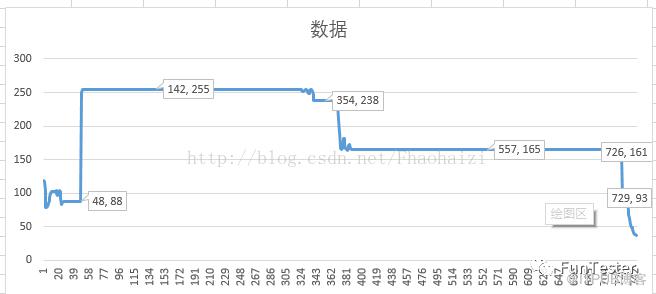
本人在使用android UiAutomator做测试的时候,有时候需要统计视频播进度,然后去断言上传的进度数据正确与否。具体的思路就是根据进度条的颜色区分,我选的红色,然后去计算各个点的数值,然后计算进度的百分比。
这是app的界面进度条的截图

下面是我两次获取到的数据。
下面是我的代码:
 1package student;
 2
 3import java.io.IOException;
 4import java.sql.SQLException;
 5import java.text.ParseException;
 6import java.util.ArrayList;
 7import java.util.List;
 8import com.android.uiautomator.core.UiObjectNotFoundException;
 9import android.graphics.Bitmap;
10import android.graphics.BitmapFactory;
11import android.graphics.Color;
12import android.graphics.Rect;
13import android.os.RemoteException;
14import source.UiAutomatorHelper;
15/**
16* @author ··-·尘
17* @E-mail:Fhaohaizi@163.com
18* @version 创建时间:2017年8月18日 上午10:53:24
19* @alter 修改时间:2017年9月7日 12:55:36
20* 类说明:测试调试用例
21*/
22@SuppressWarnings("deprecation")
23public class Student extends StudentCase{
24    public static String jarName,testClass,testName,androidId;
25    public static void main(String[] args) throws ClassNotFoundException, SQLException, InterruptedException, IOException, ParseException {
26        jarName = "DemoStudent";testClass="student.Student";testName="testTest";
27//        PerformanceThread.getInstance().start();//启动线程
28        new UiAutomatorHelper(jarName, testClass, testName);//调试用例
29//        PerformanceThread.key = false;//结束线程
30    }
31    public void testTest() throws InterruptedException, IOException, UiObjectNotFoundException, RemoteException {
32        clickPiont(500, 500);//点击屏幕,显示播放进度条
33        sleep(100);//休眠等待截图
34        Bitmap bitmap = getBitmapByResourceId("com.genshuixue.student:id/view_video_coursede_control_seekbar");//获取播放空间的bitmap实例
35        double percent = getVideoProgress(bitmap);
36    }
37}
下面是获取bitmap的方法
1    //截取某个控件的图像
2    public Bitmap getBitmapByResourceId(String id) throws UiObjectNotFoundException {
3        Rect rect = getUiObjectByResourceId(id).getVisibleBounds();//获取控件的rect对象
4        String path = screenShot("test");//截图
5        Bitmap bitmap = BitmapFactory.decodeFile(path);//创建并实例化bitmap对象
6        bitmap = Bitmap.createBitmap(bitmap, rect.left, rect.top, rect.width(), rect.height());//截取bitmap实例
7        return bitmap;
8    }
下面是获取进度的方法:
 1    //获取视频播放进度条
 2    public double getVideoProgress(Bitmap bitmap) {
 3        int height = bitmap.getHeight();
 4        int width = bitmap.getWidth();
 5        List<Integer> date = new ArrayList<Integer>();
 6        for (int i = 0;i < width; i++) {
 7            int color = bitmap.getPixel(i, height / 2);
 8            int red = Color.red(color);
 9//            output(red);
10            date.add(red);
11            }
12        int date1 = 0,date2 = 0,date3 = 0,date4 = 0;
13        int status1 = 0,status2 = 0;
14        for (int i = 1;i < date.size() - 1;i++) {
15
16            if (date.get(i) == 255 && status1 == 0) {
17                status1++;
18                date1 = i;
19            }
20            if (date.get(i) == 238 && status2 == 0) {
21                status2++;
22                date2 = i;
23            }
24            if (date.get(i + 1) < 238 && date.get(i) == 238) {
25                date3 = i;
26            }
27            if (date.get(i + 1) < 165 && date.get(i) == 165) {
28                date4 = i;
29            }
30        }
31//        output(date1, date2, date3, date4);
32//        output((date2 + date3 - date1 * 2.00)/(date4 - date1)/2);
33        return (date2 + date3 - date1 * 2.00)/(date4 - date1)/2;
34    }
技术类文章精选
非技术文章精选
大咖风采
点击查看公众号地图
原文作者:FunTester;如有侵权,请联系管理员删除。

请登录后发表评论
登录
全部评论
