1. 灰度发布
1.1 什么是灰度发布
灰度发布 Gray Release(又名金丝雀发布 Canary Release)。比如不停机旧版本,部署新版本,高比例流量(例如:95%)走旧版本,低比例流量(例如:5%)切换到新版本,通过监控观察无问题,逐步扩大范围,最终把所有流量都迁移到新版本上。

常见使用场景
1.2 基于云原生网关Higress 实现灰度发布
Higress提供复杂的路由处理能力,支持基于Header、Cookie以及权重的灰度发布功能。灰度发布功能可以通过设置注解来实现,为了启用灰度发布功能,需要设置注解higress.io/canary: "true"。通过不同注解可以实现不同的灰度发布功能。
说明:当多种方式同时配置时,灰度方式选择优先级为:基于Header > 基于Cookie > 基于权重(从高到低)。
部署两个版本的服务
1)在集群中部署第一个版本的 Deployment,本文以 nginx-v1 为例。YAML 示例如下:
apiVersion: apps/v1kind: Deploymentmetadata:  name: nginx-v1spec:  replicas: 1  selector:    matchLabels:      app: nginx      version: v1  template:    metadata:      labels:        app: nginx        version: v1    spec:      containers:      - name: nginx        image: "openresty/openresty:centos"        ports:        - name: http          protocol: TCP          containerPort: 80        volumeMounts:        - mountPath: /usr/local/openresty/nginx/conf/nginx.conf          name: config          subPath: nginx.conf      volumes:      - name: config        configMap:          name: nginx-v1
---
apiVersion: v1kind: ConfigMapmetadata:  labels:    app: nginx    version: v1  name: nginx-v1data:  nginx.conf: |-    worker_processes  1;
    events {        accept_mutex on;        multi_accept on;        use epoll;        worker_connections  1024;    }
    http {        ignore_invalid_headers off;        server {            listen 80;            location / {                access_by_lua '                    local header_str = ngx.say("nginx-v1")                ';            }            location /hello {                access_by_lua '                    local header_str = ngx.say("hello nginx-v1")                ';            }        }    }
---
apiVersion: v1kind: Servicemetadata:  name: nginx-v1spec:  type: ClusterIP  ports:  - port: 80    protocol: TCP    name: http  selector:    app: nginx    version: v1
2)再部署第二个版本的 Deployment,本文以 nginx-v2 为例。YAML 示例如下:
apiVersion: apps/v1kind: Deploymentmetadata:  name: nginx-v2spec:  replicas: 1  selector:    matchLabels:      app: nginx      version: v2  template:    metadata:      labels:        app: nginx        version: v2    spec:      containers:      - name: nginx        image: "openresty/openresty:centos"        ports:        - name: http          protocol: TCP          containerPort: 80        volumeMounts:        - mountPath: /usr/local/openresty/nginx/conf/nginx.conf          name: config          subPath: nginx.conf      volumes:      - name: config        configMap:          name: nginx-v2---
apiVersion: v1kind: ConfigMapmetadata:  labels:    app: nginx    version: v2  name: nginx-v2data:  nginx.conf: |-    worker_processes  1;
    events {        accept_mutex on;        multi_accept on;        use epoll;        worker_connections  1024;    }
    http {        ignore_invalid_headers off;        server {            listen 80;            location / {                access_by_lua '                    local header_str = ngx.say("nginx-v2")                ';            }            location /hello {                access_by_lua '                    local header_str = ngx.say("hello nginx-v2")                ';            }        }    }
---
apiVersion: v1kind: Servicemetadata:  name: nginx-v2spec:  type: ClusterIP  ports:  - port: 80    protocol: TCP    name: http  selector:    app: nginx    version: v2

基于Header灰度发布
只配置higress.io/canary-by-header:基于Request Header的名称进行流量切分。当请求包含该Header并其值为always时,请求流量会被分配到灰度服务入口;其他情况时,请求流量不会分配到灰度服务。
-
同时配置higress.io/canary-by-header和higress.io/canary-by-header-value:基于Request Header的名称和值进行流量切分。当请求中的header的名称和header的值与该配置匹配时,请求流量会被分配到灰度服务;其他情况时,请求流量不会分配到灰度服务。
请求Header为higress: always时将访问灰度服务nginx-v2;其他情况将访问正式服务nginx-v1,配置如下:
apiVersion: networking.k8s.io/v1kind: Ingressmetadata: annotations: higress.io/canary: "true" higress.io/canary-by-header: "higress" name: higress-demo-canaryspec: ingressClassName: higress rules: - http: paths: - backend: service: name: nginx-v2 port: number: 80 path: /hello pathType: Exact---apiVersion: networking.k8s.io/v1kind: Ingressmetadata: name: higress-demospec: ingressClassName: higress rules: - http: paths: - backend: service: name: nginx-v1 port: number: 80 path: /hello pathType: Exact
部署后执行以下命令进行测试
curl -H "higress: always" http:
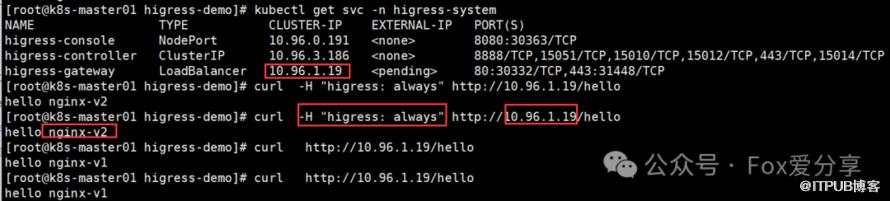
2. 请求Header为higress: v2时将访问灰度服务nginx-v2;其他情况将访问正式服务nginx-v1,配置如下:
apiVersion: networking.k8s.io/v1kind: Ingressmetadata:  annotations:    higress.io/canary: "true"    higress.io/canary-by-header: "higress"    higress.io/canary-by-header-value: "v1"  name: higress-demo-canaryspec:  ingressClassName: higress  rules:    - http:        paths:          - backend:              service:                name: nginx-v2                port:                   number: 80            path: /hello            pathType: Exact
---apiVersion: networking.k8s.io/v1kind: Ingressmetadata:  name: higress-demospec:  ingressClassName: higress  rules:    - http:        paths:          - backend:              service:                name: nginx-v1                port:                   number: 80            path: /hello            pathType: Exact
部署后执行以下命令进行测试
curl -H "higress: v2" http:

基于Cookie灰度发布
说明:基于Cookie的灰度发布不支持自定义设置Key对应的值,只能是always。
请求的Cookie为demo=always时将访问灰度服务nginx-v2;其他情况将访问正式服务nginx-v1。配置如下:
apiVersion: networking.k8s.io/v1kind: Ingressmetadata: annotations: higress.io/canary: "true" higress.io/canary-by-cookie: "demo" name: higress-demo-canaryspec: ingressClassName: higress rules: - http: paths: - backend: service: name: nginx-v2 port: number: 80 path: /hello pathType: Exact---apiVersion: networking.k8s.io/v1kind: Ingressmetadata: name: higress-demospec: ingressClassName: higress rules: - http: paths: - backend: service: name: nginx-v1 port: number: 80 path: /hello pathType: Exact
部署后执行以下命令进行测试
curl --cookie "demo=always" http:
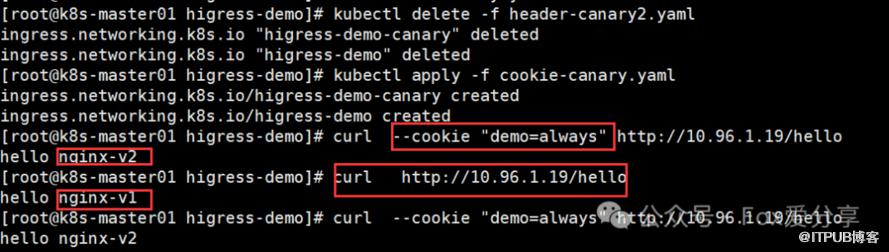
基于权重灰度发布
配置灰度服务nginx-v2的权重为30%,配置正式服务nginx-v1的权重为70%。
apiVersion: networking.k8s.io/v1kind: Ingressmetadata:  annotations:    higress.io/canary: "true"    higress.io/canary-weight: "30"  name: higress-demo-canaryspec:  ingressClassName: higress  rules:    - http:        paths:          - backend:              service:                name: nginx-v2                port:                   number: 80            path: /hello            pathType: Exact
---apiVersion: networking.k8s.io/v1kind: Ingressmetadata:  name: higress-demospec:  ingressClassName: higress  rules:    - http:        paths:          - backend:              service:                name: nginx-v1                port:                   number: 80            path: /hello            pathType: Exact
部署后执行以下命令进行测试
for i in {1..10}; do curl -H "Host: canary.example.com" http:
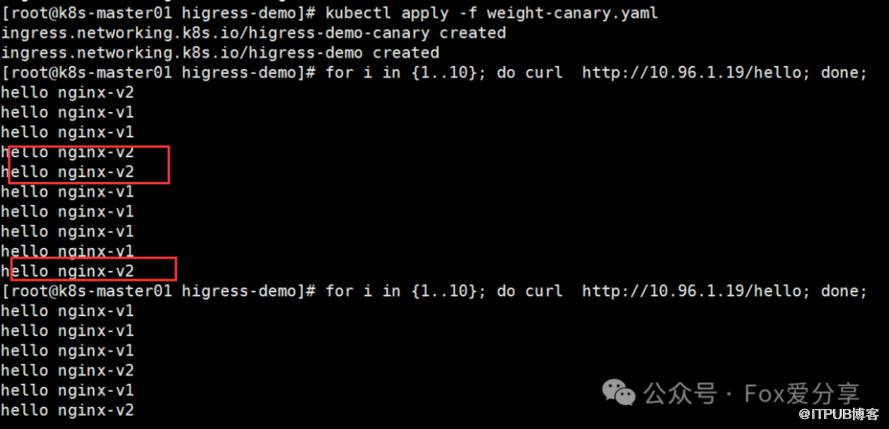
如果文章对你有帮助,就点个赞吧!
原文作者:Fox爱分享;如有侵权,请联系管理员删除。

