tkinter简介
tkinter是Python的标准GUI(图形用户界面)库,内置在Python自带的模块中,提供了跨平台的GUI支持。使用tkinter可以方便地构建GUI应用程序,如窗口、按钮、菜单、文字、输入框等界面元素。tkinter的优点有:
跨平台支持,可以运行在Windows、Mac和Linux等系统 语法简单易学,可以方便构建基本GUI 可以方便与Python代码逻辑相结合 缺点有界面不够优美等。但tkinter提供了GUI应用开发的基础,具有很高的实用价值。
tkinter基础组件和布局管理
tkinter通过各种Widget(窗口组件)来构建完整的GUI应用。常用的组件有:
Label:标签,可以显示文本 Button:按钮,可以触发函数 Entry:输入框,用于输入文本 Text:文本框,显示多行文本 Frame:框架,用于容纳其他组件 Canvas:画布,可以在上面绘制图形 Menu:菜单 等等。tkinter提供布局管理器如pack、grid、place来管理各个组件的位置和布局。pack是最简单的布局方式,可以使组件自动填充空间。grid使用网格系统进行布局。place可以精确指定组件的坐标。下面是一个简单的登录界面布局代码:
import tkinter as tk
window = tk.Tk()
window.title('登录界面')
tk.Label(window, text='欢迎登录').pack()
frm = tk.Frame(window)
frm.pack()
tk.Label(frm, text='用户名:').grid(row=0, column=0)
tk.Entry(frm).grid(row=0, column=1)
tk.Label(frm, text='密码:').grid(row=1, column=0)
tk.Entry(frm).grid(row=1, column=1)
btn = tk.Button(frm, text='登录')
btn.grid(row=2, column=1)
window.mainloop()
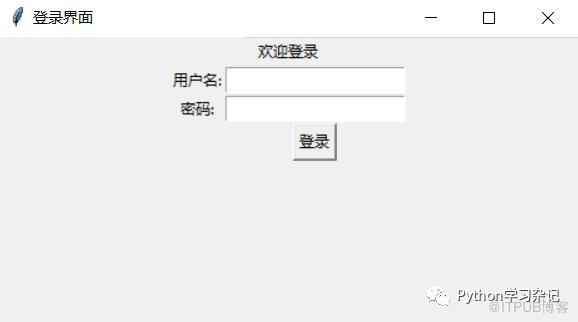 这里通过组合不同的组件和布局方式,构建一个登录界面的基本框架,包含了文字,输入框和按钮。
登录界面加背景图片
tkinter直接生成的登录界面比较单调,可以在登录界面加上背景图,背景图片放在相对路径。
import tkinter as tk
from PIL import Image,ImageTk
window = tk.Tk()
window.title('登录界面')
window.geometry('600x600')
title_label = tk.Label(window, text='登录界面设置', fg='blue', font=('SimSun', 10))
title_label.pack()
#图片位置
img = Image.open("bg2.png")  #图片,用相对路径
img = img.resize((600, 600)) # 调整图片大小
tk_img = ImageTk.PhotoImage(img)
label_img = tk.Label(window, image=tk_img)
label_img.place(x=100, y=100) # 置于顶部居中
label_img.pack()
user_label = tk.Label(window, text='用户名:', font=('SimSun', 12))
user_label.place(x=80, y=230)
user_entry = tk.Entry(window)
user_entry.place(x=180, y=230)
pwd_label = tk.Label(window, text='密码:', font=('SimSun', 12))
pwd_label.place(x=80, y=270)
pwd_entry = tk.Entry(window, show='*')
pwd_entry.place(x=180, y=270)
login_button = tk.Button(window, text='登录', font=('SimSun', 12))
login_button.place(x=300, y=300)
window.mainloop()
原文作者:Python学习杂记;如有侵权,请联系管理员删除。
上一篇:
folium底图本地化处理

请登录后发表评论
登录
全部评论
