正则表达式是Python中处理字符串的强大工具,很多朋友对正则表达式如何匹配相应的信息,还不是很熟悉。
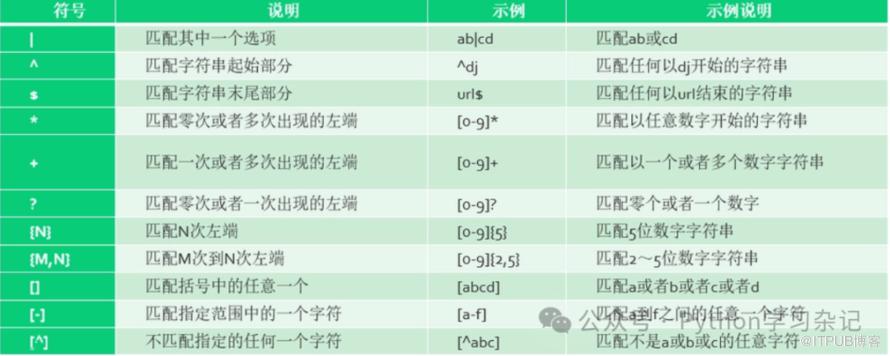
本文介绍常用的匹配操作,每个案例都有详细的代码和匹配注释,方便大家快速熟悉正则表达式的使用。
1. 匹配数字1
代码示例:
import re
text = "There are 123 apples and 456 oranges."
numbers = re.findall(r'\d+', text)
print(numbers) # Output: ['123', '456']正则表达式解释:
\d: 匹配任意数字(0-9)。+: 表示前面的字符(在这里是\d)出现一次或多次。\d+: 这里的\d代表任意一个数字(0-9),而+是一个量词,表示前面的字符(这里是数字)出现一次或多次。因此,\d+将匹配一个或多个连续数字的序列。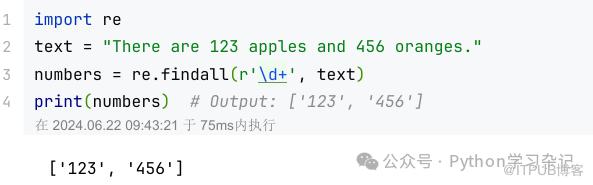
2. 匹配数字2
代码示例:
import re
text = "There are 123 apples and 456 oranges."
numbers = re.findall(r'\d', text)
print(numbers)
正则表达式解释:
\d: 匹配任意数字(0-9)。
3. 匹配特定范围的数字
代码示例:
text = "The numbers are 100, 200, and 300."
numbers = re.findall(r'\b1\d{2}\b', text)
print(numbers) 正则表达式解释:
\b: 单词边界,确保我们匹配的是独立的数字。1: 匹配数字1。\d{2}: 匹配两个数字,{2}表示精确出现两次。\b: 与表达式开头的 \b 相对应,确保整个匹配的数字是一个独立的单词。
4. 匹配邮箱地址
代码示例:
text = "Contact me at example@example.com."
emails = re.findall(r'\b[A-Za-z0-9._%+-]+@[A-Za-z0-9.-]+\.[A-Z|a-z]{2,}\b', text)
print(emails) # Output: ['example@example.com']正则表达式解释:
[A-Za-z0-9._%+-]+: 匹配邮箱用户名部分,允许字母、数字、点、下划线等。@: 字面意义上的"@"符号。[A-Za-z0-9.-]+: 匹配域名部分。\.[A-Z|a-z]{2,}: 匹配点和至少两个字母的顶级域名。
5. 匹配IP地址
代码示例:
text = "Server IP is 192.168.1.1."
ips = re.findall(r'\b(?:\d{1,3}\.){3}\d{1,3}\b', text)
print(ips) # Output: ['192.168.1.1']正则表达式解释:
(?:\d{1,3}\.){3}: 非捕获组,匹配三组1到3位数字后跟点,重复三次。\d{1,3}: 匹配1到3位数字,代表IP地址的最后一部分。
6. 匹配URL
代码示例:
text = "Visit https://www.example.com for more info."
urls = re.findall(r'\bhttps?://[^\s/$.?#]+\.[^\s]*', text)
print(urls) # Output: ['https://www.example.com']正则表达式解释:
https?: 匹配 "http" 后面可能跟着一个可选的 "s"。? 表示前面的字符 "s" 是可选的,出现0次或1次。://: 字面意义上的"://"。[^\s/$.?#]+: 匹配非空白字符,直到遇到URL的一部分结束(如/, $, ., ?, #)。\.[^\s]*: 匹配点和随后的非空白字符序列。
7. 匹配日期格式(如YYYY-MM-DD)
代码示例:
text = "The date is 2024-06-22."
dates = re.findall(r'\b\d{4}-\d{2}-\d{2}\b', text)
print(dates) # Output: ['2024-06-22']正则表达式解释:
\d{4}: 匹配四位数年份。-: 字面意义上的短横线。\d{2}: 匹配两位数月份和日期。
8. 匹配HTML标签
代码示例:
html = "<div>Hello <b>World</b>!</div>"
tags = re.findall(r'<[^>]+>', html)
print(tags) 正则表达式解释:
<: 标签的开始。[^>]+: 匹配除了>之外的一个或多个字符。>: 标签的结束。
9. 提取HTML标签属性
代码示例:
html = '<img src="image.jpg" alt="An image"/>'
attrs = re.findall(r'(\w+)="([^"]*)"', html)
print(attrs) # Output: [('src', 'image.jpg'), ('alt', 'An image')]正则表达式解释:
(\w+): 捕获一个或多个单词字符,代表属性名。=: 字面意义上的等号。"([^"]*)": 匹配双引号内的任意字符,非捕获组[^"]*匹配除了双引号之外的任意字符。
10. 匹配特定单词
代码示例:
text = "Hello world, hello universe."
matches = re.findall(r'\bhello\b', text, re.I)
print(matches) # Output: ['Hello', 'hello']正则表达式解释:
\bhello\b: 匹配独立的单词"hello",re.I使匹配不区分大小写。
11. 替换字符串
代码示例:
text = "Hello world."
new_text = re.sub(r'world', 'Python', text)
print(new_text) # Output: 'Hello Python.'正则表达式解释:
world: 直接匹配字符串"world"。
12. 匹配CSS类选择器
代码示例:
css = ".class1, .class2 {}"
classes = re.findall(r'\.(\w+)', css)
print(classes) # Output: ['class1', 'class2']正则表达式解释:
\.: 匹配点字符。(\w+): 捕获一个或多个单词字符,代表类名。
13. 匹配电话号码
代码示例:
text = "Call me at 123-456-7890."
phones = re.findall(r'\d{3}-\d{3}-\d{4}', text)
print(phones) # Output: ['123-456-7890']正则表达式解释:
\d{3}: 匹配三位数。-: 字面意义上的短横线。\d{4}: 匹配四位数。
14. 匹配十六进制颜色代码
代码示例:
text = "The color is #FFFFFF."
colors = re.findall(r'#(?:[0-9a-fA-F]{3}){1,2}', text)
print(colors) # Output: ['#FFFFFF']正则表达式解释:
#: 匹配井号。(?:[0-9a-fA-F]{3}): 非捕获组,匹配三个十六进制数字。{1,2}: 表示前面的模式重复一次或两次。
15. 匹配货币金额
代码示例:
text = "The price is $123.45."
prices = re.findall(r'\$\d+(?:\.\d{2})?', text)
print(prices) # Output: ['$123.45']正则表达式解释:
\$: 匹配美元符号。\d+: 匹配一个或多个数字。(?:\.\d{2})?:
16. 匹配特定前缀开头的信息
代码示例:
text = "start123, start456, and end789."
starts = re.findall(r'start\d+', text)
print(starts) # Output: ['start123', 'start456']正则表达式解释:
^: 行的开始。start: 字符串必须以"start"开头。\d+: 匹配一个或多个数字。
17. 匹配注释(如C++的单行注释)
代码示例:
text = "// This is a comment."
comments = re.findall(r'//(.*)', text)
print(comments) # Output: [' This is a comment.']正则表达式解释:
//: 匹配注释开始的两个斜杠。(.*): 捕获任意字符直到行尾。
18. 匹配特定模式的括号内内容
代码示例:
text = "(Hello), [World], and {Python}."
contents = re.findall(r'[\(\[\{](.*?)[\)\]\}]', text)
print(contents) # Output: ['Hello', 'World', 'Python']正则表达式解释:
[\(\[\{]: 匹配圆括号、方括号或花括号的开始。(.*?): 非贪婪模式捕获括号内的任意字符。[\)\]\}]: 匹配圆括号、方括号或花括号的结束。
19. 匹配JSON对象键值对
代码示例:
json = '{"name": "John", "age": 30}'
key_value_pairs = re.findall(r'"(\w+)":\s*(\d+|\".*?\")', json)
print(key_value_pairs) # Output: [('name', 'John'), ('age', '30')]正则表达式解释:
"(\w+)": 匹配并捕获键名,键名由单词字符组成。:\s*: 匹配冒号和随后的任意数量的空白字符。(\d+|\".*?\"): 匹配数值或字符串,非贪婪模式匹配双引号内的任意字符。
20. 匹配字母
代码示例:
text = "Hello 456World!  123."
letters = re.findall(r'[a-zA-Z]', text)
print(letters) 正则表达式解释:
[a-zA-Z]: 匹配所有字母,包含大小写。
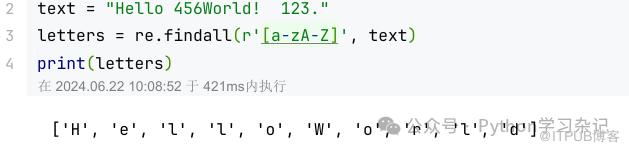 如果想匹配仅含字母的单词,可以这样实现。
import re
text = "Hello 456World! 123."
# 使用非贪婪匹配来确保匹配包含在数字或标点后的单词
words = re.findall(r'\b[a-zA-Z]+\b', text)
print(words) # 应该输出: ['Hello']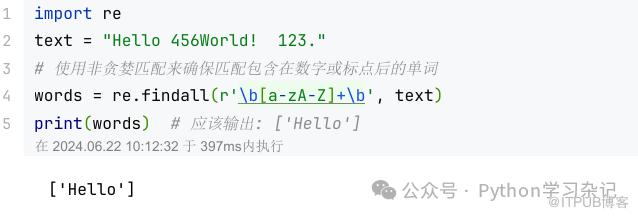 在这个修改后的正则表达式中:
\b: 单词边界,确保我们匹配的是一个独立的单词。[a-zA-Z]+: 匹配一个或多个连续的大写或小写字母。\b: 再次确保单词的结尾是单词边界。
本文详细介绍了正则表达式的常用的匹配方法,大家阅读后将对正则表达式应该会有更深的理解。
原文作者:Python学习杂记;如有侵权,请联系管理员删除。

