fastapi框架源码分析系列-starlette框架之Debug方式学源码(3)-ASGI协议套娃文解(有彩蛋)
说明
上一篇中主要是使用Debug的方式进行了解整个框架一个请求过程的调用链路是怎么样?但是都是多图的形式,而可能说的不是很清楚。那么接下来的这一篇,则主要是使用源码+文字解说的方式来了解一个请求链路流程明细。
本节主要内容信息有:
ASGI一些概念东西 ASGI协议实现几种方式 -
ASGI协议中实现响应报文进度条实现思路(彩蛋哈哈)
前置ASGI知识点
我们知道starlette是一个支持异步的框架,所以它会遵循ASGI协议,那到底什么是ASGI协议呢?如果感谢的兴趣的想深入了解每一个细节的话可以参考ASGI协议的官方文档。在ASGI还没有出来以前,为我们所熟知的支持WSGI协议一些web框架,可能我们用的最多就是Flask,django,等还小众的bottle等,这些框架在并发处理上多数的方式则是多线程或非原生(协程)的方式。如tornado更牛逼,他自身既充当了WSGI又是以一个应该开发框架。
而有了ASGI之后,则不一样,很多的异步框架都开始雨后春笋般的出现,ASGI的有别于WSGI主要特点是:
支持异步asyico特性 支持websocket协议和HTTP/2
而关于ASGI协议是啥样的概念呢?说明白一点的话,则是:
假如一个可调用对象(注意哦这里是可调用对象,)实现了下面类似的接口:
async def app(scope, receive, send):
    ...
其中函数三个参数信息说明如下:让我们来看看 3 个参数:
scope 他是一个字典类型对象,他里面包含包含客户端请求服务器的时候传入请求的信息。它的内容会根据请求类型不同而不同,如HTTP、WebSocket两种类型 receive 则是一个异步函数,主要的是用于接收ASGI事件消息,它是一个消息的通道。 send 它是一个异步函数,用于发送 ASGI 事件消息,它是一个消息的通道。
补充说明-ASGI协议中的scope其实和wsgi协议中的environ类似,如下示wsgi协议中要求实现一个接口规范:
def simple_app(environ, start_response):
    status = '200 ok'
    response_headers = [('content-type', 'text/plain')]
    start_response(status, response_headers)
    return ['hello world!\n']
而scope则具体包含那些信息呐?
scope = {dict: 12} {'type': 'http', 'asgi': {'version': '3.0', 'spec_version': '2.3'}, 'http_version': '1.1', 'server': ('127.0.0.1', 8000), 'client': ('127.0.0.1', 60256), 'scheme': 'http', 'root_path': '', 'headers': [(b'host', b'127.0.0.1:8000'), (b'connection', b'keep-al
 'type' = {str} 'http'
 'asgi' = {dict: 2} {'version': '3.0', 'spec_version': '2.3'}
 'http_version' = {str} '1.1'
 'server' = {tuple: 2} ('127.0.0.1', 8000)
 'client' = {tuple: 2} ('127.0.0.1', 60256)
 'scheme' = {str} 'http'
 'root_path' = {str} ''
 'headers' = {list: 12} [(b'host', b'127.0.0.1:8000'), (b'connection', b'keep-alive'), (b'cache-control', b'max-age=0'), (b'upgrade-insecure-requests', b'1'), (b'user-agent', b'Mozilla/5.0 (Windows NT 10.0; WOW64) AppleWebKit/537.36 (KHTML, like Gecko) Chrome/86.0.4240.198 Safari/537.36'), (b'accept', b'text/html,application/xhtml+xml,application/xml;q=0.9,image/avif,image/webp,image/apng,*/*;q=0.8,application/signed-exchange;v=b3;q=0.9'), (b'sec-fetch-site', b'none'), (b'sec-fetch-mode', b'navigate'), (b'sec-fetch-user', b'?1'), (b'sec-fetch-dest', b'document'), (b'accept-encoding', b'gzip, deflate, br'), (b'accept-language', b'zh-CN,zh;q=0.9')]
 'method' = {str} 'GET'
 'path' = {str} '/'
 'raw_path' = {bytes: 1} b'/'
 'query_string' = {bytes: 0} b''
 __len__ = {int} 12
其中:
type:表示此次请求的类型是http还是websocket asgi:则表示来圆asgi服务器的当下版本信息 http_version:http版本协议方式 server:服务启动服务IP和端口信息 client:来自客户端IP和端口号 scheme:请求协议方式 root_path:URL请求发起根目录路径,默认为空字符串 headers:请求头信息 method 请求使用的方式 path:请求URL的path路径信息 raw_path 请求URL的path路径信息 query_string 查询参数信息
当我们定义一个函数,他们定义了上述三个类型的数据接收处理,并且是使用ASGI服务器进行气的时候,那么这个就可以说我们这个协程函数已经实现了异步协议框架,那么可以接收和处理我们异步请求任务。
ASGI协议实现几种方式
函数方式-
如下面的简单的示例代码:
import uvicorn

async def app(scope, receive, send):
    assert scope['type'] == 'http'

    await send({
        'type': 'http.response.start',
        'status': 200,
        'headers': [
            [b'content-type', b'text/plain'],
        ],
    })
    await send({
        'type': 'http.response.body',
        'body': b'Hello, world!',
    })
if __name__ == "__main__":
    uvicorn.run("main:app", host="127.0.0.1", port=5000, log_level="info")
通过上面的代码示例我们可以看到, uvicorn是一个asgi类型的服务器,那么一个异步应用的时候,我们值需要传入对应的类似协议接口实现的函数或类就可以,如下格式:
async def app(scope, receive, send):
    ...
而在示例代码中,我们通过send进行响应消息应答写入,第一次写入的是响应头等信息,第二次则是写入了具体的响应报问题信息。在后续源码中,我们会看到通过使用send进行消息应用类型的处理。
甚至于我们上面使用只是函数的形式来实现了ASGI协议,但是如果我换成类的方式来实现ASGI协议的呢?其实也是可以的,如:
类方式-基于__await__的方式自动调用
如下代码示例(基于__await__的方式):
from starlette.responses import PlainTextResponse
from starlette.types import Message, Receive, Scope, Send
import typing


class app:
    def __init__(self, scope: Scope, receive: Receive, send: Send) -> None:
        assert scope["type"] == "http"
        self.scope = scope
        self.receive = receive
        self.send = send
        self._allowed_methods = [
            method
            for method in ("GET", "HEAD", "POST", "PUT", "PATCH", "DELETE", "OPTIONS")
            if getattr(self, method.lower(), None) is not None
        ]

    def __await__(self) -> typing.Generator:
        print("会自动进行调用!")
        return self.dispatch().__await__()

    async def dispatch(self) -> None:
        print("dispatch")
        response = PlainTextResponse('Hello, world!')
        await response(self.scope, self.receive, self.send)


if __name__ == '__main__':
    import uvicorn
    uvicorn.run('dsasd:app')
类方式-基于__call__的方式
如下代码示例(基于__call__的方式):
class app:
    async def __call__(self, scope: Scope, receive: Receive, send: Send) -> None:
        response = PlainTextResponse('Hello, world!')
        await response(scope, receive, send)

if __name__ == '__main__':
    import uvicorn
    uvicorn.run('dsasd:app')
starlette下类方式实现示例
app = PlainTextResponse('Hello, world!')
if __name__ == '__main__':
    import uvicorn
    uvicorn.run('dsasd:app')
如上示例代码,我们发现我们只是引入starlette中的响应体报文对象PlainTextResponse,然后把它当做一个app对象也可以处理,而它内部实现的方式其实也是类的方式:
class Response:
    media_type = None
    charset = "utf-8"

    def __init__(
        self,
        content: typing.Any = None,
        status_code: int = 200,
        headers: typing.Optional[typing.Mapping[str, str]] = None,
        media_type: typing.Optional[str] = None,
        background: typing.Optional[BackgroundTask] = None,
    ) -> None:
       ····

    def render(self, content: typing.Any) -> bytes:
       ···

    def init_headers(
        self, headers: typing.Optional[typing.Mapping[str, str]] = None
    ) -> None:
       ····

    @property
    def headers(self) -> MutableHeaders:
        ···

    def set_cookie(
        self,
        key: str,
        value: str = "",
        max_age: typing.Optional[int] = None,
        expires: typing.Optional[int] = None,
        path: str = "/",
        domain: typing.Optional[str] = None,
        secure: bool = False,
        httponly: bool = False,
        samesite: str = "lax",
    ) -> None:
       ···

    def delete_cookie(
        self,
        key: str,
        path: str = "/",
        domain: typing.Optional[str] = None,
        secure: bool = False,
        httponly: bool = False,
        samesite: str = "lax",
    ) -> None:
      ····

    async def __call__(self, scope: Scope, receive: Receive, send: Send) -> None:
        await send(
            {
                "type": "http.response.start",
                "status": self.status_code,
                "headers": self.raw_headers,
            }
        )
        print("raw_headers---", self.raw_headers)
        print("status_code---", self.status_code)
        print("body---",self.body)
        await send({"type": "http.response.body", "body": self.body})

        if self.background is not None:
            await self.background()
关键的地方则是 async def __call__的实现。
甚至还可以嵌套实现:
from starlette.responses import PlainTextResponse
from starlette.types import Message, Receive, Scope, Send

class FrameApp:
    def __init__(self, app):
        self.app = app

    async def __call__(self, scope: Scope, receive: Receive, send: Send) -> None:
        print("父APP")
        await self.app(scope, receive, send)


async def next_app_fun(scope, receive, send):
    print("next_app_funAPP")
    response = PlainTextResponse("Hello, world!")
    await response(scope, receive, send)

class NextappClass:
    def __init__(self, app):
        self.app = app

    async def __call__(self, scope: Scope, receive: Receive, send: Send) -> None:
        print("NextappClassAPP")
        await self.app(scope, receive, send)


app = FrameApp(NextappClass(next_app_fun))

if __name__ == '__main__':
    import uvicorn
    uvicorn.run('dsasd:app')
控制台输出结果为:
INFO:     127.0.0.1:60041 - "GET / HTTP/1.1" 200 OK
raw_headers--- [(b'content-length', b'13'), (b'content-type', b'text/plain; charset=utf-8')]
status_code--- 200
body--- b'Hello, world!'
父APP
NextappClassAPP
next_app_funAPP
其中
app = FrameApp(NextappClass(next_app_fun))
细品一下,有没有看得出套娃的意思呢?
ASGI 响应报文发送细节探究(响应报文进度条实现思路)
如下发送示例代码:
from starlette.types import Receive, Scope, Send


class FrameApp:

    async def __call__(self, scope: Scope, receive: Receive, send: Send) -> None:
        assert scope['type'] == 'http'
        await send({
            'type': 'http.response.start',
            'status': 200,
            'headers': [
                [b'content-type', b'text/plain'],
            ],
        })
        await send({
            'type': 'http.response.body',
            'body': b'Hello, world!',
        })
        # 发送多次的话,则会报告异常
        # await send({"type": "http.response.body", "body": b'Hello, world!222222222222', })
app = FrameApp()
if __name__ == '__main__':
    import uvicorn
    uvicorn.run('dsasd:app')
如上代码:
当我多次进行send--http.response.body的时候,那么此时会报异常信息,如下:
从提示可以看得出说明的是,我们已经完成了一次请求的发送,在此的发送的话就会出现运行时的错误了!
如果我需要实现一次请求可以出现分段返回数据的话,应该怎么处理呢?就类似一次的请求的结果返回是分段的返回的,那么此时我们可以对我们的消息体内容是否后续还有内容的标记来,分析我们的StreamingResponse流式响应报文的源码:
class StreamingResponse(Response):
    def __init__(
        self,
        content: typing.Any,
        status_code: int = 200,
        headers: typing.Optional[typing.Mapping[str, str]] = None,
        media_type: typing.Optional[str] = None,
        background: typing.Optional[BackgroundTask] = None,
    ) -> None:
        if isinstance(content, typing.AsyncIterable):
            self.body_iterator = content
        else:
            self.body_iterator = iterate_in_threadpool(content)
        self.status_code = status_code
        self.media_type = self.media_type if media_type is None else media_type
        self.background = background
        self.init_headers(headers)

    async def listen_for_disconnect(self, receive: Receive) -> None:
        while True:
            message = await receive()
            if message["type"] == "http.disconnect":
                break

    async def stream_response(self, send: Send) -> None:
        await send(
            {
                "type": "http.response.start",
                "status": self.status_code,
                "headers": self.raw_headers,
            }
        )
        async for chunk in self.body_iterator:
            if not isinstance(chunk, bytes):
                chunk = chunk.encode(self.charset)
            await send({"type": "http.response.body", "body": chunk, "more_body": True})

        await send({"type": "http.response.body", "body": b"", "more_body": False})

    async def __call__(self, scope: Scope, receive: Receive, send: Send) -> None:
        async with anyio.create_task_group() as task_group:

            async def wrap(func: typing.Callable[[], typing.Coroutine]) -> None:
                await func()
                task_group.cancel_scope.cancel()

            task_group.start_soon(wrap, partial(self.stream_response, send))
            await wrap(partial(self.listen_for_disconnect, receive))

        if self.background is not None:
            await self.background()
我们发现有一个字段信息【more_body】---它在请求中根据more_body的标记来判断是否继续body还有内容信息,如果没有后续内容,则设置-more_body=false 表示当前此次的请求响应已处理完成了!而如果设置more_body=true,则我们后续还可以继续追加内容信息返回,于是我们可以通过这个判断来进行分段下载,也可以做到类似的进度条通知的效果:
from starlette.types import Receive, Scope, Send

import asyncio
class FrameApp:
    async def __call__(self, scope: Scope, receive: Receive, send: Send) -> None:
        assert scope['type'] == 'http'
        # 设置为text/plain 则会等待整个结果处理完成再一次性的返回
        # await send({'type': 'http.response.start','status': 200,'headers': [[b'content-type', b'text/plain'],]})
        # 设置application/octet-stream 会打包会一个文件流进行下载
        # await send({'type': 'http.response.start', 'status': 200, 'headers': [[b'content-type', b'application/octet-stream'], ]})
        # 设置 application/json 则会分批次的请求响应返回,也就是可以分段
        await send({'type': 'http.response.start', 'status': 200, 'headers': [[b'content-type', b'application/json'], ]})
        # 分段请求1:返回A--然后间隔2秒继续返回B- more_body:True  # 代表后面还有消息要返回
        await send({"type": "http.response.body", "body": b'A-1', "more_body": True})
        await asyncio.sleep(2)
        # 分段请求2:返回B--然后间隔2秒继续返回C
        await send({"type": "http.response.body", "body": b'>--B-2', "more_body": True})
        await asyncio.sleep(2)
        # 分段请求3:返回C--然后间隔2秒继续返回C--more_body-不填默认值则为False
        await send({"type": "http.response.body", "body": b'>--C-3', "more_body": True})
        await asyncio.sleep(2)
        # 分段请求4:返回C--然后间隔2秒继续返回C--more_body-不填默认值则为False
        await send({"type": "http.response.body", "body": b'>--END-4',})

app = FrameApp()
if __name__ == '__main__':
    import uvicorn
    uvicorn.run('dsasd:app')
代码说明注意点:
如果需要分批次返回需要注意设置响应头信息类型是JSON格式才可以,其他都会打包后才一次性返回!这个暂时不知道其中原理是什么。 当标记已经完成响应之后,就不可以继续再发送报文内容信息
starlette请求链路分析细节
请求链路分析示例代码,分析示例源码如下:
from starlette.applications import Starlette
from starlette.responses import PlainTextResponse
from starlette.endpoints import HTTPEndpoint
from starlette.routing import Route
from starlette.applications import Starlette
from starlette.middleware import Middleware
from starlette.middleware.httpsredirect import HTTPSRedirectMiddleware
from starlette.middleware.trustedhost import TrustedHostMiddleware
from starlette.middleware.cors import CORSMiddleware


class Homepage(HTTPEndpoint):
    async def get(self, request):
        return PlainTextResponse(f"Hello, world!")


class User(HTTPEndpoint):
    async def get(self, request):
        username = request.path_params['username']
        return PlainTextResponse(f"Hello, {username}")

routes = [
    Route("/", Homepage),
    Route("/{username}", User)
]

middleware = [
  Middleware(CORSMiddleware, allow_origins=['*']),
  Middleware(TrustedHostMiddleware, allowed_hosts=['example.com', '*.example.com']),
  Middleware(HTTPSRedirectMiddleware)
]
app = Starlette(routes=routes, middleware=middleware)

if __name__ == '__main__':
    import uvicorn
    uvicorn.run('main:app')
在分析开始之前,我们需要了解一下概念信息点,ASGIapp框架筒体的协议对象的定义:
import typing
# 请求消息体上下文内容
Scope = typing.MutableMapping[str, typing.Any]
# 封装需要发送响应报文体消息
Message = typing.MutableMapping[str, typing.Any]
# 接收异步消息
Receive = typing.Callable[[], typing.Awaitable[Message]]
# 发送异步消息
Send = typing.Callable[[Message], typing.Awaitable[None]]
# 一个标准ASGIApp可调用对象
ASGIApp = typing.Callable[[Scope, Receive, Send], typing.Awaitable[None]]
如前面章节图示篇中,我们在还原一个请求处理的过程都经过哪些关卡的话,我们需要找到对应的突破口对象,而这个突破口则就是starlette实例化对象的app中的:
 async def __call__(self, scope: Scope, receive: Receive, send: Send) -> None:
        scope["app"] = self
        await self.middleware_stack(scope, receive, send)
但是再次之前,我们需要先知道当我们的执行创建一个框架对象app的时候我们整个框架都做了什么事情才能更清楚了解整个链路。如下实例化代码:
app = Starlette(routes=routes, middleware=middleware)
这句话,主要是定义了
routes 注册罗列表对象 middleware 注册中间件列表对象
第一步:Starlette初始化分析
Starlette对象示例图示: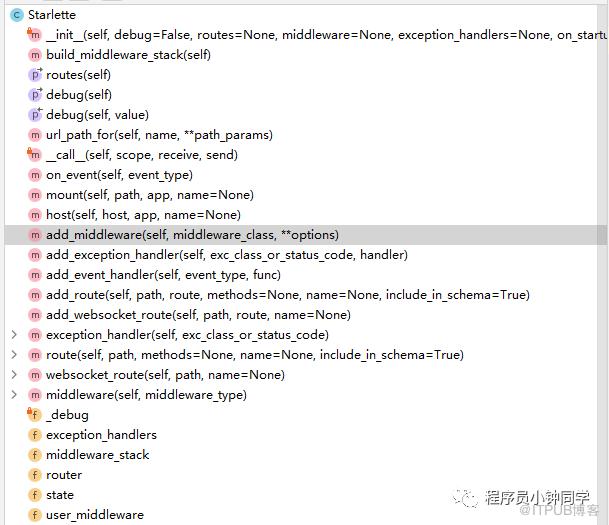
分解初始化函数:
    def __init__(
        self,
        # 是否开启debug
        debug: bool = False,
        # routes要注册路由列表
        routes: typing.Optional[typing.Sequence[BaseRoute]] = None,
        # 要注册的中间件列表
        middleware: typing.Optional[typing.Sequence[Middleware]] = None,
        # 自定义错误处理函数对象,针对响应包来设置一个键值对,{405,fun}
        exception_handlers: typing.Optional[
            typing.Mapping[
                typing.Any,
                typing.Callable[
                    [Request, Exception],
                    typing.Union[Response, typing.Awaitable[Response]],
                ],
            ]
        ] = None,
        # 服务启动回调处理
        on_startup: typing.Optional[typing.Sequence[typing.Callable]] = None,
        # 服务关闭回调处理
        on_shutdown: typing.Optional[typing.Sequence[typing.Callable]] = None,
        # lifespan 也是处理类似服务启动回调处理和服务关闭回调处理,只能存在一种
        lifespan: typing.Optional[
            typing.Callable[["Starlette"], typing.AsyncContextManager]
        ] = None,
    ) -> None:
        # The lifespan context function is a newer style that replaces
        # on_startup / on_shutdown handlers. Use one or the other, not both.
        # lifespan 也是处理类似服务启动回调处理和服务关闭回调处理,只能存在一种
        assert lifespan is None or (
            on_startup is None and on_shutdown is None
        ), "Use either 'lifespan' or 'on_startup'/'on_shutdown', not both."
        # debug
        self._debug = debug
        # 一个用户保存东西键值对对象
        self.state = State()
        # 创建一个Router的管理对象,后续主要是循环匹配请求哪一个路由
        self.router = Router(
            routes, on_startup=on_startup, on_shutdown=on_shutdown, lifespan=lifespan
        )
        # 初始化自定义错误处理函数
        self.exception_handlers = (
            {} if exception_handlers is None else dict(exception_handlers)
        )
        # 初始化用户自定义中间件信息
        self.user_middleware = [] if middleware is None else list(middleware)
        # 初始化中间站栈顶,也就是当请求过来的时候,我先处理哪一个APP对象的ASGI协议
        self.middleware_stack = self.build_middleware_stack()
第二步:Starlette初始化完成后,当请求来触发调用
当我们的app对象改准备信息都准备好后,那么此时如果我们发起请求其中一个路由,默认没有任何地址的路由对象:
 async def __call__(self, scope: Scope, receive: Receive, send: Send) -> None:
        scope["app"] = self
        await self.middleware_stack(scope, receive, send)
其中我们的build_middleware_stack源码内部是:
 def build_middleware_stack(self) -> ASGIApp:
      # 设置当前debug开关状态
      debug = self.debug
      # 错误处理重置
      error_handler = None
      # 定义一个错误处理字典存储对象,后续通过键值对的方式获取具体Callable来执行异常处理
      exception_handlers: typing.Dict[
          typing.Any, typing.Callable[[Request, Exception], Response]
      ] = {}
      # 循环当前自定义的 self.exception_handlers.items节点
      for key, value in self.exception_handlers.items():
          # 处理500错误的异常
          if key in (500, Exception):
              error_handler = value
          else:
              # 错误非500 其他自定义响应处理
              exception_handlers[key] = value
      # 合并当前默认的创建的中间件:
      # - ServerErrorMiddleware 服务错误中间件
      # - self.user_middleware 自定义中间件列表
      # - ExceptionMiddleware 异常错误中间件
      middleware = (
          [Middleware(ServerErrorMiddleware, handler=error_handler, debug=debug)]
          + self.user_middleware
          + [
              Middleware(
                  ExceptionMiddleware, handlers=exception_handlers, debug=debug
              )
          ]
      )
      # 把当前默认创建出来路由对方付给当前我们的临时app一个对象,注意这个router
      # 就是:  self.router = Router(
      #             routes, on_startup=on_startup, on_shutdown=on_shutdown, lifespan=lifespan
      #         )
      app = self.router
      # 然后我们把中间件逆序一下,并且循环的吧当前进行当前中间件app对象嵌套更换处理
      # 这里逆序之后,我们的
      for cls, options in reversed(middleware):
          print('逆序之后:',cls)
          # 逆序之后: <class 'starlette.exceptions.ExceptionMiddleware'>
          # 逆序之后: <class 'starlette.middleware.cors.CORSMiddleware'>
          # 逆序之后: <class 'starlette.middleware.errors.ServerErrorMiddleware'>
          app = cls(app=app, **options)
      # 最终我们当前app的对象是:、ServerErrorMiddleware
      print('最终我们当前app的对象是:',app)
      return app
总结代码流程分析:
1:当一个请求过来的时候,每次我们的app = Starlette的对象动态加入到scope中,方便后续的下一个ASGI协议者的进行APP对象获取和处理 2:每次请求进来时候。重新从栈顶获取中间件信息,其实就是获取对应实现了ASGI协议所有APP对象(中间件,路由,自定义其他的什么的),然后执行中间件对象ServerErrorMiddleware()之后,则会调用对应中间件里面的 async def __call__(self, scope: Scope, receive: Receive, send: Send) -> None:
·····
第三步:当请求来触发调用ServerErrorMiddleware的中间件
然后此时分析一下ServerErrorMiddleware中间件的代码:
class ServerErrorMiddleware:
    def __init__(
        self,
        app: ASGIApp,
        handler: typing.Optional[typing.Callable] = None,
        debug: bool = False,
    ) -> None:
        self.app = app
        self.handler = handler
        self.debug = debug

    async def __call__(self, scope: Scope, receive: Receive, send: Send) -> None:
        # 如果请求方式不是http类型的,直接传递到下一个app对象中,但是此时需要注意的一点是,此时
        # self.app指向的是----cprs跨域中间件
        if scope["type"] != "http":
            await self.app(scope, receive, send)
            return
        # 标记是够已经开始进行响应报文发送设置----当开始标记,就是产生响应报文码和格式这些之后,通过就说明是开始了
        response_started = False
        # 定义一个内部协程函数,用于对当前message对象进行直接的传递到下一个self.app(scope, receive, _send)中
        async def _send(message: Message) -> None:
            nonlocal response_started, send
            print("会进入到这地方进行调用!", self.app, message["type"] == "http.response.start",message["type"])
            if message["type"] == "http.response.start":
                # 标记当前请求响应处理已处理过
                response_started = True
            # 调用当前穿额度send---作息发送
            await send(message)

        try:
            # 传递到下一个ASGI-APP 此时应该是CORSMiddleware的中间件对象()里面的‘__call__’处理了
            await self.app(scope, receive, _send)
        except Exception as exc:
            # 如果传递出现异常,那么根据scope解析返回一个Request的对象
            request = Request(scope)
            if self.debug:
                # In debug mode, return traceback responses.
                # 返回debug模式下响应报文
                response = self.debug_response(request, exc)
            elif self.handler is None:
                # Use our default 500 error handler.
                 # 如果错误处理没有自定义,那么则使用默认的
                response = self.error_response(request, exc)
            else:
                # Use an installed 500 error handler.
                # 如果有自定义错误的,那么判断是否是协程函数
                if asyncio.iscoroutinefunction(self.handler):
                    # 协程函数需要等待协程对象执行完成
                    response = await self.handler(request, exc)
                else:
                    # 在线程池中运行普通函数,并等待返回
                    response = await run_in_threadpool(self.handler, request, exc)
            # 如果我们的还没有开始进行标记响应报文返回,那么也继续调用下一个ASGIapp对象
            if not response_started:
                await response(scope, receive, send)

            raise exc

  ······省略其他
其中初始化,是在调用构建栈的时候就已经初始化好,所以这里是执行【中间件对象()】的处理,也就是对‘__call__’函数的执行,此时进入到我们ServerErrorMiddleware中间件里面之后,会先判断是否开始进行了响应内容报文内容信息判断处理,其中比较关键的地方是:
  async def _send(message: Message) -> None:
            nonlocal response_started, send
            print("会进入到这地方进行调用!", self.app, message["type"] == "http.response.start",message["type"])
            if message["type"] == "http.response.start":
                # 标记当前请求响应处理已处理过
                response_started = True
            # 调用当前穿额度send---作息发送
            await send(message)
通过判断message: Message里面是否已经标记了开始执行发送响应体报文的处理,对应我们的上面
await send({'type': 'http.response.start', 'status': 200, 'headers': [[b'content-type', b'application/json'], ]})
只不过这里框架是通过封装为了一个叫做 Message的对象。当开始进入到ServerErrorMiddleware的时候,你会发现:
print("会进入到这地方进行调用!", self.app, message["type"] == "http.response.start",message["type"])
中的:message["type"] == "http.response.start"在第一次中,都是true. 当完整了我们的栈顶的第一个中间件的ASGIapp执行完成,且过程没有任何异常问题的时候,那么此时就继续下一个ASGIapp的执行,也就是我们的嵌套ASGIapp下一个,因为的在初始化的时候看到,当我们的逆序完成之后,排在第一个的ASGIapp则是我们的跨域中间件,所以此时会跑到我们的跨域中间件里面去执行对于的‘__call__’方法:
import functools
import re
import typing

from starlette.datastructures import Headers, MutableHeaders
from starlette.responses import PlainTextResponse, Response
from starlette.types import ASGIApp, Message, Receive, Scope, Send

ALL_METHODS = ("DELETE", "GET", "HEAD", "OPTIONS", "PATCH", "POST", "PUT")
SAFELISTED_HEADERS = {"Accept", "Accept-Language", "Content-Language", "Content-Type"}


class CORSMiddleware:
    def __init__(
        self,
        app: ASGIApp,
        allow_origins: typing.Sequence[str] = (),
        allow_methods: typing.Sequence[str] = ("GET",),
        allow_headers: typing.Sequence[str] = (),
        allow_credentials: bool = False,
        allow_origin_regex: str = None,
        expose_headers: typing.Sequence[str] = (),
        max_age: int = 600,
    ) -> None:

        ``````省略部分代码

        self.app = app
        self.allow_origins = allow_origins
        self.allow_methods = allow_methods
        self.allow_headers = [h.lower() for h in allow_headers]
        self.allow_all_origins = allow_all_origins
        self.allow_all_headers = allow_all_headers
        self.preflight_explicit_allow_origin = preflight_explicit_allow_origin
        self.allow_origin_regex = compiled_allow_origin_regex
        self.simple_headers = simple_headers
        self.preflight_headers = preflight_headers

    async def __call__(self, scope: Scope, receive: Receive, send: Send) -> None:
        if scope["type"] != "http":  # pragma: no cover
            await self.app(scope, receive, send)
            return
        # 进入到跨域中间件的协议处理方法内之后
        # 提取请求方法
        method = scope["method"]
        # 提取请求头信息
        headers = Headers(scope=scope)
        # 从请求头从提取请求来源
        # 请求头origin表明了请求来自于哪个站点。包括且仅仅包括协议、域名和端口,并不包含任何路径信息。
        # 通常出现跨域请求或同域下POST请求的时候会出现次这请求头信息
        origin = headers.get("origin")
        # 如果不存在跨域处理,直接继续传递到下一个ASGIapp中
        if origin is None:
            await self.app(scope, receive, send)
            return
        # 如果方法出现预校验的发起,且对请求方法有做限制处理
        if method == "OPTIONS" and "access-control-request-method" in headers:
            # 对预校验做响应报文的响应返回处理
            response = self.preflight_response(request_headers=headers)
            # 直接返回预校验是否通过的响应报文
            await response(scope, receive, send)
            return
        # 不然则进行一个其他响应报文的处理
        await self.simple_response(scope, receive, send, request_headers=headers)

    def is_allowed_origin(self, origin: str) -> bool:
      ···省略

    def preflight_response(self, request_headers: Headers) -> Response:
        ···省份部分代码

    async def simple_response(
        self, scope: Scope, receive: Receive, send: Send, request_headers: Headers
    ) -> None:
        # 通过片偏函数往下传递请求头信息,传递到下一个app上
        send = functools.partial(self.send, send=send, request_headers=request_headers)
        await self.app(scope, receive, send)

    async def send(
        self, message: Message, send: Send, request_headers: Headers
    ) -> None:
        if message["type"] != "http.response.start":
            await send(message)
            return
        # 这里是simple_response中要发送的具体的信息,就是响应报文头信息
        message.setdefault("headers", [])
        headers = MutableHeaders(scope=message)
        headers.update(self.simple_headers)
        origin = request_headers["Origin"]
        has_cookie = "cookie" in request_headers

        # If request includes any cookie headers, then we must respond
        # with the specific origin instead of '*'.
        if self.allow_all_origins and has_cookie:
            self.allow_explicit_origin(headers, origin)

        # If we only allow specific origins, then we have to mirror back
        # the Origin header in the response.
        elif not self.allow_all_origins and self.is_allowed_origin(origin=origin):
            self.allow_explicit_origin(headers, origin)
        # 最后进行发送
        await send(message)

    @staticmethod
    def allow_explicit_origin(headers: MutableHeaders, origin: str) -> None:
        headers["Access-Control-Allow-Origin"] = origin
        headers.add_vary_header("Origin")
由于我们的案例中没设计到跨域处理,所以它会直接继续传递到下一个APP上,而跨域中间件中slefp.app指向的是:ExceptionMiddleware中间件,所以下一步就是在ExceptionMiddleware中间件里面*的实现asgi协议的‘ __call__’处理:
class ExceptionMiddleware:
    def __init__(
        self, app: ASGIApp, handlers: dict = None, debug: bool = False
    ) -> None:
        self.app = app
        self.debug = debug  # TODO: We ought to handle 404 cases if debug is set.
        self._status_handlers: typing.Dict[int, typing.Callable] = {}
        self._exception_handlers: typing.Dict[
            typing.Type[Exception], typing.Callable
        ] = {HTTPException: self.http_exception}
        if handlers is not None:
            for key, value in handlers.items():
                self.add_exception_handler(key, value)

    def add_exception_handler(
        self,
        exc_class_or_status_code: typing.Union[int, typing.Type[Exception]],
        handler: typing.Callable,
    ) -> None:
        if isinstance(exc_class_or_status_code, int):
            self._status_handlers[exc_class_or_status_code] = handler
        else:
            assert issubclass(exc_class_or_status_code, Exception)
            self._exception_handlers[exc_class_or_status_code] = handler

    def _lookup_exception_handler(
        self, exc: Exception
    ) -> typing.Optional[typing.Callable]:
        for cls in type(exc).__mro__:
            if cls in self._exception_handlers:
                return self._exception_handlers[cls]
        return None

    async def __call__(self, scope: Scope, receive: Receive, send: Send) -> None:
        if scope["type"] != "http":
            await self.app(scope, receive, send)
            return

        response_started = False

        async def sender(message: Message) -> None:
            nonlocal response_started

            if message["type"] == "http.response.start":
                response_started = True
            await send(message)

        try:
            print("ExceptionMiddleware---hersisisi--->", self.app)
            await self.app(scope, receive, sender)
        except Exception as exc:
            handler = None
            # 判断错误类型
            if isinstance(exc, HTTPException):
                # 根据状态获取自定义的错误处理函数
                handler = self._status_handlers.get(exc.status_code)
            # 如果没有自定义错误处理函数,那么使用默认的
            if handler is None:
                handler = self._lookup_exception_handler(exc)

            #
            if handler is None:
                raise exc

            if response_started:
                msg = "Caught handled exception, but response already started."
                raise RuntimeError(msg) from exc
            # 解析具体的请求对象出来
            request = Request(scope, receive=receive)
            if asyncio.iscoroutinefunction(handler):
                # 协程的话则直接的等待
                response = await handler(request, exc)
            else:
                # 普通函数跑在线程池中
                response = await run_in_threadpool(handler, request, exc)
            await response(scope, receive, sender)

    def http_exception(self, request: Request, exc: HTTPException) -> Response:
        if exc.status_code in {204, 304}:
            return Response(b"", status_code=exc.status_code)
        return PlainTextResponse(exc.detail, status_code=exc.status_code)
当解析执行完成而ExceptionMiddleware中间件,之后所以下一步就是在Router路由管理类里面*的实现asgi协议的‘ __call__’处理:
class Router:
    def __init__(
        self,
        routes: typing.Sequence[BaseRoute] = None,
        redirect_slashes: bool = True,
        default: ASGIApp = None,
        on_startup: typing.Sequence[typing.Callable] = None,
        on_shutdown: typing.Sequence[typing.Callable] = None,
        lifespan: typing.Callable[[typing.Any], typing.AsyncContextManager] = None,
    ) -> None:
        self.routes = [] if routes is None else list(routes)
        self.redirect_slashes = redirect_slashes
        self.default = self.not_found if default is None else default
        self.on_startup = [] if on_startup is None else list(on_startup)
        self.on_shutdown = [] if on_shutdown is None else list(on_shutdown)

        if lifespan is None:
            self.lifespan_context: typing.Callable[
                [typing.Any], typing.AsyncContextManager
            ] = _DefaultLifespan(self)

        elif inspect.isasyncgenfunction(lifespan):
            warnings.warn(
                "async generator function lifespans are deprecated, "
                "use an @contextlib.asynccontextmanager function instead",
                DeprecationWarning,
            )
            self.lifespan_context = asynccontextmanager(
                lifespan,  # type: ignore[arg-type]
            )
        elif inspect.isgeneratorfunction(lifespan):
            warnings.warn(
                "generator function lifespans are deprecated, "
                "use an @contextlib.asynccontextmanager function instead",
                DeprecationWarning,
            )
            self.lifespan_context = _wrap_gen_lifespan_context(
                lifespan,  # type: ignore[arg-type]
            )
        else:
            self.lifespan_context = lifespan

    async def not_found(self, scope: Scope, receive: Receive, send: Send) -> None:
        if scope["type"] == "websocket":
            websocket_close = WebSocketClose()
            await websocket_close(scope, receive, send)
            return

        # If we're running inside a starlette application then raise an
        # exception, so that the configurable exception handler can deal with
        # returning the response. For plain ASGI apps, just return the response.
        if "app" in scope:
            raise HTTPException(status_code=404)
        else:
            response = PlainTextResponse("Not Found", status_code=404)
        await response(scope, receive, send)

    def url_path_for(self, name: str, **path_params: str) -> URLPath:
        for route in self.routes:
            try:
                return route.url_path_for(name, **path_params)
            except NoMatchFound:
                pass
        raise NoMatchFound()

    async def startup(self) -> None:
        """
        Run any `.on_startup` event handlers.
        """
        for handler in self.on_startup:
            if asyncio.iscoroutinefunction(handler):
                await handler()
            else:
                handler()

    async def shutdown(self) -> None:
        """
        Run any `.on_shutdown` event handlers.
        """
        for handler in self.on_shutdown:
            if asyncio.iscoroutinefunction(handler):
                await handler()
            else:
                handler()

    async def lifespan(self, scope: Scope, receive: Receive, send: Send) -> None:
        """
        Handle ASGI lifespan messages, which allows us to manage application
        startup and shutdown events.
        """
        started = False
        app = scope.get("app")
        await receive()
        try:
            async with self.lifespan_context(app):
                await send({"type": "lifespan.startup.complete"})
                started = True
                await receive()
        except BaseException:
            exc_text = traceback.format_exc()
            if started:
                await send({"type": "lifespan.shutdown.failed", "message": exc_text})
            else:
                await send({"type": "lifespan.startup.failed", "message": exc_text})
            raise
        else:
            await send({"type": "lifespan.shutdown.complete"})

    async def __call__(self, scope: Scope, receive: Receive, send: Send) -> None:
        """
        The main entry point to the Router class.
        """

        # 进入路由管理类之后,先判断所说义请求类型
        assert scope["type"] in ("http", "websocket", "lifespan")
        # 如果scope还没有把路由管理类给附加上去,那么就开始附加
        if "router" not in scope:
            scope["router"] = self
        # 如果里面包含有关于服务相关钩子函数回调处理,那么此时就执行具体钩子函数
        if scope["type"] == "lifespan":
            await self.lifespan(scope, receive, send)
            return

        # 如果路由不是全匹配模式,那么久是需要进行参数解析匹配模式,那么此时它就指向当前具体的路由类的对象
        partial = None
        # 开始循环当前所有注册路由列表,判断当前请求处理是哪一个对于的路由类
        for route in self.routes:
            # Determine if any route matches the incoming scope,
            # and hand over to the matching route if found.

            match, child_scope = route.matches(scope)
            # 如果匹配模式是FULL莫斯
            if match == Match.FULL:
                # 开始动态的添加我们的路由上的child_scope信息到scope上下文中
                scope.update(child_scope)
                # 开始调用路由对象的handle方法执行具体的路由内部的逻辑
                # print("开始调用路由对象的handle方法执行具体的路由内部的逻辑递下来到了路由!")
                await route.handle(scope, receive, send)
                # 停止继续遍历查询
                return
            elif match == Match.PARTIAL and partial is None:
                partial = route
                partial_scope = child_scope

        if partial is not None:
            #  Handle partial matches. These are cases where an endpoint is
            # able to handle the request, but is not a preferred option.
            # We use this in particular to deal with "405 Method Not Allowed".
            #处理部分匹配。在这些情况下,端点是能够处理请求,但不是首选选项。
            #我们特别使用它来处理“405方法不允许”。
            scope.update(partial_scope)
            await partial.handle(scope, receive, send)
            return
        # 判断路由重定向问题redirect_slashes--关于斜杠问题的处理,如果是开启了斜杠重定向的前提下
        if scope["type"] == "http" and self.redirect_slashes and scope["path"] != "/":
            redirect_scope = dict(scope)
            # 如果请求URL后面有斜杠
            if scope["path"].endswith("/"):
                # 那么删除末尾的rstrip指定的‘/’
                redirect_scope["path"] = redirect_scope["path"].rstrip("/")
            else:
               # 如果不是则加上
                redirect_scope["path"] = redirect_scope["path"] + "/"
            # 再次遍历路由匹配---因为修改了path
            for route in self.routes:
                match, child_scope = route.matches(redirect_scope)
                # 如果匹配模式不是NOne
                if match != Match.NONE:
                    # 直接进行UR重定向的处理,此时会进入重定向处理器中进行处理
                    redirect_url = URL(scope=redirect_scope)
                    response = RedirectResponse(url=str(redirect_url))
                    await response(scope, receive, send)
                    return
        #否则 执行默认处理
        await self.default(scope, receive, send)


    ····省略部分代码
由于我们在案例请求的是默认的Homepage路由地址,也就是没任何URL的地址,
routes = [
    Route("/", Homepage),
    Route("/{username}", User)
]
所以它会匹配到全模式,此时会执行一下代码的逻辑:
 # 如果匹配模式是FULL莫斯
            if match == Match.FULL:
                # 开始动态的添加我们的路由上的child_scope信息到scope上下文中
                scope.update(child_scope)
                # 开始调用路由对象的handle方法执行具体的路由内部的逻辑
                # print("开始调用路由对象的handle方法执行具体的路由内部的逻辑递下来到了路由!")
                await route.handle(scope, receive, send)
                # 停止继续遍历查询
                return
此时我们会进入到具体某个路由里面的handle去处理具体的逻辑。看具体的Route路由类的里面处理函数源码为:
class Route(BaseRoute):
    def __init__(
        self,
        path: str,
        endpoint: typing.Callable,
        *,
        methods: typing.List[str] = None,
        name: str = None,
        include_in_schema: bool = True,
    ) -> None:
        # 路由初始化的时候必须有前置‘/’斜杠
        assert path.startswith("/"), "Routed paths must start with '/'"
        # 定义路由路径
        self.path = path
        # 定义路由的端点函数
        self.endpoint = endpoint
        # 根据端点函数来获取具体的名称,如果没有指定路由名称,那么则根据函数名来命名
        self.name = get_name(endpoint) if name is None else name
        # 表示是否显示该路由接口,好像这里是在文档时候才有用到,false表示隐藏
        self.include_in_schema = include_in_schema
        # 开始处理端点函数
        endpoint_handler = endpoint
        # 如果端点函数是偏函数类型的话
        while isinstance(endpoint_handler, functools.partial):
            # 这个有点暂时不清楚是什么意思
            endpoint_handler = endpoint_handler.func
        # 如果是方法或函数
        if inspect.isfunction(endpoint_handler) or inspect.ismethod(endpoint_handler):
            # Endpoint is function or method. Treat it as `func(request) -> response`.
            # 那么就构造一个请求返回箱体对象并且给到当类里面app对象
            self.app = request_response(endpoint)
            if methods is None:
                methods = ["GET"]
        else:
            # Endpoint is a class. Treat it as ASGI.
            # 处理使用类方式定义的一些端点
            self.app = endpoint
        # 判断请求方法
        if methods is None:
            self.methods = None
        else:
            # 统一转化请求方法大小写敏感问题
            self.methods = {method.upper() for method in methods}
            # 默认的对GET的请求都自动驾驶HEAD的请求方法的支持
            if "GET" in self.methods:
                self.methods.add("HEAD")
        # 路由地址的解析和转换处理
        self.path_regex, self.path_format, self.param_convertors = compile_path(path)

    def matches(self, scope: Scope) -> typing.Tuple[Match, Scope]:

        if scope["type"] == "http":
            match = self.path_regex.match(scope["path"])
            # 开始进行路由匹配
            if match:
                matched_params = match.groupdict()
                for key, value in matched_params.items():
                    matched_params[key] = self.param_convertors[key].convert(value)
                path_params = dict(scope.get("path_params", {}))
                path_params.update(matched_params)
                child_scope = {"endpoint": self.endpoint, "path_params": path_params}
                if self.methods and scope["method"] not in self.methods:
                    return Match.PARTIAL, child_scope
                else:
                    return Match.FULL, child_scope
        return Match.NONE, {}

   ````省略部分代码

    async def handle(self, scope: Scope, receive: Receive, send: Send) -> None:
        # print("匹配到了路由之后,进出路由执行逻辑处理!!!!!!")
        if self.methods and scope["method"] not in self.methods:
            if "app" in scope:
                # 直接的抛出异常
                raise HTTPException(status_code=405)
            else:
                # 执行响应体
                response = PlainTextResponse("Method Not Allowed", status_code=405)
            await response(scope, receive, send)
        else:
            # 具体的路由对象里面的而下一个ASGIapp
            await self.app(scope, receive, send)
观察此时图解:
 所以下一步的就跑到具体的端点类里面执行,也就是我们的定义的Homepage:
class Homepage(HTTPEndpoint):
    async def get(self, request):
        return PlainTextResponse(f"Hello, world!")
它的本质其实就是执行自定义类的端点方式一个ASGIAPP对象:
class HTTPEndpoint:
    def __init__(self, scope: Scope, receive: Receive, send: Send) -> None:
        assert scope["type"] == "http"
        self.scope = scope
        self.receive = receive
        self.send = send

    def __await__(self) -> typing.Generator:
        return self.dispatch().__await__()

    async def dispatch(self) -> None:
        request = Request(self.scope, receive=self.receive)
        handler_name = "get" if request.method == "HEAD" else request.method.lower()
        handler = getattr(self, handler_name, self.method_not_allowed)
        is_async = asyncio.iscoroutinefunction(handler)
        if is_async:
            response = await handler(request)
        else:
            response = await run_in_threadpool(handler, request)
        await response(self.scope, self.receive, self.send)

    async def method_not_allowed(self, request: Request) -> Response:
        # If we're running inside a starlette application then raise an
        # exception, so that the configurable exception handler can deal with
        # returning the response. For plain ASGI apps, just return the response.
        if "app" in self.scope:
            raise HTTPException(status_code=405)
        return PlainTextResponse("Method Not Allowed", status_code=405)
到了这里之后几乎就差不多和前面分析差不多了!唯一的区别就是,最终测试的直接的
return PlainTextResponse(f"Hello, world!")
至此一个完整请求的过程,它代码流程走向就大概说完了!!!绕一圈下来其实就是和前面嵌套示例一样!哈哈!!
以上仅仅是个人结合自己的实际需求,做学习的实践笔记!如有笔误!欢迎批评指正!感谢各位大佬!
结尾
END
简书:https://www.jianshu.com/u/d6960089b087
掘金:https://juejin.cn/user/2963939079225608
公众号:微信搜【程序员小钟同学】
小钟同学 | 文 【欢迎一起学习交流】| QQ:308711822
原文作者:程序员小钟同学;如有侵权,请联系管理员删除。

最新文章
- 深入FastAPI异步编程-之并发编程(15)-定义全局的支持全局上下文变量和局部上下文的对象可以任意传递了!
- 深入FastAPI异步编程-之并发编程(13)-纠错-修改基于aiojobs库结合aiojobs的和FastAPI框架的示例
- 深入FastAPI异步编程-之并发编程(13)-基于aiojobs库实现类似Background Tasks的效果
- 深入FastAPI异步编程-之并发编程(12)-基于pyee异步事件驱动通知
- 深入FastAPI异步编程-之并发编程(11)-异步中的?同步原语
- 深入FastAPI异步编程-之并发编程(10)-?asyncio.wait 更精细化并发补充说明
- 深入FastAPI异步编程-之并发编程(9)-asyncio.as_completed的补充说明
- 深入FastAPI异步编程-之并发编程(8)-asyncio.gather的补充说明
- 深入FastAPI异步编程-之并发编程(7)番外篇~Windows系统下事件循环插曲
- 深入FastAPI异步编程-之并发编程(6)~事件循环
